The MongoDB connector integrates ApsaraDB for MongoDB and self-managed MongoDB into Realtime Compute for Apache Flink as source, dimension, and sink tables. It uses the Change Stream API to capture insert, update, replace, and delete events in real time.
Capabilities
|
Category |
Description |
|
Table types |
SQL source, lookup (dimension), and sink Flink CDC source DataStream source |
|
Running mode |
Streaming |
|
API types |
DataStream API, SQL, Flink CDC |
|
Sink write semantics |
Insert, update, and delete (with primary key declared) |
Monitoring metrics
Source tables:
numBytesIn, numBytesInPerSecond, numRecordsIn, numRecordsInPerSecond, numRecordsInErrors, currentFetchEventTimeLag, currentEmitEventTimeLag, watermarkLag, sourceIdleTime
Dimension and sink tables expose no monitoring metrics.
For metric definitions, see Metrics.
How it works
The MongoDB connector reads data in two phases:
-
Full snapshot — reads all existing documents from the targeted collections in parallel.
-
Incremental reading — automatically switches to consuming the oplog via the Change Stream API after the snapshot completes.
This process provides exactly-once semantics, ensuring no duplicate or missing records during fault recovery.
Key concepts
Startup modes
Choose a startup mode based on when your pipeline needs to start consuming data:
|
Mode |
Behavior |
Use when |
|
|
Reads a snapshot on first start, then switches to incremental reading |
You need a complete copy of existing data |
|
|
Starts from the current oplog position; no historical data |
You only need changes from now on |
|
|
Reads oplog events from a specified timestamp; skips the snapshot |
You need changes starting from a known point in time (requires MongoDB 4.0+) |
Full changelog support
By default, MongoDB does not store the pre-change state of documents (versions before MongoDB 6.0). Without this information, the connector can only produce UPSERT events — UPDATE_BEFORE records are missing.
To work around this, the Flink SQL planner inserts a ChangelogNormalize operator that caches document state in Flink's state backend. While functional, this approach consumes significant state storage.
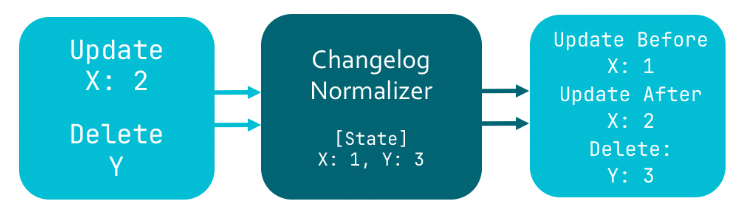
MongoDB 6.0+ supports preimage and postimage recording. When enabled, MongoDB records the complete document state before and after each change. Setting scan.full-changelog to true tells the connector to use these records to produce full changelog streams — eliminating the ChangelogNormalize operator and its state overhead.
Prerequisites
Before you begin, ensure that you have:
-
An ApsaraDB for MongoDB instance (replica set or sharded cluster), or a self-managed MongoDB 3.6+ cluster, with replica set mode enabled. See Replication.
-
If authentication is enabled, a MongoDB user with the following permissions:
splitVector,listDatabases,listCollections,collStats,find,changeStream, and read access toconfig.collectionsandconfig.chunks. -
Flink cluster IP addresses added to the MongoDB IP allowlist.
-
The target database and collection created before running the job.
Limitations
SQL source
-
Parallel snapshot reading requires MongoDB 4.0 or later. Enable it by setting
scan.incremental.snapshot.enabledtotrue. -
The
admin,local, andconfigdatabases and all system collections cannot be monitored. This is a MongoDB Change Stream restriction. See the Change Streams in MongoDB documentation. -
When creating a SQL source table, declare the
_id STRINGcolumn and set it as the primary key.
SQL sink
-
VVR 8.0.4 and earlier: insert only.
-
VVR 8.0.5 and later with a primary key declared: insert, update, and delete.
-
VVR 8.0.5 and later without a primary key: insert only.
-
Exactly-once delivery is not supported. The
sink.delivery-guaranteeoption acceptsnoneorat-least-once.
SQL lookup (dimension)
-
Supported in VVR 8.0.5 and later.
-
VVR 8.0.9 and later: lookup joins support reading the built-in
_idfield of the ObjectId type.
SQL
Syntax
CREATE TABLE tableName(
  _id STRING,
  [columnName dataType,]*
  PRIMARY KEY(_id) NOT ENFORCED
) WITH (
  'connector' = 'mongodb',
  'hosts' = 'localhost:27017',
  'username' = 'mongouser',
  'password' = '${secret_values.password}',
  'database' = 'testdb',
  'collection' = 'testcoll'
)
Declare the _id STRING column and specify it as the primary key when creating a CDC source table.
Connector options
General
|
Option |
Type |
Required |
Default |
Description |
|
|
String |
Yes |
— |
Connector identifier. Source tables: |
|
|
String |
No |
— |
MongoDB connection URI. Specify either |
|
|
String |
No |
— |
Hostname of the MongoDB server. Separate multiple hosts with commas ( |
|
|
String |
No |
|
Connection protocol. Valid values: |
|
|
String |
No |
— |
MongoDB username. Required when authentication is enabled. |
|
|
String |
No |
— |
MongoDB password. Required when authentication is enabled. Use variables instead of hardcoding credentials. |
|
|
String |
No |
— |
MongoDB database name. Supports regular expressions for source tables. If not set, all databases are monitored. Cannot monitor the |
|
|
String |
No |
— |
MongoDB collection name. Supports regular expressions for source tables. Notes:
|
|
|
String |
No |
— |
Additional connection options as By default, the connector does not set a socket connection timeout, which can cause long interruptions during network jitter. Set |
Source
|
Option |
Type |
Required |
Default |
Description |
|
|
String |
No |
|
Startup mode. Valid values: |
|
|
Long |
Conditional |
— |
Start timestamp in milliseconds since the UNIX epoch. Required when |
|
|
Integer |
No |
|
Maximum queue size during the initial snapshot phase. Takes effect only when |
|
|
Integer |
No |
|
Cursor batch size. |
|
|
Integer |
No |
|
Maximum number of change documents pulled per batch during stream reading. Larger values allocate a larger internal buffer. |
|
|
Integer |
No |
|
Interval between data pull requests, in milliseconds. |
|
|
Integer |
No |
|
Heartbeat interval in milliseconds. The connector sends heartbeats to track the latest oplog position. Setting this to |
|
|
Boolean |
No |
|
Enables parallel snapshot reading. Experimental feature. Requires MongoDB 4.0 or later. |
|
|
Integer |
No |
|
Chunk size for parallel snapshot reading, in MB. Experimental feature. Takes effect only when parallel snapshot reading is enabled. |
|
|
Boolean |
No |
|
Generates a full changelog stream using MongoDB preimage and postimage records. Experimental feature. Requires MongoDB 6.0 or later with preimage and postimage features enabled. |
|
|
Boolean |
No |
|
Parses fields separated by |
|
|
Boolean |
No |
|
Parses all primitive BSON types as STRING. Supported in VVR 8.0.5 and later. |
|
|
Boolean |
No |
|
Ignores all DELETE (-D) events, including those generated during MongoDB data archiving. Supported in VVR 11.1 and later. |
|
|
Boolean |
No |
|
Valid values:
Backfill applies only during the snapshot query of a single chunk and does not cover the entire full-read phase. When backfill is skipped, each chunk's snapshot query reads the latest data at that instant; updates that occur on a chunk after it has been read are not merged during the full-read phase and are read from the OpLog after entering the incremental phase. For example, an update to chunk5 that occurs while chunk5 is being snapshotted is reflected directly in chunk5's snapshot; if chunk5 is updated after the reader has advanced to chunk80, the update is applied later from the OpLog during the incremental phase. Important
When enabled, changes that occur during or after a chunk's scan are still delivered from the OpLog in the incremental phase and may be duplicated. Only at-least-once semantics are guaranteed. Enable this only when the downstream sink supports idempotent writes by primary key. Note
Supported only in VVR 11.1 and later. |
|
|
String |
No |
— |
MongoDB aggregation pipeline operations applied during snapshot reading to filter data. Specify as a JSON array, for example: |
|
|
Integer |
No |
— |
Number of threads for snapshot replication. Takes effect only when |
|
|
Integer |
No |
|
Queue size for the initial snapshot. Takes effect only when |
|
|
Integer |
No |
|
Number of concurrent readers for the Change Stream. Takes effect only when |
|
|
Integer |
No |
|
Message queue size for concurrent change stream subscriptions. Takes effect only when |
Lookup (dimension)
|
Option |
Type |
Required |
Default |
Description |
|
|
String |
No |
|
Cache policy. Valid values: |
|
|
Integer |
No |
|
Maximum retries on lookup failure. |
|
|
Duration |
No |
|
Interval between retries on lookup failure. |
|
|
Duration |
No |
— |
Maximum time a cached entry lives after last access. Supported units: |
|
|
Duration |
No |
— |
Maximum time a cached entry lives after being written. Requires |
|
|
Long |
No |
— |
Maximum number of rows in the cache. Oldest entries are evicted when the limit is reached. Requires |
|
|
Boolean |
No |
|
Caches a null entry when a lookup key has no matching record. Requires |
|
String |
No |
|
The conversion strategy used when Flink string values are matched against the MongoDB dimension table. Valid values:
Note This parameter is supported only in VVR 11.9 and later. |
Sink
|
Option |
Type |
Required |
Default |
Description |
|
|
Integer |
No |
|
Maximum number of records written per batch. |
|
|
Duration |
No |
|
Flush interval. |
|
|
String |
No |
|
Write delivery semantics. Valid values: |
|
|
Integer |
No |
|
Maximum retries on write failure. |
|
|
Duration |
No |
|
Interval between retries on write failure. |
|
|
Integer |
No |
— |
Custom sink parallelism. |
|
|
String |
No |
|
Strategy for handling -D and -U events. Valid values: |
Data type mappings
Source
|
BSON type |
Flink SQL |
|
Int32 |
INT |
|
Int64 |
BIGINT |
|
Double |
DOUBLE |
|
Decimal128 |
DECIMAL(p, s) |
|
Boolean |
BOOLEAN |
|
Date Timestamp |
DATE |
|
Date Timestamp |
TIME |
|
DateTime |
TIMESTAMP(3), TIMESTAMP_LTZ(3) |
|
Timestamp |
TIMESTAMP(0), TIMESTAMP_LTZ(0) |
|
String, ObjectId, UUID, Symbol, MD5, JavaScript, Regex |
STRING |
|
Binary |
BYTES |
|
Object |
ROW |
|
Array |
ARRAY |
|
DBPointer |
ROW\<$ref STRING, $id STRING\> |
|
GeoJSON Point |
ROW\<type STRING, coordinates ARRAY\<DOUBLE\>\> |
|
GeoJSON Line |
ROW\<type STRING, coordinates ARRAY\<ARRAY\<DOUBLE\>\>\> |
Lookup (dimension) and sink
|
BSON type |
Flink SQL type |
|
Int32 |
INT |
|
Int64 |
BIGINT |
|
Double |
DOUBLE |
|
Decimal128 |
DECIMAL |
|
Boolean |
BOOLEAN |
|
DateTime |
TIMESTAMP_LTZ(3) |
|
Timestamp |
TIMESTAMP_LTZ(0) |
|
String, ObjectId |
STRING |
|
Binary |
BYTES |
|
Object |
ROW |
|
Array |
ARRAY |
Metadata columns
SQL source supports the following metadata columns:
|
Metadata column |
Type |
Description |
|
|
STRING NOT NULL |
The database containing the document. |
|
|
STRING NOT NULL |
The collection containing the document. |
|
|
TIMESTAMP_LTZ(3) NOT NULL |
Time when the document changed. Returns |
|
|
STRING NOT NULL |
Change event type: |
Examples
Source
The following example reads from a MongoDB source table with parallel snapshot reading and full changelog enabled, then writes selected fields to a print sink.
-- CDC source table: reads product data from MongoDB
-- _id must be declared and set as the primary key
CREATE TEMPORARY TABLE mongo_source (
  `_id` STRING,
  name STRING,
  weight DECIMAL,
  tags ARRAY<STRING>,
  price ROW<amount DECIMAL, currency STRING>,
  suppliers ARRAY<ROW<name STRING, address STRING>>,
  db_name STRING METADATA FROM 'database_name' VIRTUAL,
  collection_name STRING METADATA VIRTUAL,
  op_ts TIMESTAMP_LTZ(3) METADATA VIRTUAL,
  PRIMARY KEY(_id) NOT ENFORCED
) WITH (
  'connector' = 'mongodb',
  'hosts' = 'dds-bp169b982fc25****.mongodb.rds.aliyuncs.com:3717,dds-bp169b982fc25****.mongodb.rds.aliyuncs.com:3717,',
  'username' = 'root',
  'password' = '${secret_values.password}',
  'database' = 'flinktest',
  'collection' = 'flinkcollection',
  'scan.incremental.snapshot.enabled' = 'true', -- Enable parallel snapshot reading (requires MongoDB 4.0+)
  'scan.full-changelog' = 'true'                -- Enable full changelog (requires MongoDB 6.0+ with preimage/postimage)
);

CREATE TEMPORARY TABLE productssink (
  name STRING,
  weight DECIMAL,
  tags ARRAY<STRING>,
  price_amount DECIMAL,
  suppliers_name STRING,
  db_name STRING,
  collection_name STRING,
  op_ts TIMESTAMP_LTZ(3)
) WITH (
  'connector' = 'print',
  'logger' = 'true'
);

INSERT INTO productssink
SELECT
  name,
  weight,
  tags,
  price.amount,
  suppliers[1].name,
  db_name,
  collection_name,
  op_ts
FROM mongo_source;
Lookup (dimension)
The following example joins a data generator stream with a MongoDB dimension table using a temporal join.
CREATE TEMPORARY TABLE datagen_source (
  id STRING,
  a INT,
  b BIGINT,
  `proctime` AS PROCTIME()
) WITH (
  'connector' = 'datagen'
);

CREATE TEMPORARY TABLE mongo_dim (
  `_id` STRING,
  name STRING,
  weight DECIMAL,
  tags ARRAY<STRING>,
  price ROW<amount DECIMAL, currency STRING>,
  suppliers ARRAY<ROW<name STRING, address STRING>>,
  PRIMARY KEY(_id) NOT ENFORCED
) WITH (
  'connector' = 'mongodb',
  'hosts' = 'dds-bp169b982fc25****.mongodb.rds.aliyuncs.com:3717,dds-bp169b982fc25****.mongodb.rds.aliyuncs.com:3717,',
  'username' = 'root',
  'password' = '${secret_values.password}',
  'database' = 'flinktest',
  'collection' = 'flinkcollection',
  'lookup.cache' = 'PARTIAL',                           -- Cache lookup results for better performance
  'lookup.partial-cache.expire-after-access' = '10min', -- Evict cached entries after 10 minutes of inactivity
  'lookup.partial-cache.expire-after-write' = '10min',  -- Evict cached entries 10 minutes after write
  'lookup.partial-cache.max-rows' = '100'               -- Maximum 100 rows in the cache
);

CREATE TEMPORARY TABLE print_sink (
  name STRING,
  weight DECIMAL,
  tags ARRAY<STRING>,
  price_amount DECIMAL,
  suppliers_name STRING
) WITH (
  'connector' = 'print',
  'logger' = 'true'
);

INSERT INTO print_sink
SELECT
  T.id,
  T.a,
  T.b,
  H.name
FROM datagen_source AS T
JOIN mongo_dim FOR SYSTEM_TIME AS OF T.`proctime` AS H ON T.id = H._id;
Sink
The following example writes data from a data generator to a MongoDB sink table. A primary key is declared to support insert, update, and delete operations.
CREATE TEMPORARY TABLE datagen_source (
  `_id` STRING,
  name STRING,
  weight DECIMAL,
  tags ARRAY<STRING>,
  price ROW<amount DECIMAL, currency STRING>,
  suppliers ARRAY<ROW<name STRING, address STRING>>
) WITH (
  'connector' = 'datagen'
);

CREATE TEMPORARY TABLE mongo_sink (
  `_id` STRING,
  name STRING,
  weight DECIMAL,
  tags ARRAY<STRING>,
  price ROW<amount DECIMAL, currency STRING>,
  suppliers ARRAY<ROW<name STRING, address STRING>>,
  PRIMARY KEY(_id) NOT ENFORCED -- Declare primary key to enable update and delete
) WITH (
  'connector' = 'mongodb',
  'hosts' = 'dds-bp169b982fc25****.mongodb.rds.aliyuncs.com:3717,dds-bp169b982fc25****.mongodb.rds.aliyuncs.com:3717,',
  'username' = 'root',
  'password' = '${secret_values.password}',
  'database' = 'flinktest',
  'collection' = 'flinkcollection'
);

INSERT INTO mongo_sink SELECT * FROM datagen_source;
Flink CDC (public preview)
Flink CDC lets you synchronize MongoDB data to a downstream store using a YAML script-based pipeline, without writing SQL DDL. This feature requires VVR 11.1 and later.
Syntax
source:
   type: mongodb
   name: MongoDB Source
   hosts: localhost:33076
   username: ${mongo.username}
   password: ${mongo.password}
   database: foo_db
   collection: foo_col_.*

sink:
  type: ...
Configuration options
|
Option |
Required |
Type |
Default |
Description |
|
|
Yes |
STRING |
— |
The connector. Set to |
|
|
No |
STRING |
|
Connection protocol. Valid values: |
|
|
Yes |
STRING |
— |
MongoDB server hostname(s). Separate multiple hosts with commas. |
|
|
No |
STRING |
— |
MongoDB username. |
|
|
No |
STRING |
— |
MongoDB password. |
|
|
Yes |
STRING |
— |
MongoDB database name to capture. Regular expressions are supported. |
|
|
Yes |
STRING |
— |
MongoDB collection name to capture. Regular expressions are supported. Use the fully qualified |
|
|
No |
STRING |
— |
Additional connection options as |
|
|
No |
STRING |
|
Schema inference strategy. |
|
|
No |
INT |
|
Maximum records to sample per collection during initial schema inference. |
|
|
No |
STRING |
|
Startup mode. Valid values: |
|
|
No |
LONG |
— |
Start timestamp in milliseconds. Required when |
|
|
No |
INT |
|
Maximum metadata chunk size. |
|
|
No |
BOOLEAN |
|
Closes idle source readers after switching to incremental reading. |
|
|
No |
BOOLEAN |
|
Valid values:
Backfill applies only during the snapshot query of a single chunk and does not cover the entire full-read phase. When backfill is skipped, each chunk's snapshot query reads the latest data at that instant; updates that occur on a chunk after it has been read are not merged during the full-read phase and are read from the OpLog after entering the incremental phase. For example, an update to chunk5 that occurs while chunk5 is being snapshotted is reflected directly in chunk5's snapshot; if chunk5 is updated after the reader has advanced to chunk80, the update is applied later from the OpLog during the incremental phase. Important
When enabled, changes that occur during or after a chunk's scan are still delivered from the OpLog in the incremental phase and may be duplicated. Only at-least-once semantics are guaranteed. Enable this only when the downstream sink supports idempotent writes by primary key. |
|
|
No |
BOOLEAN |
|
Reads unbounded chunks first. Reduces out-of-memory risk for frequently updated collections. |
|
|
No |
INT |
|
Cursor batch size. |
|
|
No |
INT |
|
Maximum entries per Change Stream pull request. |
|
|
No |
INT |
|
Minimum wait time between Change Stream pull requests, in milliseconds. |
|
|
No |
INT |
|
Heartbeat interval in milliseconds. Set this for infrequently updated collections. Setting to |
|
|
No |
INT |
|
Chunk size during snapshotting, in MB. |
|
|
No |
INT |
|
Number of samples used to estimate collection size during snapshotting. |
|
|
No |
BOOLEAN |
|
Generates full changelog events using preimage and postimage records. Requires MongoDB 6.0 or later with preimage and postimage enabled. |
|
|
No |
BOOLEAN |
|
Disables cursor timeout. By default, MongoDB closes idle cursors after 10 minutes. |
|
|
No |
BOOLEAN |
|
Ignores delete events from MongoDB. |
|
|
No |
BOOLEAN |
|
Flattens nested BSON documents. For example, |
|
|
No |
BOOLEAN |
|
Infers all primitive types as STRING. Reduces schema change events when upstream types are inconsistent. |
|
|
No |
STRING |
— |
Comma-separated list of metadata fields to pass downstream. Supported values: |
Data type mappings
|
MongoDB BSON |
Flink CDC |
Notes |
|
STRING |
VARCHAR |
— |
|
INT32 |
INT |
— |
|
INT64 |
BIGINT |
— |
|
DECIMAL128 |
DECIMAL |
— |
|
DOUBLE |
DOUBLE |
— |
|
BOOLEAN |
BOOLEAN |
— |
|
TIMESTAMP |
TIMESTAMP |
— |
|
DATETIME |
LOCALZONEDTIMESTAMP |
— |
|
BINARY |
VARBINARY |
— |
|
DOCUMENT |
MAP |
Key and value types are inferred. |
|
ARRAY |
ARRAY |
Element types are inferred. |
|
OBJECTID |
VARCHAR |
Represented as a hex string. |
|
SYMBOL, REGULAREXPRESSION, JAVASCRIPT, JAVASCRIPTWITHSCOPE |
VARCHAR |
Represented as a string. |
Metadata columns
Flink CDC supports the following metadata column for the MongoDB connector:
|
Metadata column |
Type |
Description |
|
|
BIGINT NOT NULL |
Time when the document changed (OpLog timestamp). Returns |
Use the Transform module's generic metadata columns to access database_name, collection_name, and row_kind.
DataStream API
To use the DataStream API, set up the DataStream connector for your job. See DataStream connector usage.
Add the Maven dependency
The Maven Central Repository hosts VVR MongoDB connectors.
<dependency>
    <groupId>com.alibaba.ververica</groupId>
    <artifactId>flink-connector-mongodb</artifactId>
    <version>${vvr.version}</version>
</dependency>
Build a MongoDBSource
Use MongoDBSource.builder() to construct a source:
-
To enable incremental snapshot reading, use the builder from
com.ververica.cdc.connectors.mongodb.source. -
Otherwise, use the builder from
com.ververica.cdc.connectors.mongodb.
MongoDBSource.builder()
  .hosts("mongo.example.com:27017")
  .username("mongouser")
  .password("mongopasswd")
  .databaseList("testdb")          // Supports regular expressions; use .* to match all databases
  .collectionList("testcoll")      // Supports regular expressions; use .* to match all collections
  .startupOptions(StartupOptions.initial()) // StartupOptions.latest-offset(), StartupOptions.timestamp()
  .deserializer(new JsonDebeziumDeserializationSchema())
  .build();
MongoDBSource parameters
|
Parameter |
Description |
|
|
Hostname of the MongoDB server. |
|
|
MongoDB username. Omit if authentication is not enabled. |
|
|
MongoDB password. Omit if authentication is not enabled. |
|
|
Database name to monitor. Supports regular expressions. Use |
|
|
Collection name to monitor. Supports regular expressions. Use |
|
|
Startup mode. Valid values: |
|
|
Deserializer for converting |
References
-
Flink CDC (public preview) — Synchronize MongoDB data and schema changes to downstream tables (VVR 11.1 and later).
-
Metrics — Monitor source table performance.