You can use Resource Group to manage Express Connect resources as a collection and apply Resource Access Management (RAM) policies that authorize actions only on resources within a specific group. This lets you enforce the principle of least privilege (PoLP) in your Alibaba Cloud account.
You can scope permissions to a resource group only for supported resource types and actions. For unsupported actions, any resource group scope in a policy is ignored, and permissions must be granted at the account level instead.
How it works
Resource groups organize your resources by project or environment. Once resources are grouped, you can attach a RAM policy to an identity (such as a RAM user, user group, or role) that scopes its permissions exclusively to that group. For more information, see Resource grouping and authorization.
This approach provides two key benefits:
-
Fine-grained access control: Instead of granting account-wide permissions, you can limit an identity's access to only the resources within a specific group. This helps isolate project-specific workloads and reduce the risk of unintended access.
-
Simplified management: When new resources are added to a resource group, RAM identities with permissions scoped to that group automatically gain access. You do not need to update RAM policies each time a new resource is created.
Grant resource group-level permissions to a RAM user
This section demonstrates how to grant a RAM user permission to access only the resources of Express Connect within a specific resource group.
1. Prerequisites
-
Create a resource group and ensure that the target resources are in it. If you need help doing this, see Create a resource group, Add resources to a resource group automatically, and Add resources to a resource group manually.
2. Grant permissions
You can grant resource group-level permissions from either the Resource Management console or the RAM console.
Resource Management console
-
Log on to the Resource Management console.
-
On the Resource Group page, find the target resource group and click Permission Management in the Actions column.
-
On the Permissions tab, click Grant Permission.
-
In the Grant Permission panel, configure the principal and access policy.
-
Principal: Select a RAM user.
-
Policy: Select a System Policy or a Custom Policy. For more information, see Create a custom permission policy.
-
-
Click OK.
For more information, see Grant permissions on resource groups to a RAM identity.
RAM console
-
Log on to the RAM console using an Alibaba Cloud account or a RAM administrator account.
-
In the navigation pane on the left, choose . On the Users page, find the target RAM user and click Attach Policy in the Actions column.
-
In the Attach Policy panel, add permissions for the RAM user.
-
Resource Scope: Select Resource Group.
-
Principal: Select an existing RAM user or the RAM user created in the previous step.
-
Policy: Select a System Policy or a Custom Policy. For more information, see Create a custom permission policy.
-
-
Click OK.
For more information, see Manage RAM user permissions.
Supported resources
The following resources from Express Connect support resource group-level authorization:
|
Alibaba Cloud service |
Service code |
Resource type |
|
Express Connect |
expressconnect |
expressconnectrouter : Express Connect Router (ECR) |
|
Express Connect |
expressconnect |
physicalconnection : Express Connect circuit |
|
Express Connect |
expressconnect |
routerinterface : virtual border router (VBR) |
|
Express Connect |
expressconnect |
trafficqos : QoS policy |
|
Express Connect |
expressconnect |
virtualborderrouter : VBR-to-VPC connection |
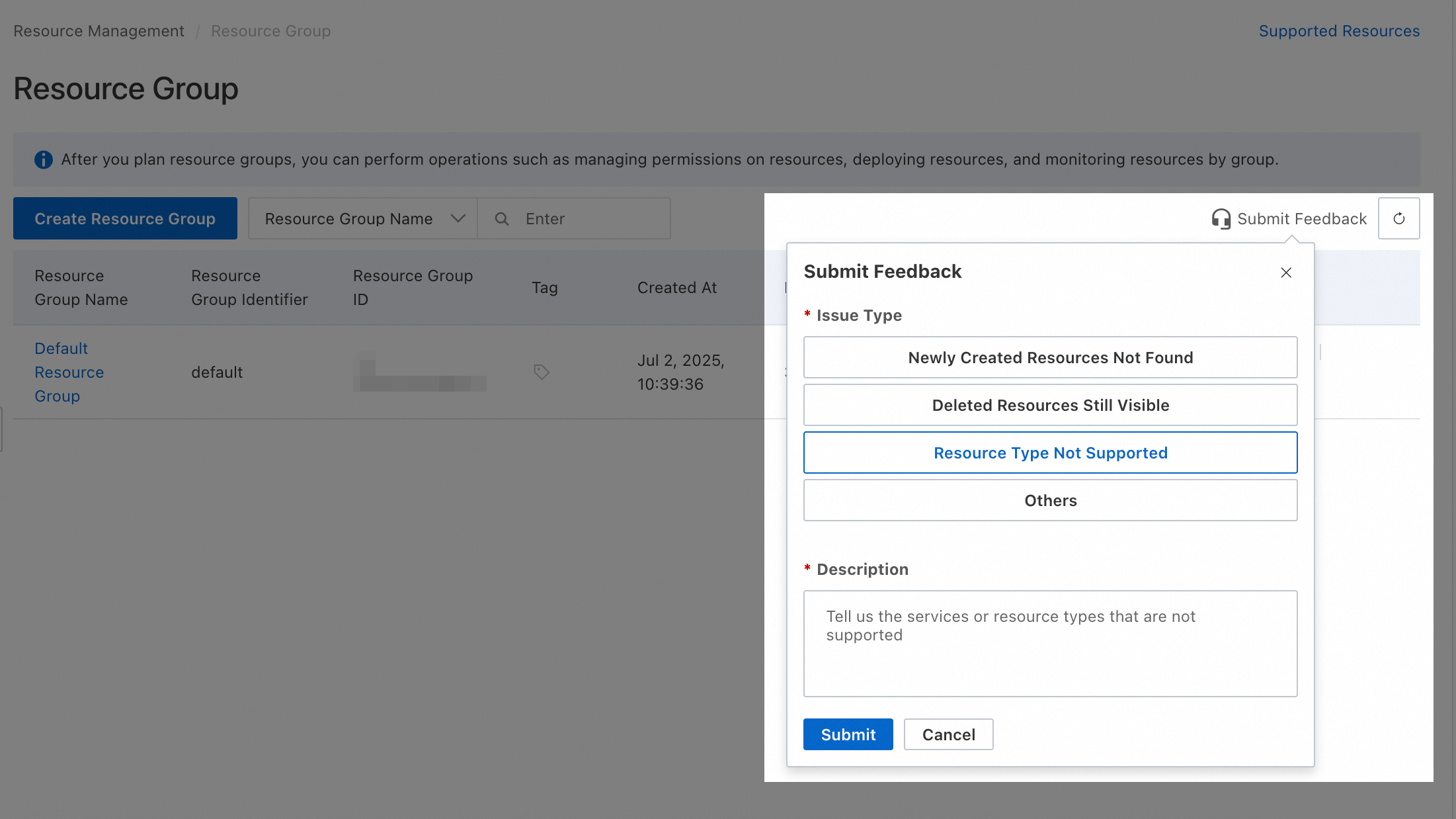
To request support for resource types not listed here, submit feedback via Resource Management console.
Unsupported actions
The following actions of Express Connect do not support resource group-level authorization:
|
Action |
Description |
|
expressconnectrouter:CreateCarrierCloudLink |
- |
|
expressconnectrouter:DeleteCarrierCloudLink |
- |
|
expressconnectrouter:DescribeCarrierCloudLink |
- |
|
expressconnectrouter:DescribeCarrierCloudLinks |
- |
|
expressconnectrouter:DescribeLineProviders |
- |
|
expressconnectrouter:DescribePartnerAccessPointRegions |
- |
|
expressconnectrouter:DescribePartnerAccessPoints |
- |
|
expressconnectrouter:DescribePartnerVendors |
- |
|
expressconnectrouter:DescribeVpcRelatedAssociation |
- |
|
expressconnectrouter:ListExpressConnectRouterSupportedRegion |
Queries a list of regions in which the Express Connect router (ECR) feature is activated. |
|
expressconnectrouter:ListRouteMapAssociations |
- |
|
expressconnectrouter:ModifyCarrierCloudLink |
- |
|
vpc:AddBandwidthPackageIps |
AddBandwidthPackageIps |
|
vpc:AddGlobalAccelerationInstanceIp |
Associates an elastic IP address (EIP) with a shared-bandwidth Global Accelerator (GA) instance. |
|
vpc:AddIPv6TranslatorAclListEntry |
Adds an IP entry to an access control list (ACL). |
|
vpc:AllocateVpcIpv6Cidr |
Reserves an IPv6 CIDR block. |
|
vpc:CancelExpressCloudConnection |
- |
|
vpc:CheckVpnBgpEnabled |
Checks whether the region of an IPsec-VPN connection supports BGP. |
|
vpc:ConvertBandwidthPackage |
- |
|
vpc:CreaeNatGateway |
- |
|
vpc:CreateBandwidthPackage |
- |
|
vpc:CreateBondRouterInterfaceConnection |
- |
|
vpc:CreateExpressCloudConnection |
Creates an Express Cloud Connect (ECC) instance. |
|
vpc:CreateGlobalAccelerationInstance |
Creates a Global Accelerator (GA) instance. |
|
vpc:CreateIPv6Translator |
Creates an IPv6 Translation Service instance. |
|
vpc:CreateIPv6TranslatorAclList |
Creates an access control list (ACL). |
|
vpc:CreateIPv6TranslatorEntry |
Adds an IPv6 mapping entry to an IPv6 Translation Service instance. |
|
vpc:CreateNqa |
- |
|
vpc:DeleteBandwidthPackage |
DeleteBandwidthPackage |
|
vpc:DeleteGlobalAccelerationInstance |
Deletes a GA instance. |
|
vpc:DeleteIPv6Translator |
Deletes an IPv6 Translation Service instance. |
|
vpc:DeleteIPv6TranslatorAclList |
Deletes an access control list (ACL). You can delete an ACL only when the ACL is not associated with IPv6 translation mappings. |
|
vpc:DeleteIPv6TranslatorEntry |
Deletes an IPv6 mapping entry. |
|
vpc:DeleteIpv6EgressOnlyRule |
Deletes an egress-only rule. |
|
vpc:DescribeAccessPoints |
- |
|
vpc:DescribeBandwidthPackageMonitorData |
- |
|
vpc:DescribeBandwidthPackagePublicIpMonitorData |
- |
|
vpc:DescribeGlobalAccelerationInstances |
Queries created GA instances. |
|
vpc:DescribeIPv6TranslatorAclListAttributes |
Queries the details of an access control list (ACL), including the specified IP addresses and associated IPv6 mapping entries. |
|
vpc:DescribeIPv6TranslatorAclLists |
Queries access control lists (ACLs). |
|
vpc:DescribeIPv6TranslatorEntries |
Queries IPv6 mapping entries. |
|
vpc:DescribeInstances |
- |
|
vpc:DescribeNetworkQuotas |
- |
|
vpc:DescribePublicIpAddress |
Queries the public IP address range of a virtual private cloud (VPC) in a region. |
|
vpc:DescribeRouterInterfacesForGlobal |
- |
|
vpc:DescribeServerRelatedGlobalAccelerationInstances |
Queries the GA instances that are associated with a specified backend server. |
|
vpc:DescribeVPCs |
- |
|
vpc:DescribeVpnGatewayAvailableZones |
Queries zones that support IPsec-VPN connections in a region. |
|
vpc:DescribeVrouters |
- |
|
vpc:DescribeZones |
- |
|
vpc:DiagnoseVpnConnections |
Diagnoses IPsec-VPN connections. |
|
vpc:DiagnoseVpnConnectionsHistory |
- |
|
vpc:DiagnoseVpnGateway |
Diagnoses a VPN gateway. |
|
vpc:DisableNatGatewayEcsMetric |
- |
|
vpc:EnableNatGatewayEcsMetric |
- |
|
vpc:GetBusinessAccessPointDetail |
- |
|
vpc:GetFlowLogServiceStatus |
Queries the status of a flow log. |
|
vpc:GetNatIpCidrAttribute |
- |
|
vpc:GetObject |
- |
|
vpc:GetPhysicalConnectionServiceStatus |
Checks whether outbound data transfer billing is enabled for the current account. |
|
vpc:GetPublicIpAddressPoolServiceStatus |
Queries whether the IP address pool feature is enabled. |
|
vpc:GetTrafficMirrorServiceStatus |
Queries the status of the traffic mirror feature. |
|
vpc:GetVpcIpamServiceStatus |
Retrieves the status of the IPAM service. |
|
vpc:GetVpnGatewayDiagnoseResult |
Queries the diagnostic result of a VPN gateway. |
|
vpc:InnerVpcCreateDscp |
- |
|
vpc:InnerVpcDeleteDscp |
- |
|
vpc:InnerVpcDescribeCrossBorderRouterInterface |
- |
|
vpc:InnerVpcDescribeDscp |
- |
|
vpc:InnerVpcModifyDscp |
- |
|
vpc:InnerVpcRefreshDscp |
- |
|
vpc:ListBusinessAccessPointPortUsage |
- |
|
vpc:ListBusinessAccessPoints |
Queries the access points of an Express Connect circuit. |
|
vpc:ListBusinessRegions |
Queries the list of regions available for an Express Connect circuit. |
|
vpc:ListGeographicSubRegions |
Queries the most recent region list. |
|
vpc:ListNatGatewayEcsMetric |
- |
|
vpc:ListVpcEndpointServicesByEndUser |
Queries available endpoint services. |
|
vpc:ModifyBandwidthPackageAttribute |
- |
|
vpc:ModifyBandwidthPackageSpec |
ModifyBandwidthPackageSpec |
|
vpc:ModifyBypassToaAttribute |
- |
|
vpc:ModifyExpressCloudConnectionAttribute |
Modifies the configuration of an Express Cloud Connect (ECC) instance. |
|
vpc:ModifyGlobalAccelerationInstanceAttributes |
Modifies the name and description of a Global Accelerator (GA) instance. |
|
vpc:ModifyGlobalAccelerationInstanceSpec |
Modifies the maximum bandwidth of a Global Accelerator (GA) instance. |
|
vpc:ModifyIPv6TranslatorAclAttribute |
Modifies the name of an access control list (ACL). |
|
vpc:ModifyIPv6TranslatorAclListEntry |
Modifies an IP entry in an access control list (ACL). |
|
vpc:ModifyIPv6TranslatorAttribute |
Modifies the name and description of an IPv6 Translation Service instance. |
|
vpc:ModifyIPv6TranslatorBandwidth |
Modifies the maximum bandwidth of an IPv6 Translation Service instance. |
|
vpc:ModifyIPv6TranslatorEntry |
Modifies an IPv6 mapping entry. |
|
vpc:OpenFlowLogService |
Enables the flow log feature. |
|
vpc:OpenPhysicalConnectionService |
Enables billing for outbound data transfer. |
|
vpc:OpenPublicIpAddressPoolService |
Enables the IP address pool feature. |
|
vpc:OpenTrafficMirrorService |
Enables traffic mirror. |
|
vpc:OpenVpcIpamService |
Activates the IP Address Management (IPAM) service. |
|
vpc:QueryHighReliablePhysicalConnectionPrice |
- |
|
vpc:QueryPconnTrafficPrice |
- |
|
vpc:QueryPhysicalConnectionPrice |
- |
|
vpc:RejectVpcPeerConnection |
Rejects a virtual private cloud (VPC) peering connection request. |
|
vpc:RemoveBandwidthPackageIps |
RemoveBandwidthPackageIps |
|
vpc:RemoveGlobalAccelerationInstanceIp |
Disassociates an EIP from a shared-bandwidth GA instance. |
|
vpc:RemoveIPv6TranslatorAclListEntry |
Deletes an IP entry from an ACL. |
|
vpc:RevokeInstanceFromCbn |
- |
|
vpc:TransformEipSegmentToPublicIpAddressPool |
Migrate a contiguous EIP group to an IP address pool. |
|
vpc:UnAssociateEipAddress |
- |
|
vpc:UnassociateGlobalAccelerationInstance |
Disassociates a Global Accelerator (GA) instance from a backend server. |
|
vpc:UpdateCrossBoarderStatus |
- |
|
vpc:associatevpccidrblock |
- |
|
vpc:createvpc |
- |
|
vpc:deleteBgpNetwork |
- |
|
vpc:describeVpcs |
- |
|
vpc:modifyVpcAttribute |
- |
|
vpc:releaseIpv6Address |
- |
For these actions, you must create a custom policy with the scope set to Account.
 Customize the following policy examples to suit your needs:
-
Allow read-only access
{ "Version": "1", "Statement": [ { "Effect": "Allow", "Action": [ "expressconnectrouter:DescribeCarrierCloudLink", "expressconnectrouter:DescribeCarrierCloudLinks", "expressconnectrouter:DescribeLineProviders", "expressconnectrouter:DescribePartnerAccessPointRegions", "expressconnectrouter:DescribePartnerAccessPoints", "expressconnectrouter:DescribePartnerVendors", "expressconnectrouter:DescribeVpcRelatedAssociation", "expressconnectrouter:ListExpressConnectRouterSupportedRegion", "expressconnectrouter:ListRouteMapAssociations", "vpc:CheckVpnBgpEnabled", "vpc:DescribeAccessPoints", "vpc:DescribeBandwidthPackageMonitorData", "vpc:DescribeBandwidthPackagePublicIpMonitorData", "vpc:DescribeGlobalAccelerationInstances", "vpc:DescribeIPv6TranslatorAclListAttributes", "vpc:DescribeIPv6TranslatorAclLists", "vpc:DescribeIPv6TranslatorEntries", "vpc:DescribeInstances", "vpc:DescribeNetworkQuotas", "vpc:DescribePublicIpAddress", "vpc:DescribeRouterInterfacesForGlobal", "vpc:DescribeServerRelatedGlobalAccelerationInstances", "vpc:DescribeVPCs", "vpc:DescribeVpnGatewayAvailableZones", "vpc:DescribeVrouters", "vpc:DescribeZones", "vpc:GetBusinessAccessPointDetail", "vpc:GetFlowLogServiceStatus", "vpc:GetNatIpCidrAttribute", "vpc:GetObject", "vpc:GetPhysicalConnectionServiceStatus", "vpc:GetPublicIpAddressPoolServiceStatus", "vpc:GetTrafficMirrorServiceStatus", "vpc:GetVpcIpamServiceStatus", "vpc:GetVpnGatewayDiagnoseResult", "vpc:ListBusinessAccessPointPortUsage", "vpc:ListBusinessAccessPoints", "vpc:ListBusinessRegions", "vpc:ListGeographicSubRegions", "vpc:ListNatGatewayEcsMetric", "vpc:ListVpcEndpointServicesByEndUser" ], "Resource": "*" } ] } -
Allow full access
{
  "Version": "1",
  "Statement": [
    {
      "Effect": "Allow",
      "Action": [
        "expressconnectrouter:CreateCarrierCloudLink",
        "expressconnectrouter:DeleteCarrierCloudLink",
        "expressconnectrouter:DescribeCarrierCloudLink",
        "expressconnectrouter:DescribeCarrierCloudLinks",
        "expressconnectrouter:DescribeLineProviders",
        "expressconnectrouter:DescribePartnerAccessPointRegions",
        "expressconnectrouter:DescribePartnerAccessPoints",
        "expressconnectrouter:DescribePartnerVendors",
        "expressconnectrouter:DescribeVpcRelatedAssociation",
        "expressconnectrouter:ListExpressConnectRouterSupportedRegion",
        "expressconnectrouter:ListRouteMapAssociations",
        "expressconnectrouter:ModifyCarrierCloudLink",
        "vpc:AddBandwidthPackageIps",
        "vpc:AddGlobalAccelerationInstanceIp",
        "vpc:AddIPv6TranslatorAclListEntry",
        "vpc:AllocateVpcIpv6Cidr",
        "vpc:CancelExpressCloudConnection",
        "vpc:CheckVpnBgpEnabled",
        "vpc:ConvertBandwidthPackage",
        "vpc:CreaeNatGateway",
        "vpc:CreateBandwidthPackage",
        "vpc:CreateBondRouterInterfaceConnection",
        "vpc:CreateExpressCloudConnection",
        "vpc:CreateGlobalAccelerationInstance",
        "vpc:CreateIPv6Translator",
        "vpc:CreateIPv6TranslatorAclList",
        "vpc:CreateIPv6TranslatorEntry",
        "vpc:CreateNqa",
        "vpc:DeleteBandwidthPackage",
        "vpc:DeleteGlobalAccelerationInstance",
        "vpc:DeleteIPv6Translator",
        "vpc:DeleteIPv6TranslatorAclList",
        "vpc:DeleteIPv6TranslatorEntry",
        "vpc:DeleteIpv6EgressOnlyRule",
        "vpc:DescribeAccessPoints",
        "vpc:DescribeBandwidthPackageMonitorData",
        "vpc:DescribeBandwidthPackagePublicIpMonitorData",
        "vpc:DescribeGlobalAccelerationInstances",
        "vpc:DescribeIPv6TranslatorAclListAttributes",
        "vpc:DescribeIPv6TranslatorAclLists",
        "vpc:DescribeIPv6TranslatorEntries",
        "vpc:DescribeInstances",
        "vpc:DescribeNetworkQuotas",
        "vpc:DescribePublicIpAddress",
        "vpc:DescribeRouterInterfacesForGlobal",
        "vpc:DescribeServerRelatedGlobalAccelerationInstances",
        "vpc:DescribeVPCs",
        "vpc:DescribeVpnGatewayAvailableZones",
        "vpc:DescribeVrouters",
        "vpc:DescribeZones",
        "vpc:DiagnoseVpnConnections",
        "vpc:DiagnoseVpnConnectionsHistory",
        "vpc:DiagnoseVpnGateway",
        "vpc:DisableNatGatewayEcsMetric",
        "vpc:EnableNatGatewayEcsMetric",
        "vpc:GetBusinessAccessPointDetail",
        "vpc:GetFlowLogServiceStatus",
        "vpc:GetNatIpCidrAttribute",
        "vpc:GetObject",
        "vpc:GetPhysicalConnectionServiceStatus",
        "vpc:GetPublicIpAddressPoolServiceStatus",
        "vpc:GetTrafficMirrorServiceStatus",
        "vpc:GetVpcIpamServiceStatus",
        "vpc:GetVpnGatewayDiagnoseResult",
        "vpc:InnerVpcCreateDscp",
        "vpc:InnerVpcDeleteDscp",
        "vpc:InnerVpcDescribeCrossBorderRouterInterface",
        "vpc:InnerVpcDescribeDscp",
        "vpc:InnerVpcModifyDscp",
        "vpc:InnerVpcRefreshDscp",
        "vpc:ListBusinessAccessPointPortUsage",
        "vpc:ListBusinessAccessPoints",
        "vpc:ListBusinessRegions",
        "vpc:ListGeographicSubRegions",
        "vpc:ListNatGatewayEcsMetric",
        "vpc:ListVpcEndpointServicesByEndUser",
        "vpc:ModifyBandwidthPackageAttribute",
        "vpc:ModifyBandwidthPackageSpec",
        "vpc:ModifyBypassToaAttribute",
        "vpc:ModifyExpressCloudConnectionAttribute",
        "vpc:ModifyGlobalAccelerationInstanceAttributes",
        "vpc:ModifyGlobalAccelerationInstanceSpec",
        "vpc:ModifyIPv6TranslatorAclAttribute",
        "vpc:ModifyIPv6TranslatorAclListEntry",
        "vpc:ModifyIPv6TranslatorAttribute",
        "vpc:ModifyIPv6TranslatorBandwidth",
        "vpc:ModifyIPv6TranslatorEntry",
        "vpc:OpenFlowLogService",
        "vpc:OpenPhysicalConnectionService",
        "vpc:OpenPublicIpAddressPoolService",
        "vpc:OpenTrafficMirrorService",
        "vpc:OpenVpcIpamService",
        "vpc:QueryHighReliablePhysicalConnectionPrice",
        "vpc:QueryPconnTrafficPrice",
        "vpc:QueryPhysicalConnectionPrice",
        "vpc:RejectVpcPeerConnection",
        "vpc:RemoveBandwidthPackageIps",
        "vpc:RemoveGlobalAccelerationInstanceIp",
        "vpc:RemoveIPv6TranslatorAclListEntry",
        "vpc:RevokeInstanceFromCbn",
        "vpc:TransformEipSegmentToPublicIpAddressPool",
        "vpc:UnAssociateEipAddress",
        "vpc:UnassociateGlobalAccelerationInstance",
        "vpc:UpdateCrossBoarderStatus",
        "vpc:associatevpccidrblock",
        "vpc:createvpc",
        "vpc:deleteBgpNetwork",
        "vpc:describeVpcs",
        "vpc:modifyVpcAttribute",
        "vpc:releaseIpv6Address"
      ],
      "Resource": "*"
    }
  ]
}
Granting account-level permissions allows access to all relevant resources in the account. Always follow PoLP.
FAQ
How do I find which resource group a resource belongs to?
-
Method 1: From the service console
-
Navigate to the service console where the resource was created. On the resource's details page, you can typically find the resource group listed in the basic information section.
-
-
Method 2: From the Resource Management console
-
Log on to the Resource Management console.
-
Choose .
-
In the left pane, select the account that owns the target resource (the default is Current Account).
-
Use filter conditions to find your resource.
-
The Resource Group Name column shows which group the resource belongs to.
-
How do I view all resources in a specific resource group?
-
Method 1:
-
Log on to the Resource Management console.
-
Choose .
-
In the left pane, under the account that owns the resources (the default is Current Account), click the name of the desired resource group.
-
In the right pane, select the cloud service from the Select resource types drop-down list.
-
All resources in that group will be displayed.
-
-
Method 2:
-
Log on to the Resource Management console.
-
Choose .
-
Find the desired resource group and click Resource Management in the Actions column.
-
On the resource management page, select the cloud service from the Service drop-down list.
-
All resources in that group will be displayed.
-
How do I move multiple resources to a different resource group in batch?
-
Log on to the Resource Management console.
-
Choose .
-
Find the desired resource group and click Resource Management in the Actions column.
-
On the resource management page, use filter conditions to find the resources you want to move.
-
Select the checkbox for each resource.
-
At the bottom of the page, click Transfer.
-
In the dialog box, select the destination resource group and click Confirm.