You can use resource groups with RAM to implement resource isolation and fine-grained access control within a single Alibaba Cloud account. This topic summarizes how Alibaba Cloud Elasticsearch supports resource groups and describes how to grant permissions at the resource group level.
-
Resource group-level authorization is effective only for resource types that support resource groups and actions that support it.
-
For resource types that do not support resource groups, permissions scoped to a resource group will have no effect. To grant account-level authorization, select account-level as the resource scope. For more information, see Actions that do not support resource group-level authorization.
Resource group authorization
You can use resource groups to organize and manage resources in your Alibaba Cloud account. For example, you can create a resource group for each project and add resources to it for centralized management. For more information, see What is a resource group?.
After grouping your resources, you can grant RAM principals, such as RAM users, RAM user groups, and RAM roles, permissions on a specific resource group. This restricts a principal to managing only the resources within the specified group. For more information, see Resource grouping and authorization.
This approach offers the following advantages:
-
Fine-grained permissions: Grant each identity only the permissions required to access specific resources. This helps keep resources from different projects separate within a single account.
-
Scalability: When you add new resources, you only need to add them to the resource group. The associated RAM identity automatically gains permissions for the new resources, without requiring separate authorization.
Grant resource group permissions to a RAM user
This topic describes how to grant a RAM user permissions to Alibaba Cloud Elasticsearch resources in a specific resource group.
1. Prerequisites
-
Create a RAM user. For more information, see Create a RAM user.
-
Create a resource group and move existing resources to it. For more information, see Create a resource group, Automatically transfer resources to a resource group, and Manually transfer resources to a resource group.
2. Grant resource group-level permissions
You can grant resource group-level permissions using one of the following methods.
Resource management console
This method uses the resource group's permission management feature to grant permissions to a RAM user. For detailed instructions, see Grant permissions on a resource group to a RAM identity.
-
Log on to the Resource Management console.
-
On the Resource Groups page, find the target resource group and click Permission Management in the Actions column.
-
On the Permission Management tab, click Add Authorization.
-
In the Add Authorization panel, configure the principal and policy.
-
principal: Select an existing RAM user.
-
policy: Select a system policy or an existing custom policy. For more information, see Create a custom policy.
-
-
Click OK.
RAM console
In the RAM console, grant resource group-level permissions to a RAM user. For detailed instructions, see Manage permissions of RAM users.
-
Log on to the RAM console as an Alibaba Cloud account (main account) or a RAM administrator.
-
In the left-side navigation pane, choose . On the Users page, find the target RAM user and click Add Permission in the Actions column.
-
In the Add Authorization panel, authorize the RAM user.
-
resource scope: Select Resource Group Level.
-
principal: Select an existing RAM user or the one created in the prerequisites.
-
policy: Select a system policy or an existing custom policy. For more information, see Create a custom policy.
-
-
Click OK.
Supported resource types
The following table lists the Alibaba Cloud Elasticsearch resource types that support resource groups.
|
Cloud service |
Cloud service code |
Resource type |
|
Alibaba Cloud Elasticsearch |
elasticsearch |
APM: Application Performance Monitoring |
|
Alibaba Cloud Elasticsearch |
elasticsearch |
instance: Instance |
|
Alibaba Cloud Elasticsearch |
elasticsearch |
logstash: Logstash |
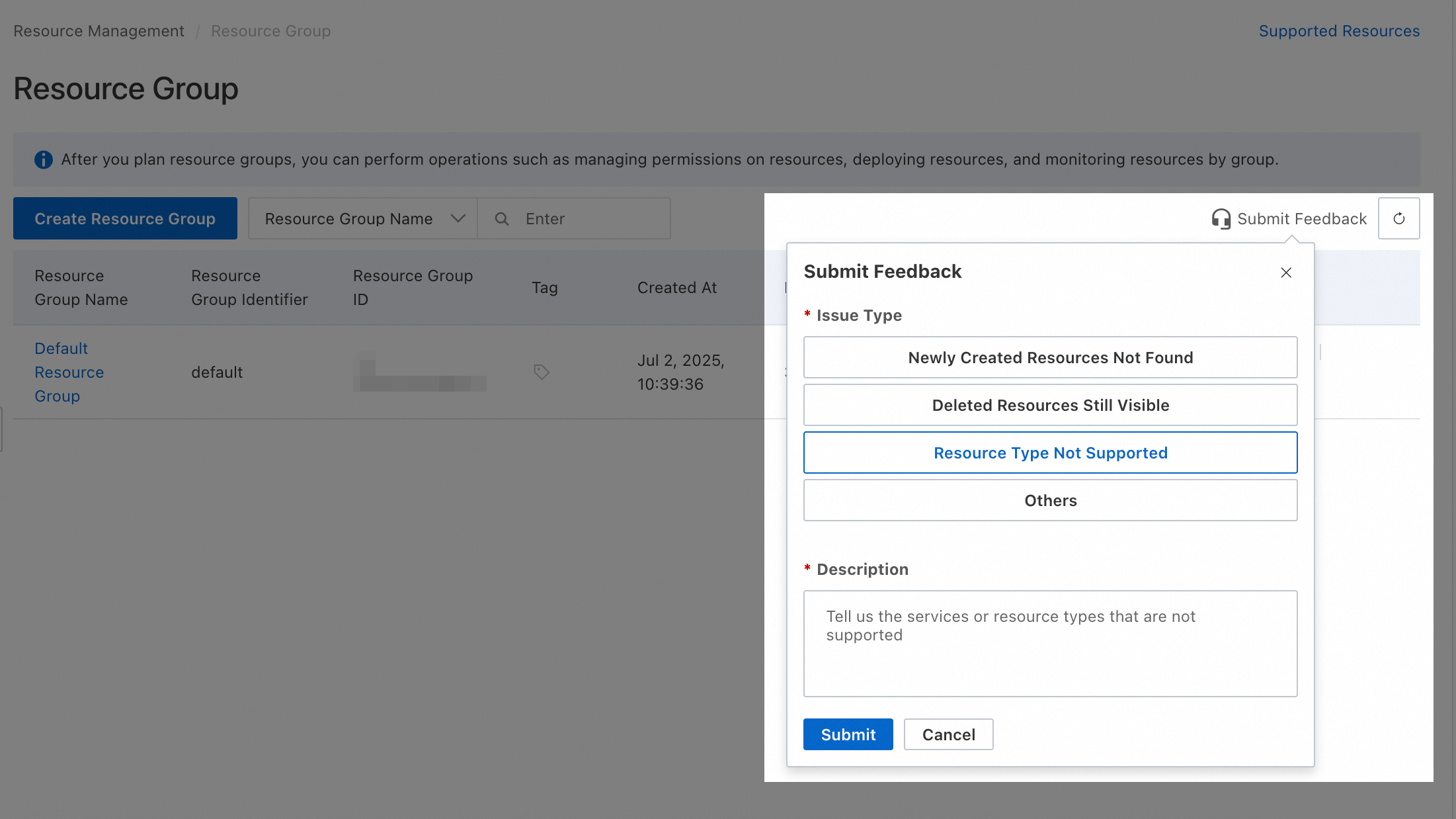
To request support for an unsupported resource type, submit feedback in the resource group console.
Actions not supporting resource group authorization
The following Alibaba Cloud Elasticsearch actions cannot be authorized at the resource group level:
|
Actions |
Description |
|
elasticsearch:ActivePhone |
- |
|
elasticsearch:AddWhiteListTemplate |
- |
|
elasticsearch:AttachMigrationJob |
- |
|
elasticsearch:CreateCollector |
Creates a collector to collect data from a specified service. |
|
elasticsearch:CreateComponentIndex |
Creates an Elasticsearch component template. |
|
elasticsearch:CreateEmonAlarmGroup |
- |
|
elasticsearch:CreateEmonAlarmRule |
- |
|
elasticsearch:CreateEmonContact |
- |
|
elasticsearch:CreateEmonContactGroup |
- |
|
elasticsearch:CreateEmonContactGroupContact |
- |
|
elasticsearch:CreateEmonProject |
- |
|
elasticsearch:CreateMigrationJob |
- |
|
elasticsearch:DeleteCollector |
Deletes a specified collector. |
|
elasticsearch:DeleteEmonAlarmGroup |
- |
|
elasticsearch:DeleteEmonAlarmRule |
- |
|
elasticsearch:DeleteEmonProject |
- |
|
elasticsearch:DeleteMigrationJobResource |
- |
|
elasticsearch:DeleteWhiteListTemplate |
- |
|
elasticsearch:DescribeAckOperator |
Describes the Elasticsearch operator installed on a specified Container Service for Kubernetes (ACK) cluster. |
|
elasticsearch:DescribeCollector |
Retrieves the details of a specified collector instance. |
|
elasticsearch:DescribeMigrationMergeConfig |
- |
|
elasticsearch:DescribeVpcs |
- |
|
elasticsearch:DescribeVswitches |
- |
|
elasticsearch:DisableEmonAlarmRule |
- |
|
elasticsearch:DisableEmonContact |
- |
|
elasticsearch:DisableEmonContactGroup |
- |
|
elasticsearch:EnableEmonAlarmRule |
- |
|
elasticsearch:EnableEmonContact |
- |
|
elasticsearch:EnableEmonContactGroup |
- |
|
elasticsearch:FeedbackReport |
- |
|
elasticsearch:GetClusterDataInformation |
Retrieves data related to index migration. |
|
elasticsearch:GetEmonAlarmEventList |
- |
|
elasticsearch:GetEmonAlarmEventStatistics |
- |
|
elasticsearch:GetEmonAlarmGroup |
- |
|
elasticsearch:GetEmonAlarmGroupList |
- |
|
elasticsearch:GetEmonAlarmRecordList |
- |
|
elasticsearch:GetEmonAlarmRecordStatistics |
- |
|
elasticsearch:GetEmonAlarmRecordStatisticsDistribute |
- |
|
elasticsearch:GetEmonAlarmRule |
- |
|
elasticsearch:GetEmonAlarmRuleList |
- |
|
elasticsearch:GetEmonConsoleConfig |
- |
|
elasticsearch:GetEmonContact |
- |
|
elasticsearch:GetEmonContactGroup |
- |
|
elasticsearch:GetEmonContactGroupList |
- |
|
elasticsearch:GetEmonContactList |
- |
|
elasticsearch:GetEmonGrafanaAlerts |
Retrieves a list of Grafana alerts. |
|
elasticsearch:GetEmonGrafanaDashboards |
Retrieves a list of Grafana dashboards. |
|
elasticsearch:GetEmonProject |
- |
|
elasticsearch:GetEmonProjectList |
- |
|
elasticsearch:GetEmonUserConfig |
- |
|
elasticsearch:GetMigrationJob |
- |
|
elasticsearch:GetRegionConfiguration |
- |
|
elasticsearch:GetSingleEmonUserConfig |
- |
|
elasticsearch:GetWhiteListTemplates |
- |
|
elasticsearch:InitCustomModel |
- |
|
elasticsearch:InitializeOperationRole |
Creates a service-linked role. |
|
elasticsearch:InstallAckOperator |
Installs an operator on a specified Container Service for Kubernetes (ACK) cluster. |
|
elasticsearch:ListAckClusters |
Retrieves a list of Container Service for Kubernetes (ACK) clusters. |
|
elasticsearch:ListAckNamespaces |
Retrieves all namespaces in a specified Container Service for Kubernetes (ACK) cluster. |
|
elasticsearch:ListApm |
- |
|
elasticsearch:ListCollectors |
Retrieves a list of collectors for the current account. |
|
elasticsearch:ListDefaultCollectorConfigurations |
Retrieves the default configurations for a collector. |
|
elasticsearch:ListDistinctEventInstanceIds |
- |
|
elasticsearch:ListEcsInstances |
- |
|
elasticsearch:ListEventRecords |
- |
|
elasticsearch:ListInstanceHistoryEvents |
Retrieves a list of hardware O&M events triggered by an Elasticsearch cluster. |
|
elasticsearch:ListMigrationJobs |
- |
|
elasticsearch:ListNodes |
Retrieves a list of nodes in a specified cluster. |
|
elasticsearch:ListStatsEventRecords |
- |
|
elasticsearch:ListTags |
Retrieves all tags within the current account and region. |
|
elasticsearch:ModifyDeployMachine |
Changes the ECS instance where a collector is deployed. |
|
elasticsearch:PostEmonAck |
- |
|
elasticsearch:PostEmonCheckin |
- |
|
elasticsearch:PostEmonTryAlarmRule |
Sends a test alert message. |
|
elasticsearch:QueryEmonMetrics |
Queries Grafana monitoring metrics for an Elasticsearch instance. |
|
elasticsearch:ReinstallCollector |
Retries a failed collector installation. |
|
elasticsearch:RestartCollector |
Restarts a collector to resume data collection. |
|
elasticsearch:StartCollector |
Starts a collector to begin data collection. |
|
elasticsearch:StopCollector |
Stops a running collector. |
|
elasticsearch:SuggestEmonMetric |
- |
|
elasticsearch:SuggestEmonMetricTagKey |
- |
|
elasticsearch:SuggestEmonMetricTagValue |
- |
|
elasticsearch:TagResources |
- |
|
elasticsearch:UntagResources |
- |
|
elasticsearch:UpdateCollector |
Updates the configuration of a collector. |
|
elasticsearch:UpdateCollectorName |
Updates the name of a collector. |
|
elasticsearch:UpdateComponentIndex |
Updates an Elasticsearch component template. |
|
elasticsearch:UpdateEmonAlarmGroup |
- |
|
elasticsearch:UpdateEmonAlarmRule |
- |
|
elasticsearch:UpdateEmonContact |
- |
|
elasticsearch:UpdateEmonContactGroup |
- |
|
elasticsearch:UpdateEmonProject |
- |
|
elasticsearch:UpdateMigrationJob |
- |
|
elasticsearch:UpdateWhiteListTemplate |
- |
|
elasticsearch:ValidateSlrPermission |
Validates the service-linked role permissions for the current account. |
|
elasticsearch:createInstance |
- |
For operations that do not support resource group authorization, selecting resource group level as the resource scope has no effect. If a RAM user still requires these permissions, create a custom policy and select account level as the resource scope.
 The following are two examples of custom permission policies that you can modify as needed.
-
Allows all read-only operations that do not support resource group-level authorization. The
Actionelement specifies these operations.{ "Version": "1", "Statement": [ { "Effect": "Allow", "Action": [ "elasticsearch:DescribeAckOperator", "elasticsearch:DescribeCollector", "elasticsearch:DescribeMigrationMergeConfig", "elasticsearch:DescribeVpcs", "elasticsearch:DescribeVswitches", "elasticsearch:GetClusterDataInformation", "elasticsearch:GetEmonAlarmEventList", "elasticsearch:GetEmonAlarmEventStatistics", "elasticsearch:GetEmonAlarmGroup", "elasticsearch:GetEmonAlarmGroupList", "elasticsearch:GetEmonAlarmRecordList", "elasticsearch:GetEmonAlarmRecordStatistics", "elasticsearch:GetEmonAlarmRecordStatisticsDistribute", "elasticsearch:GetEmonAlarmRule", "elasticsearch:GetEmonAlarmRuleList", "elasticsearch:GetEmonConsoleConfig", "elasticsearch:GetEmonContact", "elasticsearch:GetEmonContactGroup", "elasticsearch:GetEmonContactGroupList", "elasticsearch:GetEmonContactList", "elasticsearch:GetEmonGrafanaAlerts", "elasticsearch:GetEmonGrafanaDashboards", "elasticsearch:GetEmonProject", "elasticsearch:GetEmonProjectList", "elasticsearch:GetEmonUserConfig", "elasticsearch:GetMigrationJob", "elasticsearch:GetRegionConfiguration", "elasticsearch:GetSinleEmonUserConfig", "elasticsearch:GetWhiteListTemplates", "elasticsearch:ListAckClusters", "elasticsearch:ListAckNamespaces", "elasticsearch:ListApm", "elasticsearch:ListCollectors", "elasticsearch:ListDefaultCollectorConfigurations", "elasticsearch:ListDistinctEventInstanceIds", "elasticsearch:ListEcsInstances", "elasticsearch:ListEventRecords", "elasticsearch:ListInstanceHistoryEvents", "elasticsearch:ListMigrationJobs", "elasticsearch:ListNodes", "elasticsearch:ListStatsEventRecords", "elasticsearch:ListTags", "elasticsearch:QueryEmonMetrics", "elasticsearch:SuggestEmonMetric", "elasticsearch:SuggestEmonMetricTagKey", "elasticsearch:SuggestEmonMetricTagValue" ], "Resource": "*" } ] } -
Allows all operations that do not support resource group-level authorization. The
Actionelement specifies these operations.{ "Version": "1", "Statement": [ { "Effect": "Allow", "Action": [ "elasticsearch:ActivePhone", "elasticsearch:AddWhiteListTemplate", "elasticsearch:AttachMigrationJob", "elasticsearch:CreateCollector", "elasticsearch:CreateComponentIndex", "elasticsearch:CreateEmonAlarmGroup", "elasticsearch:CreateEmonAlarmRule", "elasticsearch:CreateEmonContact", "elasticsearch:CreateEmonContactGroup", "elasticsearch:CreateEmonContactGroupContact", "elasticsearch:CreateEmonProject", "elasticsearch:CreateMigrationJob", "elasticsearch:DeleteCollector", "elasticsearch:DeleteEmonAlarmGroup", "elasticsearch:DeleteEmonAlarmRule", "elasticsearch:DeleteEmonProject", "elasticsearch:DeleteMigrationJobResource", "elasticsearch:DeleteWhiteListTemplate", "elasticsearch:DescribeAckOperator", "elasticsearch:DescribeCollector", "elasticsearch:DescribeMigrationMergeConfig", "elasticsearch:DescribeVpcs", "elasticsearch:DescribeVswitches", "elasticsearch:DisableEmonAlarmRule", "elasticsearch:DisableEmonContact", "elasticsearch:DisableEmonContactGroup", "elasticsearch:EnableEmonAlarmRule", "elasticsearch:EnableEmonContact", "elasticsearch:EnbaleEmonContactGroup", "elasticsearch:FeedbackReport", "elasticsearch:GetClusterDataInformation", "elasticsearch:GetEmonAlarmEventList", "elasticsearch:GetEmonAlarmEventStatistics", "elasticsearch:GetEmonAlarmGroup", "elasticsearch:GetEmonAlarmGroupList", "elasticsearch:GetEmonAlarmRecordList", "elasticsearch:GetEmonAlarmRecordStatistics", "elasticsearch:GetEmonAlarmRecordStatisticsDistribute", "elasticsearch:GetEmonAlarmRule", "elasticsearch:GetEmonAlarmRuleList", "elasticsearch:GetEmonConsoleConfig", "elasticsearch:GetEmonContact", "elasticsearch:GetEmonContactGroup", "elasticsearch:GetEmonContactGroupList", "elasticsearch:GetEmonContactList", "elasticsearch:GetEmonGrafanaAlerts", "elasticsearch:GetEmonGrafanaDashboards", "elasticsearch:GetEmonProject", "elasticsearch:GetEmonProjectList", "elasticsearch:GetEmonUserConfig", "elasticsearch:GetMigrationJob", "elasticsearch:GetRegionConfiguration", "elasticsearch:GetSinleEmonUserConfig", "elasticsearch:GetWhiteListTemplates", "elasticsearch:InitCustomModel", "elasticsearch:InitializeOperationRole", "elasticsearch:InstallAckOperator", "elasticsearch:ListAckClusters", "elasticsearch:ListAckNamespaces", "elasticsearch:ListApm", "elasticsearch:ListCollectors", "elasticsearch:ListDefaultCollectorConfigurations", "elasticsearch:ListDistinctEventInstanceIds", "elasticsearch:ListEcsInstances", "elasticsearch:ListEventRecords", "elasticsearch:ListInstanceHistoryEvents", "elasticsearch:ListMigrationJobs", "elasticsearch:ListNodes", "elasticsearch:ListStatsEventRecords", "elasticsearch:ListTags", "elasticsearch:ModifyDeployMachine", "elasticsearch:PostEmonAck", "elasticsearch:PostEmonCheckin", "elasticsearch:PostEmonTryAlarmRule", "elasticsearch:QueryEmonMetrics", "elasticsearch:ReinstallCollector", "elasticsearch:RestartCollector", "elasticsearch:StartCollector", "elasticsearch:StopCollector", "elasticsearch:SuggestEmonMetric", "elasticsearch:SuggestEmonMetricTagKey", "elasticsearch:SuggestEmonMetricTagValue", "elasticsearch:TagResources", "elasticsearch:UntagResources", "elasticsearch:UpdateCollector", "elasticsearch:UpdateCollectorName", "elasticsearch:UpdateComponentIndex", "elasticsearch:UpdateEmonAlarmGroup", "elasticsearch:UpdateEmonAlarmRule", "elasticsearch:UpdateEmonContact", "elasticsearch:UpdateEmonContactGroup", "elasticsearch:UpdateEmonProject", "elasticsearch:UpdateMigrationJob", "elasticsearch:UpdateWhiteListTemplate", "elasticsearch:ValidateSlrPermission", "elasticsearch:createInstance" ], "Resource": "*" } ] }
A RAM user or RAM role with account-level permissions can manage all resources in your account. Always verify that the granted permissions match your intent, and follow the principle of least privilege when assigning them.
FAQ
View a resource's resource group
-
Method 1: Click the resource name to go to its details page, which shows the resource group.
-
Method 2: Log on to the Resource Management console and navigate to . In the pane on the left, select the account that owns the resource (the current account is selected by default). Use a filter to find the resource and view its resource group.
View product resources in a resource group
-
Method 1: Log on to the Resource Management console and navigate to . In the pane on the left, under the account that owns the resource (the current account is selected by default), click the target resource group. Then, in the Select Resource Type drop-down list on the right, select the product to view all its resources.
-
Method 2: Log on to the Resource Management console and navigate to . Find the target resource group and click Resource Management in the Actions column. On the Resource Management page, select the product from the Product drop-down list to view all its resources.
Change the resource group of multiple resources
Log on to the Resource Management console and navigate to . Find the target resource group and click Resource Management in the Actions column. Use a filter to find the resources, select their check boxes in the first column, click Transfer Resource Group at the bottom of the page, and follow the on-screen instructions.