In EMR Serverless Spark Notebooks, run !hadoop fs commands directly against Object Storage Service (OSS) or OSS-HDFS paths — no separate CLI setup required. This topic covers access path formats and the four most common file operations: ls, mv, cp, and stat.
Prerequisites
Before you begin, ensure that you have:
-
A notebook session created with engine version esr-4.1.1 or later. See Manage notebook sessions.
-
A Notebook developed and ready to run commands. See Develop a notebook.
-
An OSS bucket created. See Activate OSS and Create a bucket.
-
OSS-HDFS enabled on the bucket (required only for OSS-HDFS access). See Enable OSS-HDFS.
-
Cross-account access permissions configured for OSS or OSS-HDFS resources. See How do I implement cross-account access to OSS resources?
The examples in this topic use read and write permissions configured in the OSS console. Configure permissions based on your requirements.
Limitations
The !hadoop fs command is supported in the following engine versions:
| Engine series | Minimum version |
|---|---|
| esr-4.x | esr-4.1.1 |
| esr-3.x | esr-3.1.1 |
| esr-2.x | esr-2.5.1 |
Access path formats
Use the following URI formats when specifying OSS or OSS-HDFS paths in commands:
| Storage | Format |
|---|---|
| OSS | oss://<bucketName>/<object-path> |
| OSS-HDFS | oss://<bucketName>.<region>.oss-dls.aliyuncs.com/<object-path> |
Replace the placeholders with actual values:
| Placeholder | Description | Example |
|---|---|---|
<bucketName> |
Name of the OSS bucket | my-bucket |
<region> |
Region ID where the bucket resides | cn-hangzhou |
<object-path> |
Path to the object within the bucket | spark/file.txt or logs/ |
Supported commands
All FS commands supported by Jindo CLI work in a Notebook — replace jindo with !hadoop. For the full command list, examples, and use cases, see the Jindo CLI user guide.
The following table lists the four operations covered in this topic, demonstrated with engine version esr-4.1.1. Run !hadoop fs -help to see all available commands.
| Command | Description |
|---|---|
-ls |
List files and directories in a path |
-mv |
Move a file or directory to another path |
-cp |
Copy a file or directory to another path |
-stat |
Print metadata for a file or directory |
List files and directories
!hadoop fs -ls oss://<bucketName>/<object-path>
Lists the files and directories at the specified OSS or OSS-HDFS path.
Example 1: List the contents of the spark/ path.
!hadoop fs -ls oss://my-bucket/spark/
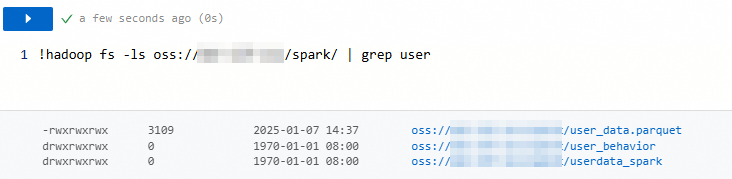
Example 2: Combine -ls with grep to filter results by name.
!hadoop fs -ls oss://my-bucket/spark/ | grep userThe command returns only the files and directories whose names contain user.
Move a file or directory
!hadoop fs -mv <source> <destination>
Moves a file or directory from the source path to the destination path. If a file with the same name already exists at the destination, it is overwritten.
Example: Move file.txt from the sr/ path to the user/ path.
!hadoop fs -mv oss://my-bucket/sr/file.txt oss://my-bucket/user/file.txtCopy a file or directory
!hadoop fs -cp <source> <destination>
Copies a file or directory from the source path to the destination path. If a file with the same name already exists at the destination, it is overwritten.
Example: Copy file.txt from spark/ to spark2/.
!hadoop fs -cp oss://my-bucket/spark/file.txt oss://my-bucket/spark2/file.txtView file or directory metadata
!hadoop fs -stat oss://<bucketName>/<object-path>/to/file
Prints metadata for the file or directory at the specified path.
Example: View the metadata of file.txt.
!hadoop fs -stat oss://my-bucket/spark/file.txtWhat's next
-
To explore the full set of supported FS commands and their options, see the Jindo CLI user guide. Replace
jindowith!hadoopwhen running commands in a Notebook. -
To develop and run commands in a Notebook, see Develop a notebook.