You can modify, delete, or add response headers from an origin server to ESA, such as Cache-Control and Expires. By controlling these headers, you can optimize cache behavior, enhance security, and customize the client experience.
How origin-to-ESA response headers work
This feature modifies specified response headers from the origin based on predefined rules. The modified headers take effect before the ESA server processes the object. If the response content is cacheable, the modified headers are stored in the cache alongside the response.
This behavior differs from modifying ESA-to-client response headers. When you modify ESA-to-client headers, changes are applied after ESA processes the complete response from the origin server or cache, and the response is immediately sent to the client.

Modify origin-to-ESA response headers
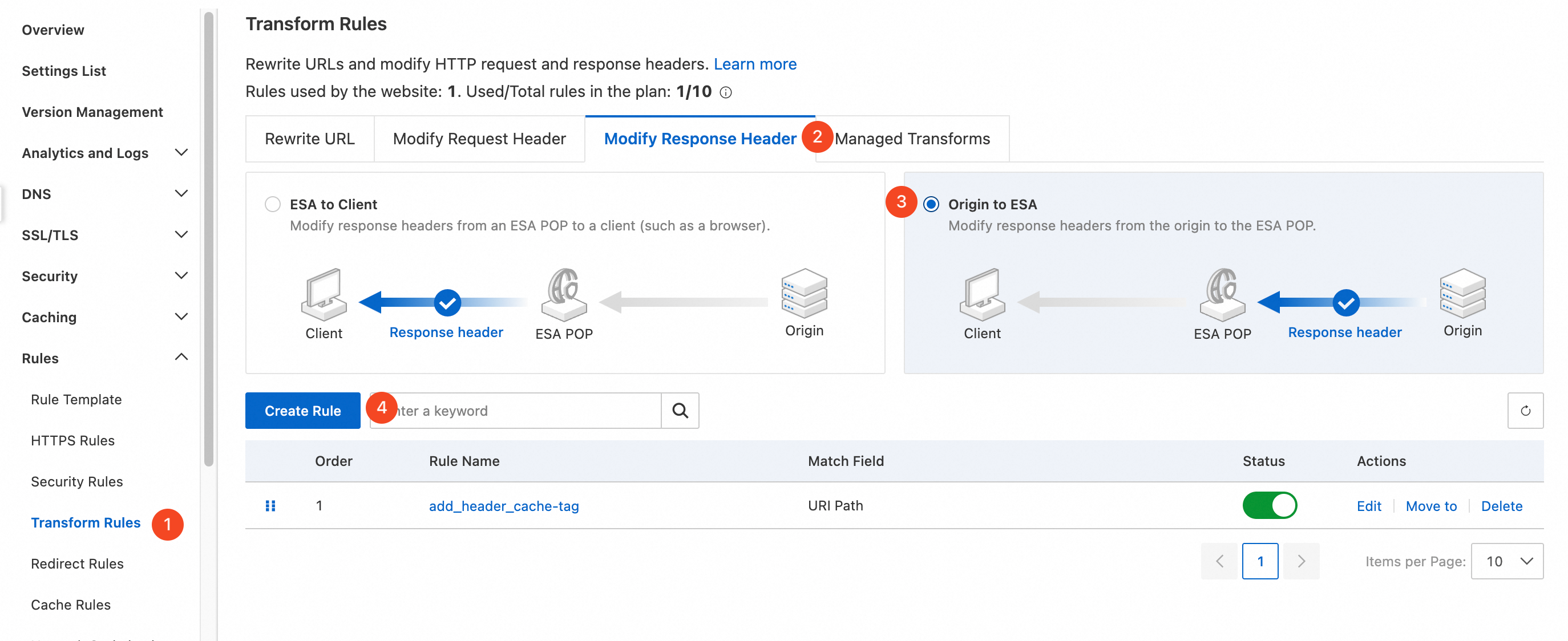
In the ESA console, select Websites, and in the Website column, click the target site.
In the left navigation pane, choose .
Select the Response Header tab, click the Origin to ESA item, click Add, and then configure match conditions in the Match Conditions section. For more information, see Components of a rule expression.
In the Modify Response Headers section, select an action, enter a header name and a header value, and then click Submit.
The following table describes the available actions and modes. Mode determines how the header value is specified: Static uses a fixed value you enter, while Dynamic evaluates a rule expression at runtime.
Action
Mode
Description
Example
Add
Static
Adds the specified response header to the response from the origin server. If a header with the same name already exists, the new header overwrites it.
To add a response header named
x-codewith the valuekey1, set Header Name tox-codeand Header Value tokey1.Add
Dynamic
The response header value can be a rule expression.
To add a response header named
Client-Ip-Geo-Locationwith the dynamic valueip.geoip.countrythat records the client's IP country or region, set Header Name toClient-Ip-Geo-Locationand Header Value toip.geoip.country.Modify
Static
Changes the value of a specified response header in the response from the origin server.
To change the value of the response header
x-codetokey2, set Header Name tox-codeand Header Value tokey2.Modify
Dynamic
The response header value can be a rule expression.
To change the value of the response header
Client-Ip-Geo-Locationto the dynamic valueip.geoip.country, set Header Name toClient-Ip-Geo-Locationand Header Value toip.geoip.country.Delete
—
Deletes all instances of the header that match the specified header name from the response from the origin server. The delete operation is the same for static and dynamic modes.
To delete the response header
x-code, set Header Name tox-code.NoteYou cannot configure a header name that starts with
ali-swift,ali-esa-inner,x-swift, orx-site(case-insensitive).You can specify multiple values in the Header Value field. Separate the values with a comma (
,).The Modify action changes an existing response header and takes effect only if a header with the specified name exists in the original response.
Response header parameters
Parameter | Description | Example |
Custom | You can add custom response headers. A custom header name must meet the following requirements: consists of uppercase letters, lowercase letters, digits, and hyphens ( |
|
| Indicates whether the response can be exposed to the page. Values: |
|
| Specifies the allowed headers for cross-origin requests. |
|
| Specifies the allowed methods for cross-origin requests. Separate multiple methods with a comma ( |
|
| Specifies which origins can access the resource. Part of the CORS (Cross-Origin Resource Sharing) mechanism. Supported values: wildcard ( |
|
| Specifies which headers client-side scripts are allowed to access. |
|
| Specifies how long the results of a preflight request can be cached, in seconds. |
|
| Specifies caching directives for requests and responses. |
|
| Suggests a default filename if the client saves the response content as a file. |
|
| Indicates the media type of the response content. |
|
| An HTTP/1.0 header used in server responses to define caching behavior for clients. |
|
Dynamic expression configuration example
The following example demonstrates how to use the regex_replace function with the http.response.headers field to replace special characters in a response header value from the origin server.
Scenario: Replace the # symbol with - in the value of the HTTP header example in the response from the origin server to the ESA node.
Configuration
In the Modify Response Headers section, configure the following settings:
Parameter | Value |
Type | Dynamic |
Operation | Modify |
Response Header Name |
|
Response Header Value |
|
Result
| Value |
Original response header |
|
Modified header |
|