ESA rule expressions match traffic based on request characteristics to apply differentiated policies. This topic describes the components of single and compound rule expressions, the types of operators, and how to use grouping symbols.
Before you begin
If you configure a feature using both rule and global settings, the rule takes precedence for matching incoming requests.
The length of a single rule configuration (including the rule condition and feature configuration) can be up to 4 KB in size.
All configuration information, including global settings and rules, must not exceed a total size of 512 KB (excluding security rules).
The rule name must be 1 to 128 characters in length.
Single filter condition
In simple business scenarios, a single rule expression is sufficient. A single rule expression consists of a match field, a match operator, and a match value. In the console, the If requests match... configuration area corresponds to the rule expression. By default, is selected to facilitate the configuration of filter conditions.
You can also select to apply the settings to all requests, which functions as global settings.

You can create a rule expression using the console's graphical controls or write it directly in the expression builder.
Multiple filter conditions
Logical combination of conditions
When business scenarios are complex, a single filter condition may be insufficient. In this case, ESA rules support combining multiple sub-filter conditions by using logical operators, which include two logical relationships:
AND relationship: Click the
 button to create an AND relationship. For example, the following figure shows a rule where the filter condition is: hostname equals
 www.example.comand country/region equals Chinese mainland.OR relationship: Click the
 button to create an OR relationship. For example, the following figure shows a rule where the filter condition is: hostname equals
 wwww.example.comor hostname equalsblog.example.com.
The number of nested conditions allowed in a single rule depends on your subscription plan. The Enterprise supports up to 20. For more information, see product billing.
Nesting logic
ESA rules support nesting an AND relationship within an OR relationship, with a maximum nesting depth of two levels. The ESA rule engine uses grouping symbols to create nested logic in expressions. You can also write complex nested expressions directly in the expression builder. For example, you can combine the following filter conditions:
Requests where the hostname equals
www.example.com.Or requests where the hostname equals
blog.example.comand the country/region is not Chinese mainland.Or requests where the hostname equals
login.example.com.
Additional functions
Rule expressions also support using a function to manipulate and validate values.
Expression builder
In addition to the graphical method, ESA also provides an expression builder to configure rule expressions using code.
Expression generation preview
When you configure a rule expression using the graphical controls, ESA automatically generates the equivalent code expression.
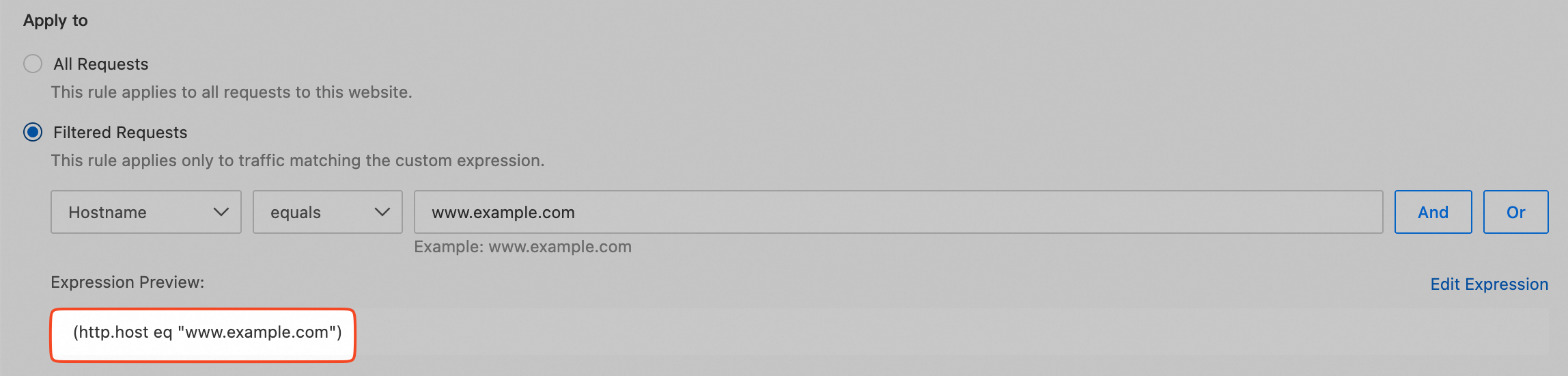
A single expression has the following format:
Single expression = (<match field> <match operator> <match value>), for example, ( http.host eq "www.example.com" )
A nested expression has the following format:
Nested expression = (<single expression 1> <logical operator> <single expression 2>), for example, ( http.host eq "www.example.com" and http.host eq "blog.example.com" )
Edit expression
Click Edit Expression to edit the rule expression directly. For information about the supported types for each component, see match field, match operator, and match value.