When an origin server returns a non-2xx status code, Edge Security Acceleration (ESA) points of presence (POPs) can cache the status code and respond directly to subsequent requests within the cache validity period. This reduces repeated origin requests and lowers the load on the origin server.
Scenarios
Normally, an ESA POP caches a resource only when the origin server returns a 2xx status code. If the origin server returns a non-2xx status code, such as 404 or 502, you can configure a cache time-to-live (TTL) for that status code so the ESA POP responds directly without forwarding every request to the origin.
Typical scenario
File A has been deleted from the origin server, but clients continue to access it. Because the ESA POP has not cached File A, all requests for File A are sent to the origin server. The origin server then responds with a 404 status code. This significantly increases the load on the origin server.
If you configure the ESA POP to cache the 404 status code, the POP caches it after the first origin fetch. Subsequent requests then receive a 404 response directly from the ESA POP until the cache expires, avoiding unnecessary origin fetches.
Procedure
-
In the ESA console, select Site Management. In the Website column, click the target site.
-
In the navigation pane on the left, choose .
-
Click Create Rule and enter a Rule Name.
-
In the If requests match... area, set the request attributes to match. For more information about rule configuration, see Composition of rule expressions.
-
In the Cache Eligibility section, specify whether to bypass cache. For more information, see Cache eligibility.
-
In the Edge Status Code Cache TTL area, click Configure.
-
In the Status Code Cache Rule section, click Add. Configure the following parameters and then click OK:
-
Status Code: The HTTP status code to cache. Supports 4xx (client error) and 5xx (server-side error) status codes, such as 404, 502, and 503.
-
Expired At: The period for which the POP caches the status code. The value can range from 1 second to 31,536,000 seconds (1 year). After the TTL expires, the POP fetches the status code from the origin server again.
-
Configuration examples
Scenario 1: Cache 404 errors for static resources
Business need: Images in the website's image folder may be deleted, but the frontend page still references the old paths.
Configuration:
-
Matching condition: URL path contains
/images -
Status code: 404
-
Cache TTL: 600 seconds (10 minutes)
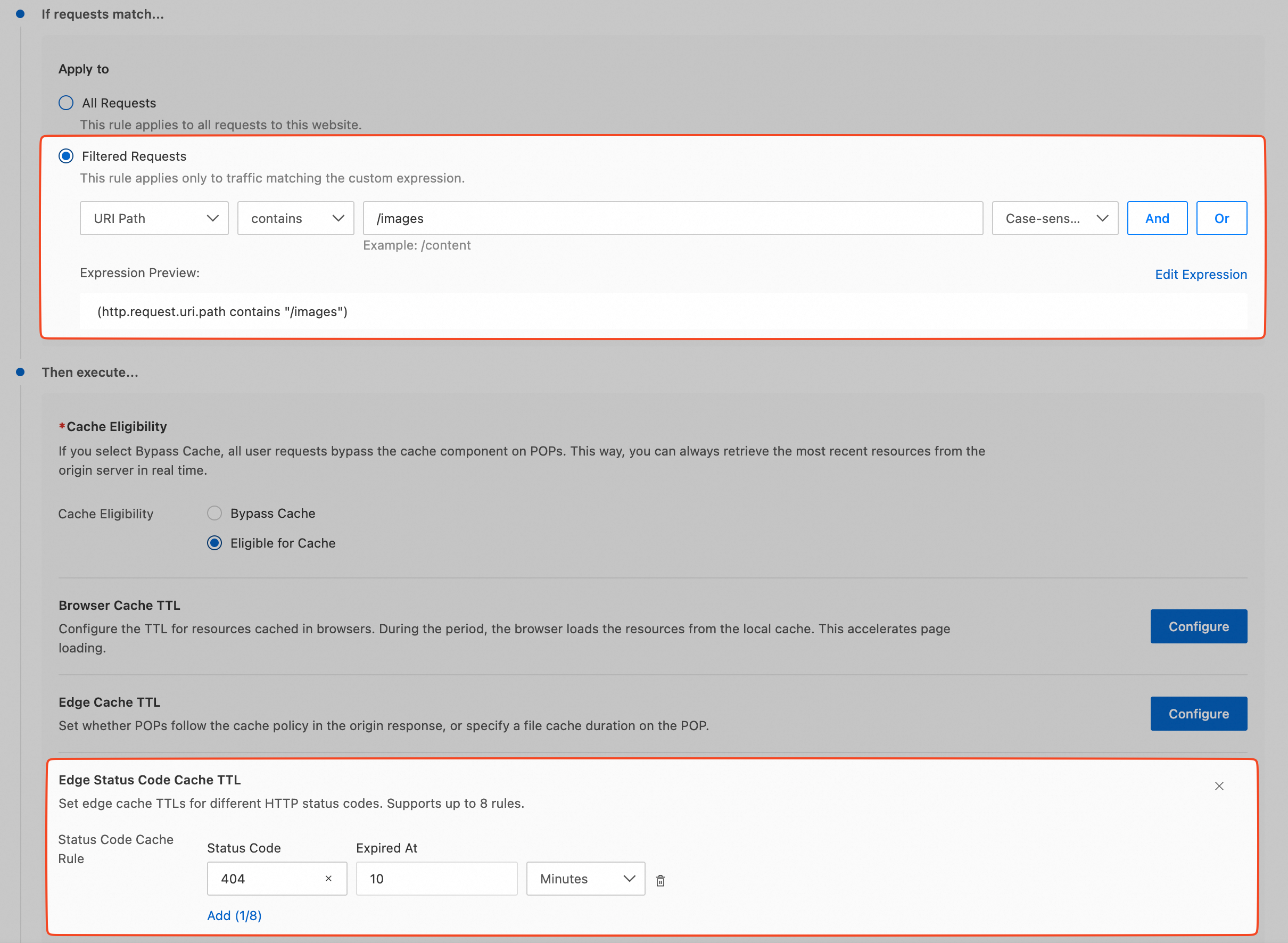
Result: On the first request for a non-existent image, the POP fetches a 404 response from the origin and caches it for 10 minutes. During that period, subsequent requests for the same image receive a 404 response directly from the POP without an origin fetch.
Scenario 2: Short-term Cache Origin Server Failure
Business need: The origin server is occasionally unavailable and returns 5xx errors. You want to reduce the impact on end users during the outage.
Configuration:
-
Matching condition: All Requests
-
Status code: 5xx
-
Cache TTL: 60 seconds (1 minute)
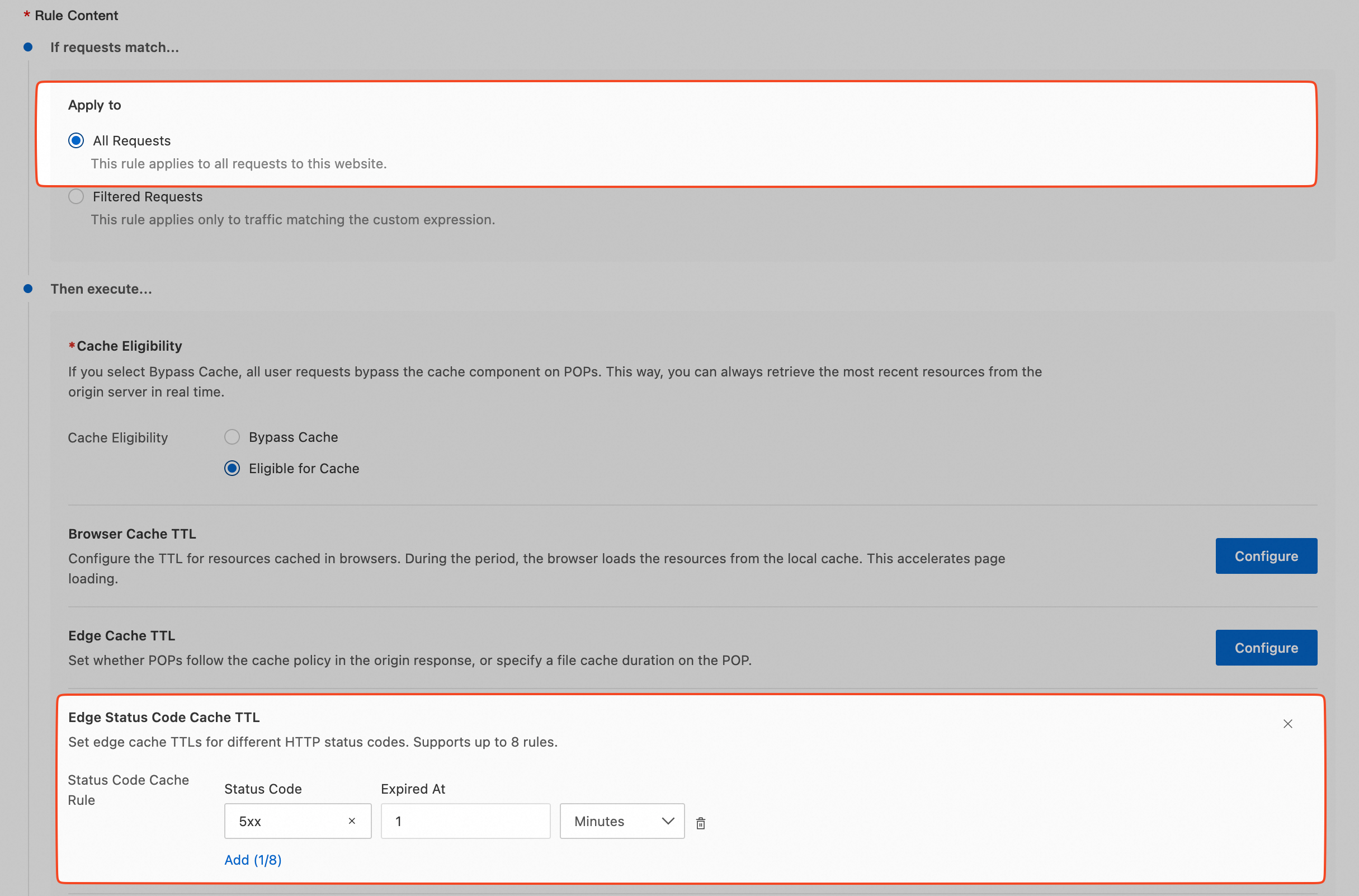
Result: When the origin server fails, the POP caches the 5xx status code for 1 minute, preventing a surge of requests from further increasing the origin load. After 1 minute, the POP fetches from the origin again to check whether the server has recovered.
Verify the configuration
After you complete the configuration, verify that it has taken effect by using one of the following methods.
Method 1: Use the curl command
-
Clear the local cache and send the first request:
curl -I https://example.com/non-existent-pageThe response header should contain
x-site-cache-status: MISS. This indicates the first origin fetch. -
Immediately request the same
URLagain:curl -I https://example.com/non-existent-pageThe response header should contain
x-site-cache-status: HIT, which indicates a cache hit. The cache age value should also increment with each subsequent request.
Method 2: Use browser developer tools
-
Open Chrome DevTools (press F12), switch to the Network tab, and check Preserve log.
-
Access a non-existent resource, such as
https://example.com/test404. -
View the
Response Headersin the request details. The first request showsx-site-cache-status: MISS. Subsequent requests showx-site-cache-status: HIT, and the cache age value increments with each request.
FAQ
Why are requests still being sent to the origin server after configuration?
-
The cache has expired: Check whether the configured
TTLvalue is too short. Examine response headers such asCache-Controlto confirm the cache TTL. -
Different URL parameters: By default, different
URLparameters are treated as different cache keys. Configure cache key rules to ignore irrelevant parameters. -
The rule has not taken effect: Verify the rule’s matching conditions, such as the path pattern, to ensure they cover the target request.
How do I verify the cache status of a specific URL?
Use the curl command to view the detailed response headers:
curl -v -I https://example.com/target-urlKey response headers:
-
x-site-cache-status: HIT— Cache hit -
x-site-cache-status: MISS— Cache miss, origin fetch performed -
Cache-Control:max-age=120— The cache has been active for 120 seconds
How do I manually purge the cache for a specific status code?
Related documentation
Rule-related features vary in effective priority, reentrancy, and effective granularity. For details, see Characteristics of rule-based features.