Cache poisoning defense feature helps prevent cache poisoning attacks.
What is cache poisoning
Cache poisoning is an attack where a malicious actor sends a specific request to a caching system, tricking it into storing incorrect or malicious content. When subsequent users make requests, they retrieve this harmful content from the cache. This can negatively affect the user experience and lead to security vulnerabilities.
Web caching mechanism
The web caching mechanism is an optimization technique designed to improve the access speed of website content and reduce the load on the server. When you use the Edge Security Acceleration (ESA) service, its edge nodes play a key role. Based on predefined cache rules, these nodes determine whether to locally store resource files, such as static or public files like CSS, JS, and images, that are requested by the client. After a file is cached, if a user from the same area requests the same resource, ESA can serve the file directly and quickly without retrieving it from the origin server. This significantly shortens the response time and improves the user experience.

How the attack works
In a web cache poisoning attack, a malicious actor uses an HTTP request to trick an origin web server into responding with a harmful resource. This resource has the same cache key as a normal request. As a result, the poisoned resource is cached and served to other users.
In a cache poisoning attack, a malicious user sends a carefully crafted HTTP request to trick the origin server into generating a poisoned version of a file. The cache key for this poisoned file, for example index.html, is the same as the cache key for a harmless request. This poisoned file may then be cached and served to other users.

How cache poisoning defense works
After you enable cache poisoning defense, when a client requests a resource, ESA compares the expected Content-Type of the file extension in the request URL with the actual Content-Type of the response file from the origin server. If the Content-Types do not match, ESA does not cache the resource.
For example, a client requests the resource http://www.example.com/index.html.
The origin server responds with the index.html file and includes the
content-type:text/htmlheader. ESA detects that this matches the expected content-type:text/html, so ESA caches the resource.The origin server responds with the index.html file and includes the
content-type:text/plainheader. ESA detects that this does not match the expected content-type:text/html, so ESA does not cache the resource.

Enable cache poisoning defense
In the ESA console, choose Websites. In the Website column, click the target site.
In the navigation pane on the left, choose .
Click Create Rule and enter a Rule Name.
In the If requests match... section, specify the conditions for the requests that you want to match. For more information about how to configure rules, see Components of a rule expression.
In the Bypass Cache section, specify whether to bypass the cache. For more information, see Cache eligibility.
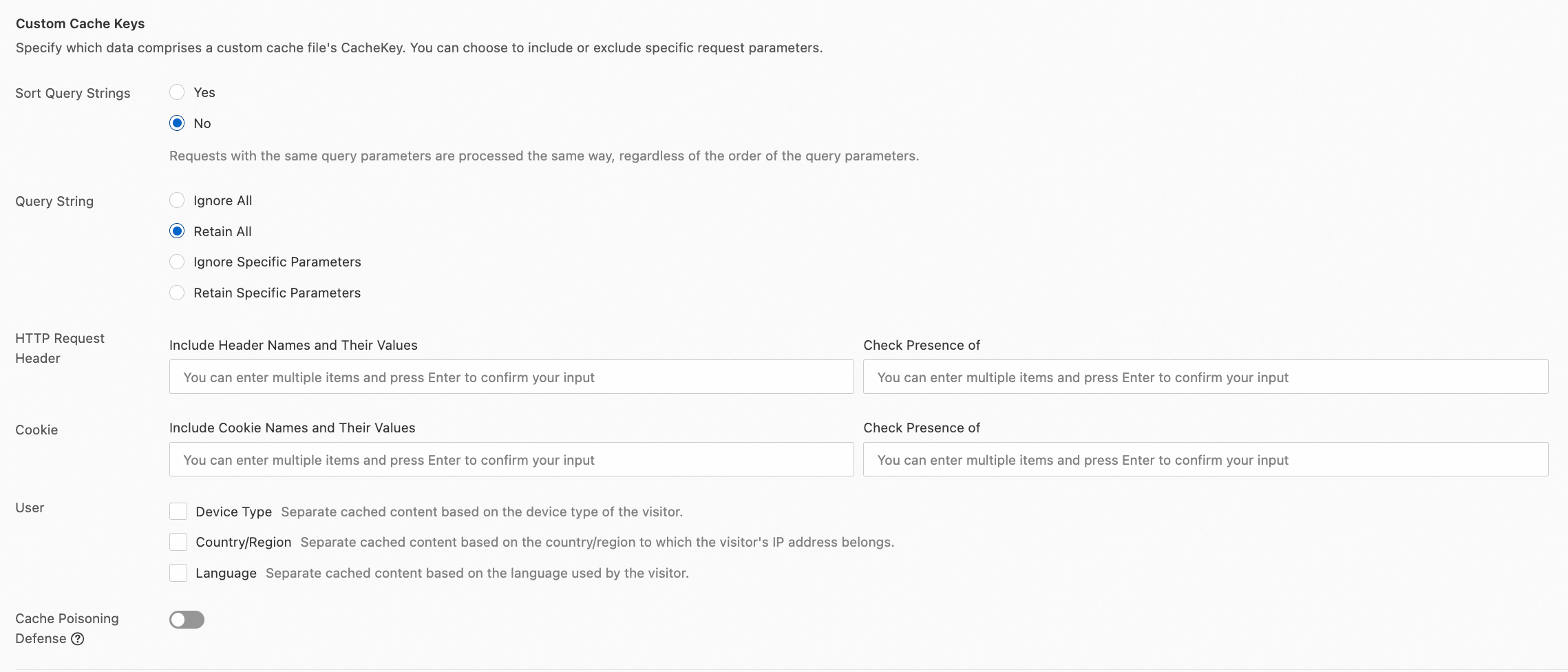
In the Custom Cache Keys section, click Configure and turn on the Cache Poisoning Defense switch.
References
Rule-related features vary in execution priority, rule behavior, and configuration scope. For more information, see How ESA rules take effect.