You can use Resource Group to manage Dynamic Content Delivery Network (DCDN) resources as a collection and apply Resource Access Management (RAM) policies that authorize actions only on resources within a specific group. This lets you enforce the principle of least privilege (PoLP) in your Alibaba Cloud account.
You can scope permissions to a resource group only for supported resource types and actions. For unsupported actions, any resource group scope in a policy is ignored, and permissions must be granted at the account level instead.
How it works
Resource groups organize your resources by project or environment. Once resources are grouped, you can attach a RAM policy to an identity (such as a RAM user, user group, or role) that scopes its permissions exclusively to that group. For more information, see Resource grouping and authorization.
This approach provides two key benefits:
-
Fine-grained access control: Instead of granting account-wide permissions, you can limit an identity's access to only the resources within a specific group. This helps isolate project-specific workloads and reduce the risk of unintended access.
-
Simplified management: When new resources are added to a resource group, RAM identities with permissions scoped to that group automatically gain access. You do not need to update RAM policies each time a new resource is created.
Grant resource group-level permissions to a RAM user
This section demonstrates how to grant a RAM user permission to access only the resources of Dynamic Content Delivery Network (DCDN) within a specific resource group.
1. Prerequisites
-
Create a resource group and ensure that the target resources are in it. If you need help doing this, see Create a resource group, Add resources to a resource group automatically, and Add resources to a resource group manually.
2. Grant permissions
You can grant resource group-level permissions from either the Resource Management console or the RAM console.
Resource Management console
-
Log on to the Resource Management console.
-
On the Resource Group page, find the target resource group and click Manage Permission in the Actions column.
-
On the Permissions tab, click Grant Permission.
-
In the Grant Permission panel, configure the principal and access policy.
-
Principal: Select a RAM user.
-
Policy: Select a System Policy or a Custom Policy. For more information, see Create a custom permission policy.
-
-
Click Grant permissions.
For more information, see Grant permissions on resource groups to a RAM identity.
RAM console
-
Log on to the RAM console using an Alibaba Cloud account or a RAM administrator account.
-
In the navigation pane on the left, choose . On the Users page, find the target RAM user and click Add Permissions in the Actions column.
-
In the Grant Permission panel, add permissions for the RAM user.
-
Resource Scope: Select Resource Group.
-
Principal: Select an existing RAM user or the RAM user created in the previous step.
-
Policy: Select a System Policy or a Custom Policy. For more information, see Create a custom permission policy.
-
-
Click OK.
For more information, see Grant permissions to a RAM user.
Supported resources
The following resources from Dynamic Content Delivery Network (DCDN) support resource group-level authorization:
|
Alibaba Cloud service |
Service code |
Resource type |
|
Dynamic Content Delivery Network (DCDN) |
dcdn |
domain : domain name |
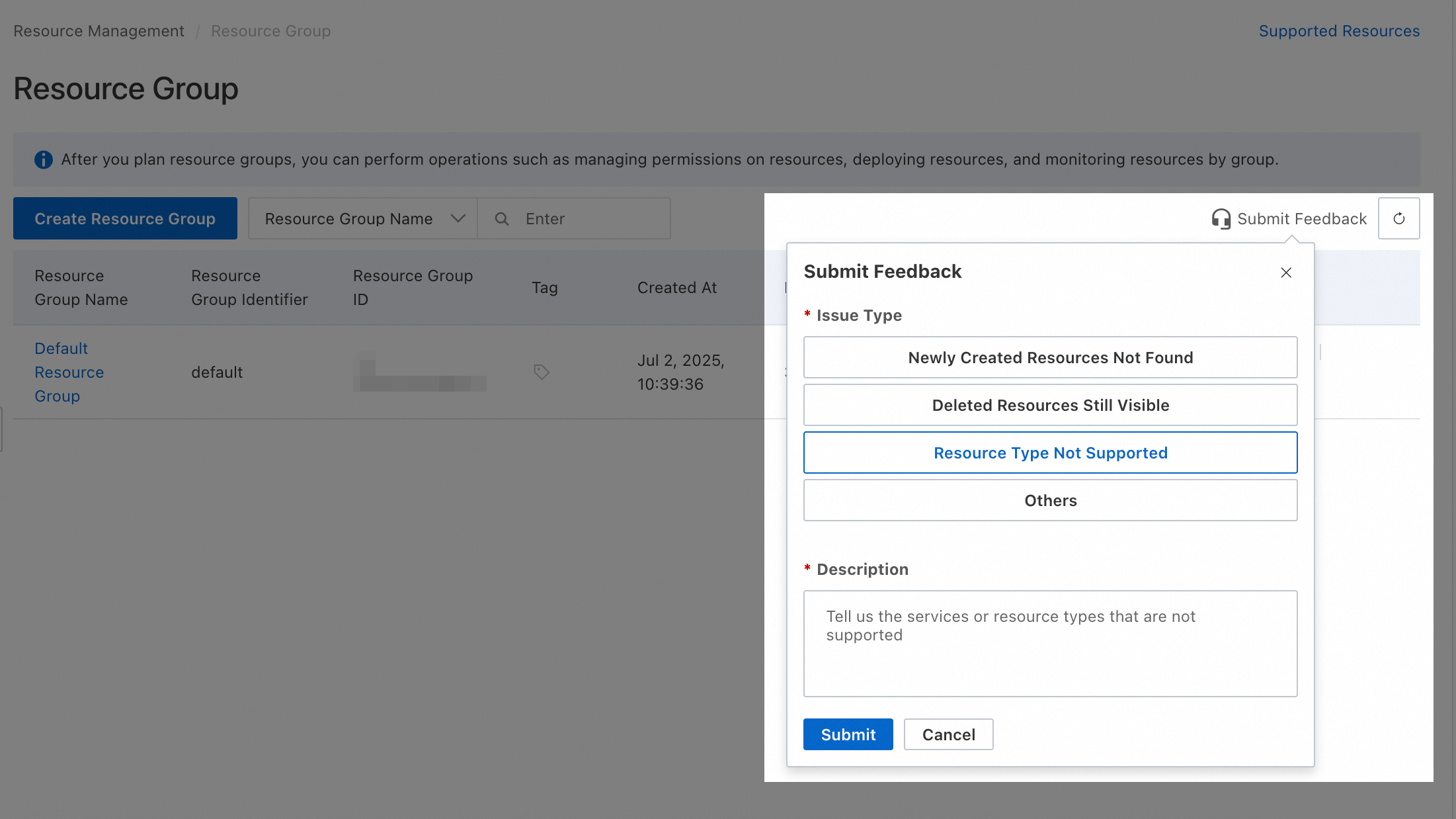
To request support for resource types not listed here, submit feedback via Resource Management console.
Unsupported actions
The following actions of Dynamic Content Delivery Network (DCDN) do not support resource group-level authorization:
|
Action |
Description |
|
dcdn:ActivateDcdnVersionOfConfigGroup |
- |
|
dcdn:AddBackOriginSource |
- |
|
dcdn:AddDcdnConfigGroup |
- |
|
dcdn:BatchCreateDcdnWafRules |
Creates Web Application Firewall (WAF) protection rules. |
|
dcdn:BatchDeleteDcdnKv |
Deletes key-value pairs from a namespace at a time based on key names. |
|
dcdn:BatchDeleteDcdnKvWithHighCapacity |
Deletes multiple key-value pairs from a namespace at a time based on specified keys. The request body can be up to 100 MB. |
|
dcdn:BatchDeleteDcdnWafRules |
Deletes multiple Web Application Firewall (WAF) protection rules at a time. |
|
dcdn:BatchModifyDcdnWafRules |
Modifies multiple Web Application Firewall (WAF) protection rules. Only Bot management rules can be modified. |
|
dcdn:BatchPutDcdnKv |
Configures multiple key-value (KV) pairs for a namespace. |
|
dcdn:BatchPutDcdnKvWithHighCapacity |
Configures key-value pairs for a namespace at a time based on specified keys. The request body can be up to 100 MB. |
|
dcdn:BatchSetRDBlockIP |
- |
|
dcdn:BlockDcdnObjectCaches |
- |
|
dcdn:CheckDcdnIpaVip |
- |
|
dcdn:CheckDcdnProjectExist |
Checks whether a real-time log delivery project exists. |
|
dcdn:CloneDcdnVersionOfConfigGroup |
- |
|
dcdn:CommitStagingRoutineCode |
Generates an official code version from unstable JavaScript code that is in the staging environment. The version can be used in the canary release or production environment. |
|
dcdn:CreateApp |
- |
|
dcdn:CreateAppConfig |
- |
|
dcdn:CreateAppVersion |
- |
|
dcdn:CreateBackOriginMapping |
- |
|
dcdn:CreateCustomScenePolicy |
- |
|
dcdn:CreateDcdnCertificateSigningRequest |
Creates a certificate signing request (CSR) file. |
|
dcdn:CreateDcdnWafGroup |
Create a custom WAF rule group. |
|
dcdn:CreateDcdnWafList |
- |
|
dcdn:CreateDcdnWafPolicy |
Creates a Web Application Firewall (WAF) protection policy. |
|
dcdn:CreateDcdnpaybag |
- |
|
dcdn:CreateRegistryNamespace |
- |
|
dcdn:CreateRegistryUser |
- |
|
dcdn:CreateRoutine |
Creates a routine. |
|
dcdn:CreateSlrAndSlsProject |
Creates a service-linked role (SLR) and a Log Service project. |
|
dcdn:CreateWasm |
- |
|
dcdn:CustomScenePolicyBindObject |
- |
|
dcdn:DcdnHttpRequestStagingTest |
- |
|
dcdn:DcdnHttpRequestTestTool |
- |
|
dcdn:DeactivateDcdnConfigOfVersion |
- |
|
dcdn:DeleteBackOriginMapping |
- |
|
dcdn:DeleteCustomDomainSampleRate |
- |
|
dcdn:DeleteCustomScenePolicy |
- |
|
dcdn:DeleteDcdnConfigGroup |
- |
|
dcdn:DeleteDcdnConfigOfVersion |
- |
|
dcdn:DeleteDcdnDeliverTask |
Deletes tracking tasks by task ID. |
|
dcdn:DeleteDcdnIpaSpecificConfig |
Deletes specific configurations of an accelerated domain name from IP Application Accelerator (IPA). |
|
dcdn:DeleteDcdnKv |
Deletes the key-value pairs in a namespace that you specify when you call the PutDcdnKvNamespace operation. EdgeKV provides a global key-value database for Dynamic Route for CDN (DCDN) points of presence (POPs). |
|
dcdn:DeleteDcdnKvNamespace |
Deletes a namespace that belongs to your account. |
|
dcdn:DeleteDcdnRealTimeLogProject |
Deletes real-time logs of a log delivery project. |
|
dcdn:DeleteDcdnSubTask |
Deletes all custom operations reports. |
|
dcdn:DeleteDcdnUserConfig |
Deletes feature configurations by user. |
|
dcdn:DeleteDcdnVersionOfConfigGroup |
- |
|
dcdn:DeleteDcdnWafGroup |
Deletes a custom WAF rule group. |
|
dcdn:DeleteDcdnWafList |
- |
|
dcdn:DeleteDcdnWafPolicy |
Deletes a protection policy. |
|
dcdn:DeleteRoutine |
Deletes a routine. |
|
dcdn:DeleteRoutineCodeRevision |
Deletes the code of the specified version from a routine. |
|
dcdn:DeleteRoutineConfEnvs |
Deletes canary release environments from a routine. |
|
dcdn:DeleteWasm |
- |
|
dcdn:DeleteWasmCodeRevision |
- |
|
dcdn:DeployAppVersion |
- |
|
dcdn:DescribeApp |
- |
|
dcdn:DescribeAppConfigs |
- |
|
dcdn:DescribeAppState |
- |
|
dcdn:DescribeAppTenant |
- |
|
dcdn:DescribeAppVersion |
- |
|
dcdn:DescribeAppVersions |
- |
|
dcdn:DescribeApps |
- |
|
dcdn:DescribeBackOriginAreas |
- |
|
dcdn:DescribeCustomDomainSampleRate |
- |
|
dcdn:DescribeCustomScenePolicies |
- |
|
dcdn:DescribeCustomScenePolicyObject |
- |
|
dcdn:DescribeDcdnAclFields |
Queries precise access control rules. |
|
dcdn:DescribeDcdnActivationHistory |
- |
|
dcdn:DescribeDcdnActiveVersionOfConfigGroup |
- |
|
dcdn:DescribeDcdnBgpBpsData |
Queries bandwidth data for Border Gateway Protocol (BGP) accelerated domain names. Data is collected every 5 minutes. |
|
dcdn:DescribeDcdnBgpTrafficData |
Queries traffic data for BGP accelerated domain names. Data is collected every 5 minutes. |
|
dcdn:DescribeDcdnBlockedRegions |
Queries countries and regions that can be added to the blacklist. |
|
dcdn:DescribeDcdnCcSignatureArgList |
- |
|
dcdn:DescribeDcdnCcSignatureObjectList |
- |
|
dcdn:DescribeDcdnCertificateDetail |
Queries details about a certificate. |
|
dcdn:DescribeDcdnCertificateDetailById |
- |
|
dcdn:DescribeDcdnConditionIPBInfo |
- |
|
dcdn:DescribeDcdnConfigGroupDetail |
- |
|
dcdn:DescribeDcdnConfigGroupList |
- |
|
dcdn:DescribeDcdnConfigOfVersion |
- |
|
dcdn:DescribeDcdnConfigOfVersionForDiff |
- |
|
dcdn:DescribeDcdnContainerStats |
- |
|
dcdn:DescribeDcdnDdosService |
Queries the status of DCDN DDoS mitigation. |
|
dcdn:DescribeDcdnDdosSpecInfo |
Queries the specifications of DCDN DDoS versions. |
|
dcdn:DescribeDcdnDeletedDomains |
Queries the domain names that are deleted from your Alibaba Cloud account. |
|
dcdn:DescribeDcdnDeliverList |
Queries all tracking tasks of operations reports. |
|
dcdn:DescribeDcdnDomainByCertificate |
Queries accelerated domain names by SSL certificate. |
|
dcdn:DescribeDcdnDomainCcActivityLog |
Queries logs of rate limiting. |
|
dcdn:DescribeDcdnDomainMax95BpsData |
- |
|
dcdn:DescribeDcdnDomainMd5Info |
- |
|
dcdn:DescribeDcdnDomainNamesOfVersion |
- |
|
dcdn:DescribeDcdnDomainVerifyData |
- |
|
dcdn:DescribeDcdnDomainsBySource |
Queries DCDN-accelerated domain names by origin server. |
|
dcdn:DescribeDcdnErUsageData |
Queries the number of times that a routine is executed within a specified period of time. |
|
dcdn:DescribeDcdnFullDomainsBlockIPConfig |
Queries the configurations of blocked IP addresses. |
|
dcdn:DescribeDcdnFullDomainsBlockIPHistory |
Queries the blocking history. |
|
dcdn:DescribeDcdnHttpsDomainList |
Queries information about all certificates that belong to your account. |
|
dcdn:DescribeDcdnIpInfo |
Queries whether an IP address belongs to a POP. |
|
dcdn:DescribeDcdnIpaDomainCidr |
Queries the back-to-origin CIDR blocks of IPA-accelerated domain names. If you want to call this API operation, you must submit a ticket to apply for the required permissions. |
|
dcdn:DescribeDcdnIpaService |
Queries the status of IPA. The information includes the time when the service was activated, the current service status, the current billing method, and the billing method of the next cycle. |
|
dcdn:DescribeDcdnKvAccount |
Queries the information about the key-value pairs that belong to your account. |
|
dcdn:DescribeDcdnKvAccountStatus |
Queries the KV status of an account. |
|
dcdn:DescribeDcdnKvNamespace |
Queries the information about a namespace. |
|
dcdn:DescribeDcdnL2Ips |
Queries CIDR blocks of Dynamic Content Delivery Network (DCDN) points of presence (POPs). |
|
dcdn:DescribeDcdnL2Vips |
Queries the origin CIDR blocks by domain name. The CIDR blocks include IPv4 and IPv6 CIDR blocks. |
|
dcdn:DescribeDcdnRealTimeDeliveryField |
Queries the fields in real-time log entries. |
|
dcdn:DescribeDcdnRefreshQuota |
Queries the maximum number and the remaining number of URLs and directories that can be refreshed or the maximum number and the remaining number of URLs that can be prefetched per day. |
|
dcdn:DescribeDcdnRefreshTaskById |
Queries the status of purge or prefetch tasks by task ID. |
|
dcdn:DescribeDcdnRegionAndIsp |
Queries the list of Internet service providers (ISPs) and regions. |
|
dcdn:DescribeDcdnReportList |
Queries custom reports. |
|
dcdn:DescribeDcdnResourcesProperty |
- |
|
dcdn:DescribeDcdnSLSRealTimeLogType |
Queries supported types of real-time logs. |
|
dcdn:DescribeDcdnSLSRealtimeLogDelivery |
Queries a real-time log delivery project. |
|
dcdn:DescribeDcdnSMCertificateDetail |
Queries the details about a ShangMi (SM) certificate. |
|
dcdn:DescribeDcdnSecFuncInfo |
Creates an edge security drop-down list in the DCDN console. |
|
dcdn:DescribeDcdnSecSpecInfo |
Queries the version of secure Dynamic Route for CDN (DCDN) and the security rules. |
|
dcdn:DescribeDcdnService |
Queries information about the Dynamic Content Delivery Network (DCDN) service. The information includes the time when the service was activated, the current service status, the current billing method, and the billing method of the next cycle. |
|
dcdn:DescribeDcdnStagingIp |
Queries valid virtual IP addresses (VIPs) in the staging environment. |
|
dcdn:DescribeDcdnSubList |
Queries custom operations reports. |
|
dcdn:DescribeDcdnTopDomainsByFlow |
Queries domain names ranked by network traffic. You can query data within the last 90 days. |
|
dcdn:DescribeDcdnUserBillHistory |
Queries the billing records of an Alibaba Cloud account. The maximum time range that you can specify is one month. |
|
dcdn:DescribeDcdnUserBillType |
Queries the metering method that is used in Dynamic Content Delivery Network (DCDN). |
|
dcdn:DescribeDcdnUserCertificateExpireCount |
Queries the number of domain names whose SSL certificates are about to expire or have already expired. |
|
dcdn:DescribeDcdnUserConfigs |
Queries the configurations of security features. |
|
dcdn:DescribeDcdnUserQuota |
Queries the resource quotas and the used resources. |
|
dcdn:DescribeDcdnUserRealTimeDeliveryField |
Queries the fields that are selected. |
|
dcdn:DescribeDcdnUserResourcePackage |
Queries information about the resource plans in your Alibaba Cloud account. |
|
dcdn:DescribeDcdnUserSecDrop |
Queries the number of packets blocked by a specified security feature. |
|
dcdn:DescribeDcdnUserSecDropByMinute |
Queries the number of packets that are blocked by security features at the application layer within a specific time range. |
|
dcdn:DescribeDcdnUserTags |
Queries user tags. |
|
dcdn:DescribeDcdnVerifyContent |
Queries the ownership verification content of a domain name. |
|
dcdn:DescribeDcdnVersionInfo |
- |
|
dcdn:DescribeDcdnVersionOfConfigGroup |
- |
|
dcdn:DescribeDcdnWafBotAppKey |
Queries the SDK authentication key for the Alibaba Cloud account. You can also use the SDK authentication key to send SDK initialization requests. The key must be included in the integration code. |
|
dcdn:DescribeDcdnWafDefaultRules |
Queries the default configurations of a WAF rule. |
|
dcdn:DescribeDcdnWafDomains |
Queries the accelerated domain names that are protected by Web Application Firewall (WAF). Fuzzy search is supported. |
|
dcdn:DescribeDcdnWafFilterInfo |
Queries the information about match conditions in a custom protection rule, such as the match fields, logical characters, and match content. |
|
dcdn:DescribeDcdnWafGeoInfo |
Queries the countries and regions that can be added to the blacklist of Web Application Firewall (WAF). |
|
dcdn:DescribeDcdnWafGroup |
Queries the details of a custom WAF rule group by page. |
|
dcdn:DescribeDcdnWafGroups |
Queries custom Web Application Firewall (WAF) rule groups. |
|
dcdn:DescribeDcdnWafList |
- |
|
dcdn:DescribeDcdnWafLists |
- |
|
dcdn:DescribeDcdnWafPolicies |
Queries the details of the Web Application Firewall (WAF) protection policies that you configured. |
|
dcdn:DescribeDcdnWafPolicy |
Queries the details of a protection policy. |
|
dcdn:DescribeDcdnWafPolicyDomains |
Queries the accelerated domain names that are protected by a specified Web Application Firewall (WAF) protection policy. |
|
dcdn:DescribeDcdnWafPolicyValidDomains |
Queries the domain names that can be bound to a custom protection policy. |
|
dcdn:DescribeDcdnWafQuota |
- |
|
dcdn:DescribeDcdnWafRule |
Queries the details of a specified protection rule. |
|
dcdn:DescribeDcdnWafRules |
Queries the details of the protection rules that you configured. |
|
dcdn:DescribeDcdnWafScenes |
Queries the information about the type of the protection policy that you use. |
|
dcdn:DescribeDcdnWafService |
Queries the information about Dynamic Content Delivery Network (DCDN) Web Application Firewall WAF), including the time when WAF is enabled, edition of WAF, current status of WAF, metering method for requests, and metering method for rules. |
|
dcdn:DescribeDcdnWafSpecInfo |
Queries the version of Web Application Firewall (WAF) used in Dynamic Content Delivery Network (DCDN). |
|
dcdn:DescribeDcdnsecService |
Queries the information about Dynamic Content Delivery Network (DCDN), such as the service activation time, the expiration time, and the current status. |
|
dcdn:DescribeDdosAllEventList |
Queries attack events. |
|
dcdn:DescribeDdosBpsList |
- |
|
dcdn:DescribeDdosBpsMax |
- |
|
dcdn:DescribeDdosEventMax |
- |
|
dcdn:DescribeDdosSpecialPort |
- |
|
dcdn:DescribeDomainAttackEventList |
- |
|
dcdn:DescribeDomainOverview |
- |
|
dcdn:DescribeDomainQpsList |
- |
|
dcdn:DescribeEncryptRoutineUid |
Queries the encrypted RoutineUid of a routine. |
|
dcdn:DescribeEsExceptionData |
- |
|
dcdn:DescribeEsExecuteData |
- |
|
dcdn:DescribeHighlightInfo |
Queries the highlighted data of attack details. You can query the reasons for which requests are blocked based on TraceIDs in logs of requests that are blocked by Basic Web Protection. The highlighted data matches the content blocked by the basic web protection module. |
|
dcdn:DescribeKVTimeoutRequestDistributionData |
- |
|
dcdn:DescribeKvPerfData |
- |
|
dcdn:DescribeKvRealTimeQpsData |
- |
|
dcdn:DescribeKvUsageData |
Queries the usage data of KV storage. |
|
dcdn:DescribeRDDomainConfig |
Queries the feature configurations of an accelerated domain name in the resource directory. |
|
dcdn:DescribeRDDomains |
- |
|
dcdn:DescribeRegistryNamespace |
- |
|
dcdn:DescribeRegistryUser |
- |
|
dcdn:DescribeRoutine |
Queries the metadata of a specified routine. The metadata includes the routine configuration in each environment, configuration version, and code version. |
|
dcdn:DescribeRoutineCanaryEnvs |
Queries the canary release environments that are supported by ER. |
|
dcdn:DescribeRoutineCodeRevision |
Queries the JavaScript code version of a routine. |
|
dcdn:DescribeRoutineRelatedDomains |
Queries the list of domain names that are associated with a routine. |
|
dcdn:DescribeRoutineSpec |
Queries the supported specifications for routines. The private preview supports the following CPU time slice specifications: 5 ms, 50 ms, and 100 ms. |
|
dcdn:DescribeRoutineUserInfo |
Queries the subdomains and routines that belong to your Alibaba Cloud account. |
|
dcdn:DescribeRuleHitsTopResource |
- |
|
dcdn:DescribeRuleIdInfo |
- |
|
dcdn:DescribeUserDcdnDdosStatus |
- |
|
dcdn:DescribeUserDcdnIpaStatus |
Whether IPA is enabled and whether you have overdue payments for your IPA are queried. |
|
dcdn:DescribeUserDcdnStatus |
Queries whether DCDN is activated and whether your account has overdue payments. |
|
dcdn:DescribeUserDcdnWafStatus |
- |
|
dcdn:DescribeUserErStatus |
Queries whether EdgeRoutine (ER) is activated or has an overdue payment. |
|
dcdn:DescribeUserLogserviceStatus |
Queries whether Log Service is activated and whether you have overdue payments for your Log Service. |
|
dcdn:DescribeWasm |
- |
|
dcdn:DescribeWasmUserInfo |
- |
|
dcdn:DisableCustomScenePolicy |
- |
|
dcdn:DisableDcdnRDAccess |
- |
|
dcdn:EditRoutineConf |
Modifies the configurations of a routine. |
|
dcdn:EditWasmConf |
- |
|
dcdn:EnableCustomScenePolicy |
- |
|
dcdn:EnableDcdnRDAccess |
- |
|
dcdn:GetAuthorizationToken |
- |
|
dcdn:GetDcdnKv |
Queries the value of a key in a key-value pair. |
|
dcdn:GetDcdnKvDetail |
Queries the value and time to live (TTL) of a key. |
|
dcdn:GetDcdnKvStatus |
Queries the KV status by key value. |
|
dcdn:ListBackOriginMapping |
- |
|
dcdn:ListBackOriginSource |
- |
|
dcdn:ListDcdnEsTemplateInfo |
- |
|
dcdn:ListDcdnIpaTagResources |
- |
|
dcdn:ListDcdnKv |
Traverses the values of keys in a namespace. |
|
dcdn:ModifyCustomScenePolicy |
- |
|
dcdn:ModifyDcdnConfigTemplate |
- |
|
dcdn:ModifyDcdnDescriptionOfVersion |
- |
|
dcdn:ModifyDcdnDomainOwner |
- |
|
dcdn:ModifyDcdnService |
- |
|
dcdn:ModifyDcdnWafGroup |
Modifies a custom Web Application Firewall (WAF) rule group. |
|
dcdn:ModifyDcdnWafList |
- |
|
dcdn:ModifyDcdnWafPolicy |
Changes the name or the status of a protection policy. |
|
dcdn:ModifyDcdnWafPolicyDomains |
Changes the accelerated domain names that are bound to a protection policy. |
|
dcdn:ModifyDcdnWafRule |
Changes the name, status, or configurations of a protection rule. |
|
dcdn:OpenDcdnService |
Activates Dynamic Route for CDN (DCDN). |
|
dcdn:PublishAppVersion |
- |
|
dcdn:PublishRoutineCodeRevision |
Publishes a specified version of routine code to an environment. |
|
dcdn:PutDcdnKv |
Sets key-value pairs in a namespace. |
|
dcdn:PutDcdnKvAccount |
- |
|
dcdn:PutDcdnKvNamespace |
Adds namespaces to your account. |
|
dcdn:PutDcdnKvWithHighCapacity |
- |
|
dcdn:RemoveBackOriginSource |
- |
|
dcdn:RollbackAppVersion |
- |
|
dcdn:SetDcdnBlockIP |
- |
|
dcdn:SetDcdnConfigOfVersion |
- |
|
dcdn:SetDcdnDomainRouteTunnelConfig |
- |
|
dcdn:SetDcdnFullDomainsBlockIP |
Blocks or unblocks IP addresses or CIDR blocks. |
|
dcdn:SetDcdnUserConfig |
Configures features for a user. |
|
dcdn:SetDdosSpecialPort |
- |
|
dcdn:SetIntelligentCCCfg |
- |
|
dcdn:SetL7GlobalCfg |
- |
|
dcdn:SetRoutineSubdomain |
Configures a subdomain for a routine. |
|
dcdn:TagDcdnIpaResources |
- |
|
dcdn:UnDeployAppVersion |
- |
|
dcdn:UntagDcdnIpaResources |
- |
|
dcdn:UpdateAppConfig |
- |
|
dcdn:UpdateAppHealthCheck |
- |
|
dcdn:UpdateBackOriginNameServer |
- |
|
dcdn:UpdateDcdnUserRealTimeDeliveryField |
Updates the fields in real-time log entries. |
|
dcdn:UploadRoutineCode |
Uploads code to EdgeRoutine (ER). |
|
dcdn:UploadStagingRoutineCode |
Uploads code to a routine for testing. |
|
dcdn:UploadWasmCode |
- |
|
dcdn:VerifyDcdnDomainOwner |
Verifies the ownership of a domain name. |
For these actions, you must create a custom policy with the scope set to Account.
 Customize the following policy examples to suit your needs:
-
Allow read-only access
{ "Version": "1", "Statement": [ { "Effect": "Allow", "Action": [ "dcdn:DescribeApp", "dcdn:DescribeAppConfigs", "dcdn:DescribeAppState", "dcdn:DescribeAppTenant", "dcdn:DescribeAppVersion", "dcdn:DescribeAppVersions", "dcdn:DescribeApps", "dcdn:DescribeBackOriginAreas", "dcdn:DescribeCustomDomainSampleRate", "dcdn:DescribeCustomScenePolicies", "dcdn:DescribeCustomScenePolicyObject", "dcdn:DescribeDcdnAclFields", "dcdn:DescribeDcdnActivationHistory", "dcdn:DescribeDcdnActiveVersionOfConfigGroup", "dcdn:DescribeDcdnBgpBpsData", "dcdn:DescribeDcdnBgpTrafficData", "dcdn:DescribeDcdnBlockedRegions", "dcdn:DescribeDcdnCcSignatureArgList", "dcdn:DescribeDcdnCcSignatureObjectList", "dcdn:DescribeDcdnCertificateDetail", "dcdn:DescribeDcdnCertificateDetailById", "dcdn:DescribeDcdnConditionIPBInfo", "dcdn:DescribeDcdnConfigGroupDetail", "dcdn:DescribeDcdnConfigGroupList", "dcdn:DescribeDcdnConfigOfVersion", "dcdn:DescribeDcdnConfigOfVersionForDiff", "dcdn:DescribeDcdnContainerStats", "dcdn:DescribeDcdnDdosService", "dcdn:DescribeDcdnDdosSpecInfo", "dcdn:DescribeDcdnDeletedDomains", "dcdn:DescribeDcdnDeliverList", "dcdn:DescribeDcdnDomainByCertificate", "dcdn:DescribeDcdnDomainCcActivityLog", "dcdn:DescribeDcdnDomainMax95BpsData", "dcdn:DescribeDcdnDomainMd5Info", "dcdn:DescribeDcdnDomainNamesOfVersion", "dcdn:DescribeDcdnDomainVerifyData", "dcdn:DescribeDcdnDomainsBySource", "dcdn:DescribeDcdnErUsageData", "dcdn:DescribeDcdnFullDomainsBlockIPConfig", "dcdn:DescribeDcdnFullDomainsBlockIPHistory", "dcdn:DescribeDcdnHttpsDomainList", "dcdn:DescribeDcdnIpInfo", "dcdn:DescribeDcdnIpaDomainCidr", "dcdn:DescribeDcdnIpaService", "dcdn:DescribeDcdnKvAccount", "dcdn:DescribeDcdnKvAccountStatus", "dcdn:DescribeDcdnKvNamespace", "dcdn:DescribeDcdnL2Ips", "dcdn:DescribeDcdnL2Vips", "dcdn:DescribeDcdnRealTimeDeliveryField", "dcdn:DescribeDcdnRefreshQuota", "dcdn:DescribeDcdnRefreshTaskById", "dcdn:DescribeDcdnRegionAndIsp", "dcdn:DescribeDcdnReportList", "dcdn:DescribeDcdnResourcesProperty", "dcdn:DescribeDcdnSLSRealTimeLogType", "dcdn:DescribeDcdnSLSRealtimeLogDelivery", "dcdn:DescribeDcdnSMCertificateDetail", "dcdn:DescribeDcdnSecFuncInfo", "dcdn:DescribeDcdnSecSpecInfo", "dcdn:DescribeDcdnService", "dcdn:DescribeDcdnStagingIp", "dcdn:DescribeDcdnSubList", "dcdn:DescribeDcdnTopDomainsByFlow", "dcdn:DescribeDcdnUserBillHistory", "dcdn:DescribeDcdnUserBillType", "dcdn:DescribeDcdnUserCertificateExpireCount", "dcdn:DescribeDcdnUserConfigs", "dcdn:DescribeDcdnUserQuota", "dcdn:DescribeDcdnUserRealTimeDeliveryField", "dcdn:DescribeDcdnUserResourcePackage", "dcdn:DescribeDcdnUserSecDrop", "dcdn:DescribeDcdnUserSecDropByMinute", "dcdn:DescribeDcdnUserTags", "dcdn:DescribeDcdnVerifyContent", "dcdn:DescribeDcdnVersionInfo", "dcdn:DescribeDcdnVersionOfConfigGroup", "dcdn:DescribeDcdnWafBotAppKey", "dcdn:DescribeDcdnWafDefaultRules", "dcdn:DescribeDcdnWafDomains", "dcdn:DescribeDcdnWafFilterInfo", "dcdn:DescribeDcdnWafGeoInfo", "dcdn:DescribeDcdnWafGroup", "dcdn:DescribeDcdnWafGroups", "dcdn:DescribeDcdnWafList", "dcdn:DescribeDcdnWafLists", "dcdn:DescribeDcdnWafPolicies", "dcdn:DescribeDcdnWafPolicy", "dcdn:DescribeDcdnWafPolicyDomains", "dcdn:DescribeDcdnWafPolicyValidDomains", "dcdn:DescribeDcdnWafQuota", "dcdn:DescribeDcdnWafRule", "dcdn:DescribeDcdnWafRules", "dcdn:DescribeDcdnWafScenes", "dcdn:DescribeDcdnWafService", "dcdn:DescribeDcdnWafSpecInfo", "dcdn:DescribeDcdnsecService", "dcdn:DescribeDdosAllEventList", "dcdn:DescribeDdosBpsList", "dcdn:DescribeDdosBpsMax", "dcdn:DescribeDdosEventMax", "dcdn:DescribeDdosSpecialPort", "dcdn:DescribeDomainAttackEventList", "dcdn:DescribeDomainOverview", "dcdn:DescribeDomainQpsList", "dcdn:DescribeEncryptRoutineUid", "dcdn:DescribeEsExceptionData", "dcdn:DescribeEsExecuteData", "dcdn:DescribeHighlightInfo", "dcdn:DescribeKVTimeoutRequestDistributionData", "dcdn:DescribeKvPerfData", "dcdn:DescribeKvRealTimeQpsData", "dcdn:DescribeKvUsageData", "dcdn:DescribeRDDomainConfig", "dcdn:DescribeRDDomains", "dcdn:DescribeRegistryNamespace", "dcdn:DescribeRegistryUser", "dcdn:DescribeRoutine", "dcdn:DescribeRoutineCanaryEnvs", "dcdn:DescribeRoutineCodeRevision", "dcdn:DescribeRoutineRelatedDomains", "dcdn:DescribeRoutineSpec", "dcdn:DescribeRoutineUserInfo", "dcdn:DescribeRuleHitsTopResource", "dcdn:DescribeRuleIdInfo", "dcdn:DescribeUserDcdnDdosStatus", "dcdn:DescribeUserDcdnIpaStatus", "dcdn:DescribeUserDcdnStatus", "dcdn:DescribeUserDcdnWafStatus", "dcdn:DescribeUserErStatus", "dcdn:DescribeUserLogserviceStatus", "dcdn:DescribeWasm", "dcdn:DescribeWasmUserInfo", "dcdn:GetAuthorizationToken", "dcdn:GetDcdnKv", "dcdn:GetDcdnKvDetail", "dcdn:GetDcdnKvStatus", "dcdn:ListBackOriginMapping", "dcdn:ListBackOriginSource", "dcdn:ListDcdnEsTemplateInfo", "dcdn:ListDcdnIpaTagResources", "dcdn:ListDcdnKv" ], "Resource": "*" } ] } -
Allow full access
{
  "Version": "1",
  "Statement": [
    {
      "Effect": "Allow",
      "Action": [
        "dcdn:ActivateDcdnVersionOfConfigGroup",
        "dcdn:AddBackOriginSource",
        "dcdn:AddDcdnConfigGroup",
        "dcdn:BatchCreateDcdnWafRules",
        "dcdn:BatchDeleteDcdnKv",
        "dcdn:BatchDeleteDcdnKvWithHighCapacity",
        "dcdn:BatchDeleteDcdnWafRules",
        "dcdn:BatchModifyDcdnWafRules",
        "dcdn:BatchPutDcdnKv",
        "dcdn:BatchPutDcdnKvWithHighCapacity",
        "dcdn:BatchSetRDBlockIP",
        "dcdn:BlockDcdnObjectCaches",
        "dcdn:CheckDcdnIpaVip",
        "dcdn:CheckDcdnProjectExist",
        "dcdn:CloneDcdnVersionOfConfigGroup",
        "dcdn:CommitStagingRoutineCode",
        "dcdn:CreateApp",
        "dcdn:CreateAppConfig",
        "dcdn:CreateAppVersion",
        "dcdn:CreateBackOriginMapping",
        "dcdn:CreateCustomScenePolicy",
        "dcdn:CreateDcdnCertificateSigningRequest",
        "dcdn:CreateDcdnWafGroup",
        "dcdn:CreateDcdnWafList",
        "dcdn:CreateDcdnWafPolicy",
        "dcdn:CreateDcdnpaybag",
        "dcdn:CreateRegistryNamespace",
        "dcdn:CreateRegistryUser",
        "dcdn:CreateRoutine",
        "dcdn:CreateSlrAndSlsProject",
        "dcdn:CreateWasm",
        "dcdn:CustomScenePolicyBindObject",
        "dcdn:DcdnHttpRequestStagingTest",
        "dcdn:DcdnHttpRequestTestTool",
        "dcdn:DeactivateDcdnConfigOfVersion",
        "dcdn:DeleteBackOriginMapping",
        "dcdn:DeleteCustomDomainSampleRate",
        "dcdn:DeleteCustomScenePolicy",
        "dcdn:DeleteDcdnConfigGroup",
        "dcdn:DeleteDcdnConfigOfVersion",
        "dcdn:DeleteDcdnDeliverTask",
        "dcdn:DeleteDcdnIpaSpecificConfig",
        "dcdn:DeleteDcdnKv",
        "dcdn:DeleteDcdnKvNamespace",
        "dcdn:DeleteDcdnRealTimeLogProject",
        "dcdn:DeleteDcdnSubTask",
        "dcdn:DeleteDcdnUserConfig",
        "dcdn:DeleteDcdnVersionOfConfigGroup",
        "dcdn:DeleteDcdnWafGroup",
        "dcdn:DeleteDcdnWafList",
        "dcdn:DeleteDcdnWafPolicy",
        "dcdn:DeleteRoutine",
        "dcdn:DeleteRoutineCodeRevision",
        "dcdn:DeleteRoutineConfEnvs",
        "dcdn:DeleteWasm",
        "dcdn:DeleteWasmCodeRevision",
        "dcdn:DeployAppVersion",
        "dcdn:DescribeApp",
        "dcdn:DescribeAppConfigs",
        "dcdn:DescribeAppState",
        "dcdn:DescribeAppTenant",
        "dcdn:DescribeAppVersion",
        "dcdn:DescribeAppVersions",
        "dcdn:DescribeApps",
        "dcdn:DescribeBackOriginAreas",
        "dcdn:DescribeCustomDomainSampleRate",
        "dcdn:DescribeCustomScenePolicies",
        "dcdn:DescribeCustomScenePolicyObject",
        "dcdn:DescribeDcdnAclFields",
        "dcdn:DescribeDcdnActivationHistory",
        "dcdn:DescribeDcdnActiveVersionOfConfigGroup",
        "dcdn:DescribeDcdnBgpBpsData",
        "dcdn:DescribeDcdnBgpTrafficData",
        "dcdn:DescribeDcdnBlockedRegions",
        "dcdn:DescribeDcdnCcSignatureArgList",
        "dcdn:DescribeDcdnCcSignatureObjectList",
        "dcdn:DescribeDcdnCertificateDetail",
        "dcdn:DescribeDcdnCertificateDetailById",
        "dcdn:DescribeDcdnConditionIPBInfo",
        "dcdn:DescribeDcdnConfigGroupDetail",
        "dcdn:DescribeDcdnConfigGroupList",
        "dcdn:DescribeDcdnConfigOfVersion",
        "dcdn:DescribeDcdnConfigOfVersionForDiff",
        "dcdn:DescribeDcdnContainerStats",
        "dcdn:DescribeDcdnDdosService",
        "dcdn:DescribeDcdnDdosSpecInfo",
        "dcdn:DescribeDcdnDeletedDomains",
        "dcdn:DescribeDcdnDeliverList",
        "dcdn:DescribeDcdnDomainByCertificate",
        "dcdn:DescribeDcdnDomainCcActivityLog",
        "dcdn:DescribeDcdnDomainMax95BpsData",
        "dcdn:DescribeDcdnDomainMd5Info",
        "dcdn:DescribeDcdnDomainNamesOfVersion",
        "dcdn:DescribeDcdnDomainVerifyData",
        "dcdn:DescribeDcdnDomainsBySource",
        "dcdn:DescribeDcdnErUsageData",
        "dcdn:DescribeDcdnFullDomainsBlockIPConfig",
        "dcdn:DescribeDcdnFullDomainsBlockIPHistory",
        "dcdn:DescribeDcdnHttpsDomainList",
        "dcdn:DescribeDcdnIpInfo",
        "dcdn:DescribeDcdnIpaDomainCidr",
        "dcdn:DescribeDcdnIpaService",
        "dcdn:DescribeDcdnKvAccount",
        "dcdn:DescribeDcdnKvAccountStatus",
        "dcdn:DescribeDcdnKvNamespace",
        "dcdn:DescribeDcdnL2Ips",
        "dcdn:DescribeDcdnL2Vips",
        "dcdn:DescribeDcdnRealTimeDeliveryField",
        "dcdn:DescribeDcdnRefreshQuota",
        "dcdn:DescribeDcdnRefreshTaskById",
        "dcdn:DescribeDcdnRegionAndIsp",
        "dcdn:DescribeDcdnReportList",
        "dcdn:DescribeDcdnResourcesProperty",
        "dcdn:DescribeDcdnSLSRealTimeLogType",
        "dcdn:DescribeDcdnSLSRealtimeLogDelivery",
        "dcdn:DescribeDcdnSMCertificateDetail",
        "dcdn:DescribeDcdnSecFuncInfo",
        "dcdn:DescribeDcdnSecSpecInfo",
        "dcdn:DescribeDcdnService",
        "dcdn:DescribeDcdnStagingIp",
        "dcdn:DescribeDcdnSubList",
        "dcdn:DescribeDcdnTopDomainsByFlow",
        "dcdn:DescribeDcdnUserBillHistory",
        "dcdn:DescribeDcdnUserBillType",
        "dcdn:DescribeDcdnUserCertificateExpireCount",
        "dcdn:DescribeDcdnUserConfigs",
        "dcdn:DescribeDcdnUserQuota",
        "dcdn:DescribeDcdnUserRealTimeDeliveryField",
        "dcdn:DescribeDcdnUserResourcePackage",
        "dcdn:DescribeDcdnUserSecDrop",
        "dcdn:DescribeDcdnUserSecDropByMinute",
        "dcdn:DescribeDcdnUserTags",
        "dcdn:DescribeDcdnVerifyContent",
        "dcdn:DescribeDcdnVersionInfo",
        "dcdn:DescribeDcdnVersionOfConfigGroup",
        "dcdn:DescribeDcdnWafBotAppKey",
        "dcdn:DescribeDcdnWafDefaultRules",
        "dcdn:DescribeDcdnWafDomains",
        "dcdn:DescribeDcdnWafFilterInfo",
        "dcdn:DescribeDcdnWafGeoInfo",
        "dcdn:DescribeDcdnWafGroup",
        "dcdn:DescribeDcdnWafGroups",
        "dcdn:DescribeDcdnWafList",
        "dcdn:DescribeDcdnWafLists",
        "dcdn:DescribeDcdnWafPolicies",
        "dcdn:DescribeDcdnWafPolicy",
        "dcdn:DescribeDcdnWafPolicyDomains",
        "dcdn:DescribeDcdnWafPolicyValidDomains",
        "dcdn:DescribeDcdnWafQuota",
        "dcdn:DescribeDcdnWafRule",
        "dcdn:DescribeDcdnWafRules",
        "dcdn:DescribeDcdnWafScenes",
        "dcdn:DescribeDcdnWafService",
        "dcdn:DescribeDcdnWafSpecInfo",
        "dcdn:DescribeDcdnsecService",
        "dcdn:DescribeDdosAllEventList",
        "dcdn:DescribeDdosBpsList",
        "dcdn:DescribeDdosBpsMax",
        "dcdn:DescribeDdosEventMax",
        "dcdn:DescribeDdosSpecialPort",
        "dcdn:DescribeDomainAttackEventList",
        "dcdn:DescribeDomainOverview",
        "dcdn:DescribeDomainQpsList",
        "dcdn:DescribeEncryptRoutineUid",
        "dcdn:DescribeEsExceptionData",
        "dcdn:DescribeEsExecuteData",
        "dcdn:DescribeHighlightInfo",
        "dcdn:DescribeKVTimeoutRequestDistributionData",
        "dcdn:DescribeKvPerfData",
        "dcdn:DescribeKvRealTimeQpsData",
        "dcdn:DescribeKvUsageData",
        "dcdn:DescribeRDDomainConfig",
        "dcdn:DescribeRDDomains",
        "dcdn:DescribeRegistryNamespace",
        "dcdn:DescribeRegistryUser",
        "dcdn:DescribeRoutine",
        "dcdn:DescribeRoutineCanaryEnvs",
        "dcdn:DescribeRoutineCodeRevision",
        "dcdn:DescribeRoutineRelatedDomains",
        "dcdn:DescribeRoutineSpec",
        "dcdn:DescribeRoutineUserInfo",
        "dcdn:DescribeRuleHitsTopResource",
        "dcdn:DescribeRuleIdInfo",
        "dcdn:DescribeUserDcdnDdosStatus",
        "dcdn:DescribeUserDcdnIpaStatus",
        "dcdn:DescribeUserDcdnStatus",
        "dcdn:DescribeUserDcdnWafStatus",
        "dcdn:DescribeUserErStatus",
        "dcdn:DescribeUserLogserviceStatus",
        "dcdn:DescribeWasm",
        "dcdn:DescribeWasmUserInfo",
        "dcdn:DisableCustomScenePolicy",
        "dcdn:DisableDcdnRDAccess",
        "dcdn:EditRoutineConf",
        "dcdn:EditWasmConf",
        "dcdn:EnableCustomScenePolicy",
        "dcdn:EnableDcdnRDAccess",
        "dcdn:GetAuthorizationToken",
        "dcdn:GetDcdnKv",
        "dcdn:GetDcdnKvDetail",
        "dcdn:GetDcdnKvStatus",
        "dcdn:ListBackOriginMapping",
        "dcdn:ListBackOriginSource",
        "dcdn:ListDcdnEsTemplateInfo",
        "dcdn:ListDcdnIpaTagResources",
        "dcdn:ListDcdnKv",
        "dcdn:ModifyCustomScenePolicy",
        "dcdn:ModifyDcdnConfigTemplate",
        "dcdn:ModifyDcdnDescriptionOfVersion",
        "dcdn:ModifyDcdnDomainOwner",
        "dcdn:ModifyDcdnService",
        "dcdn:ModifyDcdnWafGroup",
        "dcdn:ModifyDcdnWafList",
        "dcdn:ModifyDcdnWafPolicy",
        "dcdn:ModifyDcdnWafPolicyDomains",
        "dcdn:ModifyDcdnWafRule",
        "dcdn:OpenDcdnService",
        "dcdn:PublishAppVersion",
        "dcdn:PublishRoutineCodeRevision",
        "dcdn:PutDcdnKv",
        "dcdn:PutDcdnKvAccount",
        "dcdn:PutDcdnKvNamespace",
        "dcdn:PutDcdnKvWithHighCapacity",
        "dcdn:RemoveBackOriginSource",
        "dcdn:RollbackAppVersion",
        "dcdn:SetDcdnBlockIP",
        "dcdn:SetDcdnConfigOfVersion",
        "dcdn:SetDcdnDomainRouteTunnelConfig",
        "dcdn:SetDcdnFullDomainsBlockIP",
        "dcdn:SetDcdnUserConfig",
        "dcdn:SetDdosSpecialPort",
        "dcdn:SetIntelligentCCCfg",
        "dcdn:SetL7GlobalCfg",
        "dcdn:SetRoutineSubdomain",
        "dcdn:TagDcdnIpaResources",
        "dcdn:UnDeployAppVersion",
        "dcdn:UntagDcdnIpaResources",
        "dcdn:UpdateAppConfig",
        "dcdn:UpdateAppHealthCheck",
        "dcdn:UpdateBackOriginNameServer",
        "dcdn:UpdateDcdnUserRealTimeDeliveryField",
        "dcdn:UploadRoutineCode",
        "dcdn:UploadStagingRoutineCode",
        "dcdn:UploadWasmCode",
        "dcdn:VerifyDcdnDomainOwner"
      ],
      "Resource": "*"
    }
  ]
}
Granting account-level permissions allows access to all relevant resources in the account. Always follow PoLP.
FAQ
How do I find which resource group a resource belongs to?
-
Method 1: From the service console
-
Navigate to the service console where the resource was created. On the resource's details page, you can typically find the resource group listed in the basic information section.
-
-
Method 2: From the Resource Management console
-
Log on to the Resource Management console.
-
Choose .
-
In the left pane, select the account that owns the target resource (the default is Current Account).
-
Use filter conditions to find your resource.
-
The Resource Group column shows which group the resource belongs to.
-
How do I view all resources in a specific resource group?
-
Method 1:
-
Log on to the Resource Management console.
-
Choose .
-
In the left pane, under the account that owns the resources (the default is Current Account), click the name of the desired resource group.
-
In the right pane, select the cloud service from the Select resource types drop-down list.
-
All resources in that group will be displayed.
-
-
Method 2:
-
Log on to the Resource Management console.
-
Choose .
-
Find the desired resource group and click Manage Resource in the Actions column.
-
On the resource management page, select the cloud service from the Service drop-down list.
-
All resources in that group will be displayed.
-
How do I move multiple resources to a different resource group in batch?
-
Log on to the Resource Management console.
-
Choose .
-
Find the desired resource group and click Manage Resource in the Actions column.
-
On the resource management page, use filter conditions to find the resources you want to move.
-
Select the checkbox for each resource.
-
At the bottom of the page, click Transfer.
-
In the dialog box, select the destination resource group and click Confirm.