Enterprise Distributed Application Service (EDAS) is integrated with Application Configuration Management. You can use Application Configuration Management to manage application configurations in the EDAS console. Configuration updates are automatically pushed to all servers and take effect immediately.
Application Configuration Management (ACM) has been taken offline. To continue using centralized configuration management, migrate to Microservices Engine (MSE) Nacos instances. For migration steps, see Migrate from Application Configuration Management to MSE Nacos instances.
Why centralized configuration management
In a traditional architecture, every configuration change requires you to log on to each server and manually edit files.

With EDAS configuration management, you manage all configurations from the EDAS console. When you publish a change, the update is automatically pushed to each server and immediately takes effect.
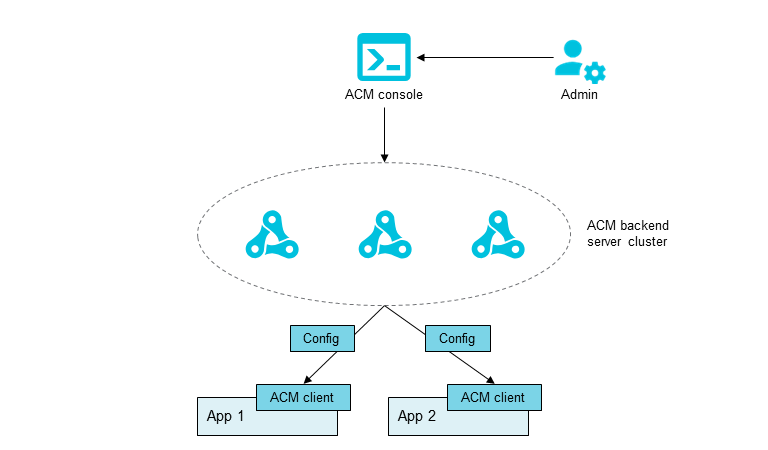
How it works
Extract variables and parameters from your application code and save them in a configuration.
Manage, update, or synchronize configurations across environments from the EDAS console.
EDAS pushes configuration updates to each server. Changes take effect immediately.
Features
Feature | Description |
Extract variables and parameters from your application code and save them in a configuration file. Update application behavior by editing the configuration file without code changes. | |
Synchronize a configuration across environments (such as development and test) or across regions. Create multiple microservices namespaces, add a configuration to one, and synchronize it to the others. | |
Search for, view, edit, or delete existing configurations in the EDAS console. | |
View the version history of a configuration and roll back to a specific version if the current configuration contains errors. | |
After you update a configuration, check whether the updates are published to the instances that monitor the configuration. | |
Track whether configuration updates are pushed to each instance. If an update does not take effect on an instance, view the tracking data to check whether the configuration updates are pushed. |