Hardcoded variables scattered across application code are difficult to update and increase maintenance costs. Microservice Configurations in Enterprise Distributed Application Service (EDAS) provides a centralized store where applications retrieve settings at runtime, enabling you to change parameters quickly and reduce code maintenance costs.
Prerequisites
Before you begin, make sure that you have:
An Alibaba Cloud account with access to the EDAS console
A microservices namespace set up in your target region
Create a configuration in the EDAS console
Log on to the EDAS console.
In the left-side navigation pane, choose Application Management > Microservice Configurations. The Configurations page appears.
In the top navigation bar, select a region. Select a microservices namespace from the Microservice Namespace drop-down list, and then click Create Configuration.
In the Create Configuration panel, set the following parameters and click Create.
Parameter Description Region The region selected in the top navigation bar. Read-only. Microservice Namespace The microservices namespace selected on the Configurations page. Read-only. Data ID A unique identifier for the configuration within its group. Use the package.classformat, whereclassis a descriptive name. Example:com.foo.bar.log.level. For naming guidance, see the Data ID naming section below.Group A logical grouping for configurations. Enter a service name or module name. Group names must be globally unique. For naming guidance, see the Group naming section below. Data encryption The encryption method. For details, see the Encryption options section below. Configuration Format The format of the configuration content. Configuration Content The configuration data. For an example, see the Configuration content example section below. Configuration Description A brief description of the configuration purpose. More Configuration Optional metadata. Application: the application this configuration belongs to. Label: a keyword tag for filtering and organizing configurations. 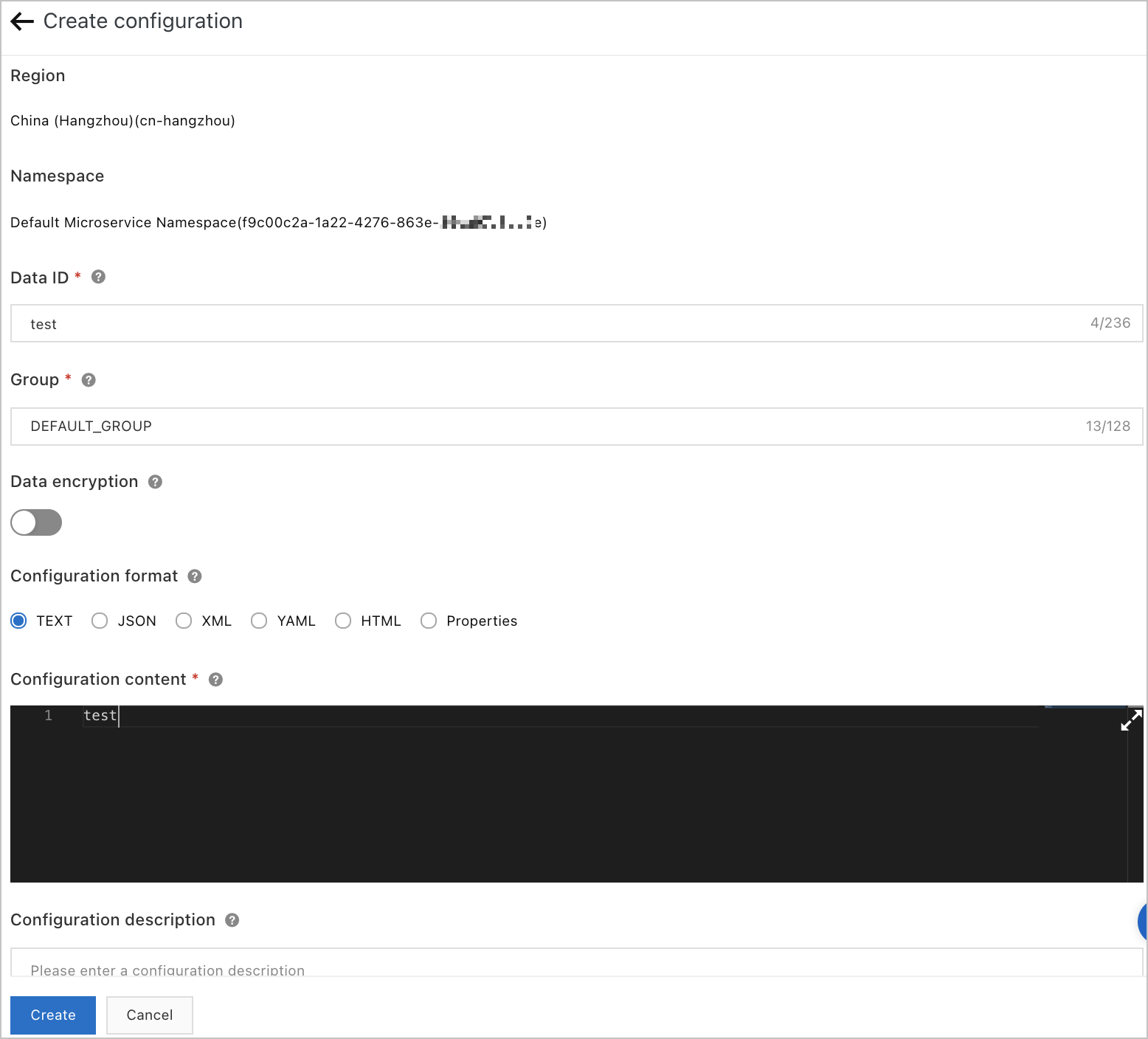
Encryption options
EDAS supports two encryption methods through Key Management Service (KMS). Choose based on your configuration size and security requirements.
| Method | How it works | Size limit | Best for |
|---|---|---|---|
| KMS encryption | Sends content directly to KMS for encryption and decryption. | Up to 6 KB | Small configurations without special characters |
| KMS AES-128 encryption | Uses KMS envelope encryption. Plaintext is never transmitted to KMS. | Up to 100 KB | Larger configurations or stricter security requirements |
For more information, see Create and use encrypted configuration.
Configuration content example
A typical Properties-format configuration:
threadPoolSize=5
logLevel=WARN
A JSON-format configuration:
{
  "threadPool": {
    "size": 5
  },
  "logging": {
    "level": "WARN"
  }
}
Best practices
Data ID naming
Use a reverse-domain naming convention to keep Data IDs organized and avoid conflicts across teams and services.
com.myapp.database.connection
com.myapp.cache.settings
com.myapp.logging.level
This hierarchical structure provides several advantages:
Readability -- Delimiters function as logical separators, making IDs easier to scan.
Manageability -- Related configurations are naturally grouped by namespace prefix.
Collision avoidance -- Reverse-domain prefixes prevent naming conflicts across teams.
Group naming
Assign each microservice or module its own group. This keeps configurations isolated and prevents naming collisions across services. For example, use group names like order-service, payment-module, or user-auth.
Encryption
Use KMS AES-128 encryption for production workloads. It supports larger payloads (up to 100 KB), keeps plaintext out of KMS, and provides stronger security through envelope encryption.
Verify the configuration
After the configuration is created, it appears on the Configurations page. Confirm that the Data ID, Group, and content match your intended settings.
What's next
Create and use encrypted configuration -- Encrypt sensitive configuration data with KMS.