Image creation FAQ
Image copy FAQ
Encrypted image FAQ
Image sharing FAQ
Image import FAQ
Image export FAQ
Image deletion FAQ
Image usage FAQ
Appendix
Can I create a custom image from an ECS data disk?
No, you cannot. To create a custom image, the source snapshot must be from a system disk. You cannot use a data disk snapshot to create a custom image. However, you can add data disk snapshots when you create a custom image from a system disk snapshot. For more information, see Create a custom image from a snapshot.
When I create a custom image from an instance, where can I view the creation progress? How long does it take to create an image?
You can view the image creation progress on the Images page of the Elastic Compute Service (ECS) console. The time required depends on the size of the disks of the instance. The image becomes available after the snapshots of all disks are created. Please wait for the process to complete. For more information, see Create a custom image from an instance.
When should I copy an image?
Custom images can be used only within the same region. You cannot use them directly in other regions. You can copy an image to another region for the following purposes:
Deploy an application on ECS instances in multiple regions.
Migrate an ECS instance to another region.
Use a custom image in a different region.
Change the encryption status of a custom image, encrypt its system disk, or encrypt its operating system data.
For more information, see Copy a custom image.
Which images can I copy?
Only custom images can be copied. Public images and Alibaba Cloud Marketplace images are not supported for this operation.
How long does it take to copy an image?
The time required to copy an image depends on the network transfer speed and the number of tasks in the queue. Copying an image involves transferring the image file from a zone in one region to a zone in the destination region over the network. Please wait for the process to complete.
To save time when you copy a large image, such as an image larger than 2 TiB, you can first copy the snapshot to the destination region and then create an image from the snapshot in that region. For more information, see Copy a snapshot and Create a custom image from a snapshot. When you copy a snapshot to a destination region, you incur fees for snapshot replication traffic and snapshot storage in the destination region. For more information, see Snapshot billing.
Can I copy a custom image created from an Alibaba Cloud Marketplace image across regions?
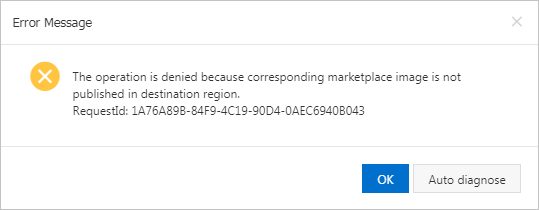
You can copy a custom image that is created from an Alibaba Cloud Marketplace image to a destination region only if the original Alibaba Cloud Marketplace image is available in that region. Otherwise, the following error message is displayed.
I have accounts on different sites. Can I share images between them?
No, you cannot. You cannot share images between accounts on the China site (aliyun.com) and the international site (alibabacloud.com).
What are the risks of using a shared image?
Shared images pose risks of data leakage and software exposure. Before sharing the image with another account, ensure it contains no sensitive and critical security data or software. An account that receives your shared image can use it to create ECS instances. That account can also create more custom images from these instances. This enables data propagation through derivative ECS instances and custom images, creating persistent data exposure risks.
Alibaba Cloud does not guarantee the integrity and security of images shared by other accounts. You use shared images at your own risk. Use only images that are shared by accounts that you trust. After you create an ECS instance from a shared image, log on to the instance to check the security and integrity of the image.
The image owner can view the sharing relationships of the image and can also delete the image. If the owner deletes a shared image, the system disks of ECS instances that were created from that image can no longer be reinitialized.
Can I re-share an image that was shared with me?
No, you cannot share it directly. However, you can copy the shared image as a new custom image and then share the new custom image.
How do I share an image across accounts and regions?
You can first share the image to the target account, then copy it to the target region. Alternatively, you can first copy the image to the target region and then share it with the target account. For more information, see Copy a custom image and Share a custom image.
Does the ECS system disk support KMS encryption? How can I encrypt it using Terraform or Packer?
Yes. ECS system disks support encryption using KMS-managed default keys or a Bring-Your-Own-Key (BYOK). For more information, see Encrypt a system disk.
In Packer, you can specify the
image_encryptedparameter. For more information, see Alicloud Image Builder.In Terraform, you can specify the
encryptedparameter. For more information, see alicloud_disks.
What are the constraints when I copy an encrypted image?
Make sure that Key Management Service (KMS) is activated. For more information, see Activate KMS.
When you copy an encrypted image, you must set the copy type to Copy and Encrypt.
If you want to use a custom key, you must create one in KMS in advance. For more information, see Create a key.
What permissions are required to share an encrypted image?
To share an encrypted custom image, you must first use Resource Access Management (RAM) to create a role named AliyunECSShareEncryptImageDefaultRole and grant it the required permissions and policies. Then, you can share the encrypted custom image with other Alibaba Cloud accounts or within your organization through a resource directory. For more information, see Share an encrypted custom image.
Where can I view the progress of an image import? How long does it take to import an image?
You can view the progress of an image import task in the custom image list of the target region or on the Tasks page.
The time required to import a custom image depends on the size of the image file and the number of concurrent import tasks. Please wait for the process to complete. For more information, see Import a custom image.
How to purchase an Alibaba Cloud license after the original BYOL license expires for an ECS instance created from an imported BYOL image?
You can change the operating system of the instance to replace the Bring-Your-Own-License (BYOL) image with an Alibaba Cloud image.
For Windows Server systems, you can use an official image from Alibaba Cloud. For more information about official images, see Public images overview.
You can obtain SQL Server and Red Hat images from the Alibaba Cloud Marketplace. For more information, see Alibaba Cloud Marketplace images.
Can I use an internal OSS URL to import a custom image?
No, you cannot. The Object Storage Service (OSS) object URL must be a public URL that you generate by sharing the file. You cannot use an the internal URL to import an image. If you do, the import task fails and an error is reported.
For more information about how to obtain the object URL of an image file, see Share a file in the console.
For more information about the internal URL of an OSS object, see Obtain the internal endpoint for a bucket.
How do I convert an ISO image file to a format supported by ECS?
ECS does not support importing ISO image files directly. You must convert the ISO file to a supported format before you can import it.
Use a tool such as VirtualBox to create a local image from the ISO file on your computer.
Convert the local image file to a supported format, such as RAW, VHD, QCOW2, or VMDK.
For more information, see Import a custom image.
How do I upload a local image file to an ECS server?
For more information, see Import a custom image.
What permissions are required to upload an image file to OSS?
If you are using an Alibaba Cloud account, you can directly upload image files to OSS. For more information, see Upload a file.
If you are a RAM user, you must contact the Alibaba Cloud account owner to grant you OSS Bucket operation permissions. For more information, see Permission description.
How do I download an image file to my local machine?
You can use the export feature for custom images to download an image file to your local computer. For more information, see Export a custom image.
Can an exported image be launched on other platforms?
An exported image is not guaranteed to launch correctly on other platforms. However, you can attach the disk of the local image to a virtual machine on another platform to access its data.
What should I do if I want to export a public image?
Alibaba Cloud ECS supports exporting custom images but does not support exporting public images directly. To export a public image, you must first create a custom image from the public image. Then, you can export a custom image.
If I have created an ECS instance from a custom image or shared the image, can I delete it? What are the effects of deletion?
Yes, but you can only Forcefully Delete Image.
The consequences of deletion are as follows:
The recipient Alibaba Cloud account can no longer find the shared image in the ECS console or using API operations.
The recipient Alibaba Cloud account can no longer use the shared image to create ECS instances or change system disks.
If the recipient Alibaba Cloud account created ECS instances from the shared image, the system disks of those instances cannot be reinitialized after the image is deleted.
For more information, see Delete a custom image.
When I try to delete an image, why do I get the error message "The specified image ID still has associated instances and cannot be deleted"?
This error occurs because the image was used to create ECS instances. To delete the image, you must select Forcefully Delete Image. Force-deleting an image does not affect existing instances. However, the system disks of ECS instances that are created from this custom image cannot be reinitialized. For more information, see Delete a custom image.
How do I resolve the issue of automatic system disk expansion failure for an instance created from a custom image?
Automatic system disk expansion may fail if the cloud-init service is not installed, fails to run, or the file system is not supported. If automatic expansion fails, you can expand the disk manually. For more information, see the Disk expansion guide.
Why do I need to comment out mount entries when creating a custom image or an ECS instance?
When you create an ECS instance from a custom image, disk attachment may fail for the following reasons:
The ECS instance does not have a data disk.
The data disk is new and has not been partitioned or formatted.
The disk mount entries in the /etc/fstab file of the custom image are not commented out.
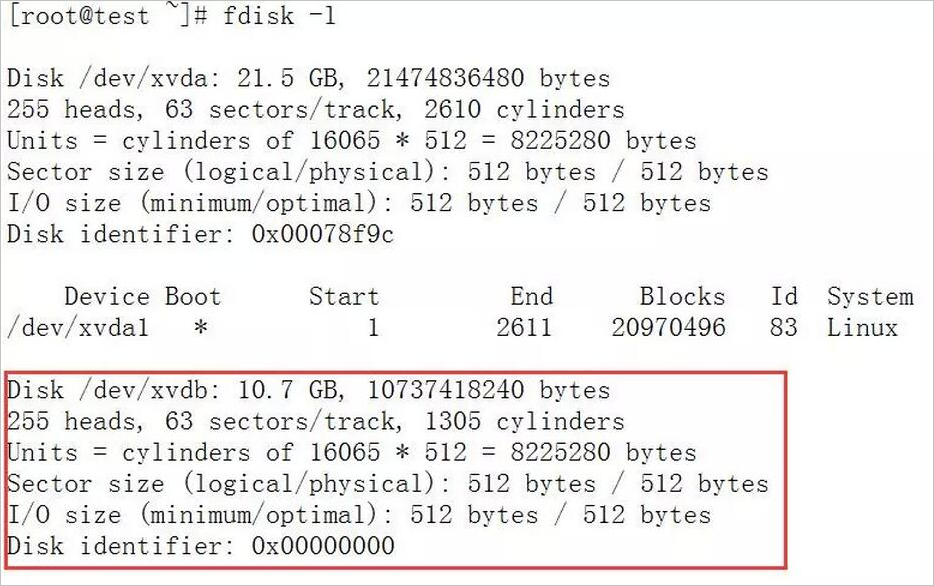
The following example explains why a data disk may fail to be attached. In this example, the data disk of an ECS instance is not partitioned, and the disk mount entries in the /etc/fstab file of the custom image are not commented out.
The data disk of the ECS instance is not partitioned, as shown in the following figure.
In the ECS instance created from the custom image, the disk mount entries in /etc/fstab are not commented out, as shown in the following figure.
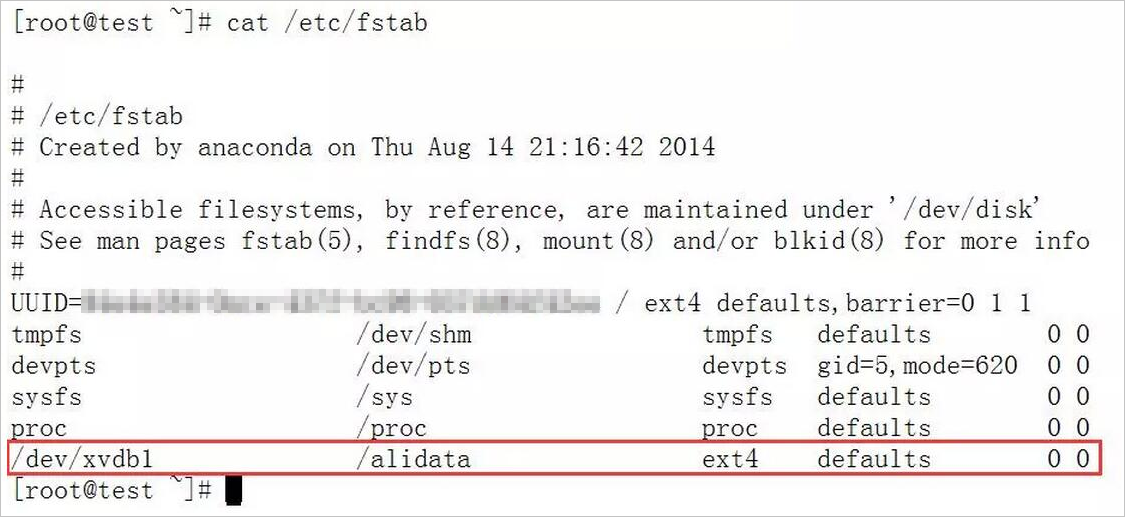
When the instance starts, it tries to attach the disk based on the configuration in the /etc/fstab file. However, the attachment fails because the data disk is not partitioned, as shown in the following figure.

You do not need to comment out disk mount entries only when you create an ECS instance with a data disk that is created from a data disk snapshot that has already been partitioned and formatted.
If the issue persists, you can submit a ticket for technical support.
Some custom images do not support the creation of I/O optimized instances. What should I do?
Some custom images do not support the creation of I/O optimized instances. To use such an image to create an I/O optimized instance, you can submit a ticket to request support. When you submit the ticket, specify the name of the image.
How do I configure and use a private Docker image repository?
Image management is a core feature of Docker. To allow image sharing within an enterprise or organization, Docker provides an open source project on GitHub called docker-registry. You can use this project to build your own private Docker image repository.
Quick Launch Docker Registry with Alibaba Cloud Object Storage Service (OSS) Support. You can download and install docker-registry from GitHub. Then, run the pip install docker-registry-driver-alioss command to install the OSS driver using pip.
Run the docker registry.
docker run -e OSS_BUCKET=-e STORAGE_PATH=/docker/ -e OSS_KEY=-e OSS_SECRET=-p 5000:5000 -d chrisjin/registry:ali_ossConfigure config.yml.
 storage: alioss
 storage_path: _env:STORAGE_PATH:/devregistry/
 oss_bucket: _env:OSS_BUCKET[:default_value]
 oss_accessid: _env:OSS_KEY
 oss_accesskey: _env:OSS_SECRET
Start docker-registry.
DOCKER_REGISTRY_CONFIG=[your_config_path] gunicorn -k gevent -b 0.0.0.0:5000 -w 1 docker_registry.wi:application
If the issue persists, you can submit a ticket for technical support.