ICANN requires that domain registrant email addresses be verified. Unverified addresses may cause the domain to enter ClientHold status, which suspends DNS resolution.
Procedure
-
Log on to the Alibaba Cloud Domain Names console.
-
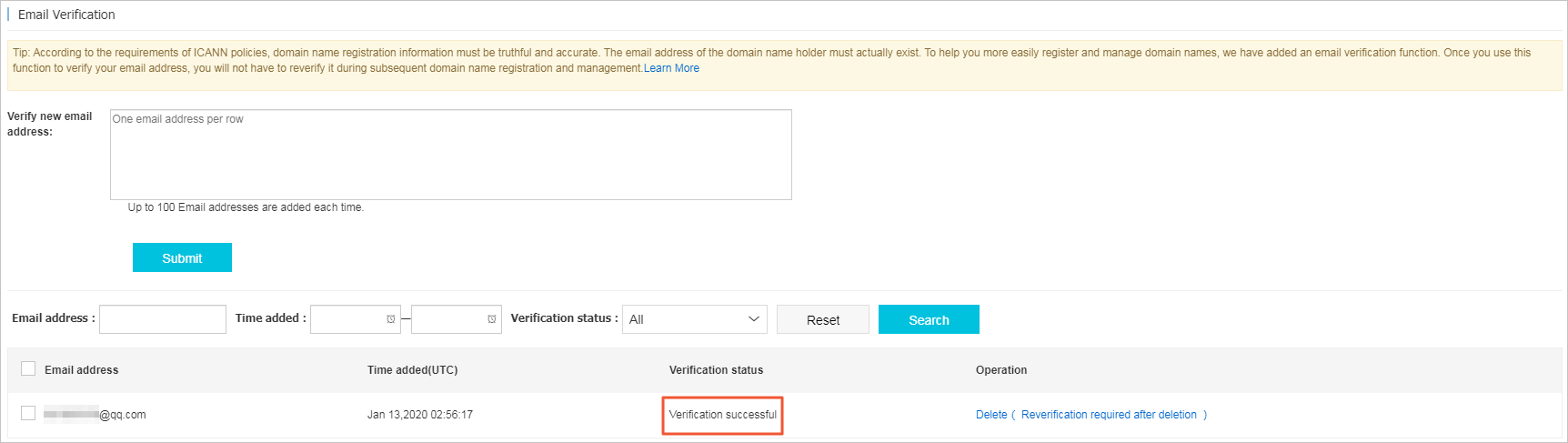
In the left-side navigation pane, click Email Verification. In the Verify New Email Address field, enter the email address and click Submit. A verification email is sent to that address.
NoteYou can enter up to 100 email addresses at a time, with each address on a new line.
-
Open the email account and click the verification link.
NoteThe verification link expires three days after the email is sent.
-
The email address status changes to Verification successful on the Email Verification page.
 Note
Note-
Deleting a verified email address requires SMS verification with the phone number linked to your Alibaba Cloud account.
-
A deleted email address must be re-verified before it can be used for new domain registrations.
-
For more information, see ICANN email verification FAQ.
Handle email verification failures
If the email address of a registrant profile fails verification, follow these steps to resolve the issue:
-
Delete the registrant profile whose email address failed verification.
-
Create a new registrant profile and enter the correct email address.
-
Click Submit to send a new verification email.
-
Log on to the email account and open the verification email.
-
Click the verification link in the email to complete the verification.
A failed email verification on an existing registrant profile does not affect the creation or verification of a new registrant profile. A registrant profile with an unverified email address cannot be used for domain registration, transfer, or change of registrant.