This topic describes how to view the prompt messages returned by DTS Insight intelligent O&M Assistant.
Prerequisites
An instance is in an abnormal status such as latency, failed, and retry. DTS Insight has generated prompt messages.
For more information about limits, see What is DTS Insight?.
Usage notes
For errors that DTS Insight cannot repair, you must manually address them or contact technical support for troubleshooting at the earliest opportunity.
The solutions generated by DTS Insight in conjunction with the Tongyi Qianwen model are for reference only. You must independently evaluate the feasibility of these solutions.
Procedure
In this example, a data synchronization instance is used to show how to view the prompt messages returned by DTS Insight.
Use one of the following methods to go to the Data Synchronization page and select the region in which the data synchronization instance resides.
DTS console
Log on to the DTS console.
In the left-side navigation pane, click Data Synchronization.
In the upper-left corner of the page, select the region in which the data synchronization instance resides.
DMS console
NoteThe actual operations may vary based on the mode and layout of the DMS console. For more information, see Simple mode and Customize the layout and style of the DMS console.
Log on to the DMS console.
In the top navigation bar, move the pointer over Data + AI and choose .
From the drop-down list to the right of Data Synchronization Tasks, select the region in which the data synchronization instance resides.
Find the instance that you want to manage.
You can filter the instance by Task Name, Instance ID, or Database Instance ID.

View the prompt messages in one of the following two ways.
View in the task list
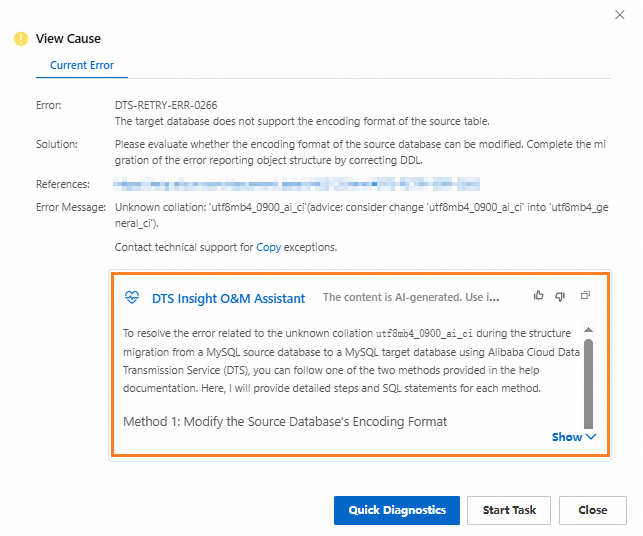
In the Status column of the instance, click View Cause.

In the dialog box that appears, view the prompt messages.
View in the error module
Click the ID of the instance.
On the Task Management page, click the error module.
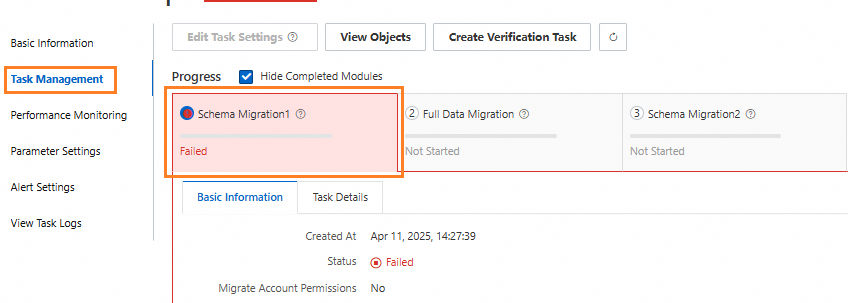
Optional: Click the Basic Information tab in the error module.
View the prompt messages below the Error Message section.
FAQ
Can I view DTS Insight prompt messages by calling an API operation?
No.
When an exception occurred in an instance, should I view the error message in the error module or the DTS Insight prompt messages?
We recommend that you combine the Error Message with the prompt messages returned by the DTS Insight. This can accurately locate and handle abnormal items in an instance.