Use Data Transmission Service (DTS) to migrate a self-managed MySQL database connected over Express Connect, VPN Gateway, or Smart Access Gateway to an ApsaraDB RDS for MySQL instance. DTS supports structure migration, full data migration, and incremental data migration for minimal downtime.
Prerequisites
-
The self-managed MySQL database is version 5.1, 5.5, 5.6, 5.7, or 8.0.
-
The destination ApsaraDB RDS for MySQL instance has more storage space than the source MySQL database.
-
The on-premises network hosting the self-managed database is connected to Alibaba Cloud over Express Connect, VPN Gateway, or Smart Access Gateway.
NoteFor connection setup steps, see Preparation overview.
Usage notes
-
A full data migration consumes read and write resources on both the source and destination databases, increasing their server load. This added load can degrade performance or cause service unavailability, especially if your databases have poor performance, low specifications, or are already busy (for example, with many slow SQL queries, tables without primary keys, or deadlocks in the destination database). Before you start the migration, evaluate the performance of both databases and perform the migration during off-peak hours, for example, when CPU utilization is below 30%.
-
If a source table to be migrated lacks a primary key or unique constraint, duplicate data may occur in the destination database.
-
For FLOAT and DOUBLE columns, DTS reads values using
ROUND(COLUMN,PRECISION). If a column's precision is not explicitly defined, DTS defaults to a precision of 38 for FLOAT and 308 for DOUBLE. Verify that this precision meets your business requirements. -
DTS automatically creates a database in the destination ApsaraDB RDS for MySQL instance. However, if the source database name does not comply with ApsaraDB RDS naming conventions, you must create a new database with a valid name in the destination instance before configuring the migration task.
NoteFor more information about the naming conventions and how to create a database, see Create a database.
-
DTS automatically attempts to recover failed migration tasks. To prevent an automatic recovery from overwriting data on the destination instance after you switch over, stop or release the migration task before switching your business.
Billing
|
Migration type |
Task configuration fee |
Internet traffic fee |
|
Schema migration and full data migration |
Free of charge. |
DTS charges an Internet traffic fee when the Access Method of the destination database is set to Public IP Address. For more information, see Billing overview. |
|
Incremental data migration |
Charged. For more information, see Billing overview. |
Migration types
-
Schema migration
DTS migrates the schema definitions of objects to the destination instance. DTS supports schema migration for tables, views, triggers, stored procedures, and functions.
Note-
During schema migration, DTS converts the
DEFINERof views, stored procedures, and functions toINVOKER. -
DTS does not migrate USER information. You must grant read and write permissions to the invoker to call views, stored procedures, and functions in the destination database.
-
-
Full data migration
DTS migrates all existing data from the selected objects from the source self-managed MySQL database to the destination ApsaraDB RDS for MySQL instance.
NoteDuring a full data migration, concurrent INSERT operations cause table fragmentation in the destination instance. After the migration is complete, the table space in the destination database may be larger than in the source database.
-
Incremental data migration
After the full data migration, DTS reads the binary log (binlog) of the source self-managed MySQL database to synchronize incremental data to the destination ApsaraDB RDS for MySQL instance. This enables you to migrate your MySQL database to the cloud without service interruption.
SQL operations for incremental migration
|
Operation type |
SQL operations |
|
DML |
INSERT, UPDATE, DELETE, REPLACE |
|
DDL |
|
Permissions required for database accounts
|
Database |
Schema migration |
Full data migration |
Incremental data migration |
|
Self-managed MySQL database |
SELECT |
SELECT |
REPLICATION SLAVE, REPLICATION CLIENT, SHOW VIEW, and SELECT |
|
ApsaraDB RDS for MySQL instance |
Read and write permissions |
Read and write permissions |
Read and write permissions |
To create a database account and grant permissions:
-
For a self-managed MySQL database, see Create an account for a self-managed MySQL database and enable binary logging.
-
For an ApsaraDB RDS for MySQL instance, see Create an account and Modify account permissions.
Before you begin
Procedure
-
Log on to the DTS console.
NoteIf you are automatically redirected to the Data Management (DMS) console, you can click the
 icon in the lower-right corner and then click
  to return to the classic DTS console.
 -
In the left-side navigation pane, click Data Migration.
-
At the top of the Migration Tasks page, select the region of the destination cluster.
-
In the upper-right corner of the page, click Create Data Migration Task.
-
Configure the source and destination databases.
Category
Setting
Description
N/A
Task name
DTS generates a task name automatically. Specify a descriptive name for easier identification. Does not need to be unique.
source database
instance type
Select Self-managed Database with VPC Access.
instance region
Select the region of the VPC connected to Express Connect, VPN Gateway, or Smart Access Gateway.
peer VPC
Select the VPC connected to Express Connect, VPN Gateway, or Smart Access Gateway.
Database type
Select MySQL.
IP address
Enter the IP address of the self-managed MySQL database.
Port
Enter the service port of the self-managed MySQL database. Default: 3306.
Database account
Enter the database account for the self-managed MySQL database. Required permissions: Permissions required for database accounts.
Database password
Enter the password for the source database account.
NoteAfter you enter the source database information, you can click Test Connectivity next to Database Password to verify that the information is correct. If the information is correct, the message Passed is displayed. If the message Failed is displayed, click Diagnose next to the Failed message and adjust the source database information based on the prompts.
destination database
instance type
Select RDS Instance.
instance region
Select the region of the destination RDS instance.
RDS instance ID
Select the ID of the destination RDS instance.
Database account
Enter the database account of the destination RDS instance. Required permissions: Permissions required for database accounts.
Database password
Enter the password for the destination database account.
NoteAfter you enter the destination database information, you can click Test Connectivity after Database Password to verify that the entered information is correct. If the information is correct, a Passed message is displayed. If a Failed message is displayed, click Diagnose after Failed and adjust the destination database information based on the prompts.
connection method
Select Non-encrypted or SSL-encrypted. If you select SSL-encrypted, enable SSL encryption for the RDS instance first. Configure SSL encryption.
NoteCurrently, you can set the Encryption only in the China (Hong Kong) region and regions in the Chinese mainland.
-
Click set whitelist and next.
If the source or destination database is an Alibaba Cloud database instance, such as an ApsaraDB RDS for MySQL or ApsaraDB for MongoDB instance, DTS automatically adds the CIDR blocks of the DTS servers in the corresponding region to the whitelist of the Alibaba Cloud database instance. If the source or destination database is a self-managed database that is hosted on an ECS instance, DTS automatically adds the CIDR blocks of the DTS servers in the corresponding region to the security rules of the ECS instance. You must also make sure that the self-managed database allows access from the ECS instance. If the database is deployed as a cluster on multiple ECS instances, you must manually add the CIDR blocks of DTS servers to the security rules of each ECS instance. If the source or destination database is a self-managed database in an IDC or a database from another cloud provider, you must manually add the CIDR blocks of DTS servers to allow access. For the CIDR blocks of DTS servers, see IP addresses of DTS servers.
WarningAdding public IP addresses of DTS servers, whether automatically or manually, may introduce security risks. By using this product, you acknowledge and accept these potential risks. You are responsible for implementing basic security measures, such as using strong passwords, restricting open ports, using authentication for internal APIs, regularly reviewing and limiting unnecessary network segments, or connecting by using private connections such as Express Connect, VPN Gateway, or Smart Access Gateway.
-
Select the migration types and objects.
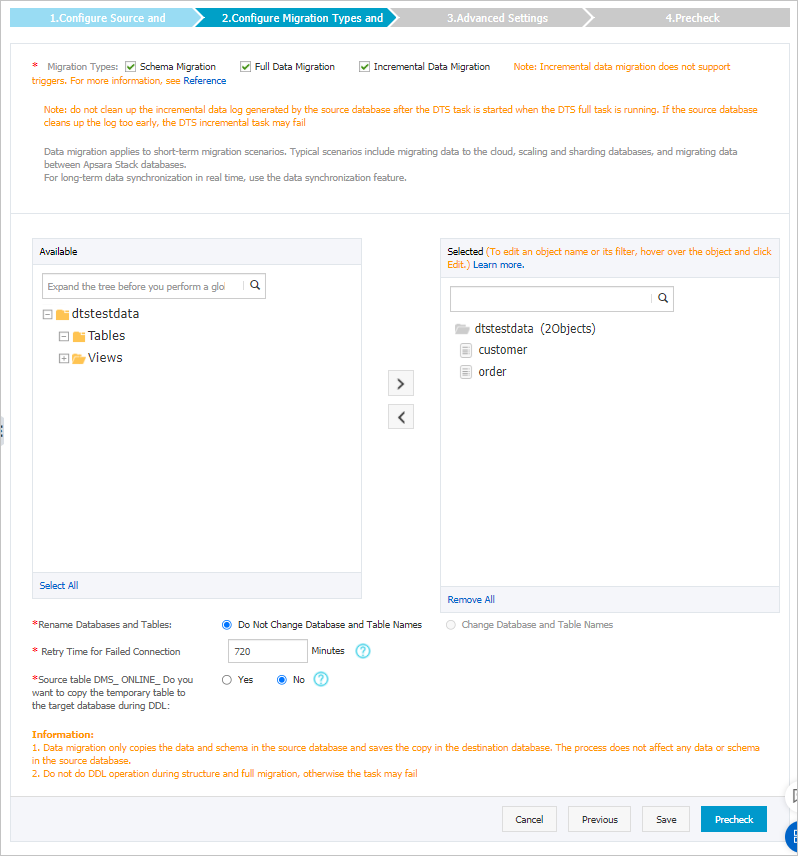
Setting
Description
Migration types
-
To perform only a full migration, select both Schema Migration and Full Data Migration.
-
To perform a zero-downtime migration, select Schema Migration, Full Data Migration, and Incremental Data Migration.
ImportantIf you do not select Incremental Data Migration, do not write new data to the source database during the full data migration to ensure data consistency.
Migration objects
In the Available box, click the objects that you want to migrate and click the
 icon to move them to the Selected Objects box.Important
-
You can select objects to migrate at the database, table, and column levels.
-
By default, object names are retained after migration. If you need to rename an object in the destination database, use the object name mapping feature. For more information, see Object name mapping.
-
If you rename an object by using the object name mapping feature, other objects that depend on it may fail to migrate.
Object name mapping
If you need to rename a migrated object in the destination instance, use the object name mapping feature. For more information, see Object name mapping.
Connection retry duration
If a connection to the source or destination database is interrupted, DTS retries to connect for a default of 720 minutes (12 hours). You can customize this duration. If DTS successfully reconnects within the specified time, the migration task resumes. Otherwise, the task fails.
NoteYou are charged for the DTS instance while it attempts to reconnect. To avoid unnecessary charges, set an appropriate retry duration or release the DTS instance promptly if the source and destination databases are released.
Replicate temporary tables created during online DDL operations in DMS
If you use Data Management (DMS) to perform online DDL operations on the source database, you can choose whether to migrate the temporary tables that are generated.
-
Yes: Migrates the data in the temporary tables that are generated by online DDL operations.
NoteIf a large amount of temporary table data is generated by online DDL operations, the migration task may experience high latency.
-
No: Does not migrate the data in the temporary tables. Only the original DDL data from the source database is migrated.
NoteThis option may cause table locks on the destination database.
-
After you complete the configuration, click Precheck and Start in the lower-right corner of the page.
Note-
Before the migration task starts, DTS runs a precheck. The task can start only after it passes the precheck.
-
If the precheck fails, click the
 icon next to the failed item to view details.
-
Fix the issues as prompted and run the precheck again.
-
If you do not need to fix the warning items, you can select Ignore and then click Ignore Warnings and Rerun Precheck to run the precheck again.
-
-
-
After the task passes the precheck, click Next.
-
In the Confirm Settings dialog box that appears, select a Instance Class and select the Data Transmission Service (pay-as-you-go) Service Terms checkbox.
-
Click Buy and Start to begin the migration.
-
Schema migration + Full data migration
Allow the task to complete automatically. Stopping it manually may result in incomplete data.
-
Schema migration + Full data migration + Incremental data migration
The migration task does not stop automatically. You must stop it manually.
ImportantChoose an appropriate time to stop the task manually, such as during off-peak hours or when you are ready to switch your business to the destination cluster.
-
Wait until the migration task enters the Incremental Data Migration phase and the status shows Undelayed. Then, stop writing data to the source database for several minutes. During this time, the status of Incremental Data Migration may show a latency.
-
Wait for the Incremental Data Migration status to show Undelayed again. Then, manually stop the migration task.

-
-
-
Switch your services to the ApsaraDB RDS for MySQL instance.