Data Transmission Service (DTS) supports two-way data synchronization between two ApsaraDB RDS for PostgreSQL databases. This is commonly used for active geo-redundancy (unit-based) and geo-disaster recovery.
Prerequisites
Before you begin, make sure that you have:
-
Created both the source and destination ApsaraDB RDS for PostgreSQL instances. See Create an ApsaraDB RDS for PostgreSQL instance.
-
Set the
wal_levelparameter tologicalon both instances. See Modify the parameters of an ApsaraDB RDS for PostgreSQL instance.
For supported source and destination database versions, see Overview of data synchronization scenarios.
Limitations
Source and destination databases
-
Tables without primary keys or UNIQUE constraints: Enable the Exactly-Once write feature when configuring the task. Without it, the destination database may contain duplicate records. See Synchronize tables without primary keys or UNIQUE constraints.
-
Table limit per task: If you select tables as objects to synchronize and rename tables or columns in the destination, a single task supports up to 5,000 tables. Exceeding this limit causes a request error. Split the tables across multiple tasks, or synchronize the entire database instead.
-
Unsupported objects: DTS cannot synchronize temporary tables, internal triggers, or internal procedures and functions written in C. DTS can synchronize custom parameters of the COMPOSITE, ENUM, and RANGE types. Tables must have PRIMARY KEY, FOREIGN KEY, UNIQUE, or CHECK constraints.
-
WAL log retention: If WAL logs are not retained for the required duration, DTS may fail to obtain them, and the task may fail. In exceptional circumstances, data inconsistency or loss may occur. Make sure that you set the retention period of WAL logs based on the preceding requirements. Otherwise, service reliability or performance in the Service Level Agreement (SLA) of DTS may not be guaranteed. After full data synchronization is complete, you can reduce retention to more than 24 hours.
-
wal_levelmust be set tological. -
Incremental synchronization only: retain WAL logs for more than 24 hours.
-
Full data synchronization + incremental synchronization: retain WAL logs for at least 7 days.
-
-
Primary/secondary switchover: Enable the Logical Replication Slot Failover feature before performing a switchover on the source instance. Without it, logical subscriptions may be interrupted.
-
Single-record size limit: If a single incremental data change exceeds 256 MB, the synchronization instance fails and cannot be recovered. Reconfigure the task.
-
DDL restrictions: Do not execute DDL statements to change database or table schemas during schema synchronization or full data synchronization. Doing so fails the task.
-
Long-running transactions: WAL logs generated before long-running transactions are committed may accumulate, exhausting disk space on the source database.
-
Major version upgrades: Performing a major version upgrade on the source database while a synchronization instance is running causes the instance to fail and become unrecoverable. Reconfigure the task.
Other limitations
-
A synchronization task syncs from one database only. Create a separate task for each additional database.
-
DTS cannot synchronize tables that have inheritance relationships across schemas.
-
Schema-level synchronization: If you create or rename a table in a synchronized schema, run the following statement before writing data to the table:
ALTER TABLE schema.table REPLICA IDENTITY FULL;Replace
schemaandtablewith the actual schema name and table name. Run this statement during off-peak hours, and avoid locking the table to prevent deadlocks. -
DTS does not validate metadata such as sequences. Validate them manually.
-
Sequences after workload switch: New sequences in the destination database do not continue from the maximum value in the source. Before switching workloads to the destination, query the maximum sequence values in the source and set them as the starting values in the destination:
The returned SQL statements include all sequences in the source database. Apply them in the destination based on your requirements.
do language plpgsql $$ declare nsp name; rel name; val int8; begin for nsp,rel in select nspname,relname from pg_class t2 , pg_namespace t3 where t2.relnamespace=t3.oid and t2.relkind='S' loop execute format($_$select last_value from %I.%I$_$, nsp, rel) into val; raise notice '%', format($_$select setval('%I.%I'::regclass, %s);$_$, nsp, rel, val+1); end loop; end; $$; -
DTS temporary tables: DTS creates the following temporary tables in the source database. Do not delete them during synchronization — they are automatically removed after the DTS instance is released:
public.dts_pg_class,public.dts_pg_attribute,public.dts_pg_type,public.dts_pg_enum,public.dts_postgres_heartbeat,public.dts_ddl_command, andpublic.dts_args_session. -
Heartbeat table: DTS adds a heartbeat table named
dts_postgres_heartbeatto the source database to maintain accurate synchronization latency. -
Replication slot: DTS creates a replication slot prefixed with
dts_sync_in the source database to obtain incremental logs from the last 15 minutes.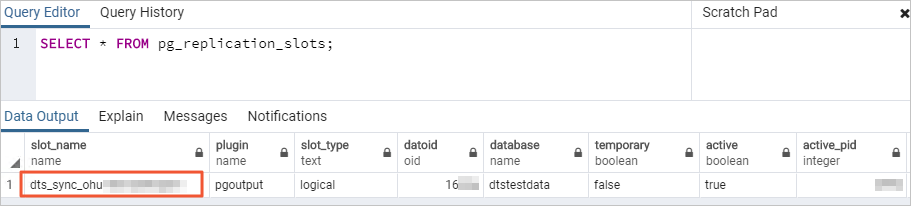
-
The replication slot is automatically deleted after the DTS instance is released. If you change the source database password or remove DTS IP addresses from the whitelist, the slot is not auto-deleted — delete it manually to prevent accumulation.
-
If the task is released or fails, DTS automatically deletes the replication slot. After a primary/secondary switchover on the source PostgreSQL database, log on to the secondary database to delete the replication slot.
-
-
Performance impact: Evaluate the impact of synchronization on source and destination database performance before starting. Run synchronization during off-peak hours when possible. Initial full data synchronization uses read and write resources on both databases.
-
Tablespace size: After initial full data synchronization, the tablespace on the destination may be larger than on the source due to fragmentation from concurrent INSERT operations.
-
Online DDL during synchronization: If DTS is the only process writing to the destination, you can use Data Management (DMS) to run online DDL operations on source tables. See Change schemas without locking tables. If other sources are also writing to the destination, running online DDL may cause data loss.
-
Foreign keys and triggers: If the destination database account is a privileged or superuser account and the tables contain foreign keys, triggers, or event triggers, DTS temporarily sets
session_replication_roletoreplicaat the session level. If cascade updates or deletes are performed on the source during synchronization with this setting active, data inconsistency may occur. After the task is released, resetsession_replication_roletoorigin. -
Two-way task rules: A two-way synchronization instance contains a forward task and a reverse task. If an object is included in both tasks:
-
Only one task can synchronize both full data and incremental data. The other task synchronizes incremental data only.
-
Data synchronized to the destination in one task is not re-used as source data for the other task.
-
-
Task restoration: If a DTS task fails, DTS technical support will attempt restoration within 8 hours. During restoration, the task may restart and task parameters may be modified. Database parameters are not modified.
Special cases
-
ApsaraDB RDS for PostgreSQL source: Do not modify the endpoint or zone of the source instance during synchronization. Doing so fails the task.
-
Self-managed PostgreSQL source: The values of
max_wal_sendersandmax_replication_slotsmust each exceed the sum of: current replication slots in use + number of DTS instances to be created for this database. -
Google Cloud SQL for PostgreSQL (GCP) source: Set Database Account to an account with the
cloudsqlsuperuserpermission. Select only objects that the account is authorized to manage, or grant the OWNER permission on the selected objects to that account. An account withcloudsqlsuperuserpermission cannot manage data owned by other accounts with the same permission.
Billing
| Synchronization type | Fee |
|---|---|
| Schema synchronization and full data synchronization | Free |
| Incremental data synchronization | Charged. See Billing overview. |
Supported synchronization topologies
DTS supports two-way synchronization between exactly two PostgreSQL databases. Two-way synchronization between three or more databases is not supported.
Supported objects
| Object type | Details |
|---|---|
| SCHEMA, TABLE | Includes PRIMARY KEY, UNIQUE KEY, FOREIGN KEY, built-in data types, and DEFAULT constraints |
| VIEW, FUNCTION, RULE, SEQUENCE, EXTENSION, TRIGGER, AGGREGATE, INDEX, OPERATOR, DOMAIN | — |
| PROCEDURE | PostgreSQL V11 or later only |
SQL operations
| Operation type | Supported statements |
|---|---|
| DML | INSERT, UPDATE, DELETE |
| DDL | CREATE TABLE, DROP TABLE, ALTER TABLE (RENAME TABLE, ADD COLUMN, ADD COLUMN DEFAULT, ALTER COLUMN TYPE, DROP COLUMN, ADD CONSTRAINT, ADD CONSTRAINT CHECK, ALTER COLUMN DROP DEFAULT), TRUNCATE TABLE (the source self-managed PostgreSQL database must be version 11 or later), CREATE INDEX ON TABLE |
DDL prerequisites and restrictions:
-
DDL synchronization is available only for tasks created after October 1, 2020.
-
For tasks created before May 12, 2023: create triggers and functions in the source database to capture DDL before configuring the task. See Use triggers and functions to implement incremental DDL migration for PostgreSQL databases.
-
The source database account must be a privileged account, and the minor engine version of the ApsaraDB RDS for PostgreSQL instance must be 20210228 or later. See Update the minor engine version.
-
To use a data synchronization task created before May 12, 2023 to synchronize DDL operations, you must create triggers and functions in the source database to capture DDL information before you configure the data synchronization task. For more information, see Use triggers and functions to implement incremental DDL migration for PostgreSQL databases.
-
Data of the BIT type cannot be synchronized during incremental data synchronization.
-
The following DDL cannot be synchronized: additional modifiers such as CASCADE or RESTRICT; DDL from sessions that run
SET session_replication_role = replica; DDL executed via function invocations; commits that mix DML and DDL; DDL for objects not included in the synchronization scope.
DDL operations are synchronized only in the forward direction (source to destination). DDL is ignored in the reverse direction.
Conflict detection
To maintain data consistency, update records with the same primary key, business primary key, or unique key on only one synchronization node at a time.
DTS detects and handles the following conflict types:
| Conflict type | Trigger | DTS behavior |
|---|---|---|
| INSERT uniqueness conflict | An INSERT on one node conflicts with an existing record on the other (same primary key) | The conflicting INSERT fails to sync |
| UPDATE — record missing | The record to update does not exist in the destination | DTS converts the UPDATE to an INSERT; uniqueness conflicts may follow |
| UPDATE — key conflict | The inserted record's primary key or unique key conflicts with an existing record | The INSERT from the converted UPDATE fails |
| DELETE — record missing | The record to delete does not exist in the destination | DTS ignores the DELETE, regardless of the conflict resolution policy |
System time differences between source and destination instances, combined with synchronization latency, mean DTS cannot guarantee that conflict detection prevents all data conflicts. Keep records with the same primary key, business primary key, or unique key on one node only.
Select a conflict resolution policy when configuring two-way synchronization:
| Policy | Behavior |
|---|---|
| TaskFailed | The task reports an error and stops. Resolve the conflict manually. |
| Ignore | The task skips the conflicting statement and continues. The existing record in the destination is kept. |
| Overwrite | The conflicting record in the destination is overwritten. |
If a latency occurs when you pause or restart a synchronization task, the selected policy does not apply during the latency period. By default, data in the destination is overwritten by data synchronized during the latency.
Configure two-way synchronization
Two-way synchronization requires two tasks: a forward task (Instance A to Instance B) and a reverse task (Instance B to Instance A). Configure the forward task first, wait for it to reach the Running state, then configure the reverse task.
Step 1: Purchase a DTS instance
Purchase a DTS instance and on the buy page, set both Source Instance and Destination Instance to PostgreSQL, and set Synchronization Topology to Two-way Synchronization.
Step 2: Open the data synchronization page
Go to the Data Synchronization page of the DTS console.
Alternatively, log on to the Data Management (DMS) console, and in the top navigation bar, choose Data + AI > DTS (DTS) > Data Synchronization.
Step 3: Configure the forward task
-
In the upper-left corner, select the region where the purchased synchronization instance resides.
-
Find the synchronization instance and click Configure Task for the forward synchronization task.
-
Configure the source and destination databases.
WarningAfter configuring the source and destination databases, read the Limits displayed on the page before proceeding.
Task Name
Parameter Description Task Name Enter a descriptive name. The name does not need to be unique. Source database [Instance A]
Parameter Description Database Type Select PostgreSQL. Connection Type Select Alibaba Cloud Instance. Instance Region Pre-filled from the buy page. Cannot be modified. Instance ID Select the source ApsaraDB RDS for PostgreSQL instance. Database Name Enter the name of the source database. Database Account Enter a privileged account that owns the source database. See Create an account and Create a database. Database Password Enter the account password. Encryption Select Non-encrypted or SSL-encrypted. For SSL, upload the CA Certificate and optionally the Client Certificate, Private Key of Client Certificate, and Private Key Password of Client Certificate. See SSL encryption. Destination database [Instance B]
Parameter Description Database Type Select PostgreSQL. Connection Type Select Alibaba Cloud Instance. Instance Region Pre-filled from the buy page. Cannot be modified. Instance ID Select the destination ApsaraDB RDS for PostgreSQL instance. Database Name Enter the name of the destination database. Database Account Enter a privileged account that owns the destination database. Database Password Enter the account password. Encryption Select Non-encrypted or SSL-encrypted. -
Click Test Connectivity and Proceed.
Make sure DTS server CIDR blocks are added to the security settings of the source and destination databases. See Add the CIDR blocks of DTS servers. For self-managed databases with an access method other than Alibaba Cloud Instance, click Test Connectivity in the CIDR Blocks of DTS Servers dialog box.
-
Configure the objects to synchronize. In the Configure Objects step, set the following parameters:
Parameter Description Synchronization Types Select Schema Synchronization, Full Data Synchronization, and Incremental Data Synchronization. Full data synchronization migrates historical data as the baseline for incremental synchronization. If you select Schema Synchronization, DTS synchronizes the schemas of the selected tables from the source database to the destination database. The schemas include foreign keys. Processing Mode of Conflicting Tables Precheck and Report Errors: fails the precheck if tables with identical names exist in source and destination (recommended). Ignore Errors and Proceed: skips this check — use with caution. If the source and destination databases have the same schema and a record with the same primary key or unique key exists in both: during full data synchronization, DTS does not synchronize the conflicting record and the existing record in the destination is retained; during incremental data synchronization, DTS synchronizes the record and the existing record in the destination is overwritten. If the source and destination databases have different schemas, data may fail to initialize — only some columns may be synchronized, or the task may fail. Synchronization Topology Select Two-way Synchronization. Enable Exactly-Once Write Select Yes if any tables to synchronize lack primary keys and UNIQUE constraints. Exclude DDL Operations No to synchronize DDL; Yes to exclude it. Displayed only when configuring the forward task. DDL is always ignored in the reverse direction. Conflict Resolution Policy Select TaskFailed, Ignore, or Overwrite. See Conflict detection. Capitalization of Object Names in Destination Instance Defaults to DTS default policy. Adjust to match source or destination conventions if needed. See Specify the capitalization of object names in the destination instance. Source Objects Select objects and click the arrow icon to move them to Selected Objects. You can select columns, tables, or schemas. Selected Objects Right-click an object to rename it or filter data with WHERE conditions. Click Batch Edit to rename multiple objects at once. See Map object names and Use SQL conditions to filter data. -
Click Next: Advanced Settings and configure the following:
Parameter Description Dedicated Cluster for Task Scheduling Leave blank to use the shared cluster. For higher stability, purchase a dedicated cluster. See What is a DTS dedicated cluster. Retry Time for Failed Connections Time range to retry failed connections. Valid values: 10–1440 minutes. Default: 720. Set to at least 30 minutes. If the shortest retry time is set across multiple tasks sharing a source or destination, that value takes precedence. When DTS retries a connection, you are charged for the DTS instance. Retry Time for Other Issues Time range to retry failed DDL or DML operations. Valid values: 1–1440 minutes. Default: 10. Set to more than 10 minutes. Must be less than Retry Time for Failed Connections. Enable Throttling for Full Data Migration Set QPS to the source database, RPS of Full Data Migration, and Data migration speed (MB/s) to reduce load during full synchronization. Displayed only if Full Data Synchronization is selected. Enable Throttling for Incremental Data Synchronization Set RPS of Incremental Data Synchronization and Data synchronization speed (MB/s) to reduce load during incremental synchronization. Environment Tag Optional. Select a tag to identify the DTS instance. Monitoring and Alerting Select Yes to receive alerts when the task fails or latency exceeds a threshold. Configure the alert threshold and notification settings. See Configure monitoring and alerting. -
Click Next Step: Data Verification to configure data verification. See Configure a data verification task.
-
Save the task and run a precheck.
-
To preview the API parameters: hover over Next: Save Task Settings and Precheck and click Preview OpenAPI parameters.
-
Click Next: Save Task Settings and Precheck to proceed.
The precheck must pass before the task can start.
-
If the precheck fails: click View Details next to each failed item, fix the issues, and run the precheck again.
-
If an alert is triggered:
-
For alerts that cannot be ignored: click View Details, fix the issue, and rerun the precheck.
-
For alerts that can be ignored: click Confirm Alert Details > Ignore > OK, then click Precheck Again.
-
-
-
Wait until the success rate reaches 100%, then click Back.
Step 4: Configure the reverse task
-
Wait until the forward task enters the Running state.
-
Find the reverse synchronization task and click Configure Task.
-
Configure the reverse task following steps 3 through 9 above, with the source and destination databases swapped:
-
Source database [Instance B]: use the instance that was the destination in the forward task.
-
Destination database [Instance A]: use the instance that was the source in the forward task.
Keep the following in mind:
Important-
The Instance Region cannot be modified for the reverse task.
-
The reverse task synchronizes incremental data only for objects that were synchronized in the forward task (full data synchronization is not repeated).
-
The number of parameters to configure for the reverse task is less than for the forward task. Configure only the parameters displayed in the console.
-
Tables already synchronized by the forward task are excluded from the Processing Mode of Conflicting Tables check.
-
Do not select the same objects from the forward task's Selected Objects for the reverse task.
-
Avoid using the object name mapping feature for the reverse task. Doing so may cause data inconsistency.
-
-
After both tasks enter the Running state, two-way data synchronization is active.