Use Data Transmission Service (DTS) to set up a continuous, one-way data pipeline from a source PolarDB for PostgreSQL (Compatible with Oracle) cluster to a destination cluster. The pipeline covers schema synchronization, full data load, and incremental change data capture (CDC) using PostgreSQL logical replication.
Prerequisites
Before you begin, make sure that you have:
-
A destination PolarDB for PostgreSQL (Compatible with Oracle) cluster with storage capacity greater than the used storage space of the source cluster. For more information, see Create a PolarDB for PostgreSQL (Compatible with Oracle) cluster
-
A database created in the destination cluster to receive data. For more information, see Database management
-
The
wal_levelparameter set tologicalon the source cluster. For more information, see Configure cluster parameters -
Logical Replication Slot Failover enabled on the source cluster
If the source cluster's Database Engine is Oracle syntax compatible 2.0, it does not support Logical Replication Slot Failover. A high-availability (HA) switchover on such a cluster causes the synchronization instance to fail and become unrecoverable.
Billing
| Synchronization type | Pricing |
|---|---|
| Schema synchronization and full data synchronization | Free of charge |
| Incremental data synchronization | Charged. For more information, see Billing overview |
Supported synchronization objects
| Object | Details |
|---|---|
| SCHEMA, TABLE | Includes PRIMARY KEY, UNIQUE KEY, FOREIGN KEY, built-in data types, and DEFAULT CONSTRAINT |
| VIEW, PROCEDURE | Requires PostgreSQL version 11 or later. Support varies by destination database type—check the console for details |
Supported SQL operations
| Operation type | Statements |
|---|---|
| DML | INSERT, UPDATE, DELETE |
| DDL | CREATE TABLE, DROP TABLE |
| DDL | ALTER TABLE — includes RENAME TABLE, ADD COLUMN, ADD COLUMN DEFAULT, ALTER COLUMN TYPE, DROP COLUMN, ADD CONSTRAINT, ADD CONSTRAINT CHECK, ALTER COLUMN DROP DEFAULT |
| DDL | CREATE INDEX ON TABLE |
DDL statements are not synchronized in the following scenarios:
-
The statement contains CASCADE or RESTRICT
-
A transaction contains both DML and DDL statements
-
Only partial DDL statements of a transaction fall within the synchronization scope
-
The DDL statement is executed from a session created by
SET session_replication_role = replica -
The DDL statement is executed via a FUNCTION call
-
No schema is defined in the DDL statement (in this case, the public schema is used per
SHOW search_path) -
The DDL statement contains IF NOT EXISTS
Database account permissions
| Database | Required permission | How to create and grant |
|---|---|---|
| Source PolarDB for PostgreSQL (Compatible with Oracle) cluster | Privileged account | Create a database account |
| Destination PolarDB for PostgreSQL (Compatible with Oracle) cluster | Database owner | Create a database account and Database management. The database owner is specified when creating the database |
Limitations
Review these limitations before you start. Some constraints require action on the source database before you configure DTS.
Source database limitations
Bandwidth The server hosting the source database must have sufficient outbound bandwidth. Insufficient bandwidth reduces synchronization speed.
Tables without a primary key or UNIQUE constraint Enable the Exactly-Once write feature when configuring the task. Without it, duplicate data may appear in the destination database. For more information, see Synchronize tables without a primary key or UNIQUE constraint.
More than 1,000 tables with name mapping If the synchronization objects are tables with table or column name mapping applied, and a single task exceeds 1,000 tables, split the tables across multiple tasks or configure the task to synchronize the entire database. Exceeding this limit may cause a request error when submitting the task.
WAL retention Enable WAL and set the retention period based on the synchronization types in your task:
-
Incremental synchronization only: retain WAL logs for more than 24 hours
-
Full and incremental synchronization: retain WAL logs for at least 7 days. After full synchronization completes, you can set the retention period to more than 24 hours
If DTS cannot obtain WAL logs, the task fails. In extreme cases, data inconsistency or data loss may occur. Issues caused by a WAL retention period shorter than the DTS requirement are not covered by the Service-Level Agreement (SLA).
Long-running transactions Long-running transactions cause WAL to accumulate until those transactions commit. This can exhaust disk space on the source database during incremental synchronization.
DDL operations during sync Do not perform DDL operations that change the database or table structure during schema synchronization or full data synchronization. Doing so causes the task to fail.
Writes during full-only sync Do not write new data to the source cluster if the task runs full data synchronization only. Data inconsistency will result. To maintain real-time consistency, include schema synchronization, full data synchronization, and incremental data synchronization in the task.
Single incremental data piece larger than 256 MB If a single piece of data exceeds 256 MB after an incremental change, the synchronization instance may fail and cannot be recovered. Reconfigure the synchronization instance.
Other limitations
One database per task A single synchronization task can synchronize only one database. Configure a separate task for each additional database.
Unsupported objects DTS does not support TimescaleDB extension tables, tables with cross-schema inheritance, or tables with unique indexes based on expressions. Schemas created by installing plugins cannot be synchronized and do not appear in the console during task configuration.
SERIAL type fields If a table contains a SERIAL data type field, the source database automatically creates a sequence for that field. When configuring Source Objects, if you select Schema Synchronization as a synchronization type, also select Sequence or synchronize the entire schema. Otherwise, the synchronization instance may fail.
REPLICA IDENTITY FULL requirement Run the following command on each table to be synchronized in the source database before writing data to it. This ensures data consistency. Do not lock the tables while running this command to avoid deadlocks.
ALTER TABLE schema.table REPLICA IDENTITY FULL;Replace schema and table with the actual schema name and table name. Run this command during off-peak hours.
This command is required in the following scenarios:
-
The first time the instance runs
-
You selected schema-level granularity for object selection, and a new table is created in the schema or an existing table is rebuilt using the RENAME command
-
You use the modify synchronization objects feature
If you skip the related precheck items, DTS automatically runs this command during instance initialization.
Temporary tables in the source database DTS creates the following temporary tables in the source database to obtain DDL statements, incremental table structures, and heartbeat information. Do not delete these tables during synchronization—deleting them causes the task to become abnormal. DTS automatically deletes these tables after the instance is released:
public.dts_pg_class, public.dts_pg_attribute, public.dts_pg_type, public.dts_pg_enum, public.dts_postgres_heartbeat, public.dts_ddl_command, public.dts_args_session, public.aliyun_dts_instance
Heartbeat table DTS adds a heartbeat table named dts_postgres_heartbeat to the source database to maintain accurate incremental synchronization latency metrics.
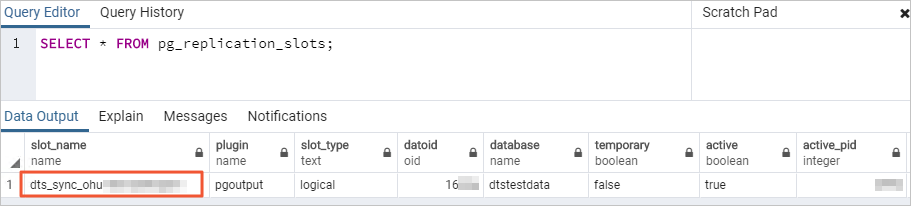
Replication slot DTS creates a replication slot with the dts_sync_ prefix in the source database. This slot retains incremental logs from the last 15 minutes. When the synchronization task fails or the instance is released, DTS attempts to automatically clear the slot.
If you change the source database account password or remove the DTS IP address from the source database whitelist during synchronization, the replication slot cannot be cleared automatically. Manually clear the replication slot in the source database to prevent disk space accumulation, which can make the source database unavailable. If a failover occurs in the source database, log on to the secondary database to manually clear the slot.
Sequences after business switchover After switching your business to the destination instance, sequences do not continue from the maximum value in the source. Update the sequence value in the destination database before the business switchover. For more information, see Update the sequence value in the destination database.
Performance impact of full synchronization Full data synchronization runs concurrent INSERT operations, which consumes read and write resources on both the source and destination databases and causes table fragmentation in the destination. The destination table space will be larger than the source after full synchronization. Evaluate performance before synchronizing, and run during off-peak hours when the CPU load of both databases is below 30%.
FLOAT and DOUBLE precision DTS reads FLOAT and DOUBLE values using ROUND(COLUMN, PRECISION). If no explicit precision is defined, DTS uses a default precision of 38 for FLOAT and 308 for DOUBLE. Verify that this precision meets your business requirements.
DTS auto-recovery DTS attempts to automatically recover failed tasks for up to seven days. Before switching your business to the destination instance, end or release the task, or use the REVOKE command to revoke write permissions from the DTS account on the destination instance. Without this step, auto-recovery may cause source data to overwrite destination data after the switchover.
Foreign keys, triggers, and event triggers For full or incremental synchronization tasks involving tables with foreign keys, triggers, or event triggers, DTS temporarily sets session_replication_role to replica at the session level:
-
If the destination database account is a privileged account or has superuser permissions, DTS sets this automatically
-
If the destination account does not have these permissions, manually set
session_replication_roletoreplicain the destination database before the task runs
During this period, cascade update or delete operations in the source database may cause data inconsistency. After the DTS task is released, set session_replication_role back to origin.
Schema synchronization and foreign keys During schema synchronization, DTS synchronizes foreign keys from the source to the destination. During full and incremental synchronization, DTS temporarily disables constraint checks and foreign key cascade operations at the session level. Data inconsistency may occur if cascade update or delete operations run on the source while the task is active.
Task failure recovery If a task fails, DTS support staff will attempt to restore it within eight hours. During restoration, they may restart the task or adjust DTS task parameters (not database parameters). Parameters that may be adjusted are listed in Modify instance parameters.
Partitioned tables Include both the parent table and all its child partitions as synchronization objects. PostgreSQL partitioned tables store data only in child partitions, not the parent table. If child partitions are excluded, their data is not synchronized, resulting in data inconsistency.
Configure a one-way synchronization task
Step 1: Go to the data synchronization task list
Navigate to the synchronization task list for your target region using one of the following consoles.
DTS console
-
Log on to the DTS console.DTS console
-
In the left navigation pane, click Data Synchronization.
-
In the upper-left corner of the page, select the region where the synchronization instance is located.
DMS console
-
Log on to the DMS console.DMS console
-
In the top menu bar, choose Data + AI > DTS (DTS) > Data Synchronization.
-
To the right of Data Synchronization Tasks, select the region of the synchronization instance.
Step 2: Create a task and configure database connections
-
Click Create Task.
-
Configure the source and destination databases using the following parameters.
Task settings
| Parameter | Description |
|---|---|
| Task Name | DTS generates a name automatically. Specify a descriptive name for easy identification. The name does not need to be unique |
Source database
| Parameter | Description |
|---|---|
| Select Existing Connection | Select a registered database instance from the drop-down list to auto-fill the connection details. If you have not registered the instance, configure the fields below manually. In the DMS console, this field is labeled Select a DMS database instance |
| Database Type | Select PolarDB (Compatible with Oracle) |
| Access Method | Select Alibaba Cloud Instance |
| Instance Region | Select the region where the source cluster resides |
| Replicate Data Across Alibaba Cloud Accounts | Select No if the source cluster belongs to the current Alibaba Cloud account |
| Instance ID | Select the ID of the source cluster |
| Database Name | Enter the name of the source database that contains the objects to synchronize |
| Database Account | Enter the database account. For permission requirements, see Database account permissions |
| Database Password | Enter the password for the database account |
Destination database
| Parameter | Description |
|---|---|
| Select Existing Connection | Select a registered database instance from the drop-down list. If you have not registered the instance, configure the fields below manually. In the DMS console, this field is labeled Select a DMS database instance |
| Database Type | Select PolarDB (Compatible with Oracle) |
| Access Method | Select Alibaba Cloud Instance |
| Instance Region | Select the region where the destination cluster resides |
| Instance ID | Select the ID of the destination cluster |
| Database Name | Enter the name of the destination database that will receive data |
| Database Account | Enter the database account. For permission requirements, see Database account permissions |
| Database Password | Enter the password for the database account |
-
Click Test Connectivity and Proceed.
Add the CIDR blocks of DTS servers to the security settings of both the source and destination databases, either automatically or manually, to allow access. For more information, see Add the IP address whitelist of DTS servers.
If the source or destination is a self-managed database (that is, Access Method is not Alibaba Cloud Instance), also click Test Connectivity in the CIDR Blocks of DTS Servers dialog box.
Step 3: Configure synchronization objects
-
On the Configure Objects page, configure the following settings.
| Parameter | Description |
|---|---|
| Synchronization Types | DTS always selects Incremental Data Synchronization. By default, also select Schema Synchronization and Full Data Synchronization. After the precheck passes, DTS initializes the destination cluster with the full data of the selected source objects as the baseline for incremental synchronization |
| Synchronization Topology | Select One-way Synchronization |
| Processing Mode of Conflicting Tables | Precheck and Report Errors (default): checks for tables with the same names in the destination database. If any are found, an error is reported during precheck and the task does not start. To resolve the conflict without deleting or renaming the table, map it to a different name in the destination. For more information, see Database Table Column Name Mapping. Ignore Errors and Proceed: skips the same-name check. Use with caution—selecting this option may cause data inconsistency: during full synchronization, DTS retains the destination record and skips the source record when primary or unique key values conflict; during incremental synchronization, DTS overwrites the destination record with the source record. If table schemas are inconsistent, data initialization may fail. This can result in only partial data synchronization or a complete synchronization failure. Use with caution |
| Capitalization of Object Names in Destination Instance | Configures the case policy for database, table, and column names in the destination. The default is DTS default policy. For more information, see Case policy for destination object names |
| Source Objects | In the Source Objects box, click the objects to select, then click  to move them to the Selected Objects box. Select objects at the schema or table level. If you select only tables, other objects such as views, triggers, and stored procedures are not synchronized. If a table contains a SERIAL data type and you select Schema Synchronization, also select Sequence or the entire schema to move them to the Selected Objects box. Select objects at the schema or table level. If you select only tables, other objects such as views, triggers, and stored procedures are not synchronized. If a table contains a SERIAL data type and you select Schema Synchronization, also select Sequence or the entire schema |
| Selected Objects | To rename a single object in the destination, right-click it in the Selected Objects box. For more information, see Map a single object name. To rename multiple objects, click Batch Edit in the upper-right corner of the box. For more information, see Map multiple object names in bulk. To select specific SQL operations for a database or table, right-click the object and select the operations in the dialog box. For supported operations, see Supported SQL operations. To filter data using a WHERE clause, right-click a table and specify the filter conditions. For more information, see Set filter conditions. If you use object name mapping, dependent objects may fail to synchronize |
-
Click Next: Advanced Settings and configure the following options.
| Parameter | Description |
|---|---|
| Dedicated Cluster for Task Scheduling | By default, DTS uses a shared cluster. For greater stability, purchase a dedicated cluster. For more information, see What is a DTS dedicated cluster? |
| Retry Time for Failed Connections | If the connection to the source or destination database fails after the task starts, DTS immediately begins retrying. The default retry duration is 720 minutes. Set a value between 10 and 1,440 minutes; 30 minutes or more is recommended. If the connection is restored within this period, the task resumes automatically. Note
If multiple DTS instances share a source or destination, DTS uses the shortest configured retry duration across all instances. DTS charges for task runtime during connection retries |
| Retry Time for Other Issues | If a non-connection issue occurs (such as a DDL or DML execution error), DTS immediately retries. The default is 10 minutes. Set a value between 1 and 1,440 minutes; 10 minutes or more is recommended. This value must be less than Retry Time for Failed Connections |
| Enable Throttling for Full Data Synchronization | Limits the full synchronization rate to reduce pressure on the destination database. Set Queries per second (QPS) to the source database, RPS of Full Data Migration, and Data migration speed for full migration (MB/s). Available only if Full Data Synchronization is selected. You can also adjust this rate while the instance is running |
| Enable Throttling for Incremental Data Synchronization | Limits the incremental synchronization rate. Set RPS of Incremental Data Synchronization and Data synchronization speed for incremental synchronization (MB/s) |
| Environment Tag | Select an environment tag to identify the instance. No selection is required for this task |
| Configure ETL | Choose whether to enable the extract, transform, and load (ETL) feature. Select Yesalert notifications and enter data processing statements in the code editor, or select No to disable it. For more information, see What is ETL? and Configure ETL in a data migration or data synchronization task |
| Monitoring and Alerting | Select Yes to receive notifications when the synchronization fails or latency exceeds the threshold. Set the alert threshold and contacts. For more information, see Configure monitoring and alerting during task configuration. Select No to skip alerts |
-
Click Next: Data Validation to configure a data validation task. For more information, see Configure data validation.
Step 4: Save settings and run the precheck
-
To preview the API parameters for this task, hover over Next: Save Task Settings and Precheck and click Preview OpenAPI parameters in the tooltip.
-
Click Next: Save Task Settings and Precheck to save and start the precheck.
DTS performs a precheck before the task starts. The task only starts after the precheck passes.
If the precheck fails, click View Details next to the failed item, fix the issue as prompted, and rerun the precheck.
If the precheck generates warnings:
For non-ignorable warnings, click View Details, fix the issue, and rerun the precheck.
For ignorable warnings, click Confirm Alert Details > Ignore > OK, then click Precheck Again. Ignoring precheck warnings may lead to data inconsistencies. Proceed with caution.
Step 5: Purchase the instance
-
When the Success Rate reaches 100%, click Next: Purchase Instance.
-
On the Purchase page, select the billing method and instance class.
| Parameter | Description |
|---|---|
| Billing Method | Subscription: pay upfront for a fixed duration. Cost-effective for long-term, continuous tasks. Pay-as-you-go: billed hourly for actual usage. Suitable for short-term or test tasks; release the instance at any time to stop billing |
| Resource Group Settings | The resource group for the instance. The default is default resource group. For more information, see What is Resource Management? |
| Instance Class | Determines the synchronization performance level. Select a class based on your throughput requirements. For more information, see Data synchronization link specifications |
| Subscription Duration | (Subscription billing only) Monthly options: 1–9 months. Yearly options: 1, 2, 3, or 5 years |
-
Select the Data Transmission Service (Pay-as-you-go) Service Terms checkbox.
-
Click Buy and Start, then click OK in the confirmation dialog box.
Monitor the task progress on the data synchronization page.