This topic provides guidelines for granting permissions to RAM users for various DataWorks use cases.
Background
DataWorks provides a comprehensive permission management system to manage the product and its features. It includes global-level and workspace-level modules, which are controlled by global-level and workspace-level roles, respectively. The RAM policy system controls product management permissions in DataWorks, while the role-based access control (RBAC) model governs permissions for product modules.
This topic explains how to grant permissions for various DataWorks use cases by detailing the permission controls for management, global modules, and workspace modules.
Permission management system
The following figure shows how to manage permissions for RAM users based on different dimensions such as operation type and permission system.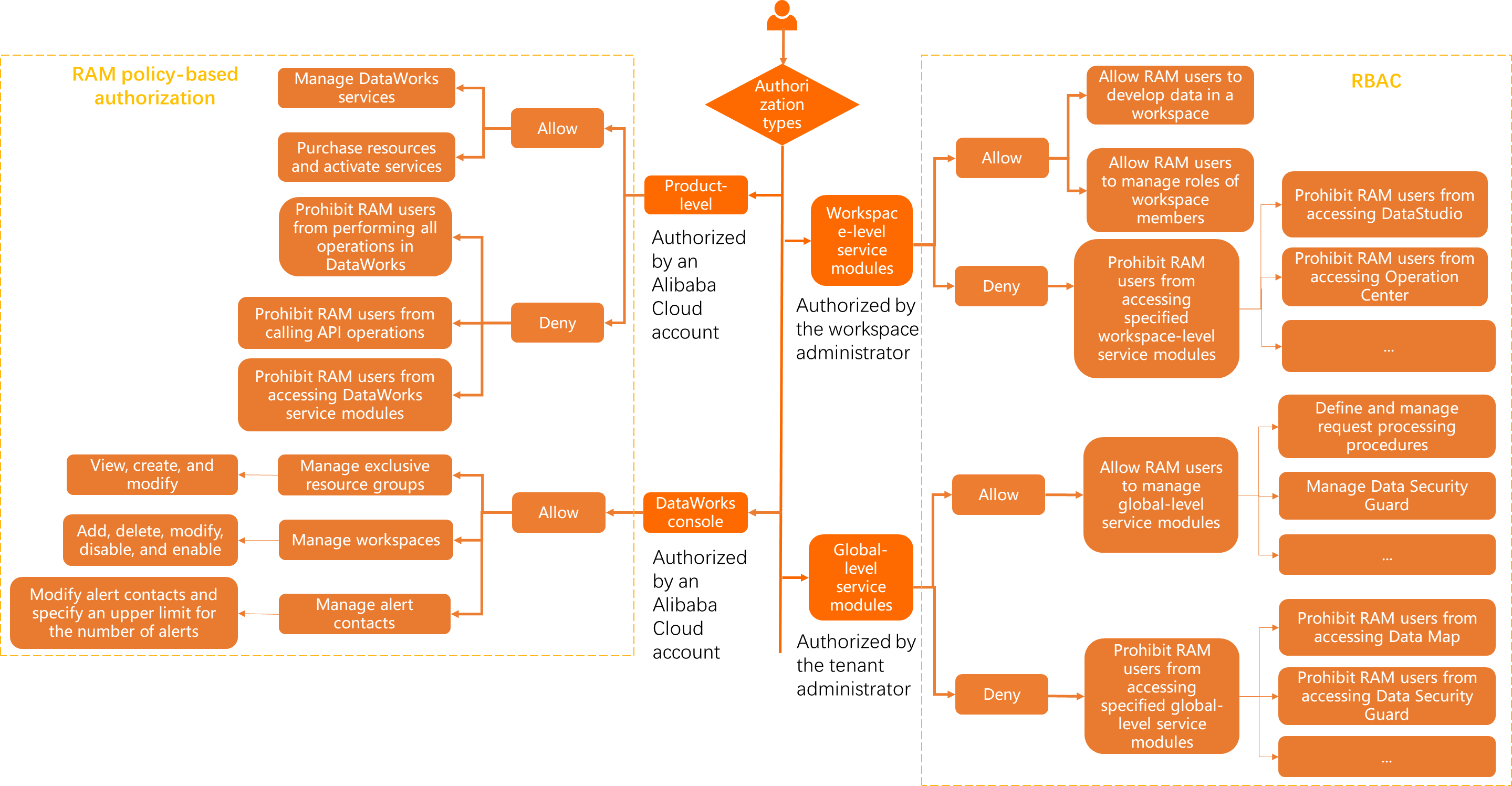 For global operations, grant coarse-grained, product-level permissions. For operations on a specific module or management of the console and resource groups, grant fine-grained, module-level permissions.
For a RAM user, a policy with a Deny statement always takes precedence over any policies that grant permissions.
This topic details permission management for RAM users, organized by authorization type. For more information, see the following sections:
Product-level: Management and operation permissions
To control DataWorks management and operation permissions at the product level, use RAM policies in Resource Access Management (RAM).
|
Permission type |
Description |
Procedure |
References |
|
Allow a RAM user to manage DataWorks |
By default, only an Alibaba Cloud account has the permissions to manage DataWorks. If you want a RAM user to collaboratively manage DataWorks, grant the RAM user this permission. Note
After you grant this permission, the RAM user has extensive permissions in DataWorks and can manage internal features on behalf of the Alibaba Cloud account, excluding purchase-related features. |
|
|
|
Allow a RAM user to purchase resources and activate services |
By default, only an Alibaba Cloud account can purchase resources and activate services, such as purchasing DataWorks Standard Edition, Professional Edition, or Enterprise Edition. If you want a RAM user to perform these operations, grant the RAM user this permission. Note After the authorization, the RAM user can view, pay for, and cancel orders in Billing Management (BSS). |
|
|
|
Deny a RAM user access to DataWorks |
If you want to deny a user access to the management console, DataWorks module pages, and Open API calls, grant this permission to the user. Note
By default, all RAM users under an Alibaba Cloud account are tenant members of DataWorks and are allowed to access the DataWorks management console. |
|
|
|
Deny a RAM user from calling Open API operations |
By default, a user who has permissions on a DataWorks module can call the Open API operations of the module. If you want to deny a user from calling all Open API operations, grant this permission to the user. |
|
|
|
Deny a RAM user from accessing DataWorks module pages |
If you want to deny a user from accessing all DataWorks module pages, grant this permission to the user. Note
|
|
Module-level: DataWorks console permissions
To control permissions for the DataWorks console at the module level, use RAM policies in Resource Access Management (RAM).
|
Permission type |
Description |
Procedure |
References |
|
Allow a RAM user to manage workspaces and resource groups |
By default, only an Alibaba Cloud account can manage DataWorks resources and workspaces. For example, modifying resource group and workspace configurations, or deleting resource groups. If you want a RAM user to manage resource groups and workspaces, grant this permission to the RAM user. |
|
Module-level: DataWorks module permissions
To control permissions for different DataWorks modules at the module level, use member management in DataWorks workspaces.
DataWorks does not support granting permissions in bulk by RAM user group. To grant workspace permissions to multiple RAM users, add users one by one in workspace member management and assign roles such as preset roles (workspace administrator, operator, etc.) or custom roles.
|
Permission type |
Description |
Procedure |
|
Assign workspace roles to a RAM user |
A RAM user must join a workspace as a member before the user can perform development operations. You can assign different workspace roles to the RAM user to control the permissions for different module features. For example:
Note For more information about preset workspace roles and custom roles in DataWorks, see Workspace roles and permissions. |
|
|
Assign global roles to a RAM user |
By default, all RAM users under an Alibaba Cloud account are tenant members and can access but cannot manage global modules. If you want a RAM user to manage global modules for different permission control scenarios, grant the RAM user this permission. For example:
Note For more information about preset global roles and custom roles in DataWorks, see Global roles and permissions. |