This topic answers common questions about migrating domain names and DNS records.
FAQ
When I transfer a domain to another account in the Domain console, are DNS records deleted?
A: When you transfer a domain name to another Alibaba Cloud account in the Domain Names console, DNS records are not deleted and DNS services remain unaffected. The specific scenarios are as follows:
-
Paid edition of Alibaba Cloud DNS: After successfully transferring the domain to another Alibaba Cloud account, DNS records remain in the original account and continue to resolve normally without affecting your services. Log on to the Alibaba Cloud DNS - Public Authoritative Zone under the new account and click Add Zone to reclaim the DNS records. For details, see Domain management.
-
Free Edition of Alibaba Cloud DNS: After successfully transferring the domain to another Alibaba Cloud account, DNS records automatically sync to the new account and continue to resolve normally.
Can I transfer a non-Alibaba Cloud registered domain to another account in the Domain console?
A non-Alibaba Cloud registered domain is one registered with a registrar other than Alibaba Cloud. Whether you can transfer it to another Alibaba Cloud account in the Domain console depends on the following scenarios:
-
Domain not transferred into Alibaba Cloud: If the domain has not been transferred to Alibaba Cloud as its registrar, you cannot transfer it to another Alibaba Cloud account from the Domain console. However, you can add DNS records for this domain in Alibaba Cloud DNS - Public Authoritative Zone. For details, see Add a domain.
-
Domain transferred into Alibaba Cloud: If you have successfully transferred the domain into Alibaba Cloud, you can transfer it to another Alibaba Cloud account from the Domain console. If your DNS was previously managed by another registrar, migrate it to the Alibaba Cloud DNS console to avoid service disruption due to DNS interruption. For details, see How to smoothly migrate domain name resolution to Alibaba Cloud DNS.
Does transferring a domain into or out of Alibaba Cloud affect DNS resolution?
No. Domain registration and DNS resolution are independent. Transferring a domain into or out of Alibaba Cloud does not require simultaneous DNS migration. Performing only domain transfer operations without migrating DNS records does not affect DNS resolution.
If you only need to transfer the domain, do not change the domain's DNS servers.
After a domain is transferred from another account, it does not appear in the current account’s Alibaba Cloud DNS console. Adding the domain fails with an error.
Problem description
The domain is already under the current account, but DNS records still reside in the previous account. When trying to add the domain in the DNS console of the current account, the following error appears: “Sorry, this domain belongs to your account, but data synchronization failed. It is not displayed in the list. Please submit a ticket.”
Root cause
The domain was transferred between accounts, but Global Traffic Manager (GTM) was configured for this domain (or any of its subdomains) in the original account. To enable DNS record synchronization to the current account, you must first remove the GTM configuration in the original account.
Solution
If this issue occurs, delete the GTM configuration in the original account. Then, Alibaba Cloud engineering will correct the backend data. After that, the current account can add the domain in the Alibaba Cloud DNS console to take over DNS management.
-
In the original account, delete all GTM configurations related to this domain in the Global Traffic Manager console.
WarningNote: After deleting a GTM instance, it no longer provides DNS resolution. Assess the impact on your services before proceeding.
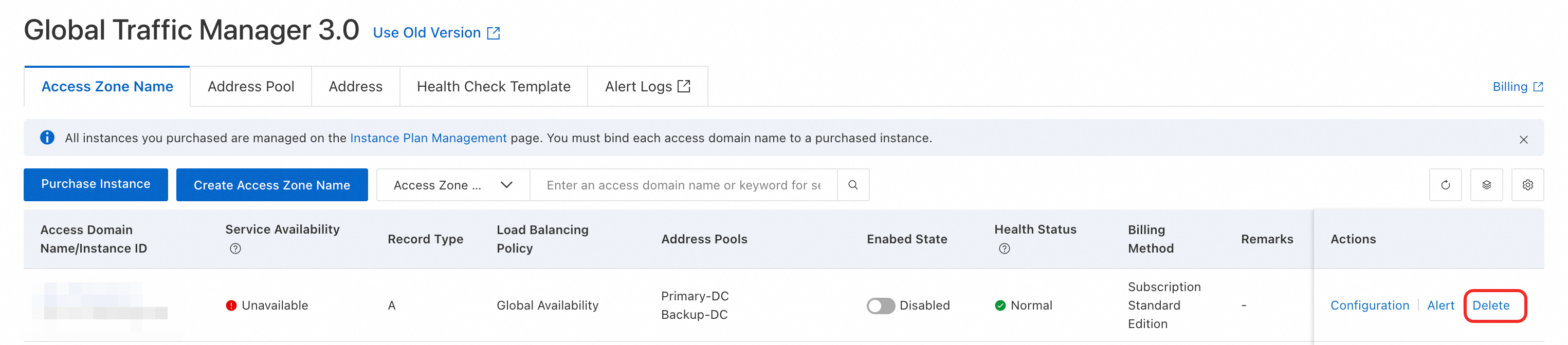
-
(Optional) Alibaba Cloud engineering corrects related backend data (required only if the domain is registered with Alibaba Cloud).
-
In the current account, add the domain in the Public Authoritative Zone console.
Tutorials
|
Category |
Subcategory |
Problem description |
|
Domain registration migration |
cross-vendor |
How to transfer a domain into Alibaba Cloud without affecting DNS resolution |
|
Between Alibaba Cloud accounts |
How to transfer a domain between Alibaba Cloud accounts without affecting DNS resolution |
|
|
DNS record migration |
cross-vendor |
How to smoothly migrate domain name resolution to Alibaba Cloud DNS |
|
Between Alibaba Cloud accounts |