Use Global Traffic Manager (GTM) for global disaster recovery. GTM directs users from different regions to the nearest endpoint. If a data center fails, GTM switches traffic to a healthy data center to ensure business continuity. This solution is ideal for global disaster recovery in multicloud, multi-region, and multi-data center scenarios.
Solution architecture

Intelligent DNS resolution
DNS query source | Application endpoint | Failover address |
The Chinese mainland (Global) | On-premises data center (223.5.XX.XX) | Alibaba Cloud in China (Hong Kong) (223.6.XX.XX) |
China (Hong Kong) | Alibaba Cloud in China (Hong Kong) (223.6.XX.XX) | Huawei Cloud in Singapore (223.7.XX.XX) |
Outside China | Huawei Cloud in Singapore (223.7.XX.XX) | Alibaba Cloud in China (Hong Kong) (223.6.XX.XX) |
Prerequisites
The domain name
cloud-example.comuses Alibaba Cloud DNS. The service domain name to add to GTM iswww.cloud-example.com.NoteIf your service domain name does not use Alibaba Cloud DNS, you can still use GTM. To do this, add a CNAME record with your current DNS provider that points your service domain name to the GTM access domain name.
Procedure
On the Access Zone Name tab, click the Create Access Zone Name button.
Select Custom Scenario.
On the Create Access Zone Name page, click the icon for the access domain name and select Basic Configuration.
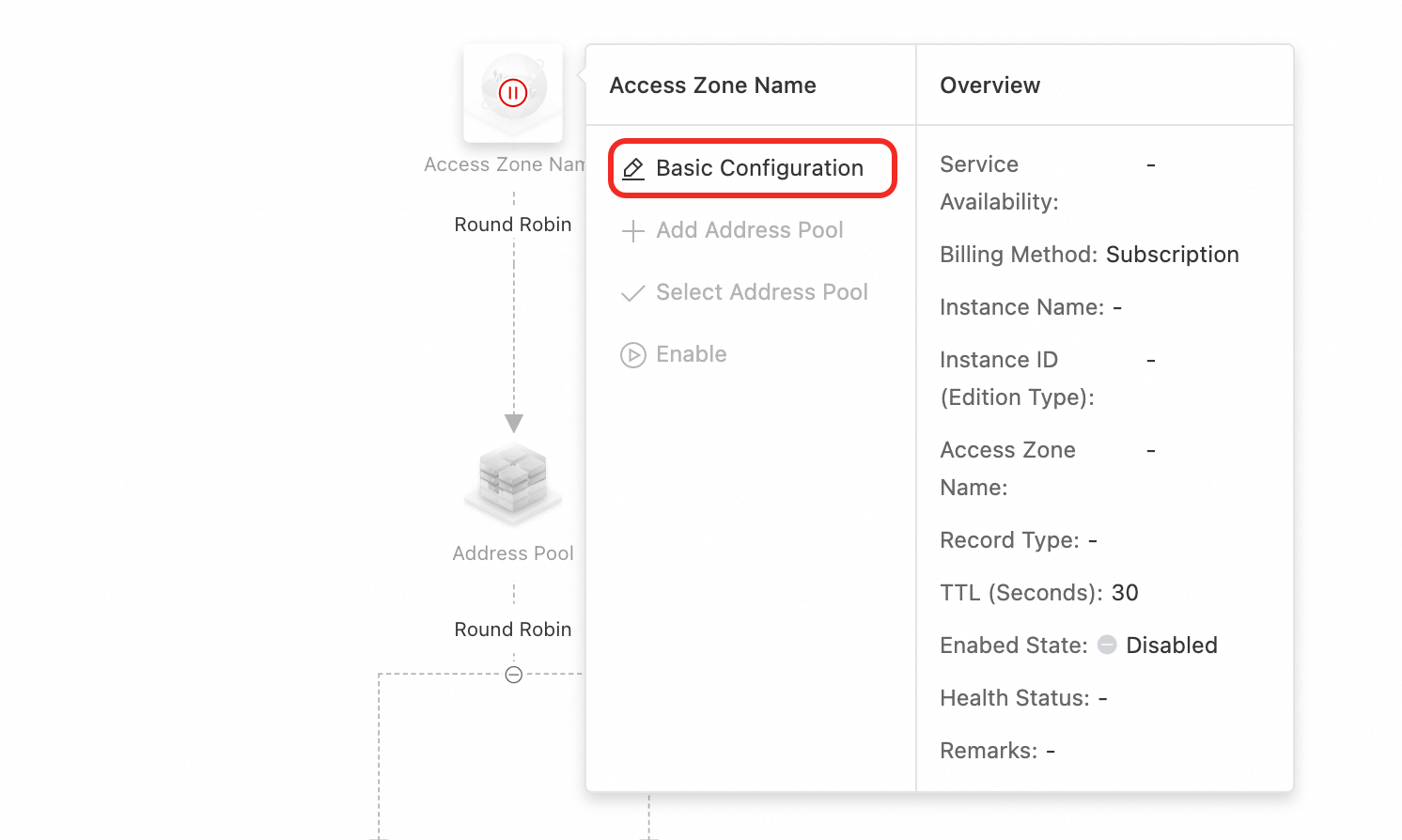
On the Basic Configuration page, configure the parameters and submit the form. For more information, see Access Domain Name.
Access Zone Name: Enter
www.cloud-example.com.Billing Method: Select Pay-As-You-Go.
Record Type: Select A.
Click the icon for the access domain name and select Add Address Pool. Create three address pools: China (Hong Kong), Overseas, and Global.

Click the icon for an address pool and select Add Address. Add addresses to the three address pools. On the Add Address page, configure the parameters and select a health check template.
NoteIf you have not created a health check template, click the Add Health Check Template button to add one. For more information, see Health Check Template.

Under the access domain name, click the load balancing policy name and select Configure Load Balancing Policy. This example uses a geography-based policy. Set the load balancing policy between address pools to Nearest Source. For more information, see Configure a Load Balancing Policy Between Address Pools. In the Query Source section, set the source for the three address pools to China (Hong Kong), Overseas, and Global Default respectively.
ImportantTo prevent terminals from failing to resolve an address when no source line matches, you must configure a Default line.
If an address pool for an intelligent line becomes unavailable, GTM responds with an address from the default line.
If all address pools are unavailable, GTM responds with all addresses from the global default address pool based on the polling policy. If the default line has multiple address pools, GTM responds with addresses from the non-empty address pool with the smallest ordinal number. If there is no default line, GTM responds with addresses from the non-empty address pool with the smallest ordinal number.

Under an address pool, click the load balancing policy name and select Configure Load Balancing Policy. To implement active-standby disaster recovery, select Global Availability and set Preemptive Mode to Preemptive Mode. For more information, see Address Pool Configuration.
ImportantThe smaller the ordinal number of an address, the higher its resolution priority. An address with a larger ordinal number is used only when the address with a smaller ordinal number is unavailable.
The ordinal number of an address pool has two purposes. First, if multiple address pools have the same source, the one with the smaller ordinal number has higher resolution priority. Second, if all address pools are unavailable, GTM returns all IP addresses from the non-empty address pool with the smallest ordinal number.
 Important
This example demonstrates the configuration procedure. If you see red or orange alert metrics during configuration, check the health status of the addresses immediately.
Configure alert monitoring for the instance. For more information, see Alert Configuration.
Click the icon for the access domain name and select Enable.

In the confirmation dialog box, enable the access domain name.
ImportantIf a DNS record with the same name and type exists in the authoritative zone of Alibaba Cloud DNS, queries for that record type are first processed by the GTM policy for intelligent scheduling and resolution. This enables features such as load balancing and failover.
If you disable or delete the GTM instance, the domain name will be resolved through the authoritative zone of Alibaba Cloud DNS.