Data Management (DMS) provides the sensitive data protection feature. You can use the feature to scan a database for sensitive data. Then, you can de-identify and manage the sensitive data.
Background information
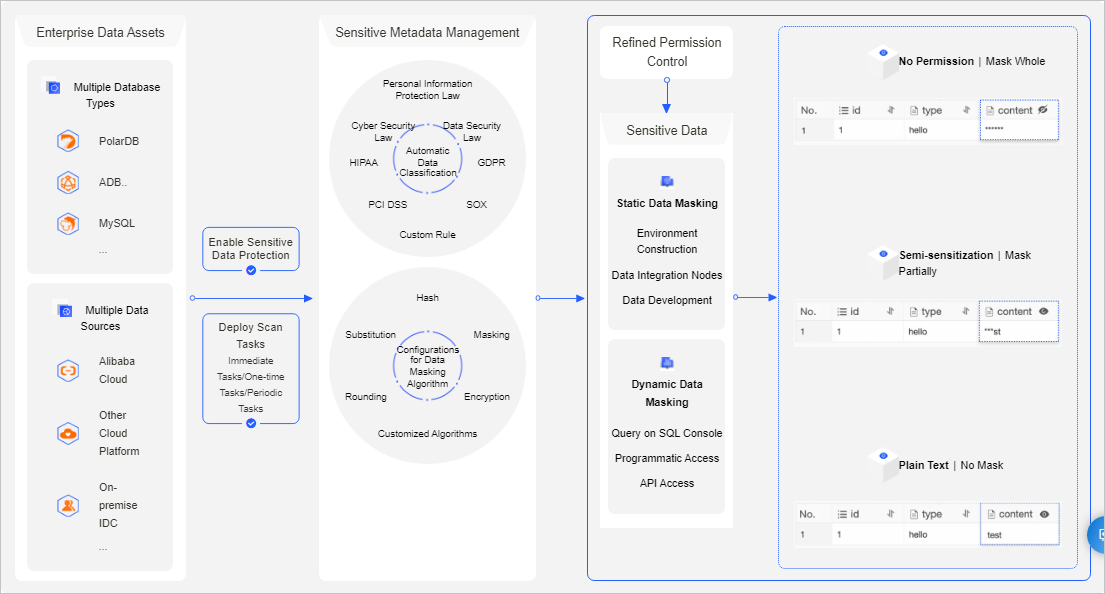
The sensitive data protection feature helps you effectively detect and protect sensitive data assets in your enterprise. This prevents sensitive data from being abused or leaked. The following figure shows the architecture of the sensitive data protection feature.
Supported databases
Relational databases:
MySQL: ApsaraDB RDS for MySQL, PolarDB for MySQL, and MySQL databases from other sources
SQL Server: ApsaraDB RDS for SQL Server and SQL Server databases from other sources
PostgreSQL: ApsaraDB RDS for PostgreSQL, PolarDB for PostgreSQL, and PostgreSQL databases from other sources
MariaDB: ApsaraDB RDS for MariaDB and MariaDB databases from other sources
PolarDB for PostgreSQL (Compatible with Oracle)
PolarDB for Xscale (PolarDB-X)
OceanBase
Oracle
Db2
Dameng (DM)
Lindorm: Lindorm_CQL and Lindorm_SQL
openGauss
Data warehouses
AnalyticDB for MySQL
AnalyticDB for PostgreSQL
Data Lake Analytics (DLA)
ClickHouse
MaxCompute
Hologres
Hive
Usage notes
The sensitive data protection feature is applicable only if you manage databases in the DMS console. This feature is inapplicable if you manage databases by using other methods, such as calling API operations.
The data in the source database is not affected if you use the sensitive data protection feature. For example, if you mask data in an ApsaraDB RDS for MySQL database that is managed by DMS, the data masking result is visible only in DMS and does not affect data in your source database.
Features
Sensitive data dashboard: DMS provides a sensitive data dashboard that helps an enterprise manage sensitive data in a centralized manner.
Automated data scan:
DMS allows you to customize a schedule for scanning data.
DMS can automatically detect and classify sensitive data. This helps you effectively detect and manage sensitive data.
DMS supports built-in and custom data classification templates to implement fine-grained classification and management of sensitive data. You can manage sensitive data based on the principle of least privilege.
Sensitive data masking:
DMS supports built-in and custom sensitive data masking rules. This helps you flexibly manage sensitive data masking algorithms. You can mask different fields based on your business scenarios, implement fine-grained permission control, and ensure the least sensitive data exposure.
DMS provides a test environment that allows you to experiment with your sensitive data detection and masking rules.
DMS allows you to manage the access of users and applications to sensitive data.
Sensitive data monitoring: DMS monitors the use of sensitive data, audits anomalous activities, and generates alerts. This helps you trace anomalous activities and the source of data leaks.
Terms
Sensitivity level: Business data, such as mobile numbers and ID card numbers, is sensitive. The fields that store sensitive data must be encrypted before they are displayed during regular queries. DMS supports the following three sensitivity levels based on the sensitivity of the data:
Low Sensitivity: The Low Sensitivity level is derived from the Internal level of DMS. For a database instance that is managed in Security Collaboration mode, the sensitivity level of the data stored in the database instance is Low Sensitivity by default.
Moderate Sensitivity: The Moderate Sensitivity level is derived from the Sensitive level of DMS.
High Sensitivity: The High Sensitivity level is derived from the Confidential level of DMS.
NoteAfter you set the sensitivity levels for data, take note of the following rules:
When you query data in the SQLConsole, the Moderate Sensitivity and High Sensitivity fields on which you have no permissions are displayed as strings of asterisks (*) or in a custom manner.
To query, export, or change Moderate Sensitivity or High Sensitivity fields, you must apply for the permissions on these fields.
A database administrator (DBA) or DMS administrator can configure special approval processes for exporting or changing data that contains Moderate Sensitivity or High Sensitivity fields.
Detection rule: DMS provides built-in sensitive data detection rules that are designed for different industries based on the relevant laws and regulations. You can also customize detection rules that detect sensitive data based on the metadata of a database or the data that is stored in the database.
Data types: DMS provides data types that are defined based on various laws and regulations. You can also create custom data types.
Level 1 data types: include types such as personal information, enterprise information, and location information.
Level 2 data types: include types such as mobile phone numbers, email addresses, and bank card numbers.
Masking algorithm: DMS supports hash, redaction, substitution, transformation, and encryption algorithms to mask data. You can configure custom masking rules based on the built-in masking algorithms.
Masking policy: DMS generates a masking policy after you configure a masking rule for the selected sensitive fields.
Procedure
