Alibaba Cloud CLI lets you automate management and maintenance of Data Disaster Recovery from the command line. After completing this tutorial, you can:
-
Install and configure Alibaba Cloud CLI with a RAM user credential
-
Discover available Data Disaster Recovery API operations
-
Call an API operation and interpret the response
The tutorial uses DescribeBackupPlanBilling as the working example.
Prerequisites
Before you begin, ensure that you have:
-
An Alibaba Cloud account
-
A RAM user with the
AliyunDMSFullAccesspolicy attached — see Grant permissions to a RAM user -
An AccessKey pair for the RAM user — see Create an AccessKey pair
An Alibaba Cloud account has full access to all Alibaba Cloud services. Create a Resource Access Management (RAM) user and grant only the permissions required, following the principle of least privilege. For the permission policies supported by Data Disaster Recovery, see Predefined system policies and Custom policies.
Step 1: Install Alibaba Cloud CLI
Choose the path that matches your environment.
Option A: Use Cloud Shell (no installation required)
Alibaba Cloud CLI is pre-installed in Cloud Shell. Cloud Shell also configures an identity credential automatically, so you can skip Step 2 and go straight to Step 3. See What is Cloud Shell?
Option B: Install locally
Alibaba Cloud CLI supports Windows, Linux, and macOS. Follow the guide for your operating system:
For an overview of Alibaba Cloud CLI, see What is Alibaba Cloud CLI?
Step 2: Configure credentials
Skip this step if you are using Cloud Shell — credentials are configured automatically.
Configure your AccessKey credentials in Alibaba Cloud CLI using an AkProfile configuration:
-
Create a RAM user and create an AccessKey pair for that user.
-
Attach the
AliyunDMSFullAccesspolicy to the RAM user. See Grant permissions to a RAM user. -
Find the region ID for the region you want to use. Alibaba Cloud CLI sends API requests to the region you specify. See Endpoints for the regions Data Disaster Recovery supports.
-
Configure the AccessKey credentials in the
AkProfileconfiguration file. For a step-by-step example, see the "Configuration examples" section in Configure credentials.
Alibaba Cloud CLI supports multiple credential types. For a full list, see the "Credential types" section in Configure credentials.
Use the --region option to target a specific region for any command. This overrides the region set in your credential configuration and environment variables. See Command line options for API calls.
Step 3: Generate a CLI command
OpenAPI Explorer generates ready-to-use CLI commands for every Data Disaster Recovery API operation.
-
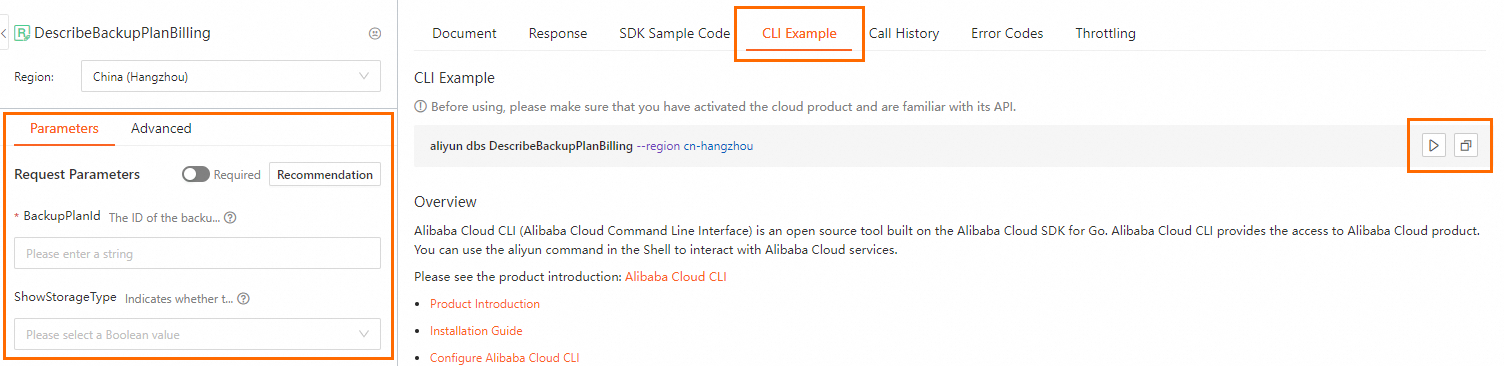
Open the DescribeBackupPlanBilling page in OpenAPI Explorer.
-
On the Parameters tab, fill in the request parameters.
-
Click the CLI Example tab to view the generated command.
-
Copy or run the command:
-
Click
 to run the command directly in Cloud Shell.
 -
Click
 to copy the command to your clipboard, then paste it into your local shell.
-
OpenAPI Explorer appends --region to generated commands by default. When you run the command locally, Alibaba Cloud CLI uses that region instead of the one in your credential configuration. Remove or keep the option based on your needs. For parameter format details, see Parameter formats.
Step 4: Call API operations
Alibaba Cloud CLI integrates the Data Disaster Recovery API operations of version 2019-03-06 by default. To call version 2021-01-01 operations, use the --force and --version options. OpenAPI Explorer adds these options automatically when you generate a command for the 2021-01-01 API.
For complex workflows that chain multiple commands, compile them into a shell script to improve efficiency.
For a full list of operations, see:
List available API operations
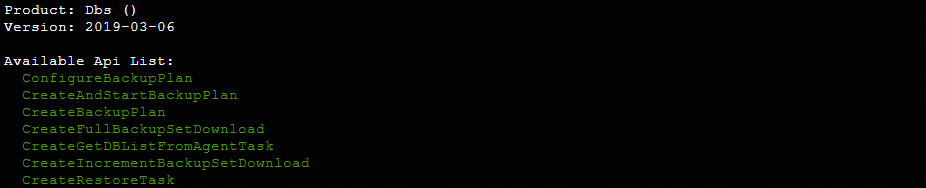
Use the --help option to see all 2019-03-06 API operations available in Alibaba Cloud CLI:
aliyun dbs --helpExpected output:
Query backup schedule billing information
The following example calls DescribeBackupPlanBilling to query billing information for a backup schedule. See DescribeBackupPlanBilling for the full parameter reference.
aliyun dbs DescribeBackupPlanBilling --BackupPlanId 'dbstooi01ex****' --ShowStorageType trueExpected output:
{
  "HttpStatusCode": 200,
  "RequestId": "DD7BC7F5-4E3A-5DF3-BFF9-831503C4D9E3",
  "Success": true,
  "Item": {
    "BuyCreateTimestamp": 1658372830000,
    "FullStorageSize": 151,
    "BuyExpiredTimestamp": 1661097600000,
    "BuySpec": "micro",
    "QuotaEndTimestamp": 1659283200000,
    "IsExpired": true,
    "QuotaStartTimestamp": 1656604800000,
    "TotalFreeBytes": 858993459200,
    "PaiedBytes": 0,
    "UsedFullBytes": 0,
    "IsFreeBytesUnlimited": true,
    "ContStorageSize": 10437039,
    "BuyChargeType": "PREPAY",
    "UsedIncrementBytes": 9406734
  }
}
Troubleshoot errors
If an API call returns an error, check the error code and verify that the request parameters and their values are valid.
For self-service diagnostics, visit OpenAPI Troubleshoot and enter the request ID or SDK error information from the response.
What's next
-
Explore all available operations in the API reference (2019-03-06) and API reference (2021-01-01)
-
Use
--forceand--versionto call2021-01-01operations — see Forcibly call an API operation