Connect Apache Spark on E-MapReduce (EMR) on ECS to a Data Lake Formation (DLF) catalog using Apache Paimon's REST metastore interface.
Prerequisites
Before you begin, ensure that you have:
An EMR on ECS cluster running version 5.12.0 or later, with Spark 3 and Paimon selected as components. For other version requirements, contact DLF developers via DingTalk group 106575000021
Completed the Quick Start for DLF
EMR and DLF deployed in the same region, with the Virtual Private Cloud (VPC) of your EMR cluster added to the DLF whitelist
Create a catalog
See Set up DLF.
Grant DLF permissions to a role
Step 1: Attach the RAM policy to AliyunECSInstanceForEMRRole
Skip this step after EMR is natively integrated with DLF.
Log on to the Resource Access Management (RAM) console using your Alibaba Cloud account or as a RAM administrator.
In the navigation pane, choose Identity Management > Roles, then search for AliyunECSInstanceForEMRRole.
In the Actions column, click Add Permissions.
Under Permission Policies, search for and select AliyunDLFFullAccess, then click Confirm.
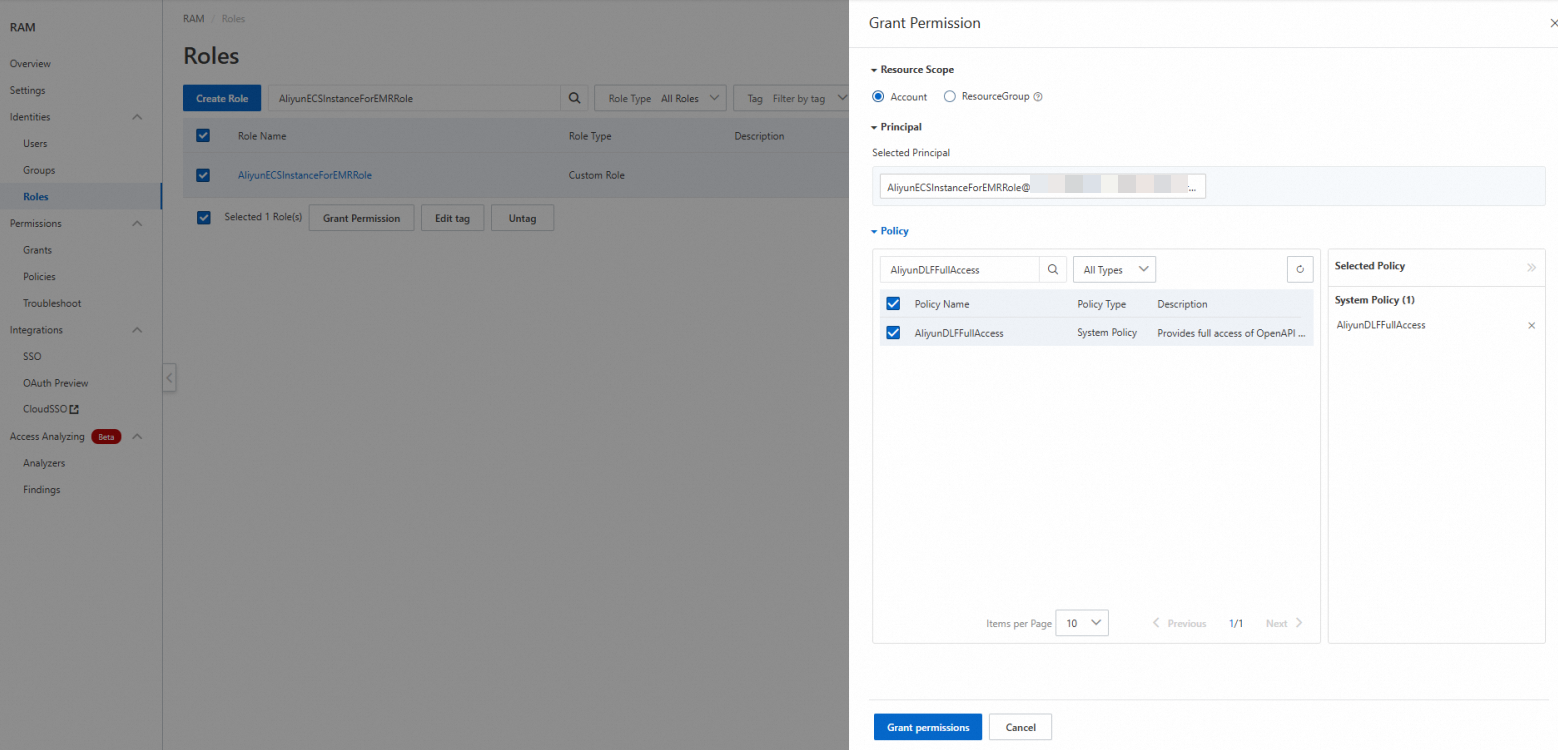
Step 2: Grant DLF permissions to AliyunECSInstanceForEMRRole
Log on to the Data Lake Formation console.
On the Catalogs page, click the name of the catalog to open its details page.
Click the Permissions tab to grant permissions at the catalog level. To grant permissions at a lower scope, navigate to the target database or table and click its Permissions tab instead.
On the authorization page, configure the following settings and click OK.
NoteIf AliyunECSInstanceForEMRRole does not appear in the dropdown list, go to the user management page and click Sync.
Field Value User/Role RAM User/RAM Role Select Authorization Object AliyunECSInstanceForEMRRole Preset Permission Type Select read permissions manually, or choose a predefined role: Data Reader or Data Editor
Upgrade Paimon dependencies in your EMR cluster
Download Paimon version 1.1 or later from the Maven repository. You need two JAR files that match the Spark version of your EMR cluster:
| JAR file | Description |
|---|---|
paimon-jindo-*.jar | Paimon integration for Alibaba Cloud storage (Jindo) |
paimon-spark-3.x-*.jar | Paimon connector for Spark 3. Match the 3.x suffix to your Spark minor version. |
Step 1: Upload JAR files and the upgrade script to OSS
Upload both JAR files to Object Storage Service (OSS) and set their permissions to public-read. For upload instructions, see Simple upload.
Modify the following script by replacing the two placeholder URLs with the actual OSS download URLs of your JAR files, then upload the script to OSS.
ImportantEMR on ECS clusters cannot access the public network by default. Use private network URLs when your OSS bucket and EMR cluster are in the same region.
Placeholder JAR file URL format <paimon-jindo-1.1.0.jar-url>paimon-jindo-*.jarPrivate network: https://<bucket>.oss-cn-hangzhou-internal.aliyuncs.com/jars/paimon-jindo-1.1.0.jar<br>Public network:https://<bucket>.oss-cn-hangzhou.aliyuncs.com/jars/paimon-jindo-1.1.0.jar<paimon-spark-3.x-1.1.0.jar-url>paimon-spark-3.x-*.jarPrivate network: https://<bucket>.oss-cn-hangzhou-internal.aliyuncs.com/jars/paimon-spark-3.x-1.1.0.jar<br>Public network:https://<bucket>.oss-cn-hangzhou.aliyuncs.com/jars/paimon-spark-3.x-1.1.0.jar#!/bin/bash echo 'clean up paimon-dlf-2.5 exists file' rm -rf /opt/apps/PAIMON/paimon-dlf-2.5 rm -rf /opt/apps/PAIMON/paimon-dlf-2.5.tar.gz.* cd /opt/apps/PAIMON/paimon-current/lib/spark3 mkdir -p /opt/apps/PAIMON/paimon-dlf-2.5/lib/spark3 cd /opt/apps/PAIMON/paimon-dlf-2.5/lib/spark3 wget <paimon-jindo-1.1.0.jar-url> wget <paimon-spark-3.x-1.1.0.jar-url> echo 'link paimon-current to paimon-dlf-2.5' rm -f /opt/apps/PAIMON/paimon-current ln -sf /opt/apps/PAIMON/paimon-dlf-2.5 /opt/apps/PAIMON/paimon-currentReplace each placeholder with the OSS download URL of the corresponding JAR file:
Step 2: Run the script on your EMR cluster
Run the script as a Script Action across all nodes. For details, see Manually run a script.
In your EMR cluster, go to Script Action > Manual Execution and click Create And Execute.
In the dialog box, configure the following settings and click OK.
Field Value Name A custom name for the script Script Location The OSS path of the upgrade script. Format: oss://**/*.shExecution Scope Cluster After the script completes, restart the Spark service for the changes to take effect.
Read and write data with Spark
Connect to the Paimon catalog
Run the following spark-sql command. Replace <regionID> with your region ID (for example, cn-hangzhou), and replace <catalog> with the name of the DLF catalog you created.
spark-sql --master yarn \
  --conf spark.driver.memory=5g \
  --conf spark.sql.defaultCatalog=paimon \
  --conf spark.sql.catalog.paimon=org.apache.paimon.spark.SparkCatalog \
  --conf spark.sql.catalog.paimon.metastore=rest \
  --conf spark.sql.extensions=org.apache.paimon.spark.extensions.PaimonSparkSessionExtensions \
  --conf spark.sql.catalog.paimon.uri=http://<regionID>-vpc.dlf.aliyuncs.com \
  --conf spark.sql.catalog.paimon.warehouse=<catalog> \
  --conf spark.sql.catalog.paimon.token.provider=dlf \
  --conf spark.sql.catalog.paimon.dlf.token-loader=ecs
Key parameters:
| Parameter | Description |
|---|---|
spark.sql.catalog.paimon.metastore | Set to rest to use the Paimon REST metastore protocol. |
spark.sql.catalog.paimon.uri | The DLF REST catalog endpoint for your region. Uses the VPC internal address. |
spark.sql.catalog.paimon.warehouse | The DLF catalog name. This is a catalog instance name, not a file path. |
spark.sql.catalog.paimon.token.provider | Set to dlf to authenticate with DLF. |
spark.sql.catalog.paimon.dlf.token-loader | Set to ecs to load credentials from the ECS instance RAM role automatically, without configuring an access key. |
This guide uses ECS instance RAM role authentication. For other authentication methods (access key, STS token), see the Apache Paimon DLF token documentation.
Create tables
Run the following SQL to create a managed table and a foreign table.
CREATE TABLE user_samples
(
    user_id INT,
    age INT,
    gender_code STRING,
    clk BOOLEAN
);

CREATE TABLE user_samples_di (
    user_id INT,
    age INT,
    gender_code STRING,
    clk BOOLEAN
)
USING CSV
OPTIONS(
'path'='oss://<bucket>/user/user_samples_di'
);
Table behavior:
| Table | Type | Metadata | Data files | Drop behavior |
|---|---|---|---|---|
user_samples | Managed | DLF | OSS (under the catalog's default path) | — |
user_samples_di | Foreign | DLF | OSS (at the path you specify) | Only metadata is deleted; data files in OSS are retained |
If you do not specify a database, tables are created in the default database of the catalog. Create the /user/user_samples folder in OSS before running the managed table statement.
Insert data
INSERT INTO user_samples VALUES
(1, 25, 'M', true),
(2, 18, 'F', false);

INSERT INTO user_samples_di VALUES
(1, 25, 'M', true),
(2, 18, 'F', true),
(3, 35, 'M', true);
Query data
SELECT * FROM user_samples;
SELECT * FROM user_samples_di;

Merge data
The following statement merges rows from user_samples_di into user_samples, matching on user_id. Matched rows are updated; unmatched rows are inserted.
MERGE INTO user_samples
USING user_samples_di
ON user_samples.user_id = user_samples_di.user_id
WHEN MATCHED THEN
UPDATE SET
  age = user_samples_di.age,
  gender_code = user_samples_di.gender_code,
  clk = user_samples_di.clk
WHEN NOT MATCHED THEN
  INSERT (user_id, age, gender_code, clk)
  VALUES (user_samples_di.user_id, user_samples_di.age, user_samples_di.gender_code, user_samples_di.clk);
Considerations
Foreign table vs. managed table: Dropping a foreign table removes only its metadata—data files stored in OSS are not deleted.
OSS directory pre-creation: You must create the
/user/user_samplesdirectory in OSS before creating a managed table. If the directory does not exist, the table creation statement fails.Network access: EMR on ECS clusters cannot access the public network by default. When uploading Paimon JARs to OSS, use private network URLs to ensure the upgrade script can download them from within the cluster.
VPC whitelist: The VPC of your EMR cluster must be added to the DLF whitelist before Spark can connect to the DLF catalog endpoint.