Can I choose which Direct Mail domain to attach to a dedicated IP?
You do not attach a dedicated IP to a domain. Instead, you can attach it to a sender address.
You can do this in two ways.
Method 1: Attach a configuration set to a sender address
In the console, you can attach a configuration set to a sender address. After the set is attached, all sending methods automatically use the dedicated IP. You no longer need to specify the IP pool ID parameter when you send emails. For more information, see Sending configuration (configuration set).
Method 2: Pass the IP pool during a call
When you send emails using the console, an API, or SMTP, you can specify the IP pool parameter.
For more information, see Dedicated IP.
How can I verify if I am successfully using a dedicated IP?
When you send emails from the console, you can query the IP pool that was used. However, API and SMTP methods do not support direct queries for the outbound IP address in delivery records.
You can use the following methods to confirm:
Check the delivery error messages that are returned by some recipients. These messages might contain the delivery IP address.
Send a test email and view the original message. The message header usually contains the delivery IP and the X-AliDM-Settings field. You can decode the X-AliDM-Settings value from Base64 to find the IP pool ID.
On the dedicated IP page, go to the View Data tab and compare the displayed data with your actual sending volume.
You can use the event distribution feature. The callback information includes details about the dedicated IP pool and the dedicated IP.
Is the purchased dedicated IP permanent or periodically updated?
The dedicated IP does not change after purchase.
How many IPs can a single IP pool support?
By default, an IP pool supports a maximum of 5 IPs. This limit can be adjusted as needed.
How many IP address pools can a dedicated IP join?
A dedicated IP can be added to only one IP address pool. An address pool can contain multiple different dedicated IPs.
Can IPs be used across regions?
No, they cannot. You must purchase dedicated IPs in the region where you intend to use them.
I have paid for a dedicated IP, but why can't I find the option to create a new dedicated IP pool?
This can happen if the dedicated IP was purchased in the wrong region. Dedicated IPs are region-specific. In the console, verify that you purchased the IP in the correct region. You can check other regions to confirm.
What should I be aware of when sending verification codes using the dedicated IP service?
Ensure that the automatic warm-up feature is enabled, the DNS records for your email domain are configured correctly, and you provide high-quality content.
Also, avoid using this IP for batch emails. This practice can harm the IP reputation.
Why are my emails still going to spam folders even though I'm using a dedicated IP?
Emails may be delivered to spam folders due to the recipient's anti-spam policy. The exact reason can vary, but common factors include the reputation of the sender address, email domain, and IP address. We recommend that you first review and optimize your configuration. You can improve email deliverability and reputation by properly configuring domain name resolution, optimizing your content, and managing your recipient lists. These actions help prevent your emails from being blocked by anti-spam mechanisms.
Configure domain name resolution before sending
Sender Policy Framework (SPF), DomainKeys Identified Mail (DKIM), and Domain-based Message Authentication, Reporting, and Conformance (DMARC)
Manage email content and unsubscribes
Unsubscribe Link
Improve email quality
Implement a recipient management policy
Request that recipients add you to their whitelist
Maintain high-quality recipient lists
Follow recommended sending practices
Email warm-up
Differentiate your content
For more information, see the following documents:
How can I view the delivery volume for each recipient?
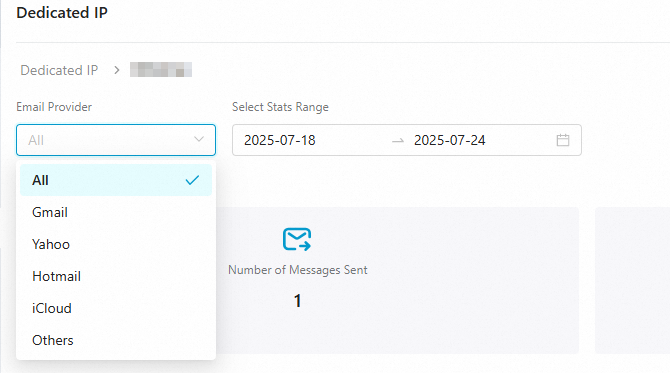
On the Dedicated IP -- View Data page, you can view the delivery data for a specific day and recipient service provider. Supported providers include Gmail, Yahoo, Hotmail, and iCloud.
For more information, see Dedicated IP.