Sender configuration (configuration set)
A sender configuration is a collection of settings that you can apply to your emails. It currently supports features such as associating an IP pool with a sender address and pre-send address validation. Using a sender configuration lets you customize sending rules for different email types, such as marketing and transactional emails, to improve sending efficiency and optimize overall performance.
In the future, we will add support for more features, such as unsubscribe management, data tracking, and email tags.
A sender configuration (configuration set) is optional.
Manage sender configurations
1. Configure in the console
Navigation: email settings > sender configuration
To create a sender configuration, click the "Create Configuration" button in the upper-right corner of the page. Enter the configuration name, description, associated IP pool, and specify whether to fall back to the public channel. The configuration is then created.
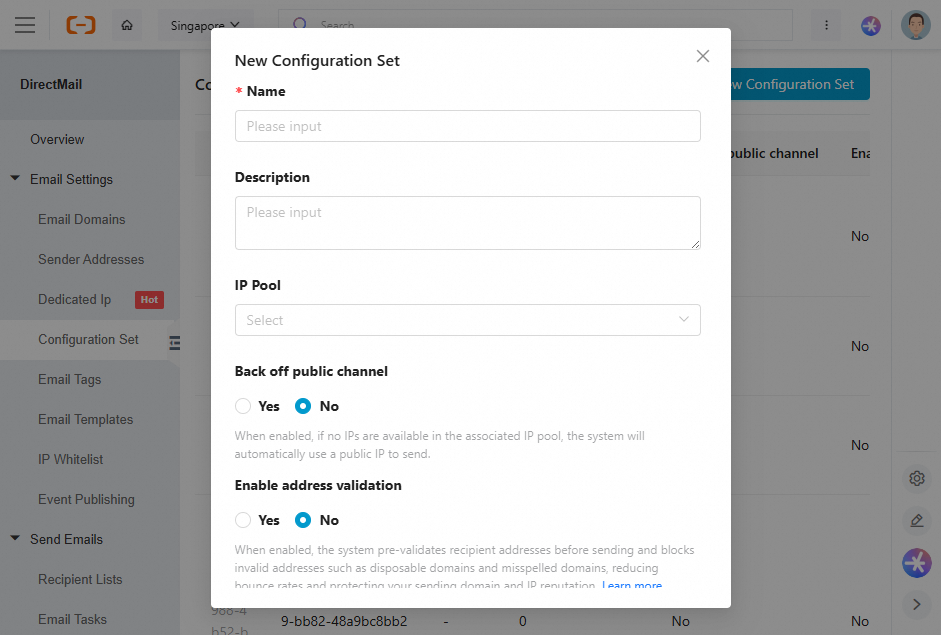
You can also edit or delete existing sender configurations on this page.
1.1 Fallback to public channel (optional)
The system automatically uses public IPs for sending if the associated IP pool has no available IPs, regardless of whether this option is enabled.
If you select "No": By default, the system will not fall back to the public channel. However, dedicated IPs in the warm-up process are an exception and will still fall back until the warm-up is complete.
1.2 Enable address validation (optional)
When you create or edit a sender configuration, you can enable the address validation feature.
When enabled, the system pre-validates recipient addresses before sending, blocking invalid addresses such as those from disposable or misspelled domains. This helps reduce your bounce rate and protect your sending domain and IP reputation.
How to enable
Go to email settings > sender configuration. In the dialog box for creating or editing a sender configuration, find the "Enable address validation" option and select "Yes".
Default status: The default setting is "No". You must explicitly enable it.
Deactivation behavior: If you later disable this feature, your previous blocklist configuration is retained and remains editable. You can then easily re-enable it with the same settings at any time.
Default blocklist policy
When address validation is enabled, the following items are pre-selected by default for a new configuration:
Primary Status:
INVALID(invalid address)Primary Status:
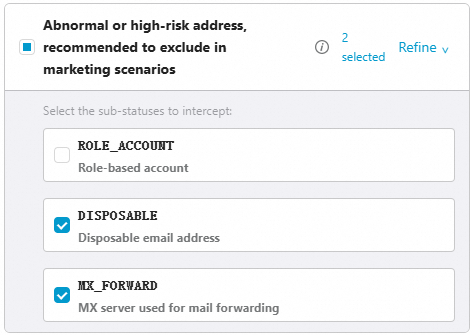
DO_NOT_MAIL(Abnormal or high-risk address, recommended for exclusion from marketing campaigns) with the following sub-statuses:DISPOSABLE(disposable email address),MX_FORWARD(MX server is used for mail forwarding)
When you send emails using a sender configuration, address validation only supports the quick validation mode (BASIC_ONLY). For features that require an SMTP probe (FULL mode), see the Validate Email Address API documentation.
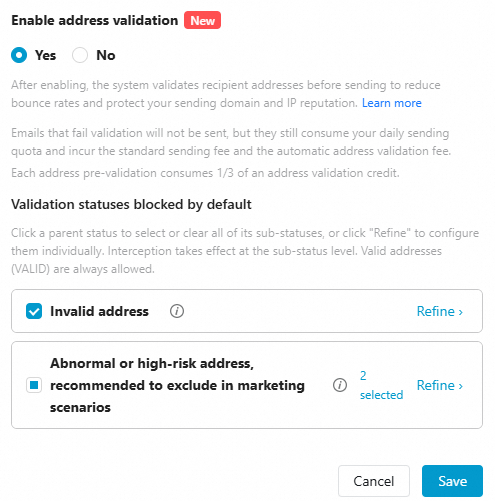
Interaction rules
Selecting a main category blocks all addresses under it.
Click "Refine" to configure specific sub-statuses individually.
Note: Valid addresses (
VALID) are always allowed and cannot be blocked.
Validation mechanism and performance
During delivery, the system automatically calls the address validation feature in quick validation mode (BASIC_ONLY):
Detection capabilities: All detection capabilities are enabled except for the SMTP probe. This includes syntax checks, DNS/MX record verification, and identification of disposable or misspelled domains.
Latency: Latency is extremely low, typically in the millisecond range.
Processing logic: The system uses a fail-open mechanism. Recipient addresses on the blocklist are rejected. Addresses not on the list, or those for which the check times out, are allowed to pass through.
Billing (address validation and delivery)
Each pre-validation check consumes one-third of an address validation quota unit.
Blocked sends still count toward your daily sending quota, and the standard sending fee still applies.
Status and sub-status
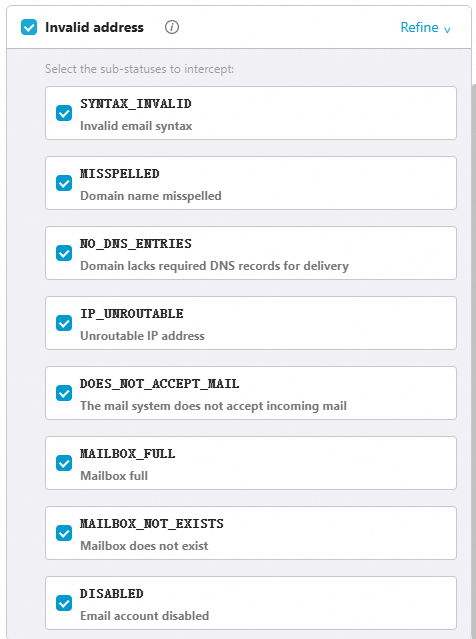
The following table describes the statuses returned by address validation. You can configure your blocklist policy based on your business needs.
Primary status | Description | Sub-status |
INVALID | The address is invalid or does not exist. |
|
DO_NOT_MAIL | The address is deliverable but not recommended for email marketing. |
|
CATCH_ALL | The domain is configured to accept all incoming mail, so the system cannot verify whether this specific address exists. | — |
UNKNOWN | The system could not provide a validation result. |
|
Delivery results
In the sending details, recipients blocked by validation are shown as a 576 delivery failure, with the error message
Recipient rejected by validation.Note: An address blocked by validation is not added to the "invalid address" suppression list in the console. The block applies only to the current sending task.
For more information, see Email Address Validation.
2. Using sender configurations
When you send emails via the console, API, or SMTP (for more information, see Three Ways to Send Email), the system automatically applies the sender configuration associated with the sender address. You do not need to specify it separately in your code.
Associate sender configuration with sender address
You can associate a sender configuration with a sender address.
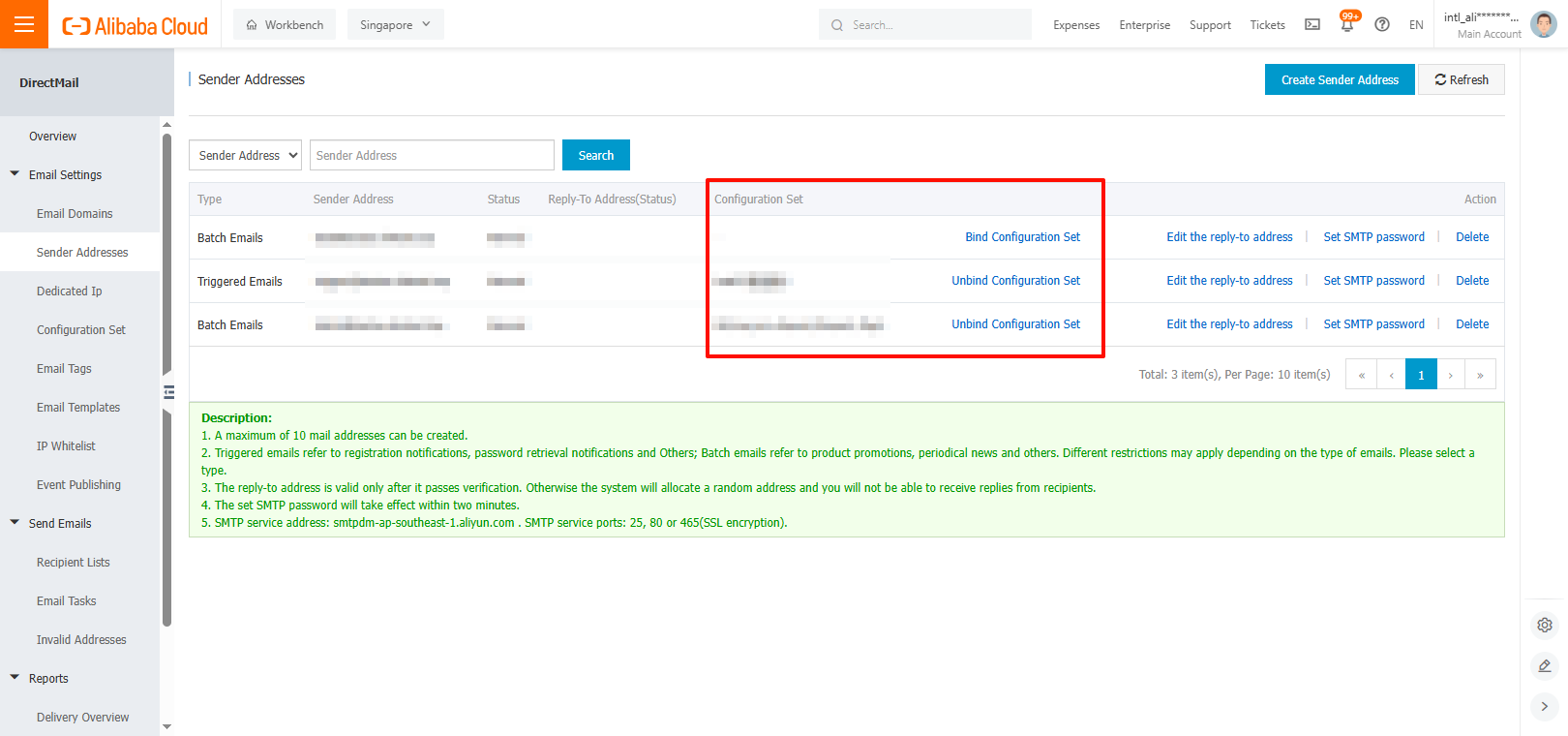
Click "Associate Sender Configuration" or "Change Sender Configuration". In the pop-up window, you can select one of your sender configurations. Each sender address can be associated with only one sender configuration, but multiple sender addresses can share the same sender configuration.
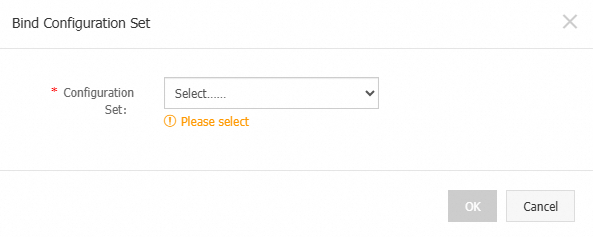
Then, click "Confirm Association".
FAQ
Q: If I specify IP pool A when creating a sending task, but the sender address is associated with a sender configuration that uses IP pool B, which IP pool is ultimately used?
A: IP pool A is used.
Priority logic for settings specified in a sending task versus an associated sender configuration:
If you do not specify settings like an IP pool or email tags in your API request or console task, and the sender address is associated with a sender configuration, the system uses the settings from that sender configuration.
If you have specified settings like an IP pool or email tags in your API request or console sending task, those settings take priority. This is useful if you need to temporarily switch an IP pool or run A/B tests.