DataWorks provides end-to-end data development and governance with a unified workflow. You can implement custom process controls at key stages to meet your business needs.
Edition requirements
This feature is available in DataWorks Enterprise Edition and later editions.
Overview
DataWorks workspaces are available in standard mode and basic mode. The development process for a node varies slightly between the two modes. The following diagrams illustrate the data development workflows for each mode.
-
Development workflow in a standard mode workspace

-
Development workflow in a basic mode workspace
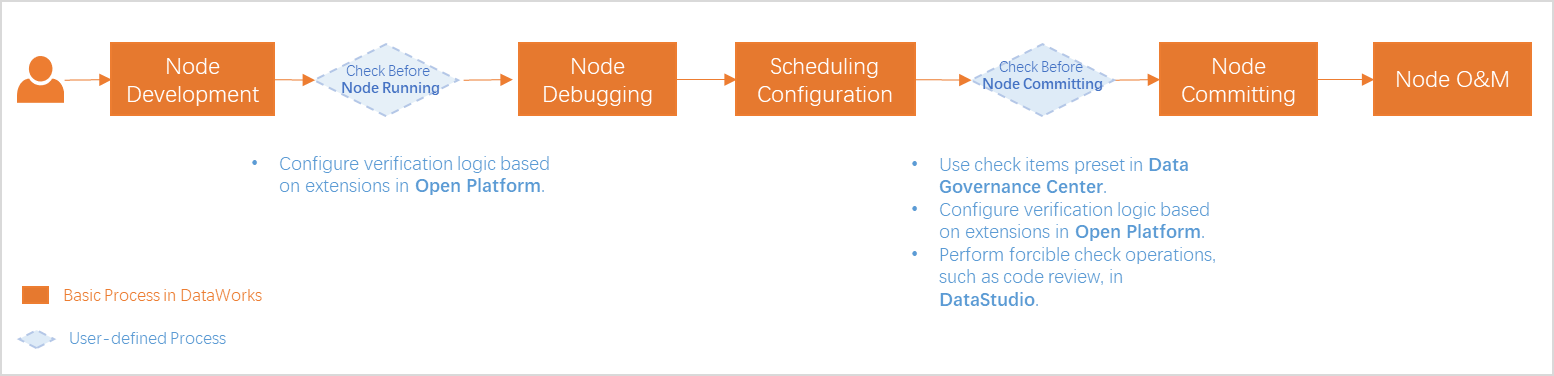
As shown in the diagrams, you can implement process controls at key workflow stages, such as before running, committing, or deploying a node.
|
Pre-run check |
Pre-commit check |
Pre-deployment check |
|
On the data development page, click the Run button on the toolbar to run your code. A "Checking" message indicates that the operation will proceed automatically if the check passes. In the left-side Operation Check panel, you can view the records for all checks, such as the pre-run event check and pre-deployment event check, and their statuses. Click a record to open the details panel, which shows the check name, check type (for example, Pre-run checker_Data), status, and the View Details and View Documentation links. |
When you click the Commit button on the data development page, a "Checking" message indicates that a check is in progress, which proceeds automatically if it passes. You can view the results in the Operation Check panel. This panel lists all triggered extension checks, such as the file commit pre-event. Click a record to view details like the check name, check type (for example, "Pre-commit check_Test program"), and status. You can also click View Details or View Documentation. |
Click the Deploy button in the upper-right corner of the code editor to trigger the file deployment pre-event check. On the Create Deployment Package page, the node's status changes to Checking. Click the node row to open the Operation Check panel at the bottom. This panel displays the check type (for example, Pre-deployment check_Test program), status, and the View Details and View Documentation options. |
You can use modules like Open Platform and Data Governance Center to implement these checks at key stages of the data development process.
|
Related module |
Pre-run check |
Pre-commit check |
Pre-deployment check |
Description |
|
Data Governance Center |
|
|
|
DataWorks Data Governance Center provides multiple built-in check items that you can enable as needed. When a relevant action occurs, DataWorks triggers the validation logic, and the action proceeds only after the check passes. |
|
Open Platform |
|
|
|
If built-in checks are insufficient, use Open Platform to develop and integrate custom check programs for specific events into your data development workflow. |

The following sections describe these process control capabilities in a standard mode workspace.
Enable built-in checks: Data Governance Center
The DataWorks Data Governance Center provides built-in check items that you can enable based on your business needs. When triggered, DataWorks runs its validation logic, and the action can proceed only if the check passes.
|
Item |
Description |
|
DataWorks module |
DataWorks Data Governance Center Data Governance Center offers many built-in check items to validate operations. Go to the Configuration Management > Check Items page and turn on the Enable Check Items switch. Select the Development, Quality, Security, Compute, or Storage tab, find the target check item, such as High-Cost SQL Check, and enable it.
|
|
Configuration and guidance |
You need to enable the check items in Data Governance Center and specify the workspace where they take effect. For general instructions, see Configure governance items. |
Customize validation logic: Open Platform
If built-in checks are insufficient, you can use Open Platform to develop custom logic for specific events and integrate it into your data development workflow. The following table describes how to use custom logic for pre-run, pre-commit, and pre-deployment checks.
|
Item |
Description |
|
DataWorks module |
DataWorks Open Platform DataWorks Open Platform provides features like OpenEvent, Extensions, and OpenAPI. You can use OpenEvent to subscribe to messages for user actions in DataStudio. After an event occurs, you can use an extension to run a custom validation and approval program. Finally, you can use an OpenAPI to send the program's results back to DataWorks. For more information about OpenEvent and extensions, see OpenEvent overview and Extension overview. |
|
Check process |
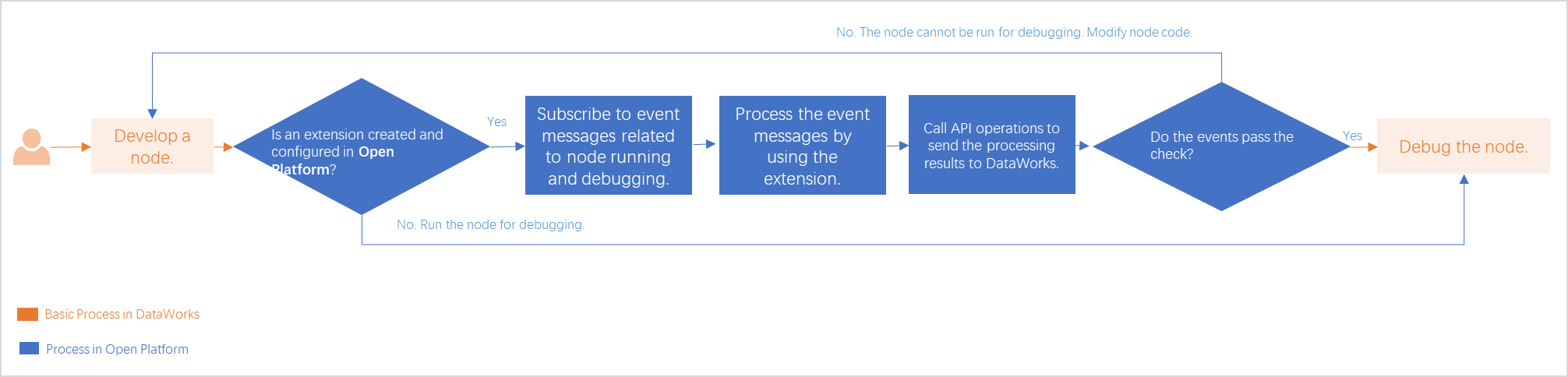
When a user performs a subscribed action in DataStudio, Open Platform triggers the validation process. The following diagram shows an example of a pre-run check process. |
|
Configuration and guidance |
Subscribe to DataStudio events in Open Platform, develop a custom extension to handle these events, publish the extension, and enable it in the desired workspace.
For more event types that you can subscribe to in Open Platform, see Extension overview.
|