You can grant other workspaces the permissions to call an API after you publish the API or view the APIs that your workspace is granted the permissions to call to implement data sharing. This topic describes how to grant required permissions to call an API in different scenarios.
Prerequisites
You can unpublish, authorize access to, or change the protocols of APIs only after the APIs are published. For more information, see API testing, publishing, and version management.
Go to the Manage APIs page
-
Log on to the DataWorks console. In the target region, click in the left-side navigation pane. Select a workspace from the drop-down list and click Go to DataService Studio.
-
On the top menu bar, click Service Management to go to the Manage APIs page.
Grant permissions to call an API
-
On the Published APIs tab, find the desired API and click Authorization.
-
In the API Authorization dialog box, configure the parameters.
After you grant authorization, members of the target workspace can view the API on the Manage APIs > APIs Authorized for Me tab and call it by using their workspace's AppCode or AppKey and AppSecret. To manage or revoke authorizations, go to the Manage APIs > APIs I Have Authorized tab and click Manage Authorization. To add other credentials, go to the API Gateway console, navigate to Call API > Application Management, create a new application, and authorize it. Note: If you unpublish or delete an API, existing authorizations become invalid. Perform these actions with caution.
Parameter
Description
API Name
The name of the API that you want to grant a workspace the permissions to call. You cannot change the value of this parameter.
Tenant Account ID
The ID of the Alibaba Cloud account to be granted permission to call the API. You can view it on the Security Settings page.
Authorized Workspace
The name of the workspace to which you want to grant the permissions to call the API. You can select a workspace that belongs to the current Alibaba Cloud account from the drop-down list.
Authorization Validity Period
The validity period for the API call permission. Valid values are Limited and Unlimited.
-
Limited: You must select an expiration date. The API can be called until this date.
-
Unlimited: After you select Unlimited, you will have permanent permission to call the API.
-
-
Click Confirm.
On the Published APIs tab, you can also perform the following operations:
-
Click Unpublish next to the API. In the Unpublish API dialog box, click Confirm.
Note-
If you unpublish or delete an API after you grant a workspace the permissions to call the API, the workspace can no longer call the API.
-
If you republish an API after you unpublish or modify the API, you must grant the related workspace the permissions to call the API again.
-
-
Click Test next to the API to go to the API Test page. For more information, see Test an API.
-
Hover over More next to the API and click Change Protocol. In the Change Protocol dialog box, set the new API protocol and click Confirm.
Note-
If you delete a protocol, the API can no longer be called by using the protocol. Proceed with caution when you perform this operation.
-
The protocol change takes effect in real time.
-
-
View the APIs that your workspace is granted the permissions to call
On the Manage APIs page, click the Authorized to Use tab to view all APIs authorized for you.
You can perform the following operations on the APIs that your workspace is granted the permissions to call:
-
Click Test next to the API to go to the API Test page. For more information, see Test an API.
-
Click Delete next to the API. In the Delete authorized dialog box, click Confirm.
View the APIs that you grant other workspaces the permissions to call
On the Manage APIs page, click the Authorize Others to Use tab to view all APIs that you have authorized for others.
You can perform the following operations on the APIs that you grant other workspaces the permissions to call:
-
Click Test next to the API to go to the API Test page. For more information, see Test an API.
-
Click Manage next to the API. In the Authorization dialog box, you can revoke or modify the authorization for a workspace.
API authorization feature
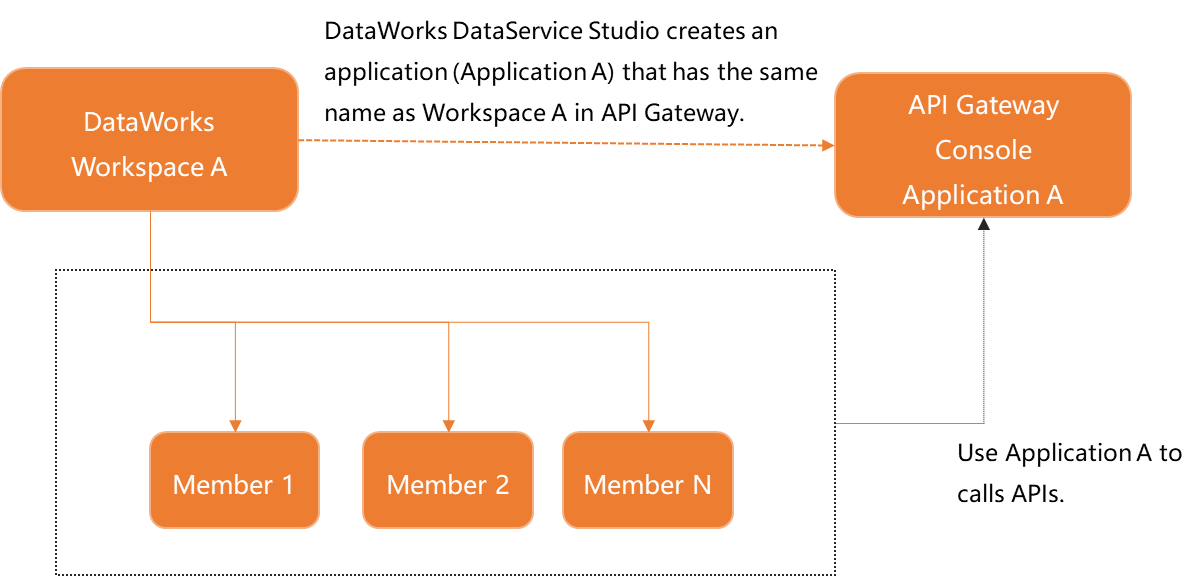
The API authorization feature is used to grant applications the permissions to call APIs. An application is an identity that is used to call an API. To call an API, you must grant the application the permissions to call the API. By default, Alibaba Cloud APP that is supported by DataWorks DataService Studio is used for user identity authentication during API calls in a workspace. DataWorks DataService Studio grants the application that has the same name as the workspace the permissions to call an API in the workspace. In this case, the caller can use the AppCode, AppKey, and AppSecret of the application to call the API in a secure manner. For more information, see Call an API.
When you call an API, you may encounter specific issues, such as how to identify and distinguish the source of the call and how to properly allocate authentication information to authenticate a call. This section describes how to grant permissions to call DataService Studio APIs at different granularities in different scenarios based on your business requirements.
Scenario 1: Members in a DataWorks workspace use the same application to call APIs
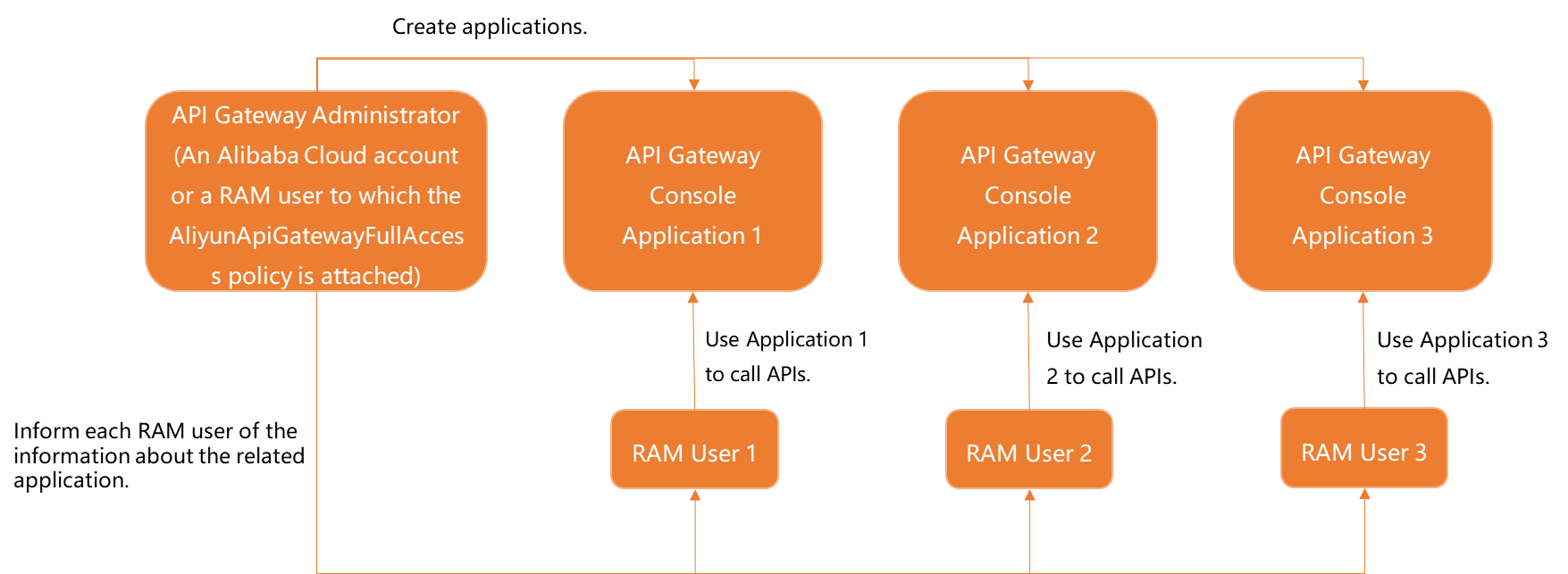
Scenario 2: Each RAM user uses a separate application that belongs to the RAM user to call APIs
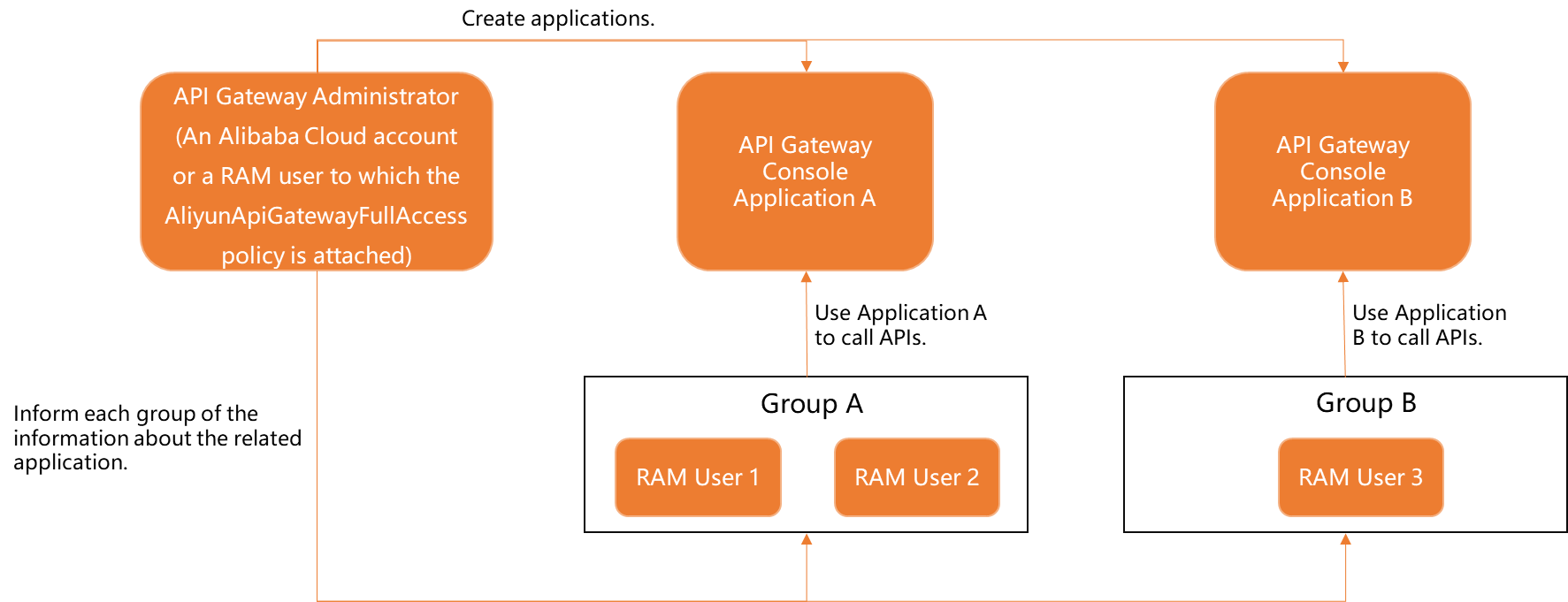
Scenario 3: RAM users in the same group use the same application to call APIs