After an API is published to API Gateway, callers must use the credentials of an authorized app to access it. The process covers creating an app, granting authorization, choosing an authentication method, obtaining credentials, and making calls through an SDK.
Prerequisites: Three essential elements
Before you call any Data Service API, you must meet three prerequisites:
|
Prerequisite |
Description |
Responsible role |
|
API is published |
The API must be approved and published to API Gateway to generate an online calling endpoint. For more information, see Publish an API. |
API developer |
|
An app is created |
The caller must have an app in API Gateway to act as its identity when calling an API. |
API caller |
|
Authorization is granted |
The app must be authorized to call the target API; otherwise, API Gateway denies access, even with valid credentials. For more information, see API Gateway authorization. |
API developer/administrator |
The relationship between these three elements: the API is the "door," the app is the "ID card," and authorization is the "pass." You can only pass through the door if you present both a valid ID card and the corresponding pass.
Create an app (app identity)
An app serves as a container for API-calling credentials. Each app has an independent set of authentication information (AppKey, AppSecret, and AppCode), equivalent to an account and password.
Automatically created default app
When you publish an API in DataWorks for the first time, the system automatically creates an app with the same name as the workspace in API Gateway and authorizes all APIs in that workspace to this default app. This means that:
-
Workspace members can use the default app's credentials to call APIs without additional authorization.
-
The authentication information of the default app can be viewed on the Call APIs page of the Data Service console.
Manually create an app
To isolate traffic or differentiate permissions for different callers, create a new app in the API Gateway console:
-
Log on to the API Gateway console.
-
In the left-side navigation pane, choose Application Management.
-
Click Create Application and enter the app name and description.
-
After the app is created, the system generates a set of AppKey, AppSecret, and AppCode for the app.
Create separate apps for different calling scenarios (such as internal systems, third-party partners, and dashboards) to simplify traffic monitoring, throttling, and permission management.
Authorization process
Authorization grants an app permission to call a specific API. Only an authorized app can successfully call the corresponding API using its credentials.
Grant access to other accounts
To make an API available to workspaces under other Alibaba Cloud accounts, perform cross-account authorization:
-
Log on to the DataWorks console. In the target region, click in the left-side navigation pane. Select a workspace from the drop-down list and click Go to DataService Studio.
-
Go to the Data Services page, click Service Management in the top menu bar, and go to the Manage APIs page.
-
On the Published APIs tab, find the target API and click Authorization in the Actions column.
-
In the API Authorization dialog, configure the following parameters:
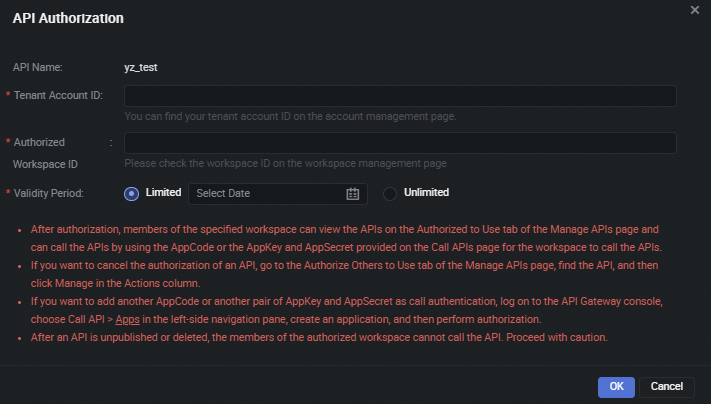
Parameter
Description
API Name
The name of the API to be authorized. This value cannot be modified.
Alibaba Cloud Account ID to Authorize
The Alibaba Cloud account ID that needs to be granted the permission to call this API. You can view the account ID on the page.
Authorized Workspace
Select the workspace under the target Alibaba Cloud account.
Authorization Validity Period
Select the authorization validity period (see details below).
-
Click Confirm to complete the authorization.
Authorization validity period
The authorization validity period determines how long the authorized party can call the API:
|
Validity type |
Description |
Applicable scenario |
|
Limited |
Select an expiration date. The authorized party can call the API until this date, after which the authorization automatically expires. |
Temporary data sharing, time-limited collaboration projects, and trial scenarios. |
|
Unlimited |
The authorized party can call the API indefinitely unless the authorization is manually revoked. |
Long-term stable system integration and internal service-to-service calls. |
If an authorized API is undeployed or deleted, the authorized party can no longer call it. If an authorized API is undeployed and then republished, or modified and republished, the API owner must re-authorize the new version.
View authorized and granted APIs
On the Manage APIs page, you can view the authorization status from two perspectives:
View APIs authorized to you (which APIs am I authorized to use)
Click the Authorized to Use tab to view all APIs that other accounts have authorized to you. On this page, you can:
-
Click Test to test an authorized API online. For more information, see Test an API.
-
Click Delete to voluntarily give up the calling authorization for an API.
View APIs you have authorized to others (which APIs have I authorized to others)
Click the Authorize Others to Use tab to view the APIs you have authorized to other workspaces. On this page, you can:
-
Click Test to test an authorized API online.
-
Click Manage to revoke or modify the authorization for a specific workspace.
Three authorization scenarios
API authorization granularity varies depending on team size and security requirements. The following three scenarios cover the most common approaches.
Scenario 1: Same workspace, sharing one app
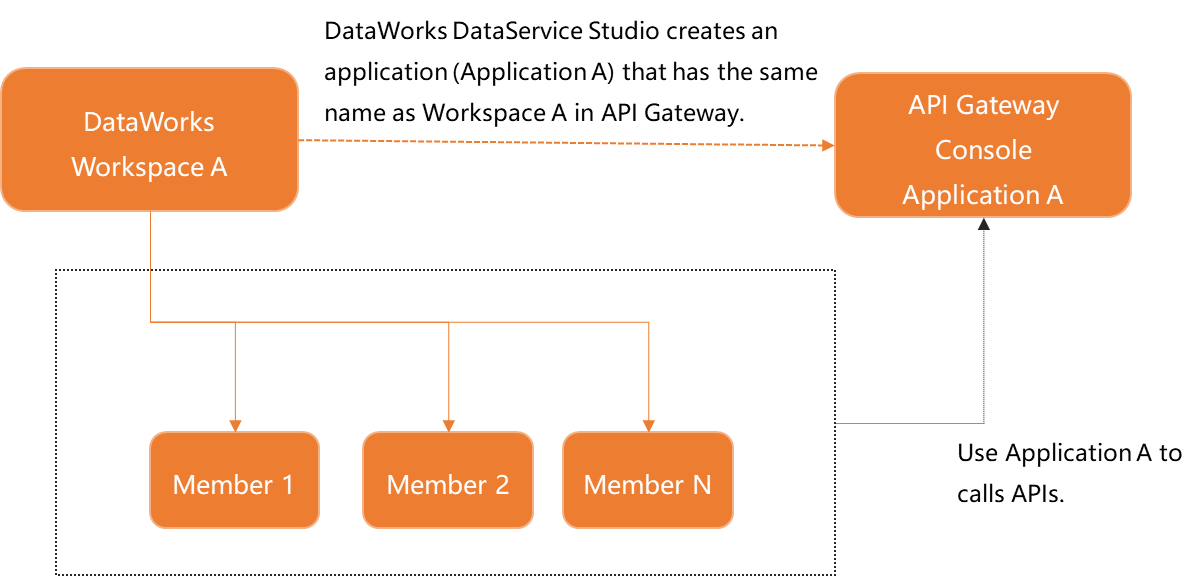
Scenario description: All members within the same DataWorks workspace share the default app that was automatically created for the workspace to call APIs.
Applicable situation: Small team with high mutual trust; no need to differentiate call traffic by individual member; quick start with minimal configuration.
How it works: When an API is published, DataWorks automatically creates an app with the same name as the workspace and authorizes all APIs in the workspace to this app. All workspace members share the same AppKey, AppSecret, and AppCode.
Advantage: Zero configuration, ready to use out of the box. Disadvantage: Cannot identify which specific member initiated a call; if credentials are leaked, the entire workspace is affected.
Scenario 2: Each RAM user uses an independent app
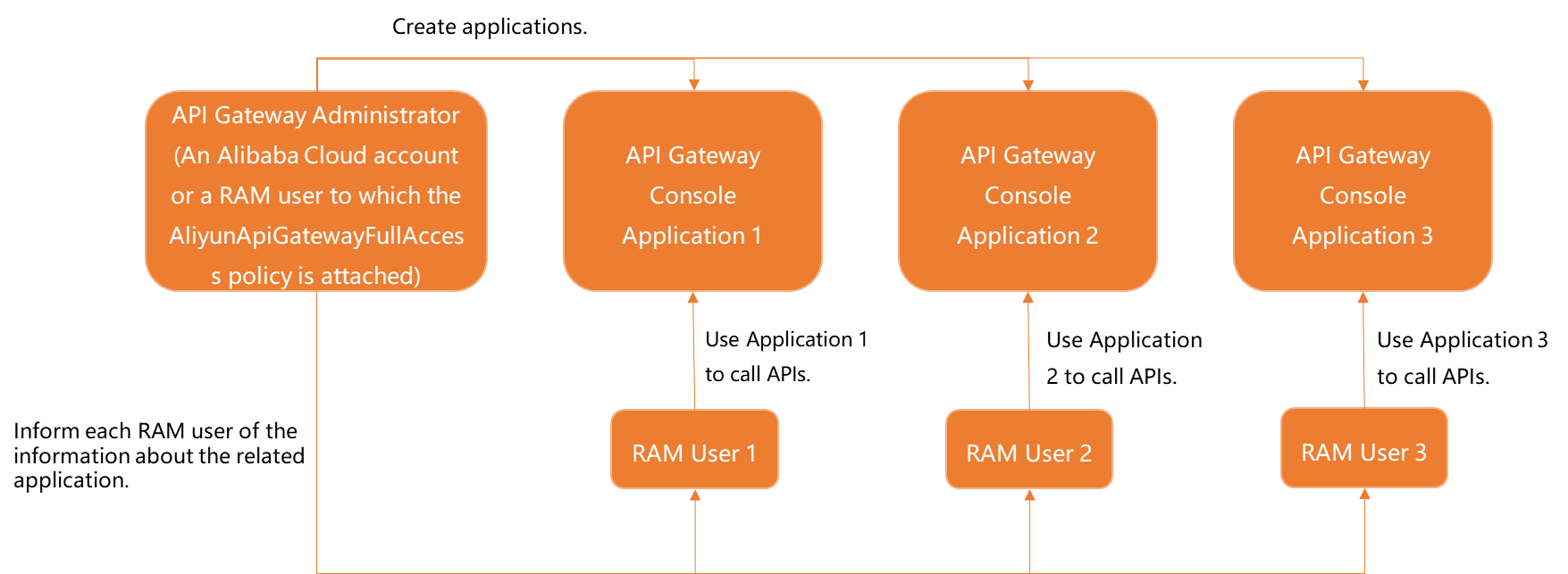
Scenario description: Each RAM user (sub-account) in the organization creates an independent app in API Gateway and is individually authorized to call APIs.
Applicable situation: Need to precisely track each user's API calling behavior; need to set different throttling policies for different users; high security and compliance requirements that mandate per-user credentials.
How it works: Each RAM user logs on to the API Gateway console and creates their own app; the API administrator authorizes the API to each user's app individually; each user calls the API using their own app's credentials.
Advantage: Calling behavior is traceable to individuals, strong security isolation, and minimal impact from credential leakage. Disadvantage: Higher management overhead; each new user requires app creation and authorization configuration.
Scenario 3: Multiple RAM users grouped, each group sharing one app
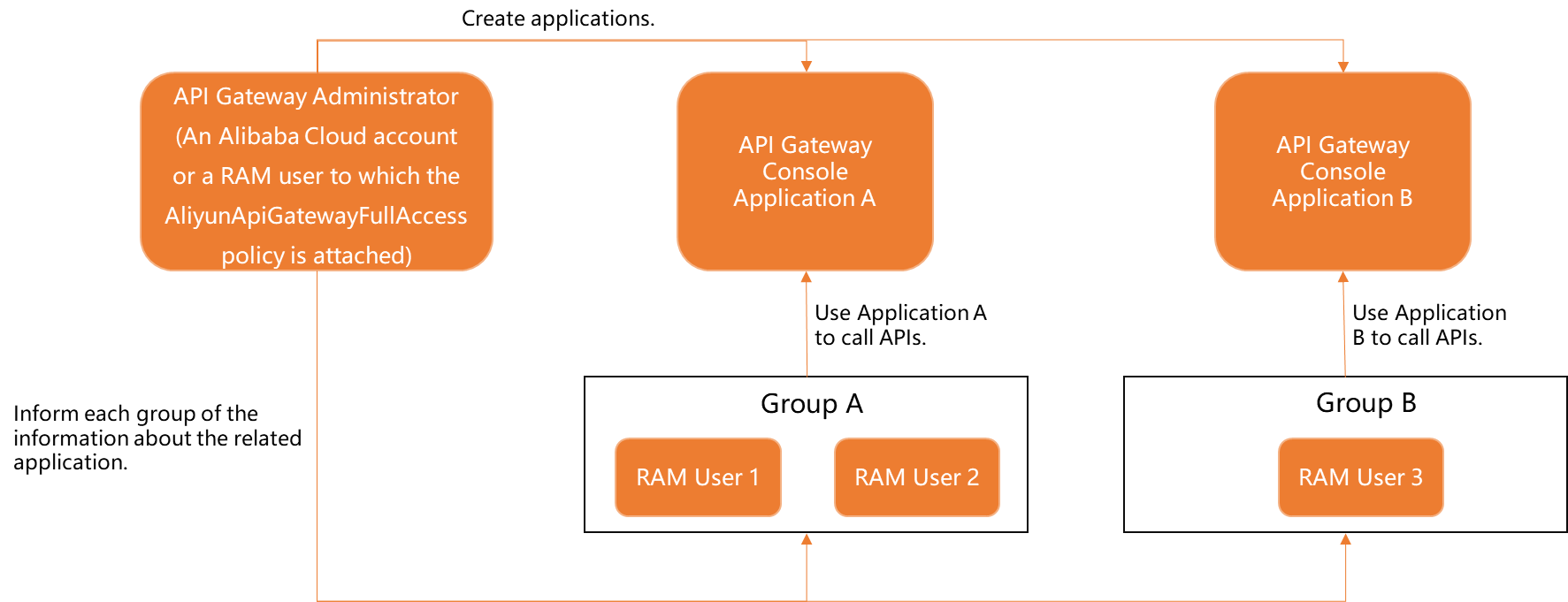
Scenario description: Multiple RAM users are divided into groups by business function or team, and members within each group share the same app to call APIs.
Applicable situation: Large team organized by department or project; need to differentiate call traffic by business line without requiring per-user tracking; balancing management cost and security.
How it works: Create a corresponding number of apps for each business group; the API administrator authorizes the API to each group's app; members within a group share their group app's credentials.
Advantage: Moderate management granularity that distinguishes business sources without excessive overhead. Disadvantage: Cannot further differentiate members within the same group.
Scenario selection recommendations
|
Dimension |
Scenario 1 (shared app) |
Scenario 2 (independent app) |
Scenario 3 (grouped app) |
|
Management complexity |
Low |
High |
Medium |
|
Security isolation |
Low |
High |
Medium |
|
Traffic tracking granularity |
Workspace level |
User level |
Business group level |
|
Credential leakage impact |
Entire workspace |
Individual only |
Business group only |
|
Recommended team size |
Fewer than 5 members |
Any size |
10 or more members |
Three types of credentials: Avoid confusion
Data Service uses three distinct types of authentication credentials with different purposes, sources, and usage scenarios. Make sure you distinguish them:
|
Credential type |
Purpose |
Source |
Usage scenario |
|
API calling credentials (AppKey/AppSecret/AppCode) |
Prove the caller's identity when calling a published API |
API Gateway > Application Management |
Calling Data Service APIs in client code |
|
Data source connection credentials (AccessKey ID/AccessKey Secret) |
Authenticate Data Service when connecting to backend data sources |
Alibaba Cloud RAM > AccessKey Management |
Entered on the data source configuration page for Data Service to connect to your database |
|
DataWorks platform permissions (RAM user/role) |
Control who can operate APIs in the DataWorks console |
Alibaba Cloud RAM > User/Role Management |
Log on to DataWorks, create/publish/manage APIs |
Quick summary: AccessKey is for "connecting to data sources," AppKey is for "calling APIs," and RAM is for "accessing the console." Each serves a different purpose and cannot replace the others.
Confusion 1: "My API call returns 403, but I have RAM administrator permissions" — RAM permissions control DataWorks console operations, not API calling permissions. API calling permissions are controlled by app authorization. Even if you are a RAM administrator, you still need an authorized app's AppKey/AppSecret to call an API.
Confusion 2: "Is the AccessKey configured for the data source the same as the AppKey for API calls?" — No. AccessKey is used by Data Service to connect to backend data sources; AppKey is used by callers to call APIs. They are completely independent.
Confusion 3: What should I enter in the "Alibaba Cloud Account ID" field on the authorization page? — The authorization page requires the Alibaba Cloud account ID (a numeric value), not a RAM username or login email. To obtain it, log on to the Account Management page and view the account ID in the security settings.
Authentication method comparison
API Gateway supports two authentication methods. Data Service adds "Alibaba Cloud APP authentication" to APIs in the workspace by default. Choose a method based on your security requirements.
Simple authentication (AppCode)
Add the AppCode to the HTTP request header to complete authentication. No signature calculation is required.
Request example:
GET /api/v1/users?name=test HTTP/1.1
Host: your-api-endpoint.cn-shanghai.alicloudapi.com
Authorization: APPCODE 3f963a8e1cd7492bbd8a5e2e5e4c****
Signature authentication (AppKey + AppSecret)
The caller uses AppSecret to compute an HMAC-SHA256 signature over the request content and adds the AppKey and signature to the request header. API Gateway recalculates the signature using the same AppSecret and compares it to verify the caller's identity.
Request example (header section):
X-Ca-Key: 12345678
X-Ca-Signature: BASE64_ENCODED_SIGNATURE
X-Ca-Timestamp: 1741593600000
X-Ca-Nonce: unique-uuid-string
X-Ca-Signature-Headers: X-Ca-Key,X-Ca-Nonce,X-Ca-Timestamp
Comparison of the two methods
|
Comparison item |
Simple authentication (AppCode) |
Signature authentication (AppKey + AppSecret) |
|
Security level |
Low |
High |
|
Implementation complexity |
Very low (only one header line) |
Medium (requires implementing the signature algorithm) |
|
Anti-replay attack |
Not supported |
Supported (based on timestamp and nonce) |
|
Anti-tampering |
Not supported |
Supported (request content is included in the signature) |
|
Applicable scenario |
Internal system debugging, dashboards, and quick prototype verification |
Production environments, externally exposed APIs, and scenarios with high security and compliance requirements |
|
Transport requirement |
Strongly recommended to use with HTTPS |
Provides some security even over HTTP, but HTTPS is still recommended |
Selection recommendations:
-
Development and testing phase: Use AppCode for quick API verification to reduce development costs.
-
Production environment: Always use AppKey + AppSecret signature authentication with HTTPS transport encryption.
-
Externally exposed APIs: Must use signature authentication to prevent replay attacks after credentials are intercepted during transmission.
Signature algorithm details
Signature authentication is based on the HMAC-SHA256 algorithm. The core process is as follows:
Signature process overview
-
Construct the canonicalized request string (StringToSign): Concatenate the HTTP method (GET/POST), Accept header, Content-MD5 (MD5 value of the request body), Content-Type, Date, custom headers involved in the signature (X-Ca-*, sorted alphabetically), and the canonicalized URL (path + sorted query parameters) in sequence.
-
Calculate the signature using HMAC-SHA256:
Signature = Base64(HMAC-SHA256(AppSecret, StringToSign)) -
Add the signature information to the request header: This includes
X-Ca-Key(AppKey),X-Ca-Signature(signature value),X-Ca-Timestamp(millisecond-level timestamp),X-Ca-Nonce(UUID for anti-replay), andX-Ca-Signature-Headers(list of headers involved in the signature).
Key considerations
The following details are common sources of signature errors:
-
Parameter sorting: URL query parameters and signature headers must be sorted by key in alphabetical order (ASCII order).
-
URL encoding: Special characters in parameter values (spaces, Chinese characters, etc.) must be URL-encoded.
-
Line separator: Lines in StringToSign must be separated by
\n(LF). Do not use\r\n(CRLF). -
Empty value handling: When there is no body, Content-MD5 is an empty string (not null). When headers such as Accept do not exist, use an empty string as well.
-
Timestamp precision:
X-Ca-Timestampis a millisecond-level timestamp. The time difference between the client and the server must not exceed 15 minutes. -
Nonce uniqueness: A unique UUID must be generated for each request as
X-Ca-Nonce. Reusing a nonce triggers replay attack interception.
For complete code examples in Java and Python, detailed StringToSign concatenation rules, and debugging methods for common signature errors, see the Signature algorithm section in the API Gateway documentation.
View authentication credentials
After you create an app and obtain authorization, retrieve the AppKey, AppSecret, or AppCode to make API calls.
View credentials from the Data Service console
-
Log on to the DataWorks console. In the target region, click in the left-side navigation pane. Select a workspace from the drop-down list and click Go to DataService Studio.
-
On the Data Service page, click Service Management in the top menu bar.
-
In the left-side navigation pane, click Call APIs.
-
On the Call APIs page, you can view and copy the following authentication information: AppKey (unique app identifier), AppSecret (used for signature authentication; keep it secure), and AppCode (used for simple authentication).
View credentials from the API Gateway console: Log on to the API Gateway console, find the target app in Application Management, and go to the app details page to view the AppKey, AppSecret, and AppCode.
AppSecret and AppCode are sensitive information. Do not expose them in code repositories, logs, frontend pages, or other public locations. If you suspect credential leakage, immediately reset the AppSecret in the API Gateway console.
Call APIs using the API Gateway SDK
API Gateway provides SDKs for mainstream programming languages with built-in signature algorithm implementations. You only need to provide the AppKey and AppSecret. For more information, see Call an API and SDK download and usage.
Supported SDK languages
|
Language |
SDK description |
|
Java |
Supports Maven dependency import and provides both synchronous and asynchronous calling methods. |
|
Python |
Supports pip installation and is compatible with Python 2.7 and 3.x. |
|
Node.js |
Supports npm installation. |
|
PHP |
Supports Composer installation. |
|
C# |
Supports NuGet package management. |
|
Go |
Supports go get installation. |
Advantages of using the SDK
Compared to manually constructing HTTP requests, the SDK offers these advantages:
-
Automatic signing: The SDK implements the HMAC-SHA256 signature algorithm, so developers do not need to handle signing details.
-
Automatic retry: Some SDKs include built-in retry mechanisms for network exceptions.
-
Parameter validation: The SDK validates parameters before sending requests.
-
Performance optimization: SDKs typically use connection pooling and HTTP/2 to improve network performance.
Quick integration example (Java)
The following example shows how to call a Data Service API using the API Gateway Java SDK:
// 1. Add Maven dependency
// <dependency>
//     <groupId>com.aliyun.api.gateway</groupId>
//     <artifactId>sdk-core-java</artifactId>
//     <version>latest version</version>
// </dependency>

// 2. Initialize the client
HttpClientBuilderParams params = new HttpClientBuilderParams();
params.setAppKey("your_app_key");
params.setAppSecret("your_app_secret");

ApacheHttpClient client = new ApacheHttpClient(params);

// 3. Construct the request
IoTApiRequest request = new IoTApiRequest();
request.setDomain("your-api-endpoint.cn-shanghai.alicloudapi.com");
request.setPath("/api/v1/query");
request.setHttpMethod("GET");
request.putQueryParam("pageSize", "10");
request.putQueryParam("pageNum", "1");

// 4. Execute the call
ApiResponse response = client.execute(request);
System.out.println("Response: " + response.getBody());
Quick integration example (Python)
# 1. Install the SDK
# pip install aliyun-api-gateway-sdk

# 2. Call the API
from com.alibaba.cloudapi.sdk.client import DefaultClient
from com.alibaba.cloudapi.sdk.model import HttpClientBuilderParams

params = HttpClientBuilderParams()
params.app_key = "your_app_key"
params.app_secret = "your_app_secret"
params.host = "your-api-endpoint.cn-shanghai.alicloudapi.com"

client = DefaultClient(params)
response = client.get(
    path="/api/v1/query",
    query_params={"pageSize": "10", "pageNum": "1"},
    headers={"Accept": "application/json"}
)

print(f"Status: {response.status_code}")
print(f"Body: {response.content}")For detailed usage instructions, API references, and sample code for each language SDK, see the SDK download and usage section in the API Gateway documentation.
Complete call process summary
The complete process from API publishing to a successful call: The API developer develops, tests, and publishes the API to API Gateway, which automatically creates a default app and authorization. For cross-account sharing, the developer manually authorizes the target account. The API caller creates an app or uses the default app, obtains credentials (AppKey/AppSecret/AppCode), chooses an authentication method (AppCode for simple authentication or AppKey + AppSecret for signature authentication), and calls the API through the SDK or HTTP. After API Gateway verifies the identity, Data Service executes the query and returns the results.