After testing an API in DataService Studio, publish it to API Gateway to make it callable by applications. You can also list published APIs on Alibaba Cloud Marketplace to monetize your data.
This topic covers:
Submitting a tested API for approval
Publishing the approved API to API Gateway
(Optional) Listing the API on Alibaba Cloud Marketplace
Prerequisites
Before you begin, ensure that you have:
A tested API in DataService Studio. For more information, see Test an API that is being developed.
An activated API Gateway instance.
When purchasing an API Gateway instance, set the Type parameter to Standard instance. The VPC integration instance type is not compatible with the DataWorks network architecture.
Publish an API to API Gateway
Publishing an API involves four stages: submitting a version, requesting approval, waiting for approval, and executing the publish.
Step 1: Open the API in DataService Studio
Log in to the DataWorks console. In the top navigation bar, select your region.
In the left-side navigation pane, choose Data Analysis and Service > DataService Studio. Select your workspace and click Go to DataService Studio.
In the Service Development pane, under Business Processes, double-click the API name to open its configuration tab.
Step 2: Submit the API
On the API configuration tab, click Submit in the top toolbar.
A prompt appears at the top of the page and a version is created automatically. To view the version status, click Version in the right-side navigation pane.
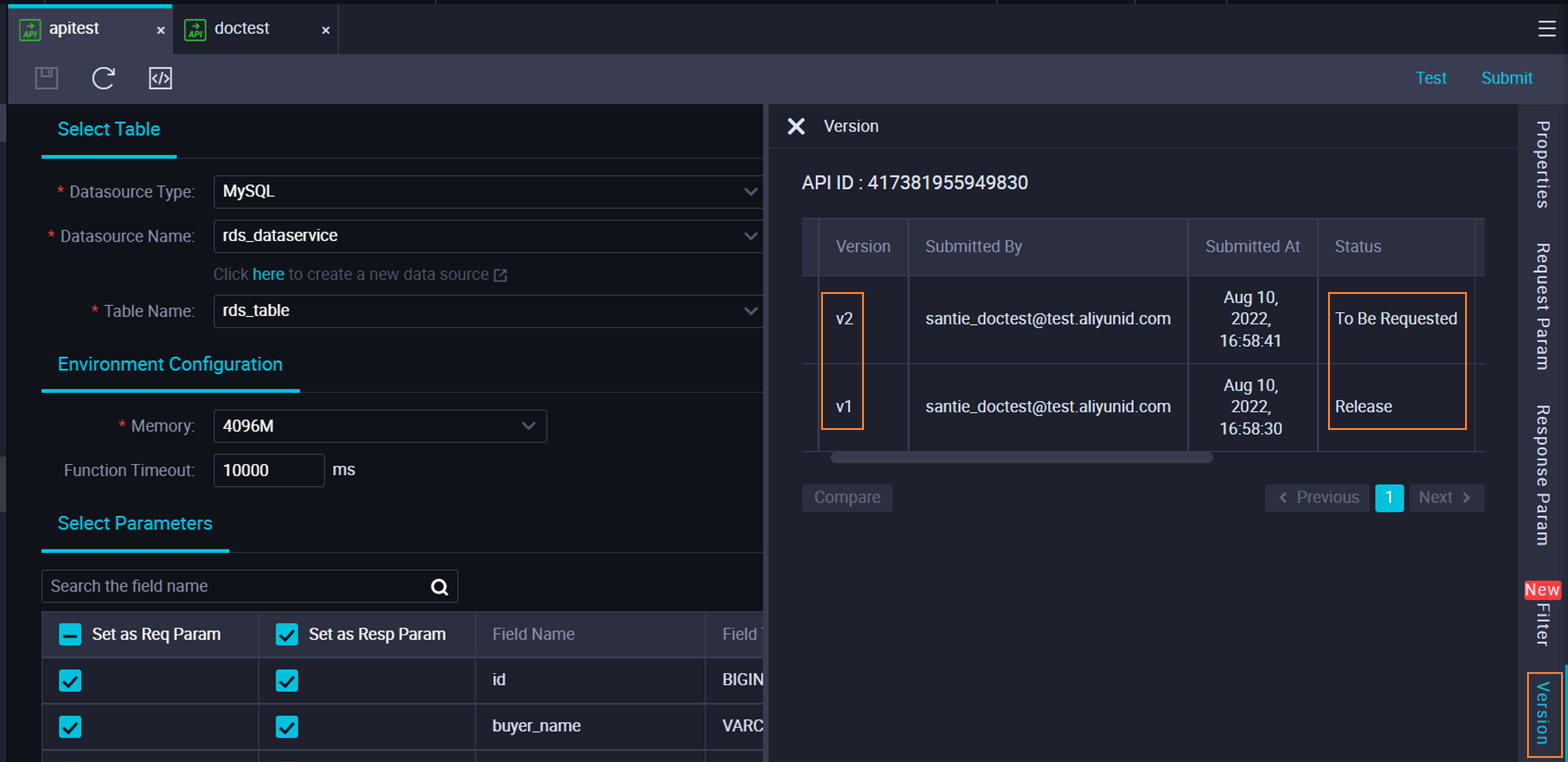
Only tested APIs can be submitted. For more information, see Test an API.
Step 3: Request to publish
In the right-side navigation pane, click Version.
Find the version you submitted and click Request to Publish in the Actions column.
In the dialog box, keep the default application type Publish data service API, enter a reason in the Reason for application field, and click Apply for permission.
If an approval policy is defined in DataWorks Approval Center, a reviewer must approve the request before you can publish. For more information, see Overview.
Step 4: Publish
After the request is approved, the version status on the Version tab changes from To Be Requested to Can Be Published.
In the right-side navigation pane, click Version.
Find the approval record and click Publish in the Actions column.
DataWorks publishes the API to the API group in API Gateway associated with the business process. To view which API group a business process is associated with, right-click the business process in the Service Development pane and select Modify attributes.
To verify the published API, go to the API Gateway console and choose Open API > APIs.
After publishing
Once the API is live in API Gateway, you can:
Configure throttling and access control in the API Gateway console.
Call the API from your application by creating an app in API Gateway, authorizing it, and signing requests with the AppKey and AppSecret. For more information, see Examples on calling APIs.
Integrate the API using an SDK. API Gateway provides SDKs for mainstream programming languages. For more information, see Download and use an SDK.
Publish an API to Alibaba Cloud Marketplace
The API section of Alibaba Cloud Marketplace provides thousands of API products in categories such as finance, artificial intelligence (AI), e-commerce, transportation and geography, lifestyle services, enterprise management, and public affairs. Alibaba Cloud Marketplace provides a platform where you can monetize your data.
After you publish APIs that are created or registered in DataService Studio to API Gateway, you can publish the APIs to Alibaba Cloud Marketplace with a few clicks. Alibaba Cloud Marketplace lets you monetize published APIs across categories such as finance, AI, e-commerce, transportation and geography, living services, corporate management, and public affairs.
Before listing an API on Alibaba Cloud Marketplace, register as an independent software vendor (ISV).
Only enterprise users can register as an ISV.
To list a published API on Alibaba Cloud Marketplace:
Log in to the ISV portal of Alibaba Cloud Marketplace.
In the left-side navigation pane, click Listing. The Commodity Manager page appears.
Click Create Product.
In the Access Information step, configure the parameters, click Next, and complete the remaining steps.
Before you can publish an API to Alibaba Cloud Marketplace, you must register as an independent software vendor (ISV) on the platform.
Next steps
Grant API access to other workspaces — Share the published API across workspaces to enable data sharing. For more information, see Grant permissions to call an API.
Call the API — Use simple authentication (AppCode in the request header) or signature authentication (AppKey and AppSecret in the request header). For more information, see Call an API.