A parameter node is a virtual node that manages parameters in workflows and passes them between nodes. It supports constant parameters, variable parameters, and transparent pass-through of ancestor node parameters.
Background information
Parameter nodes are virtual nodes that do not run computing tasks. They pass parameters between nodes and manage parameters in workflows.
-
Parameter passing between nodes
If a node in a workflow needs the output parameters of its ancestor nodes, create a parameter node as an intermediary. Place it as a descendant of those ancestor nodes and an ancestor of the target node, then add all required parameters to it.
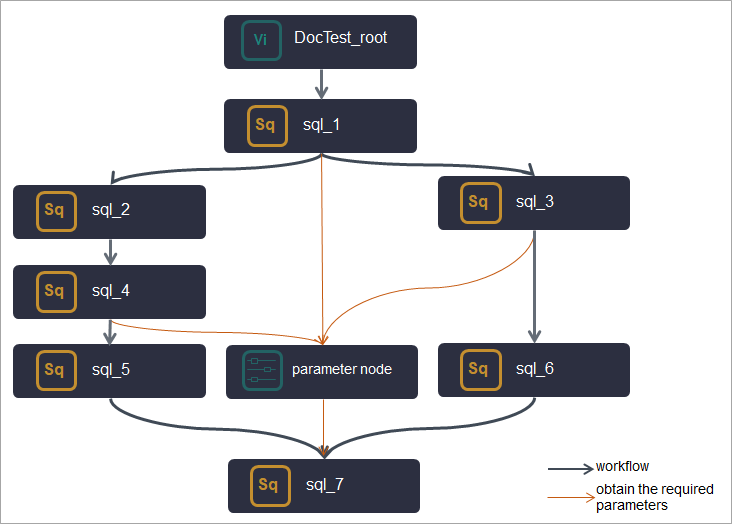 In the preceding figure, the sql_7 node needs output parameters from the sql_1, sql_3, and sql_4 nodes. A parameter node is placed between them to collect and forward all required parameters to sql_7.
 -
Parameter management
If multiple nodes in a workflow share constant or variable parameters, create a parameter node as their common ancestor and add all shared parameters to it. This centralizes parameter management for the workflow.
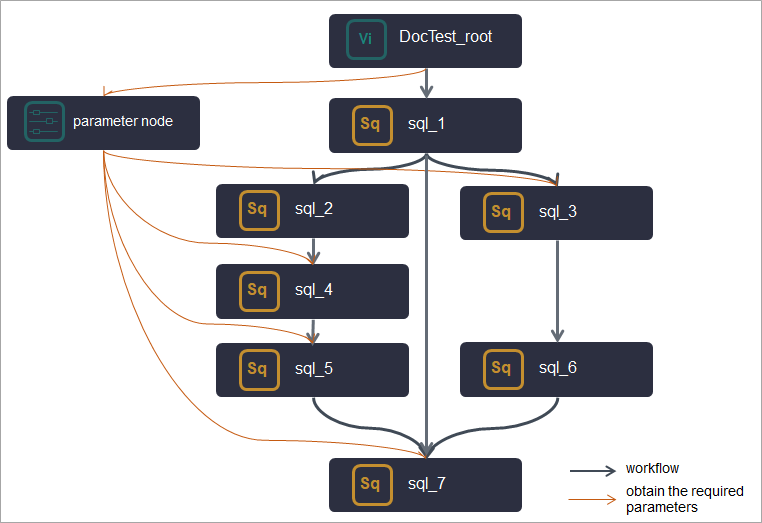 In the preceding figure, the sql_3, sql_4, sql_5, and sql_7 nodes share parameters through a common parameter node that serves as their ancestor.
Precautions
If a node needs to use parameters in a parameter node, the node must be a direct descendant node of the parameter node.
Limits
Supported regions: China (Hangzhou), China (Shanghai), China (Beijing), China (Shenzhen), China (Chengdu), China (Hong Kong), Japan (Tokyo), Singapore, Malaysia (Kuala Lumpur), Indonesia (Jakarta), Germany (Frankfurt), UK (London), US (Silicon Valley), and US (Virginia).
Create a parameter node
-
Log on to the DataWorks console. In the target region, click in the left-side navigation pane. Select a workspace from the drop-down list and click Go to Data Development.
-
On the DataStudio page, hover over the
 icon and choose .
Alternatively, open a workflow, right-click General, and choose .
-
In the Create Node dialog box, enter a Name and select a Path.
-
Click OK.
Configure scheduling properties for the parameter node
After creating the parameter node, configure its scheduling properties based on your business requirements.
Scheduling properties include basic properties, time properties, resource properties, and scheduling dependencies. Because a parameter node only manages and passes parameters without running data development tasks, pay special attention to its scheduling dependencies.
-
If a node needs to use the parameters in a parameter node, the node must be a descendant node of the parameter node.
-
Ancestor nodes whose parameters need to be transparently passed must be the ancestor nodes of the parameter node.
For more information about how to configure scheduling properties for a parameter node, see Configure basic properties, Configure time properties, Configure the resource property, and Configure same-cycle scheduling dependencies.
Add parameters to the parameter node
After configuring scheduling properties, add the parameters you want to manage or pass through to the parameter node.
-
On the configuration page of the parameter node, click Add Parameter.
-
Configure the Parameter name, Type, Value, and Description, and then click Save.
A note at the top of the page reminds you that any node referencing these parameters must be a direct descendant of this parameter node. The parameter types include Constant, Variable, and Pass-through Variable.
-
Constant: The parameter has a fixed value.
-
Variable: The parameter's value is dynamic. Select this type if you need to use system variables, such as the current time. For more information about supported formats, see Supported formats for scheduling parameters.
-
Pass-through Variable: Passes an output parameter from a direct ancestor node to a descendant node. For this type, you select the value from a list of all available output parameters from the direct ancestor nodes of this parameter node.
-
What to do next: Use the parameters in the parameter node
After configuring the parameter node, its descendant nodes can directly use the parameters, enabling centralized parameter management and more efficient task development.
To use these parameters, configure them as input parameters of the descendant nodes so they can be referenced directly in the node code.
-
Configure the parameters as the input parameters of the descendant nodes.
For the descendant node, go to the section. In the Input Parameters subsection, click Add. Enter the parameter name, select the value source, and then click Save. The settings are as follows:
-
Parameter Name: the name of the parameter that the descendant node needs to use. You can view the parameter name in the parameter node.
-
Value Source: the source of the parameter that the descendant node needs to use.
Hover over truncated parameter information to view the full details. Parameters from the parameter node are displayed in the Output name of the parameter node:Parameter name format. Select the source name ending with the required parameter name.
-
-
Use the parameters in the code of the descendant node.