A cross-cycle scheduling dependency ensures a node's current instance runs only after its instance from the previous scheduling cycle succeeds. This is useful when a daily task needs the previous day's data or when an hourly or minute-level task depends on its preceding instance. This topic explains how to configure these dependencies.
Usage notes
Before you configure a cross-cycle scheduling dependency, take note of the following points.
|
Item |
Description |
References |
|
Display of cross-cycle dependencies |
In the DataWorks DAG, a dashed line represents a cross-cycle scheduling dependency. |
|
|
Check for same-cycle dependencies after configuration |
After you configure dependencies, a descendant node runs only after all its ancestor nodes are complete. Same-cycle dependencies are parsed automatically. After configuring a cross-cycle dependency, verify if the same-cycle dependency is still required. If not, delete the auto-generated dependency to ensure the descendant node runs correctly. |
|
|
Use in complex scenarios |
In some cases, you may need to configure a cross-cycle scheduling dependency when a same-cycle dependency does not meet your requirements. For example, a daily task depends on all instances of an hourly task by default. You can configure a self-dependency for the hourly task to make the daily task depend on an instance from a specific cycle. |
Principles and examples of scheduling configurations in complex dependency scenarios |
|
Preview node dependencies |
Before deploying a task, preview its dependencies to verify that the instance relationships are correct. This practice prevents scheduling delays in the production environment caused by misconfigurations. |
|
|
Task deployment |
Deploy both the ancestor and descendant nodes in a cross-cycle scheduling dependency to the production environment. You can then view the dependency relationship in Operation Center. |
Configuration entry point
On the node editor page in DataStudio, click Scheduling Settings in the right-side navigation pane. In the section, go to the Previous Cycle area to configure the node's dependencies.
Dependency types
The following table describes the supported types of cross-cycle scheduling dependencies.
|
Dependency type |
Node dependency relationship |
Business scenario |
|
Dependency on the current node's previous cycle (self-dependency) |
The current instance of a node runs only after its own instance from the previous cycle succeeds. |
The current instance of a node depends on the data produced by its own instance in the previous cycle. |
|
The current instance of a node runs only after its descendant nodes from the previous cycle succeed. |
The current instance depends on whether the data from its own previous cycle's output table was successfully processed by its descendant nodes in the previous cycle. |
|
|
The current instance of a node depends on the instance results of other specified nodes from the previous cycle. The current instance runs only after the specified nodes from the previous cycle succeed. |
The current instance has a business logic dependency on data from another business process, but the node's code does not directly reference that data. |
Self-dependency
The current instance of a node depends on the data produced by its own instance in the previous cycle. The following figure shows an example of the dependency settings and the resulting relationship.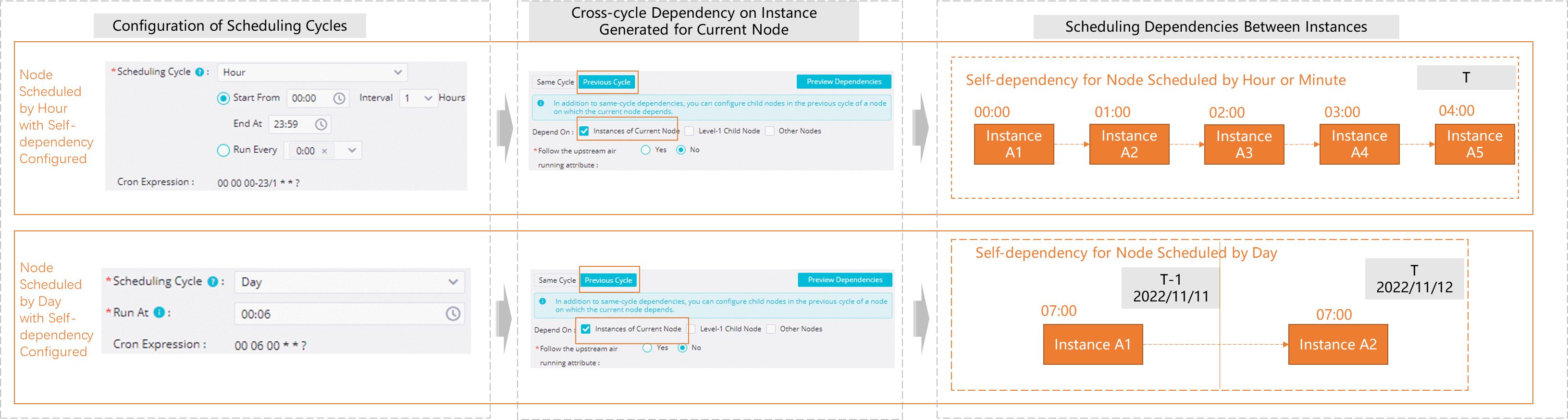
The execution results of instances for an hourly task or minute-level task are interdependent across different scheduling cycles.
When a daily task depends on an hourly task or minute-level task, whether you configure a self-dependency for the hourly or minute-level task affects the execution time of the daily task:
-
Hourly or minute-level task without a self-dependency
The daily task depends on all instances of the hourly or minute-level task from the current day by default. The daily task aggregates and processes all table data produced by the hourly or minute-level task on that day.
-
Hourly or minute-level task with a self-dependency
The daily task depends on the nearest instance of the hourly or minute-level task based on the principle of proximity, rather than all instances from the current day.
For more information about specific dependency scenarios, see Appendix: Summary of complex dependency scenarios.
When you backfill data for a task with a self-dependency, its instances run sequentially in chronological order. For more information, see Data backfill behavior for self-dependent tasks.
Dependency on level-1 descendant nodes
A node's current instance depends on the processing results of its descendant nodes from the previous cycle. This dependency ensures that data from the node's own previous cycle was successfully processed by its descendants.
For example, node C has two descendant nodes, A and B. A dependency on level-1 descendant nodes means that node C depends on the results of node A and node B from the previous cycle (T-1 in the figure). The current instance of node C (at T) starts to run only after the instances of both node A and node B from the previous cycle succeed.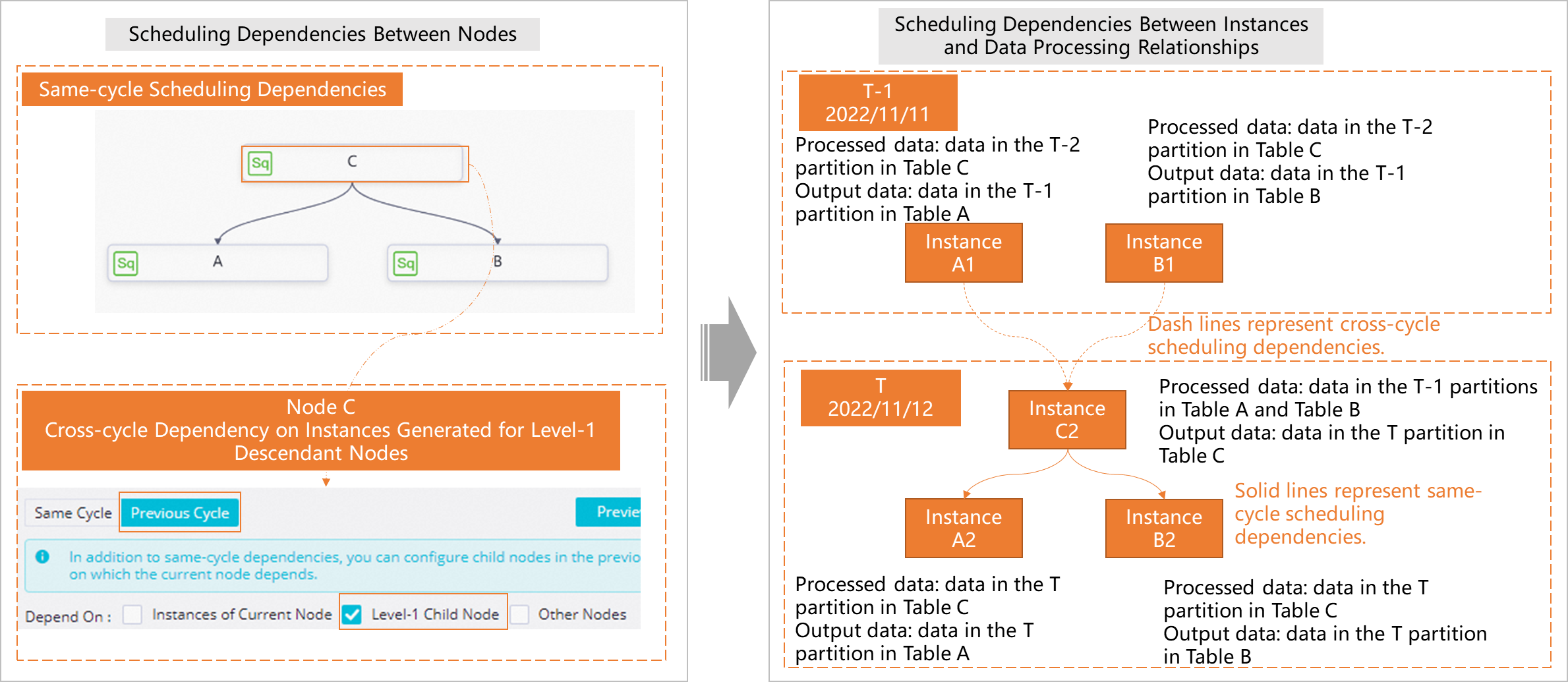
Dependency on other nodes
The current instance of a node runs only after the instances of other specified nodes from the previous cycle succeed.
For example, node A and node B are two descendant nodes of some other node. A dependency on other nodes is configured so that node B depends on the result of node D from the previous cycle (T-1 in the figure). The current instance of node B (at T) starts to run only after the instance of node D from the previous cycle succeeds.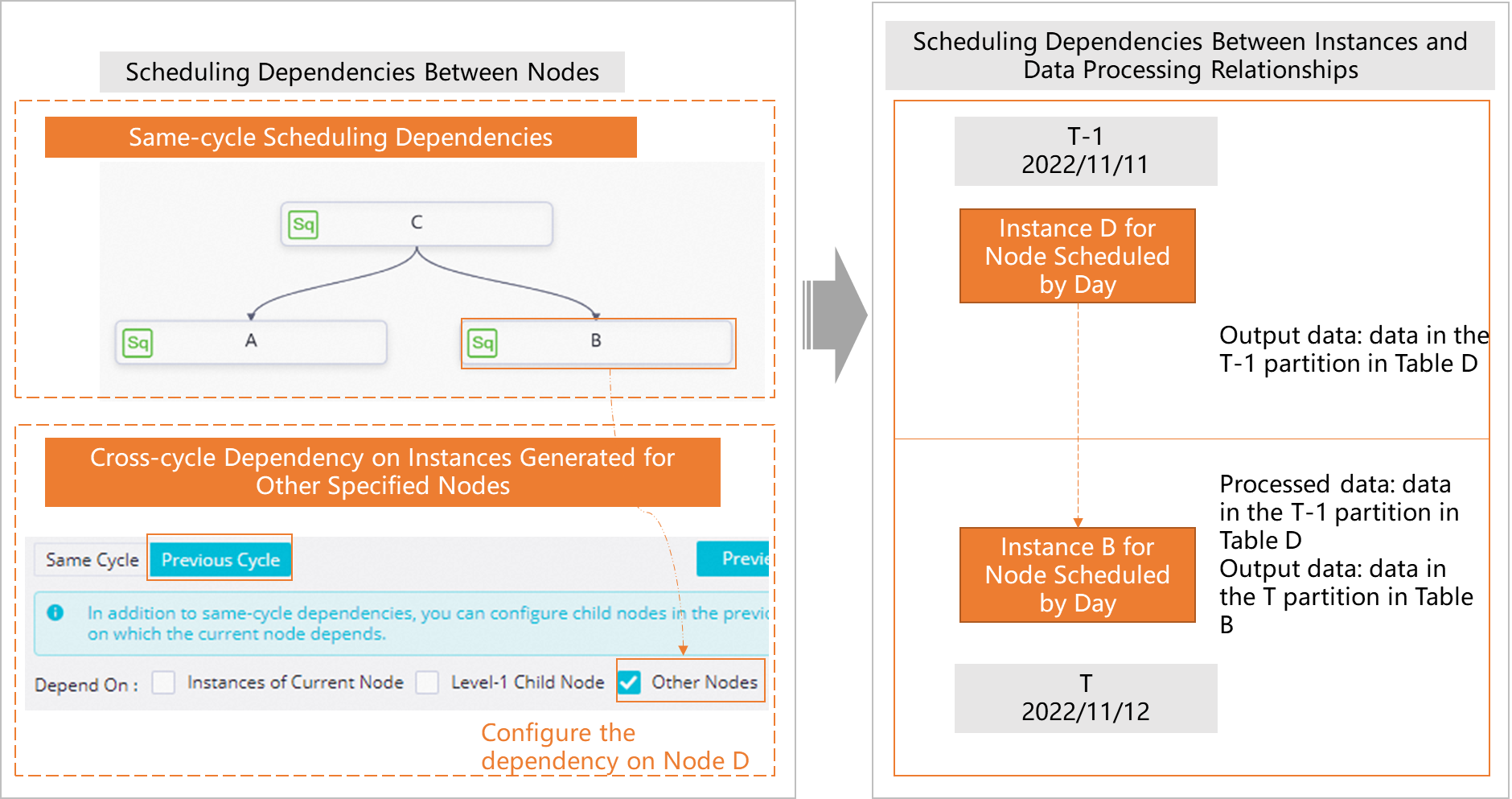
Inheriting the dry-run attribute
This setting is primarily used with branch nodes.
-
Configuration entry point
In the scheduling dependency settings, you can set the Skip the dry-run property of the ancestor node option to Yes. This prevents the descendant node from inheriting the dry-run attribute of its ancestor node in the previous cycle.
-
Use case
A node has multiple descendant nodes. During task execution, some descendant branches might be set to a dry-run state. If a descendant node that is in a dry-run state is also configured with a self-dependency, it passes the dry-run attribute to subsequent instances, causing a perpetual dry-run state. To prevent this inheritance, set Skip the dry-run property of the ancestor node to Yes.
-
Example
-
Assume Assign_Node is an assignment node, Branch_Node is a branch node, and Shell_Node1 and Shell_Node2 are descendant nodes of Branch_Node. All are daily tasks.
-
During a run, Shell_Node1 is set to dry-run, while Shell_Node2 runs normally.
-
The Shell_Node1 node is configured with a self-dependency on its previous cycle.
-
The instance of Shell_Node1 generated in the current cycle (T) is named
Shell_Node1'. -
The instance of Shell_Node1 generated in the previous cycle (T-1) is named
Shell_Node1.
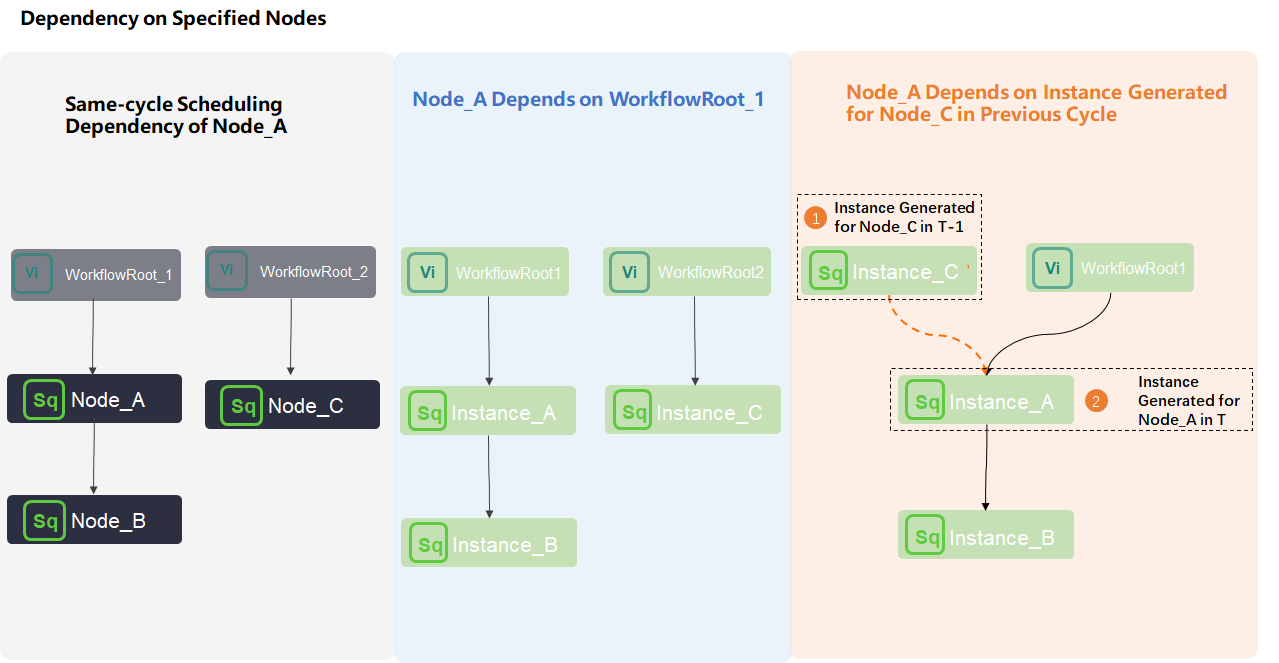 The instance
 Shell_Node1'for the current cycle (T) depends on the instanceShell_Node1from the previous cycle (T-1). If the "Skip Ancestor's Dry-run Attribute" is not enabled, the new instance inherits the dry-run attribute from the previous instance, causing the Shell_Node1 node to remain in a permanent dry-run state. -
Preview scheduling dependencies
After configuring the dependencies, you can preview them. For details, see Next steps: Verify that dependencies are as expected.