When an ancestor task and a descendant task run at different frequencies — for example, a daily task depending on an hourly task — DataWorks must determine exactly which ancestor instance each descendant instance waits for. This document explains that resolution rule (scheduling time proximity) and shows how enabling self-dependency changes the behavior for each frequency combination.
For same-cycle dependency configuration, see Configure same-cycle scheduling dependencies. For cross-cycle dependency configuration, see Configure cross-cycle scheduling dependencies.
How DataWorks resolves instance-level dependencies
DataWorks supports six scheduling frequencies: minute, hour, day, week, month, and year. Each scheduling cycle generates one instance. A dependency between two tasks is, in effect, a dependency between specific instances — the descendant instance waits for the ancestor instance to reach the Successful state before it runs.
Two behaviors govern all frequency combinations:
| Behavior | Description |
|---|---|
| Scheduling time proximity | When ancestor and descendant tasks have different frequencies, each descendant instance depends on the ancestor instance whose scheduling time is closest to but not later than the descendant instance's own scheduling time — and that is not already serving as an ancestor of another descendant instance. |
| Impact on actual run time | A descendant instance does not start at its scheduled time if its ancestor instance has not yet reached the Successful state. |
Edge cases that apply to all combinations:
If a descendant instance is scheduled earlier than its ancestor on the same day, it waits until the ancestor completes.
If no ancestor instance has a scheduling time earlier than the first descendant instance on the current day, that first descendant instance depends on the first ancestor instance of the current day.
When proximity applies — and when it does not
| Scenario | Proximity-based? | Notes |
|---|---|---|
| Ancestor and descendant have the same frequency and same number of daily cycles | No | One-to-one instance mapping; scheduling time is irrelevant |
| Ancestor and descendant have different frequencies | Yes | Closest-but-not-later rule applies |
Impact on actual run time — example
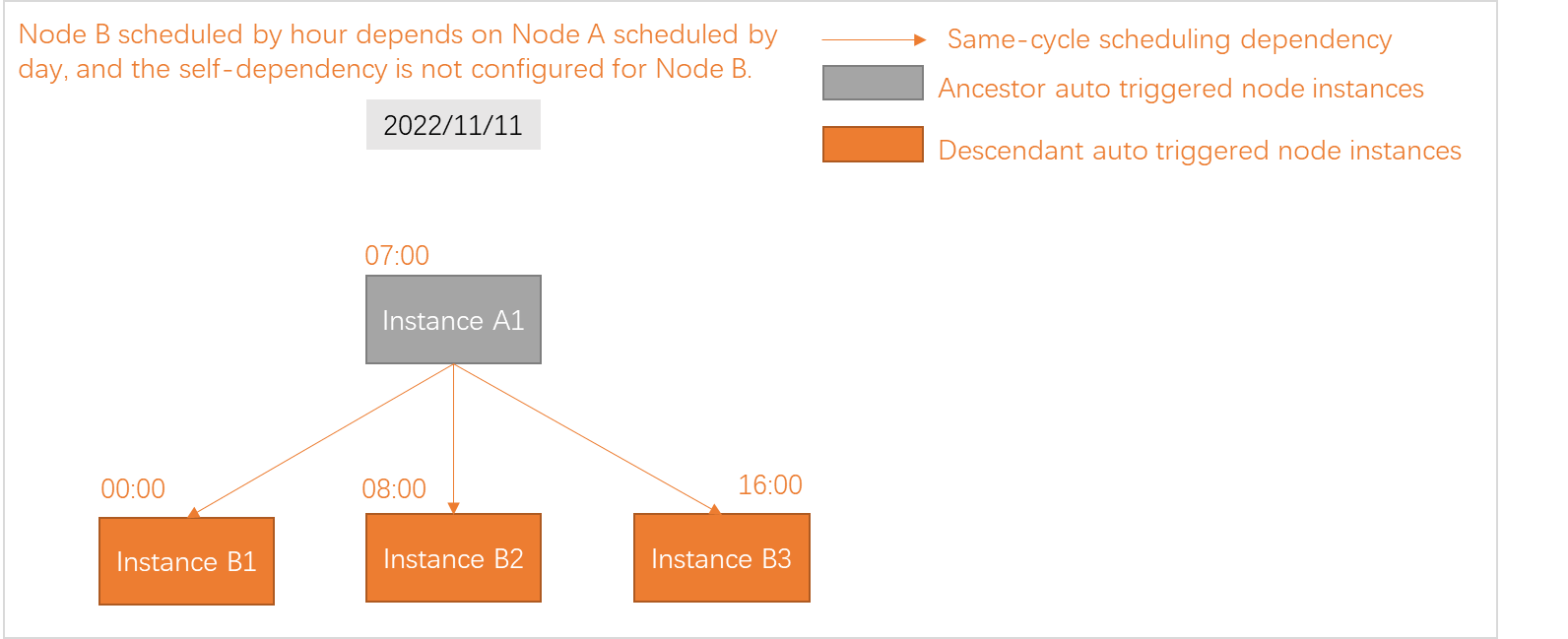
Task A is scheduled by day at 07:00. Task B is scheduled by hour at 00:00, 08:00, and 16:00. Task B depends on Task A.
At
00:00: Task B's first instance is scheduled but does not run — Task A has not started yet.At
07:00: Task A completes. Task B's first instance then begins running.At
08:00and16:00: Task B's remaining instances run at their scheduled times because Task A is already Successful.
Default behavior vs. behavior with self-dependency
The sections below cover each frequency combination. For each combination, the default behavior (no self-dependency) is described first, followed by the change when self-dependency is enabled.
Self-dependency means a task depends on its own instance from the previous cycle. When self-dependency is enabled on an hourly or minute task, the first instance of each day may depend on the last instance of the previous day. If that previous-day instance has not finished, the task cannot run on the current day. For configuration steps, see Dependency on the instance generated for the current node in the previous cycle.
Dependencies for tasks scheduled by day
Day depends on another day task
| Configuration | Behavior |
|---|---|
| No self-dependency | The descendant day instance depends on the ancestor day instance in the same scheduling cycle (one-to-one). |
| Self-dependency enabled on the ancestor day task | A cross-dependency exists: the descendant day instance depends on an ancestor day instance that itself depends on its own previous-cycle instance. |
Day depends on an hour task (current day)
| Configuration | Behavior |
|---|---|
| No self-dependency on the hour task | The day instance depends on all hour instances on the current day. For example, if the hour task runs at 00:00, 01:00, ... 23:00, the day task waits for all 24 hourly instances to complete. |
| Self-dependency enabled on the hour task | The day instance depends only on the closest hour instance whose scheduling time is not later than the day task's scheduling time. For example, if the day task runs at 08:30, it waits only for the 08:00 hourly instance. |
To make the day task depend on a specific hourly instance rather than all instances, enable self-dependency on the hour task.
Day depends on an hour or minute task (previous day)
| Configuration | Behavior |
|---|---|
| No self-dependency on the hour/minute task | The current-day instance depends on all instances of the hour or minute task from the previous day. |
| Self-dependency enabled on the hour/minute task | The current-day instance depends only on the last instance of the hour or minute task from the previous day. |
The following diagram illustrates how a day task depends on an hourly task from the previous day.
Dependencies for tasks scheduled by hour
Hour depends on another hour task
| Cycle count comparison | Behavior |
|---|---|
| Same number of daily instances | One-to-one mapping: the first descendant hour instance depends on the first ancestor hour instance, the second on the second, and so on. |
| Different number of daily instances | Proximity rule applies: each descendant hour instance depends on the ancestor hour instance whose scheduling time is closest to but not later than its own. If the ancestor generates fewer instances, multiple descendant instances may depend on the same ancestor instance. |
Hour depends on a day task
| Configuration | Behavior |
|---|---|
| No self-dependency on the hour task | All hour instances on the current day depend on the single day instance. After the day task finishes, all pending hourly instances run concurrently. |
| Self-dependency enabled on the hour task | Only the first hour instance depends on the day task. Each subsequent hour instance depends on the previous hour instance (previous-cycle self-dependency). Instances run sequentially — one after another — rather than concurrently. |
Hour depends on a minute task
| Configuration | Behavior |
|---|---|
| No self-dependency on the minute task | The hour instance depends on all minute instances within the same hour. For example, if the minute task runs every 15 minutes, the 09:00 hour instance waits for the 08:00, 08:15, 08:30, and 08:45 minute instances to complete. |
| Self-dependency enabled on both the hour and minute tasks | The hour instance depends on the closest minute instance whose scheduling time is not later than its own. For example, the 09:00 hour instance depends only on the 08:45 minute instance. |
Dependencies for tasks scheduled by minute
Minute depends on an hour task
| Configuration | Behavior |
|---|---|
| No self-dependency on the minute task | Each minute instance depends on the closest hour instance whose scheduling time is not later than its own. Multiple minute instances within the same hour all depend on the same hour instance. For example, minute instances at 09:05, 09:10, and 09:15 all wait for the 09:00 hourly instance. |
| Self-dependency enabled on both the minute and hour tasks | Each minute instance depends on its own previous-cycle instance and on the closest hour instance (not later). The self-dependency chain ensures instances run sequentially within a cycle. |
Minute depends on a day task
| Configuration | Behavior |
|---|---|
| No self-dependency on the minute task | All minute instances on the current day depend on the single day instance. After the day task finishes, all pending minute instances whose scheduling time has already arrived run concurrently. |
| Self-dependency enabled on the minute task | Only the first minute instance depends on the day task. Each subsequent minute instance depends on the previous minute instance. All instances run sequentially. |
Dependencies on tasks scheduled by week, month, or year
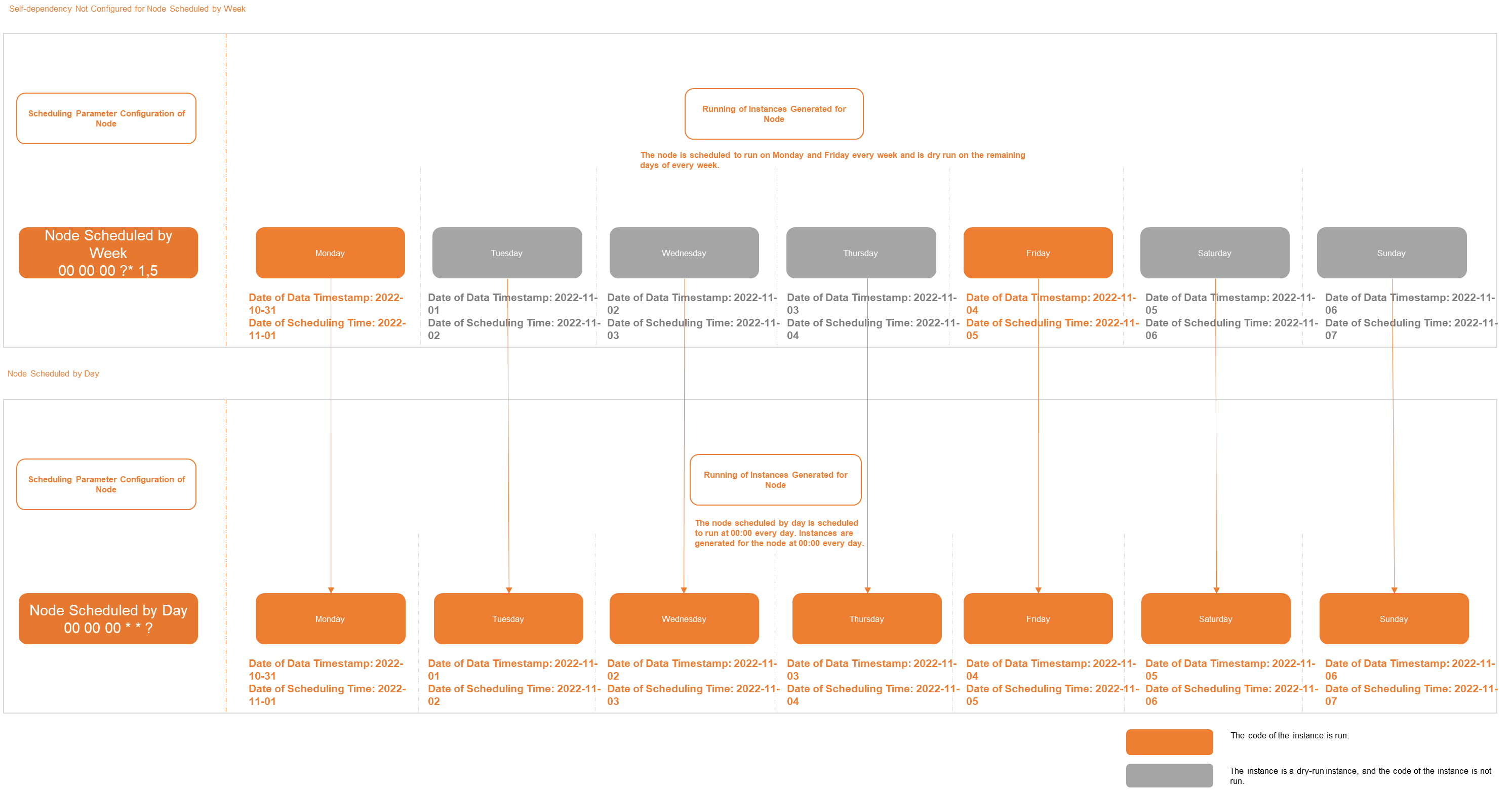
When a day, hour, or minute task depends on a task scheduled by week, month, or year, DataWorks generates dry-run instances for the lower-frequency task on days when it is not scheduled to run. Dry-run instances do not execute any code, do not generate data, do not consume resources, and do not block descendant tasks.
When a dry-run instance's scheduled time arrives, its status is immediately set to Successful, allowing descendant instances to proceed normally.
Example: A week task is scheduled every Monday and Friday. A day task depends on it.
On Monday and Friday: real instances run and generate data.
On Tuesday, Wednesday, Thursday, Saturday, and Sunday: dry-run instances are generated and immediately marked Successful.
The day task runs every day, depending on the corresponding week-task instance (real or dry-run), without any blockage on non-scheduling days.