This topic describes frequently asked questions about dependencies.
What you need to know before configuring scheduling dependencies
FAQ about scheduling dependency configuration
Error: The parent node output that the current node depends on does not exist
Why are downstream node name and ID sometimes empty and not editable in the node output section
What are the rules for downstream tasks depending on upstream tasks
Can multiple nodes that write to the same table have the same output name
How to exclude intermediate tables when using auto-parsed dependencies
How to configure the parent node of the topmost node in a workflow
FAQ about node deletion and modification
Scenarios for cross-cycle dependency configuration
How does self-dependency on an hourly task affect the task and its downstream nodes
How to configure dependencies when a daily task depends on an hourly task in different scenarios
When a daily task depends on an hourly task, when does the daily task run
How to make a daily task depend on a specific hourly instance instead of all hourly instances
How to make a daily task depend on all of yesterday's hourly instances instead of today's
When to configure the cross-cycle dependency to depend on the current node itself
How to configure dependencies when a downstream node depends on multiple upstream tasks
If an upstream hourly task runs past midnight, will the downstream daily task still run
How to trigger a daily task after the first hourly task instance succeeds each day
Scenarios for scheduling dependency configuration
Other FAQ
Key concept
A scheduling dependency is an upstream-downstream dependency between nodes. In DataWorks, a downstream task node starts running only after its upstream task node runs successfully.
After a dependency is configured, one of the prerequisites for the current node to run is that the parent nodes on which the current node depends must run successfully. For more information about scheduling dependencies, see Scheduling dependencies.
Why do I need to configure scheduling dependencies
After scheduling dependencies are configured, the scheduling system ensures that a scheduled task retrieves the correct data at runtime. After the upstream node on which the current node depends runs successfully, DataWorks identifies that the latest data in the upstream table has been produced based on the running status of the node. Then, the downstream node retrieves the data. This prevents issues where the downstream node retrieves data before the upstream table has finished producing data.
How do I configure scheduling dependencies in DataWorks?
In DataWorks, the output of an upstream node serves as the input of a downstream node to form a node dependency.
SQL tasks automatically configure node inputs and outputs in the following ways:
When you
selectfrom a table, the system automatically parses the node that produces the table as the upstream dependency of the current node.When you
insertinto orcreatea table, the system automatically parses the table as the output of the current node.
For Data Integration tasks, you must manually add the output table in the format of
projectname.tablenameas the node output. This ensures that the auto-parsing feature can resolve the dependency when downstream nodes process the synchronized output table.Because a unique output is required to locate a unique node and form a node dependency, the node output (
projectname.tablename) must be unique.
In which scenarios are scheduling dependencies not supported?
Scheduling dependencies in DataWorks are primarily designed to ensure that tables updated on a schedule by scheduled nodes have their data correctly consumed by downstream nodes. Therefore, tables that are not updated by DataWorks scheduled nodes cannot be monitored by the platform.
If a table is not produced by periodic scheduling and a node uses select to query data from such a table, you must manually delete the upstream node dependency that was automatically generated from the select statement. Tables not produced by periodic scheduling include:
Tables uploaded to DataWorks from a local source
Dimension tables
Tables not produced by DataWorks scheduling
Tables produced by manual tasks
How do I delete tables that do not require dependencies?
Right-click the table name in the code and select Delete Output, and then run auto-parsing again. Add the annotation --@exclude_input=table_name on the first line of the code editor to exclude a specified input dependency (for example, --@exclude_input=xc_dw_user_info_all_d). Then, right-click in the editor and select Delete Output to remove unnecessary output dependencies. Click the Parse Inputs and Outputs button in the schedule settings panel on the right to re-parse the scheduling dependencies. In the scheduling dependency table, you can view the output name of the current parent node, the source (manually added or auto-parsed), and other information. You can also click Delete in the Actions column to remove the corresponding dependency.
Submission error: The parent node output on which the current node depends does not exist
When you submit a node, the system displays an error indicating that the parent node output on which the current node depends does not exist. For possible causes and solutions, see Troubleshoot the error that the parent node output does not exist.
Submission prompt: Inputs and outputs do not match the code lineage analysis
When you submit a node, the system displays a prompt indicating that the inputs and outputs do not match the code lineage analysis. For possible causes and solutions, see Troubleshoot the mismatch between inputs/outputs and code lineage analysis.
Why does an auto-parsed parent node name report that the dependent parent node output (table) does not exist?
When you submit a node in Data Studio, an error appears at the top of the node dependency configuration panel: The dependent parent node output workshop_yanshi.tb_2 does not exist. You cannot submit this node. Submit the parent node first. This dependency is automatically generated by the system from the FROM tb_2 statement in the SQL code.
This error does not mean that the table does not exist. It means that the system cannot find a node that produces the table data to establish the node dependency.
This issue can occur for the following two reasons:
The upstream node has not been submitted. Submit it and try again.
The upstream node has been submitted, but its output name is not workshop_yanshi.tb_2.
If tb_2 is a table produced by a synchronization task, manually add it as the node output in the format of
projectname.tablenamein the output section of the synchronization task node that produces the tb_2 table. For more information, see Configure scheduling dependencies.If tb_2 is a table that is not updated by a scheduled node on a daily basis, right-click the table in the code to delete the input, and then run auto-parsing again.
For tables that are not updated daily by scheduled nodes, see In which scenarios are scheduling dependencies not supported?
Why do some nodes have downstream node names and IDs in the node output section while others are empty and cannot be manually edited?
Node dependencies are established by downstream nodes referencing upstream node outputs. If the current node has no downstream child nodes, this section is empty. After a child node is configured downstream of this node, the content is automatically parsed and displayed.
How do I delete unnecessary dependencies?
Right-click the table in the code and delete the input, then select auto-parsing again to exclude unnecessary upstream dependency nodes.
Key concept
In the DataWorks scheduling system, upstream-downstream dependencies between nodes are configured to ensure effective data production and retrieval. Whether to configure a dependency can be determined based on whether the data has a strong correlation. For more information, see Configure scheduling dependencies.
Key concept
A node output name is used to establish dependencies between nodes. For example, if the output name of node A is ABC and node B uses ABC as its input, an upstream-downstream relationship is established between node A and node B.
Can a node have multiple output names?
Yes. A node output serves as the identifier of the current node. If a downstream node needs to depend on the current node, it can reference any output name of this node as the parent node output name of the downstream node to establish a dependency.
If multiple nodes write data to the same table, auto-parsing reports an error that the node output names are the same. Can nodes have the same output name?
No. Node output names, like nodes and tables, must be unique at the tenant level. This ensures that auto-parsing can locate a unique node based on a unique output to establish the node dependency. If multiple nodes produce data for the same table in your scenario, you need to determine which node the downstream node should depend on when auto-parsing this table (the node that writes data to the table last, ensuring correct data retrieval by the downstream node). You must also modify the outputs of the other nodes to ensure uniqueness.
If two scheduled nodes in the same workspace insert data into the same table, auto-parsing causes one of the nodes to produce the following error: The output name of node ${nodename1} in workspace ${projectname} is the same as that of node ${nodename2} in workspace ${projectname}: ${node_outputname}. Multiple nodes cannot use the same output name.
How do I prevent intermediate tables from being parsed when using auto-parsing?
Select the intermediate table name in the SQL code, right-click, and select Delete Input or Delete Output, and then run auto-parsing for inputs and outputs again.
How do I configure the parent node for the most upstream node in a workflow?
If the node is the starting node of a workflow, you can add a virtual node as the starting node of the workflow. The upstream of the virtual node can be set to the workspace root node. For more information about how to use virtual nodes, see Use virtual nodes.
Why does node A find a non-existent output name of node B when searching for upstream node output names?
Dependency parsing is based on the information of nodes that have already been submitted and deployed. If you delete an output name of node B after it is submitted without submitting the change to the scheduling system, the deleted output name of node B can still be found when searching from node A.
Why does the system report that the current node has child nodes and cannot be undeployed, even though no dependency is shown in the schedule settings?
A node can be undeployed only when no other node depends on it in both the development environment and the production environment. You can verify this by checking in the Operation Center of the development environment and the Operation Center of the production environment.
Why are some dependency lines dashed in Operation Center?
Dashed lines indicate cross-cycle dependencies. For more information about cross-cycle dependencies, see Cross-cycle dependencies.
Key concepts
Impact on the current node: The next-cycle instance of the upstream node starts running only after the previous-cycle instance runs successfully.
Scenario: Assume an hourly task is scheduled starting from 00:00. The 01:00 instance must wait for the 00:00 instance to run successfully before it can start.
Impact on downstream nodes: Assume the downstream node is a daily scheduled task. The downstream daily node changes from directly depending on multiple hourly instances to directly depending on a specific hourly instance of the upstream node. Because self-dependency is configured for the hourly instances, the downstream daily task effectively depends on all upstream hourly instances indirectly.
How do I configure dependencies when a daily task depends on an hourly task in different scenarios?
Scenario 1: A daily task depends on all hourly instances of the hourly task on the current day.
When a daily task directly depends on an hourly task, it depends on all instances of the hourly task on the current day.
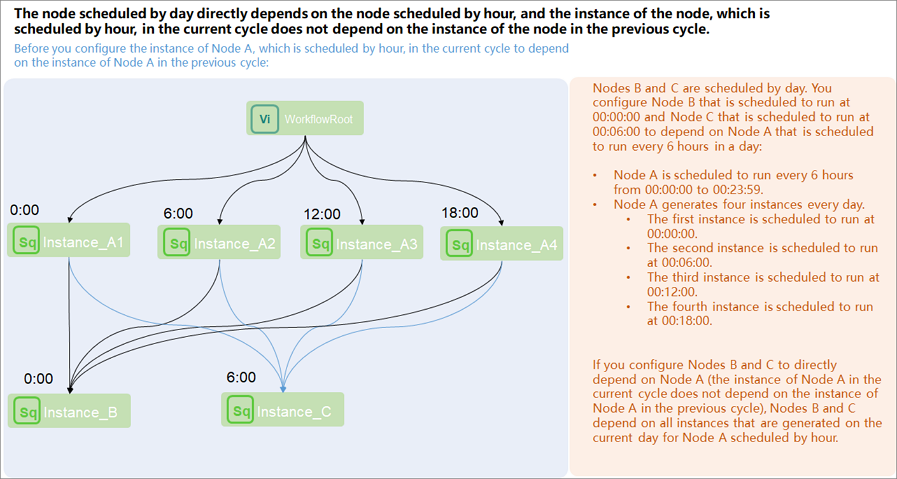
Scenario 2: A daily task depends on a specific hourly instance on the current day.
Hourly task configuration: Configure self-dependency for the hourly task. In the schedule settings of the hourly task, select the current node as the previous-cycle dependency.
Daily task configuration: The daily task directly depends on the hourly task. Configure the hourly task as the input (dependent upstream node) of the daily task.
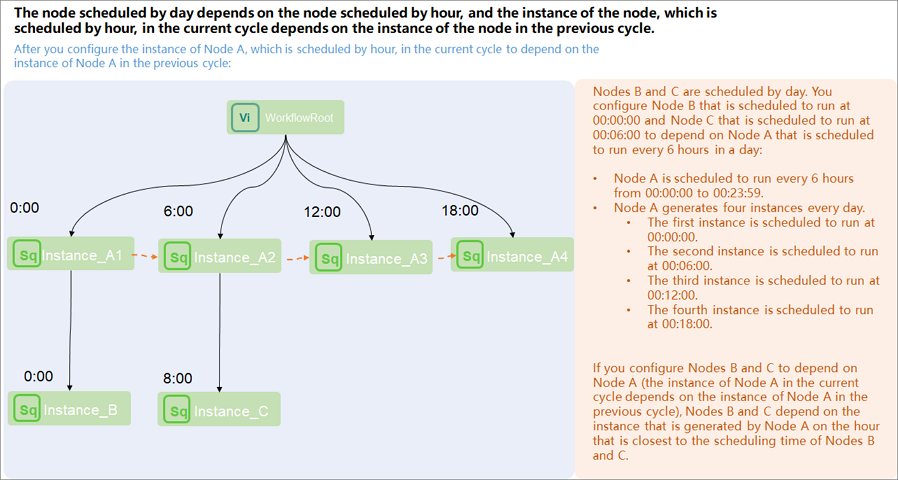
Scenario 3: A daily task depends on all hourly instances of the hourly task from the previous day.
Configure a cross-cycle dependency for the daily task on the hourly task. In the schedule settings of the daily task, select Previous-cycle Scheduling Dependency, select Custom, and enter the node ID of the hourly task.
Remove the same-cycle dependency on the hourly task from the daily task schedule settings. In the same-cycle dependency (Parent Nodes) section, remove the same-cycle dependency on the hourly task.
If you have configured a cross-cycle dependency on the hourly task for the daily task, verify that the same-cycle dependency has been removed. Otherwise, the daily task depends on both all hourly instances of the current day and all hourly instances of the previous day.
When a daily task directly depends on an hourly task, when does the daily task run?
How it works: When a daily task directly depends on an hourly task, the daily task depends on all instances of the hourly task on the current day. The daily task starts only after the last hourly instance of the day runs successfully.
Scenario:
Assume an hourly task is scheduled starting from 00:00, running once every hour. The daily task must wait for all 24 hourly instances to complete before it can start.
Viewing dependencies in Operation Center: Right-clicking the daily task to view parent nodes shows that it depends on all instances of the hourly task on the current day, meaning it depends on 24 hourly instances. (dependency line: solid)
When a daily task depends on an hourly task, how do I make the daily task depend on a specific hourly instance instead of all hourly instances?
How it works: To make a daily task depend on a specific hourly instance on the current day, configure self-dependency for the hourly task and set the scheduled time of the daily task to match the specific hourly instance.
Scenario: When the daily task needs to depend on the hourly instance scheduled at 12:00 on the current day
Dependency configuration:
Upstream hourly task configuration: Configure self-dependency for the hourly task. In Scheduling Settings, in the Time attribute section, select .
Downstream daily task configuration: Set the scheduled time of the daily task to 12:00.
Viewing dependencies in Operation Center:
Right-clicking the daily instance to view parent nodes shows that it depends on the hourly instance scheduled at 12:00 on the current day. (dependency line: solid)
Right-clicking the hourly instance to view parent nodes shows that the upstream parent node is the previous hourly instance. The 12:00 instance depends on the 11:00 instance. (dependency line: dashed, because the hourly task has a cross-cycle dependency configured with the dependency item set to the current node)
When a daily task depends on an hourly task, how do I make the daily task depend on all hourly instances from the previous day instead of the current day?
How it works: To make a daily task depend on all hourly instances from the previous day, configure a cross-cycle dependency on the hourly task for the daily task.
Scenario: The daily task needs to depend on all hourly instances from the previous day.
Dependency configuration:
Downstream daily task configuration: Configure a cross-cycle dependency on the hourly task. In Scheduling Settings, in the Time attribute section, select and enter the node ID.
Upstream hourly task configuration: No configuration is required.
Viewing dependencies in Operation Center:
Right-clicking the downstream daily instance to view parent nodes shows that it depends on all hourly instances of the hourly task from the previous day. (dependency line: dashed, because the daily task has a cross-cycle dependency configured on the hourly task)
When should I configure the previous-cycle dependency item as the current node?
Business scenario: If the current node needs data produced by the same node in the previous cycle, you can configure self-dependency for the current node. This means the next-cycle instance of the current node starts running only after the previous-cycle instance finishes, preventing data retrieval while the previous-cycle instance is still running (data has not been produced yet).
If the current node depends on data produced by itself in the previous cycle and you need to confirm the time when the previous cycle produced data, go to of the task and configure .
If an hourly task depends on a daily task, and the downstream hourly task has multiple cycles whose scheduled times have already passed when the upstream daily task finishes running, the hourly task may run multiple cycles concurrently. In this case, go to of the task and configure .
How do I configure dependencies when a downstream node depends on multiple tasks simultaneously?
If a downstream node is configured to depend on multiple tasks, you need to make a business judgment on whether all dependencies are required. If the table data has strong correlations, we recommend that you configure all the nodes as dependencies. For information about whether to configure node dependencies, see Why do I need to configure scheduling dependencies.
For example, downstream node C depends on both daily task B and hourly task A on the current day. Hourly task A outputs table A, and daily task B outputs table B. Downstream node C needs data from both table A and table B.
Assume downstream node C queries data from both table A and table B. If you configure only hourly task A as Parent Nodes without configuring daily task B as Parent Nodes, downstream node C may start running before the upstream daily task B finishes. This causes a failure when retrieving data from the output table B of the daily task. Therefore, in this example, you need to configure both the daily task and the hourly task as Parent Nodes of downstream node C.
If the downstream node does not have a strong dependency on the upstream table, meaning the downstream node can retrieve data from the upstream table at any time without issues (even if the upstream node has not produced the latest data), you do not need to configure a node dependency.
If upstream task A is an hourly task and downstream task B is a daily task that runs once after all instances of task A finish, will the daily task still run if the hourly task runs into the next day? Are scheduling parameters affected?
Daily task B directly depends on all instances of hourly task A on the current day. Daily task B aggregates the hourly task data for the current day. If the hourly task finishes its last instance after midnight (the next day), the downstream daily task still runs. Only the running time differs; scheduling parameter substitution is not affected.
Node A runs every hour on the hour every day, and node B runs once a day. How do I make node B start after node A runs successfully for the first time each day?
When configuring node A, select Previous-cycle Scheduling Dependency and choose Current Node. Set the scheduled time of node B to 00:00. In the daily auto-scheduled instances, the instance of node B depends only on the instance of node A generated at 00:00, which is the first instance of node A.
There are three tasks A, B, and C. How do I run A->B->C every hour (B starts after A finishes, and C starts after B finishes)?
Dependency configuration: Set the dependency relationship so that the output of A serves as the input of B, and the output of B serves as the input of C.
Schedule frequency configuration: Since the schedule is configured at the node level, all three nodes A, B, and C must have their schedule set to hourly.
How do I configure cross-workflow and cross-project dependencies within the same region?
How it works: The output of an upstream node serves as the input of a downstream node to form a node dependency. Add the output of the node you want to depend on (cross-project or cross-workflow) to the input section of the node that requires the dependency.
A task configured with rerun-on-failure did not rerun after failure, and reported the error: Task Run Timed Out, Killed by System!!
Error message:
When the Scheduling Settings > Time attribute > Rerun of the target task is set to Allow Regardless of Running Status or Allow upon Failure Only, the task does not rerun after failure and produces the error
Task Run Timed Out, Killed by System!.Possible cause:
The Scheduling Settings > Time attribute of this task has the Timeout configured. When the task duration exceeds the timeout period, the task is automatically terminated. Tasks that fail due to timeout do not trigger the rerun mechanism.
Solution:
When a task fails due to timeout, the rerun-on-failure mechanism does not take effect. You must manually restart the task.