Value-added features
DataV offers purchasable value-added features that extend widget collection capacity and screen count limits beyond your current edition.
Value-added feature types
DataV offers two value-added features: the Widget Collection Capacity Extension Package and the Screen Count Extension Package.
Alibaba Cloud does not offer custom screen development. To meet custom development needs, find a suitable third-party vendor. For future updates, follow official announcements from the DataV platform.
Widget Collection Capacity Extension Package
DataV lets you save configured widgets or widget groups, including all their style and data configurations, as collections.
Scenarios
If your saved widgets reach the limit for your purchased edition, purchase the Widget Collection Capacity Extension Package to expand your widget library.
Feature overview
After purchase, your saved widget limit increases. The additional quota appears in Workspace Management, where you can assign it to your workspaces as needed.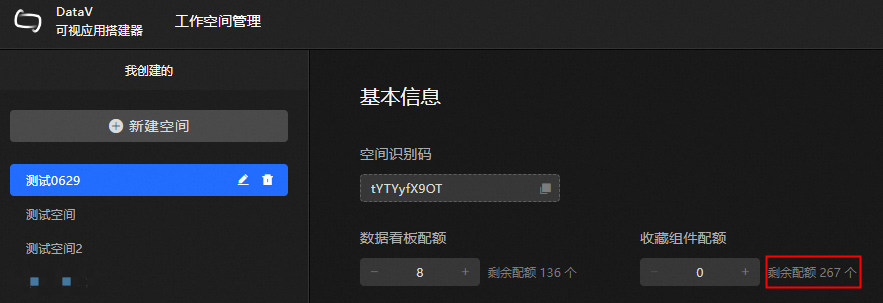
The widget collection limit increase is permanent for your Alibaba Cloud account and remains valid as long as the account is active. When your account expires, renew your DataV console logon account. No extra payment is required to retain the extended collection capacity.
Purchase steps
Access the DataV console.
-
On the Workbench page, click User Center in the upper-right corner.
-
On the User Center page, in the Widget Collection Capacity Extension Package section, click Purchase.
-
Follow the on-screen instructions to complete the purchase. For more information, see Product Billing.
Screen Count Extension Package
Purchase the Screen Count Extension Package to increase the number of projects you can create in DataV.
Feature overview
After purchase, the number of available projects increases. The additional screen quota appears in Workspace Management, where you can assign it to your workspaces as needed.
The screen count increase is permanent for your Alibaba Cloud account and remains valid as long as the account is active. When your account expires, renew your DataV console logon account. No separate renewal is required for the screen extension package.
Purchase steps
Access the DataV console.
-
On the Workbench page, click User Center in the upper-right corner.
-
On the User Center page, in the Screen Count Extension Package section, click Purchase.
-
Follow the on-screen instructions to complete the purchase. For more information, see Product Billing.