Visual mapping of data is the process of mapping raw data to visual properties of visualization elements (such as color, shape, and size) through specific rules to visually represent data features. This topic provides information about the visual mapping function.
Example effect
The following figure shows an example scenario: the Graph configuration panel of the Vector Scatter Layer subcomponent in Basic Flat Map 3.0 and its corresponding visualization effect.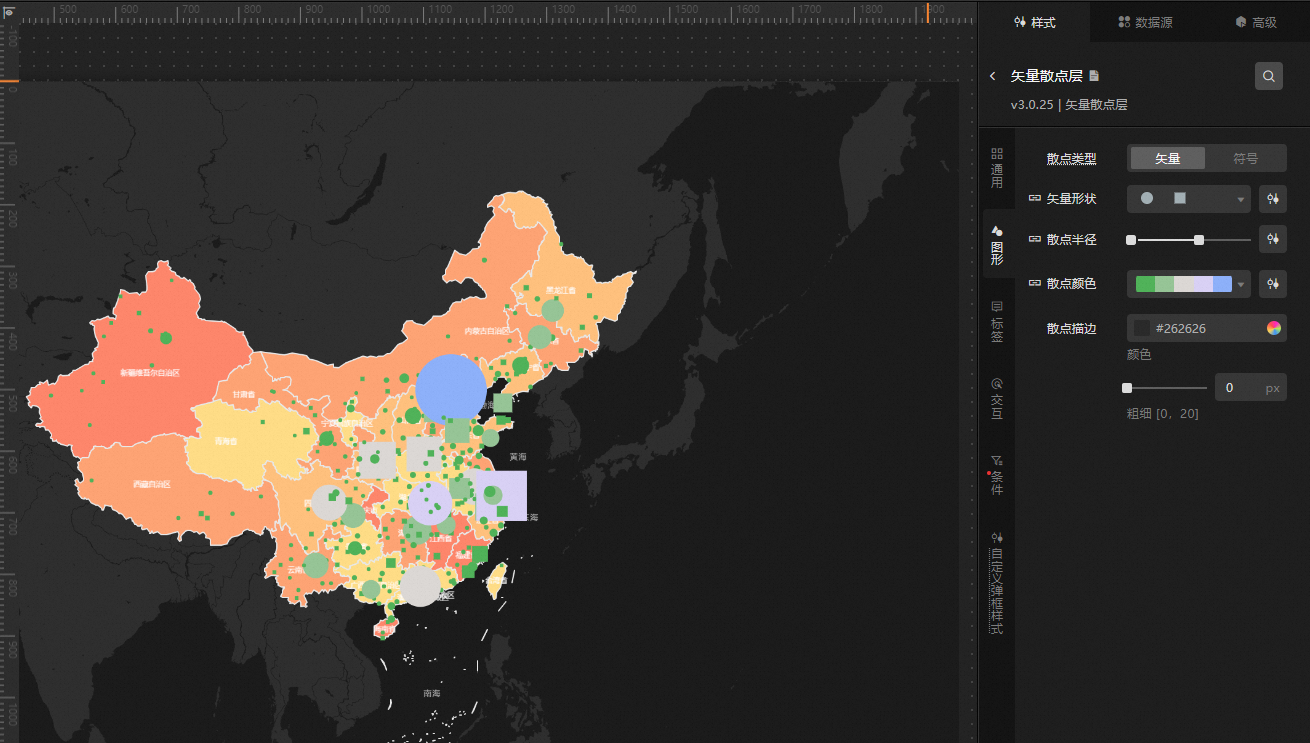
Limits
The visual mapping function is currently compatible with two types of components:
All components of version 5.x and above.
Subcomponents in Basic Flat Map and 3D Flat Map.
Function introduction
DataV deeply integrates style configuration and data mapping capabilities, providing comprehensive visual mapping functions including color mapper, shape mapper, size mapper, and condition tree. When you enable the visual mapping function of a component, it supports intuitive association between style and data, allowing you to customize the visual presentation effect of the component in a flexible and efficient manner.
Feature | Description |
Color mapper | Color mapper is used to set the mapping configuration effect between various colors and data values in the component. |
Shape mapper | The mapping configuration method of Shape mapper is similar to that of the color mapper, used to map the mapping content between data values and graphics in the component. Graphics include two types: vector and icon. |
Size mapper | Size mapper is used to adjust the size of graphic elements. By using range sliders to determine the size range of graphic elements, you can customize the mapping relationship between data values and sizes. |
Condition tree | Condition tree is used to specify logical judgments for conditional style modifications or filter style settings. |