Only listed assets have viewable details. The asset details page shows the API name, properties, usage statistics, and invocation instructions.
Prerequisites
You must have purchased the asset operation value-added service and the DataService Studio feature.
API asset details
In the top menu bar on the Dataphin home page, select Asset > Asset Directory.
Select the API asset tab, then click the name of the target asset to access the asset details page.
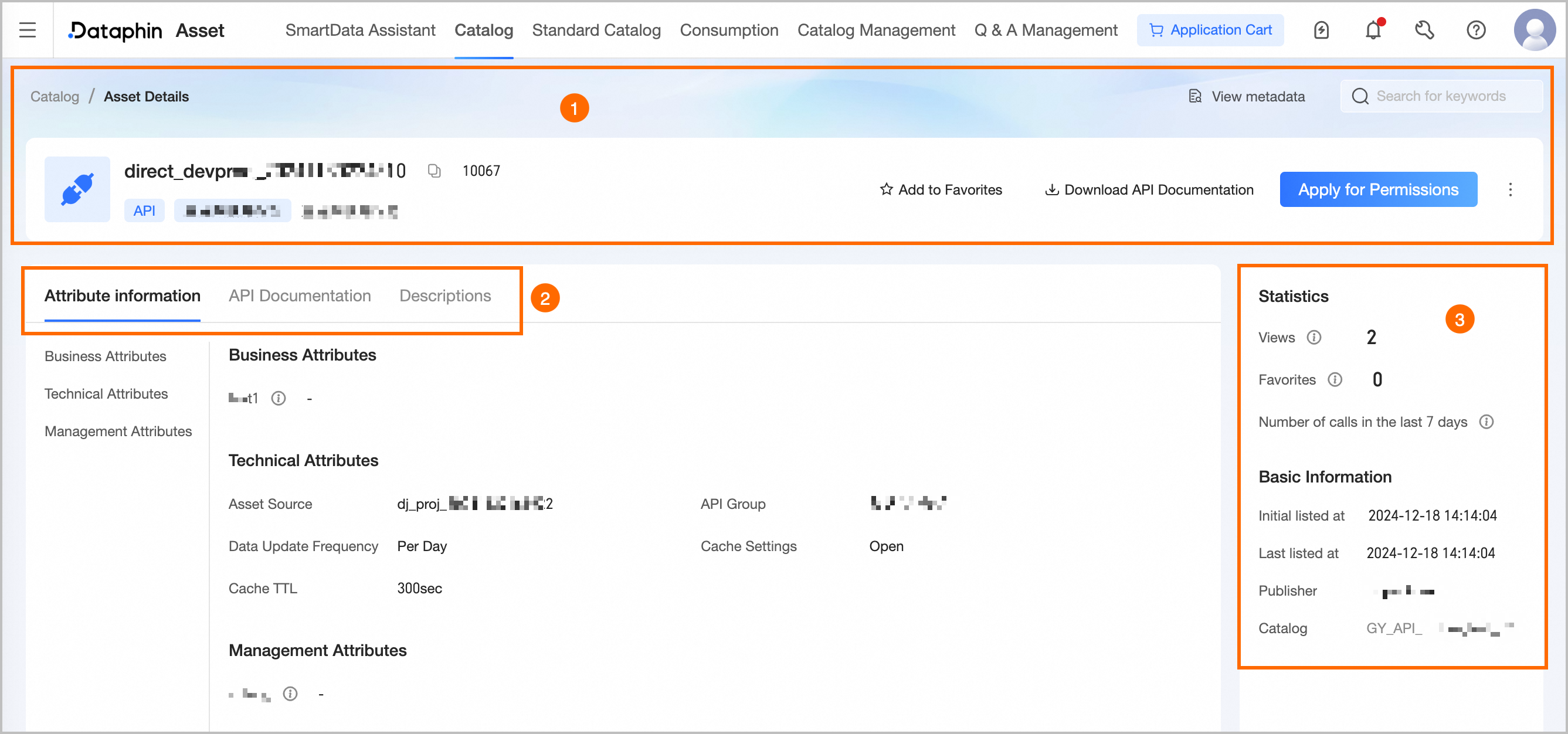
Area
Description
①Summary Information
Shows the API name, API_ID, type, description, and tags. You can also perform the following operations:
View Metadata: Opens the asset checklist details page for this API.
Search Asset: Quickly search for other assets and navigate to their details page.
Favorite: Add or remove the asset from favorites. You can view all favorited assets in the Personal Data Center. For more information, see View and manage my favorited assets.
Download API Document: Downloads the API document in Word format for offline editing.
Request Permission: Opens the permission request page for this API. For more information, see Manage API permissions.
Edit: Opens the directory management page where you can modify the asset's properties and usage instructions. For more information, see Edit asset information.
View Invocation Instructions: View the API invocation example template, including the Java SDK method (with Python SDK flow) and Token invocation method, whitelist invocation method.
NoteIf the SDK and invocation instructions are modified in Service > Invoke > Invocation Instructions, the invocation instructions here will be synced. Therefore, there may be differences between the help document and the actual situation.
Default Invocation Example Download: Downloads the API invocation example.
Python Invocation Example Download: Downloads the Python example file package.
Java SDK Download: Downloads the Java SDK code package.
②Basic Information
Property Information: Shows the API's property information, including technical properties.
Technical properties: Shows the asset source, API group, and data update frequency. Technical properties vary by API type.
Data Update Frequency: The data source update frequency of this API, helping callers understand data timeliness.
Custom Properties: Shows properties created in Data Warehouse Plan > Attribute Management that are visible in the asset directory. Custom properties include business, management, and technical properties.
API Document: Shows the API basic information, business and public request parameters, return parameters, JSON return example, row-level permission list (visible only if row-level permissions are enabled during API creation), client error codes, server error codes (API invocation), and server error codes (SQL execution).
Usage Instructions: Must be enabled on the manually listed API asset editing page. Provides usage instructions as reference for data viewers and users.
③Asset Information
Shows the API's Usage Statistics and Basic Information.
Usage Statistics: Includes page views, favorites count, and invocation count over the last 7 days.
Page Views: The API's page views (PV), incremented on each refresh and updated in real time. Counts only views on the asset directory details page.
Number Of Favorites: The number of times this API has been favorited, including favorites from both the asset checklist and asset directory. Updated in real time.
Number Of Invocations In The Last 7 Days: The number of times this API has been invoked in the last 7 days. Updated in real time.
Basic Information: Includes the initial listing time, most recent listing time, publisher, and belonging directory.