This topic describes the basic processes of using Data Transport III devices to migrate data between data centers and Alibaba Cloud Object Storage Service (OSS). The processes include order creation, data migration, and data writing to network-attached storage (NAS) file systems of Data Transport. You can migrate data by following these processes based on your business requirements.
Process of migrating data from your data center to Alibaba Cloud OSS
You can lease a Data Transport III device only in regions within the Chinese mainland, China (Hong Kong), and Indonesia (Jakarta).
The process of using Data Transport III devices in regions in the Chinese mainland and in regions outside the Chinese mainland is different. Please refer to the following figures for details.
Process of using Data Transport III devices in regions in the Chinese mainland
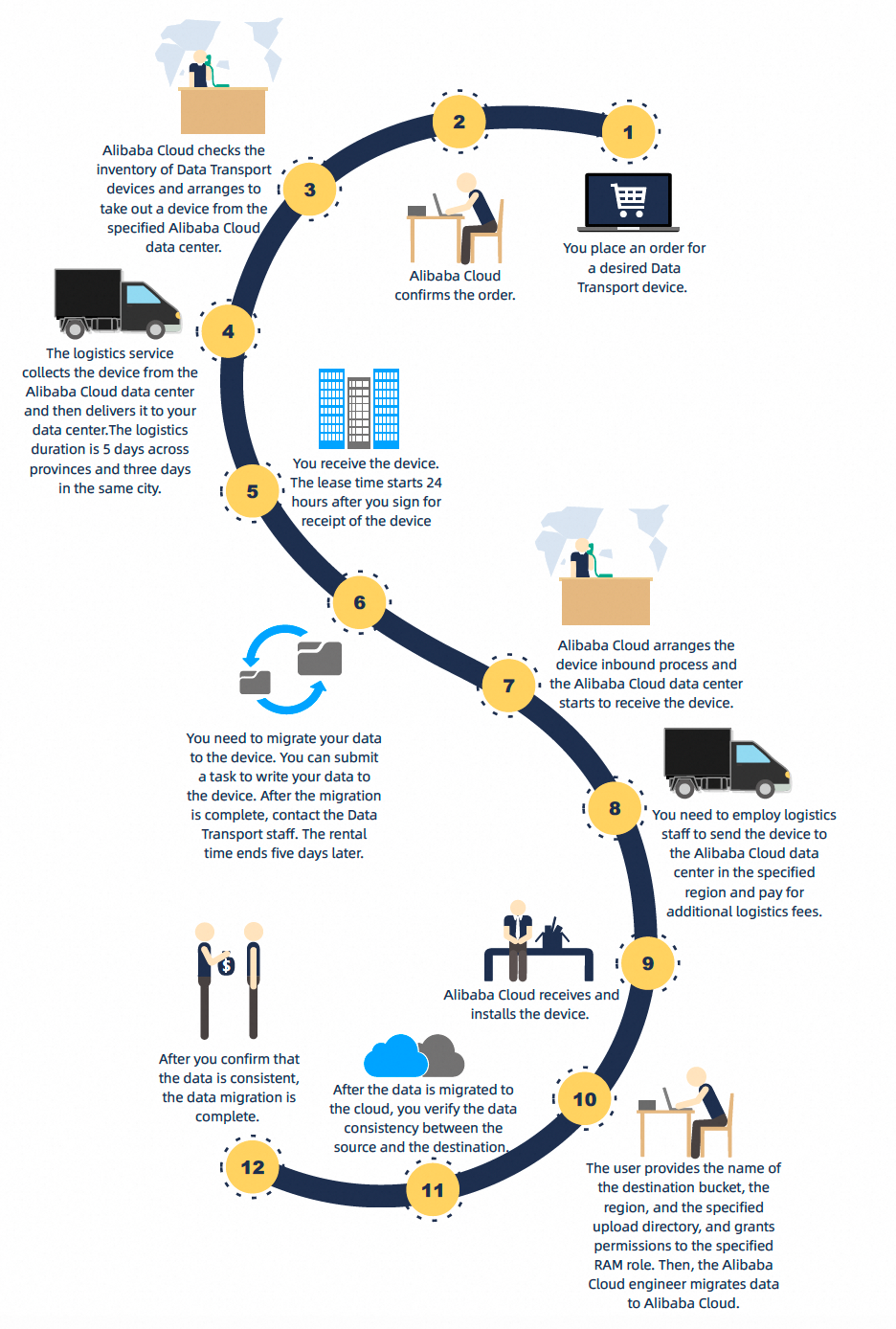
Process of using Data Transport III devices in regions outside the Chinese mainland
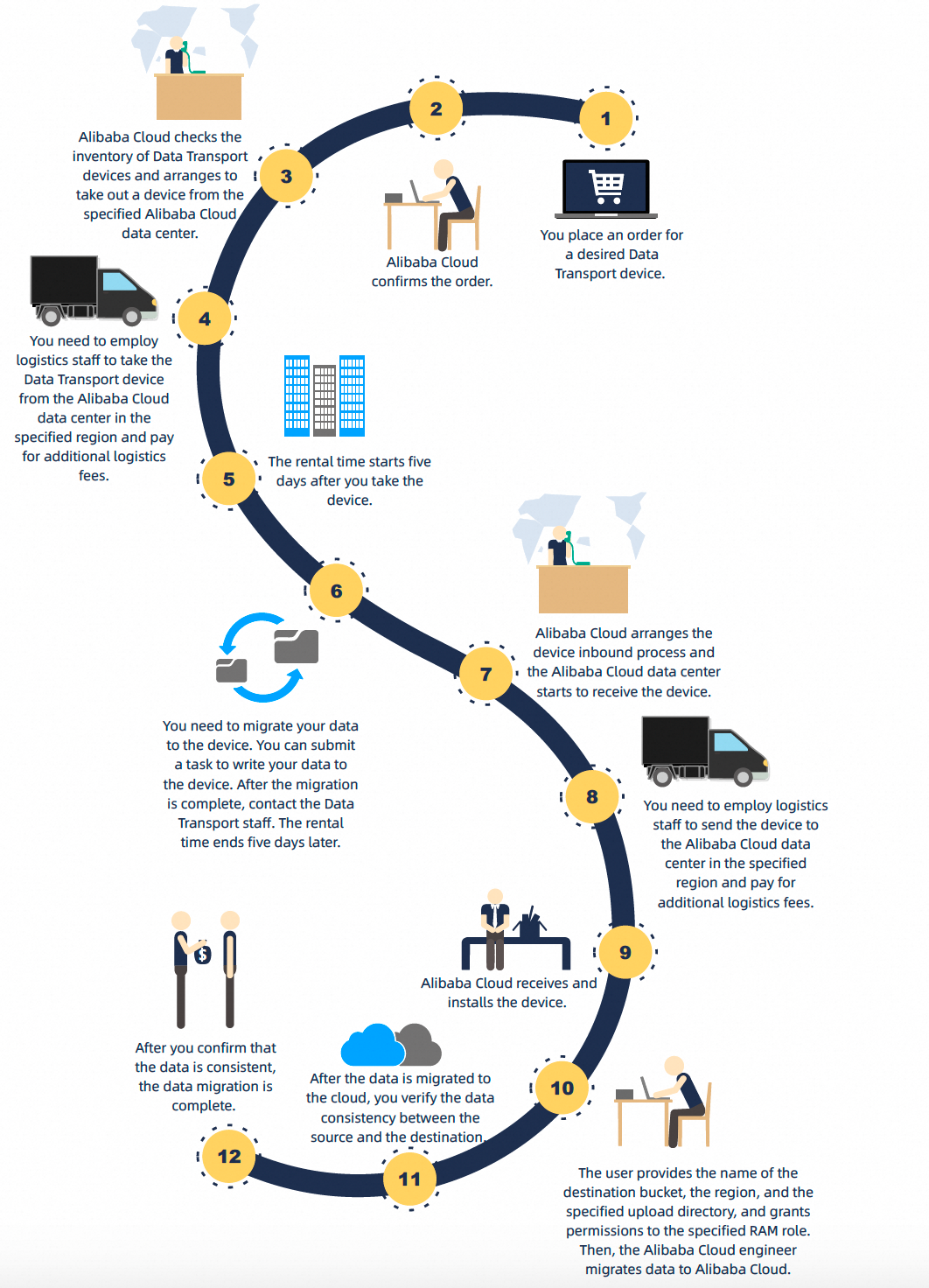
Migrate data from your data center to Alibaba Cloud OSS
Create an order for a Data Transport III device and complete the payment. For more information, see Create an order to lease a device for a single time.
NoteRegions in the Chinese mainland:
After you complete the payment, Alibaba Cloud sends the Data Transport III device to the address that is specified in the order.
Regions outside the Chinese mainland:
After the order is created, Alibaba Cloud staff prepares the Data Transport III device and transfers the device from the warehouse. You need to employ logistics staff to take the Data Transport III device from the Alibaba Cloud data center in the specified region and pay for additional logistics fees.
Create an OSS bucket. For more information, see Create buckets.
After you confirm the receipt of the Data Transport III device, install the device. For more information, see Install a Data Transport device.
Mount the file system in which source data is stored. For more information, see Mount the file system in which source data is stored.
Create and run a data migration task to migrate on-premises data to the Data Transport III device. For more information, see Copy on-premises data.
Power off the Data Transport III device and notify Alibaba Cloud to retrieve the device. For more information, see Migrate data to the cloud and verify the migration result.
NoteRegions in the Chinese mainland:
After the on-premises data is migrated to the Data Transport III device, Alibaba Cloud staff perform the following operations:
Arrange for a logistics service to retrieve the Data Transport III device and send the device to an Alibaba Cloud data center.
Install the device in the Alibaba Cloud data center and migrate the data from the device to Alibaba Cloud OSS.
Regions outside the Chinese mainland:
After the on-premises data is migrated to the Data Transport III device, the following operations must be performed:
Alibaba Cloud staff inform the Alibaba Cloud data center in the specified region of preparing to receive the device.
You need to employ logistics staff to take the Data Transport III device from the Alibaba Cloud data center in the specified region and pay for additional logistics fees.
Alibaba Cloud staff install the Data Transport III device in the Alibaba Cloud data center and migrate the data from the device to Alibaba Cloud OSS.
After the data migration task is complete, Alibaba Cloud staff provide you with a data migration report. This data migration report contains information, such as the total number of files and the total amount of data migrated to OSS, and the paths of all migrated files and files that failed to be migrated. The migration report is for reference only. You can check whether the source data is the same as the data in the cloud. After the data migration task is complete, you must also revoke the permissions granted to the specified RAM role.
Process of migrating data from Alibaba Cloud OSS to your data center
This scenario is supported only in regions in the Chinese mainland.
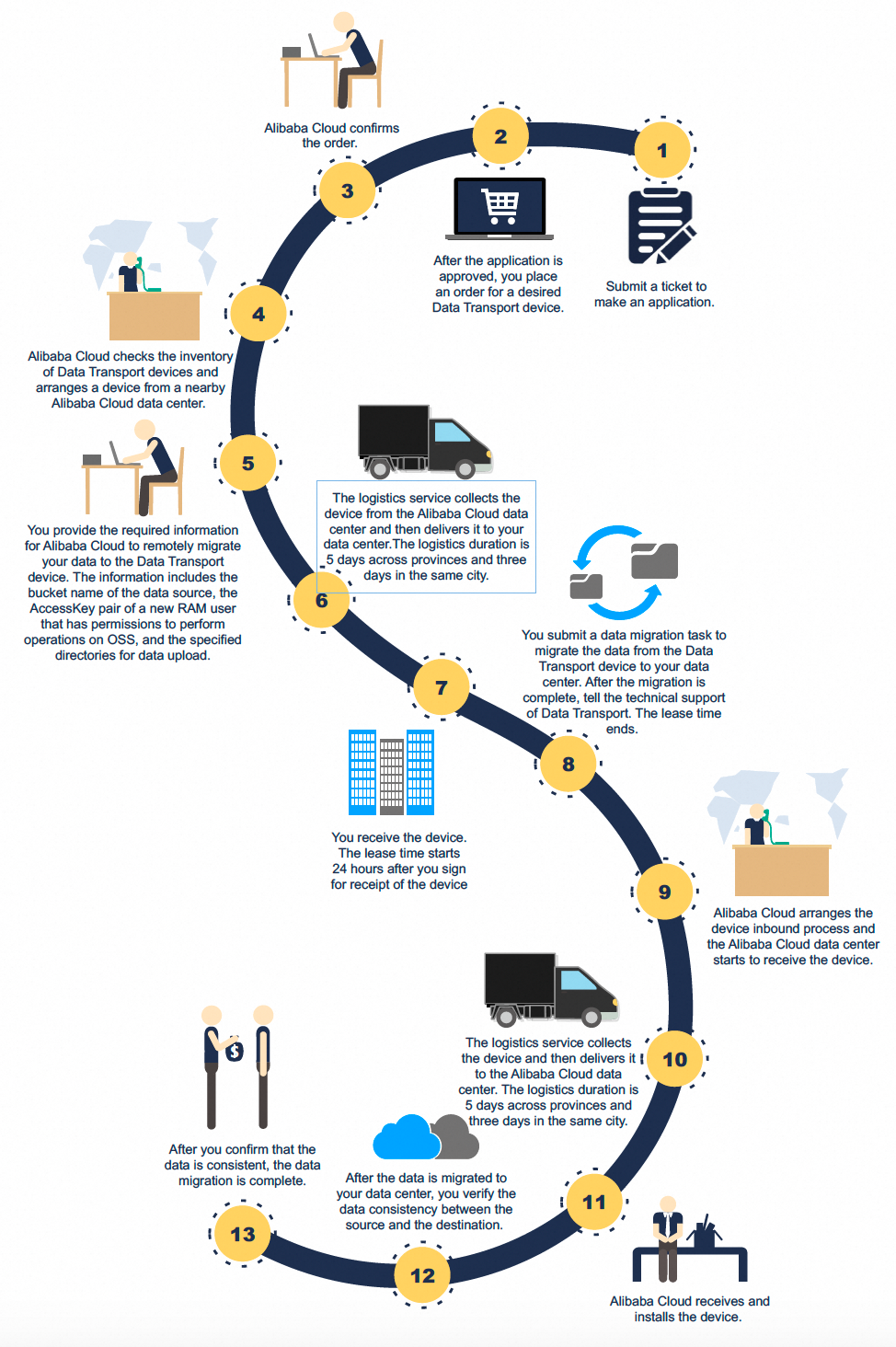
Migrate data from Alibaba Cloud OSS to your data center
When you use Data Transport to migrate data from Alibaba Cloud OSS to your data center, you are charged USD 28.57 for 1 TB of data. You are charged a minimum fee of 10 TB of data. If the data volume you upload is less than 10 TB, you are charged for 10 TB of data.
If you use Data Transport over the Internet, you are charged OSS-related fees and the rental fee of the Data Transport III device. For more information, see Billing overview.
Before you use Data Transport to migrate data of the Archive storage class, you must manually restore the data. Take note of the following items when you restore the data:
Make sure that you have restored the data before you migrate the data.
You must specify the number of days during which the restored data remains in the restored state based on the amount of data that you want to migrate. This prevents the data from entering the frozen state during data migration.
You are charged for data retrieval when you restore data. In some cases, the restoration fees are high. For more information about the billing, see Billing overview.
Before you place an order, submit a ticket. You must provide your user ID (UID) and the reason for data migration.
After your ticket is approved, select Back up to Data Center in the Data Transport console, create an order, and then complete the payment.
You must provide the required information for Alibaba Cloud to remotely migrate data to the specified Data Transport device. The information includes the bucket name of the data source, the AccessKey pair of a new Resource Access Management (RAM) user that has permissions to perform operations on OSS, and the specified directories for data download.
After the data is migrated to the Data Transport III device, Alibaba Cloud staff provide you with a data migration report. This data migration report contains information, such as the total number of files and the total amount of data migrated to the device, and the paths of all migrated files and files that failed to be migrated. The migration report is for reference only. Alibaba Cloud staff arrange a logistics provider to deliver the device to the designated address.
After you confirm the receipt of the Data Transport III device, install the device. For more information, see Install a Data Transport device.
Mount the file system in which the data of your data center is stored. For more information, see Mount the file system in which source data is stored.
Create and run a data migration task to migrate data from the Data Transport III device to the on-premises data center. For more information, see Copy on-premises data.
NoteYou can run the data migration task to migrate data to your data center that uses remote file systems such as the remote Windows file system, remote Linux file system, and the NAS server. If your data center uses Hadoop Distributed File System (HDFS) or other storage systems, you must use other tools for data migration.
Power off the Data Transport III device and notify Alibaba Cloud to retrieve the device. For more information, see Migrate data to the cloud and verify the migration result.
After data migration is complete, you must check the data consistency between the cloud and your data center.