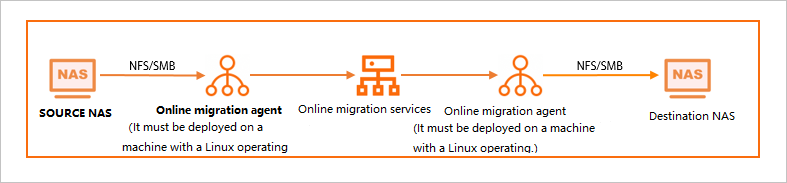
Data Online Migration transfers data between Alibaba Cloud NAS file systems. It mounts each file system on an Elastic Compute Service (ECS) instance as a local directory and uses the LocalFS workflow to migrate data between the mounted paths.
Data Online Migration does not guarantee data consistency during migration. Verify migrated data at the destination after each task completes. If you delete source data before verification, you bear full responsibility for any resulting data loss.
How it works
Data Online Migration mounts NAS file systems to ECS instances as local directories, then migrates data between these directories using the LocalFS migration workflow. This approach works for all NAS-to-NAS scenarios, regardless of region or VPC configuration. For the full LocalFS migration tutorial, see Migrate data between local file systems.
Prerequisites
Before you begin, ensure that you have:
-
At least one ECS instance per tunnel, each with a minimum of 4 CPU cores, 8 GB of memory, and 20 GB of free disk space. For sizing details, see Select an agent
-
Network connectivity between each ECS instance and its corresponding NAS file system
-
For cross-region migrations, a Cloud Enterprise Network (CEN) connection between the source and destination VPCs. See Mount a NAS file system across accounts and regions using CEN
Step 1: Plan agent capacity
Calculate the number of ECS instances required per tunnel:
Number of ECS instances = Expected migration speed / Migration speed of a single instance
For example, with an ecs.c7.xlarge instance (4 CPU cores, 8 GB of memory, 3 Gbps baseline bandwidth):
| Expected speed | Calculation | ECS instances per tunnel |
|---|---|---|
| 2 Gbps | 2 / 3 = 0.6 | 1 |
| 5 Gbps | 5 / 3 = 1.6 | 2 |
Actual migration speed depends on network conditions, NAS file system performance, directory structure, and average file size. Treat the calculated instance count as a starting estimate.
Step 2: Mount the NAS file systems
Mount the source NAS file system on all source ECS instances, and the destination NAS file system on all destination ECS instances.
Mount requirements
-
Create separate tunnels for the source and destination data addresses.
-
Use the same local mount directory on every ECS instance within a tunnel. For example, if you mount the source NAS file system to
/mnt/src/on one source ECS instance, mount it to/mnt/src/on all other source ECS instances.
Mount command
Use the NFS v3 protocol to mount the NAS file system:
sudo mount -t nfs -o vers=3,nolock,proto=tcp,rsize=1048576,wsize=1048576,hard,timeo=600,retrans=2,noresvport <mount_address>:<nas_directory> <local_path>Mount address format
| NAS file system type | Mount address format |
|---|---|
| General-purpose NAS | file-system-id.region.nas.aliyuncs.com:/ /mnt |
| Extreme NAS | file-system-id.region.extreme.nas.aliyuncs.com:/share /mnt |
To find the mount address, go to the File System List page in the NAS console, click Manage next to the target file system, and open the Mount Targets tab. For details, see Manage mount targets.
The shared directory for an Extreme NAS file system must start with /share (for example, /share or /share/subdir).
Mount parameters
| Parameter | Description | Recommended value |
|---|---|---|
vers |
NFS protocol version. General-purpose NAS supports NFS v3 and NFS v4.0. Extreme NAS supports only NFS v3. | 3 |
rsize |
Read data block size in bytes. | 1048576 (maximum) |
wsize |
Write data block size in bytes. | 1048576 (maximum) |
hard |
Applications wait if the NAS file system becomes temporarily unavailable. | Enabled |
timeo |
Timeout in tenths of a second before the NFS client retries a request. | 600 (60 seconds). Use a minimum of 150 (15 seconds). |
retrans |
Number of NFS client retries for a request. | 2 |
noresvport |
Uses a new TCP port on reconnection for uninterrupted network fault recovery. | Enabled |
Do not use the soft mount option, which risks data consistency. Avoid changing read/write buffer sizes or disabling attribute caching, as these changes degrade performance.
Keep the NAS file system mounted and available throughout the migration. If the mount point becomes unavailable, data may be written to the local disk instead of the NAS file system. For NAS mount questions, contact NAS technical support.
Step 3: Configure the migration in Data Online Migration
Open the Data Online Migration console and follow the LocalFS migration tutorial to complete these steps:
-
Create a source tunnel. Create one or more source agents, set the Network Type to Leased Line/VPN (VPC), associate them with the source tunnel, and deploy them on the source ECS instances.
-
Create a destination tunnel. Create one or more destination agents, set the Network Type to Leased Line/VPN (VPC), associate them with the destination tunnel, and deploy them on the destination ECS instances.
-
Create a source data address. Associate it with the source tunnel, select the source agents, and set the Directory to Be Migrated to the local mount path (for example,
/mnt/src/). -
Create a destination data address. Associate it with the destination tunnel, select the destination agents, and set the Directory to Be Migrated to the local mount path (for example,
/mnt/dest/). -
Create a migration task using the source and destination data addresses.
Agent permissions
Start all agents as an administrator.
-
Source agents require read access to all files and subdirectories in the source NAS file system directory.
-
Destination agents require read and write access to all files and subdirectories in the destination NAS file system directory.
Examples
Same region, same VPC
Scenario: Migrate 200 TB from a source NAS file system in China (Beijing) (VPC: vpc-nas, vSwitch: vsw-nas) to a destination NAS file system in the same region and VPC. Target migration speed: 2 Gbps.
Procedure:
-
Calculate the ECS instance count: 2 Gbps / 3 Gbps = 0.6, rounded up to 1 instance per tunnel.
-
In the ECS console, create two ecs.c7.xlarge instances (ECS-1 and ECS-2) in China (Beijing), VPC vpc-nas, vSwitch vsw-nas.
-
Log on to ECS-1, create
/mnt/src/, and mount the source NAS file system. Log on to ECS-2, create/mnt/dest/, and mount the destination NAS file system.ImportantKeep both NAS file systems mounted and available during the entire migration.
-
In the Data Online Migration console for China (Beijing):
-
Create a source tunnel with one agent (Network Type: Leased Line/VPN (VPC)). Deploy the agent on ECS-1.
-
Create a destination tunnel with one agent (Network Type: Leased Line/VPN (VPC)). Deploy the agent on ECS-2.
-
Create a source data address linked to the source tunnel. Set Directory to Be Migrated to
/mnt/src/. -
Create a destination data address linked to the destination tunnel. Set Directory to Be Migrated to
/mnt/dest/. -
Create a migration task with the source and destination data addresses.
-
Same region, different VPCs
Scenario: Migrate 200 TB from a source NAS file system in China (Beijing) (VPC: vpc-nas-1, vSwitch: vsw-nas-1) to a destination NAS file system in the same region but a different VPC (vpc-nas-2, vSwitch: vsw-nas-2). Target migration speed: 2 Gbps.
Procedure:
-
Calculate the ECS instance count: 2 Gbps / 3 Gbps = 0.6, rounded up to 1 instance per tunnel.
-
Create ECS-1 (ecs.c7.xlarge) in China (Beijing), vpc-nas-1, vsw-nas-1. Create ECS-2 (ecs.c7.xlarge) in China (Beijing), vpc-nas-2, vsw-nas-2.
-
Log on to ECS-1, create
/mnt/src/, and mount the source NAS file system. Log on to ECS-2, create/mnt/dest/, and mount the destination NAS file system.ImportantKeep both NAS file systems mounted and available during the entire migration.
-
In the Data Online Migration console for China (Beijing):
-
Create a source tunnel with one agent (Network Type: Leased Line/VPN (VPC)). Deploy the agent on ECS-1.
-
Create a destination tunnel with one agent (Network Type: Leased Line/VPN (VPC)). Deploy the agent on ECS-2.
-
Create a source data address linked to the source tunnel. Set Directory to Be Migrated to
/mnt/src/. -
Create a destination data address linked to the destination tunnel. Set Directory to Be Migrated to
/mnt/dest/. -
Create a migration task with the source and destination data addresses.
-
Different regions, different VPCs
Scenario: Migrate 200 TB from a source NAS file system in China (Beijing) (VPC: vpc-nas-1, vSwitch: vsw-nas-1) to a destination NAS file system in China (Hangzhou) (VPC: vpc-nas-2, vSwitch: vsw-nas-2). Target migration speed: 5 Gbps.
Procedure:
-
Enable cross-region mount access through Cloud Enterprise Network (CEN). For details, see Mount a NAS file system across accounts and regions using CEN.
-
Calculate the ECS instance count: 5 Gbps / 3 Gbps = 1.6, rounded up to 2 instances per tunnel.
-
In the ECS console, create two ecs.c7.xlarge instances named ECS-Src1 and ECS-Src2 for the source NAS file system. Select the China (Beijing) region, vpc-nas-1, and vsw-nas-1 when you create the instances. Then, create two ecs.c7.xlarge instances named ECS-Dst1 and ECS-Dst2 for the destination NAS file system. These instances must also be created in the China (Beijing) region.
-
Log on to ECS-Src1 and ECS-Src2, create
/mnt/src/, and mount the source NAS file system to this directory on both instances. Log on to ECS-Dst1 and ECS-Dst2, create/mnt/dest/, and mount the destination NAS file system to this directory on both instances.ImportantKeep all NAS file systems mounted and available during the entire migration.
-
In the Data Online Migration console for China (Beijing):
-
Create a source tunnel with two agents (Network Type: Leased Line/VPN (VPC)). Deploy the agents on ECS-Src1 and ECS-Src2.
-
Create a destination tunnel with two agents (Network Type: Leased Line/VPN (VPC)). Deploy the agents on ECS-Dst1 and ECS-Dst2.
-
Create a source data address linked to the source tunnel. Set Directory to Be Migrated to
/mnt/src/. -
Create a destination data address linked to the destination tunnel. Set Directory to Be Migrated to
/mnt/dest/. -
Create a migration task with the source and destination data addresses.
-
Performance considerations
| Factor | Impact |
|---|---|
| Deep directory nesting with few files | Slows scanning. For example, 1 million files in 500,000 directories scan slower than the same files in 10,000 directories. |
| Directories with more than 200,000 files | Limits migration speed due to OS kernel and NAS concurrency constraints. |
| Very large or actively modified directories | May cause the NAS file system to respond slowly or become unresponsive during list operations, interrupting the migration task. See Why does a file system stutter or not respond when I run the ls command? |