When your source data resides in a self-managed IDC or a local server, or must be uploaded to the cloud over a leased line or VPN, Alibaba Cloud Data Online Migration cannot directly access the source data. In this case, deploy an agent on an ECS instance. The agent acts as a secure, high-speed bridge between your data source and Data Online Migration. Correct agent configuration is critical to high-bandwidth, low-latency migration.
How it works
Each agent instance can be deployed and run on only one machine. After you deploy an agent instance, do not deploy the same instance again on another machine.
In multi-agent scenarios, use agent machines of identical instance types. If you mix high-specification and low-specification agents, the low-specification agents can drag down overall performance, and the actual migration speed can be lower than when you use only high-specification agents.
Deploy an agent at the source
When you migrate data from self-managed storage — such as an IDC data center or third-party cloud storage — to Alibaba Cloud OSS, deploy an agent at the source.
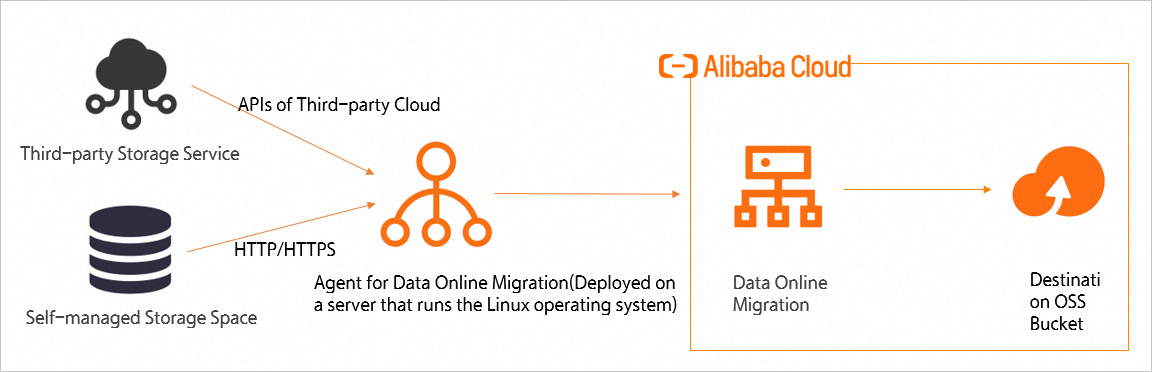
How it works: The agent is a secure entry point for reading data. Data Online Migration pulls source data through the agent, forwards it to the Alibaba Cloud internal migration server, and writes it to the destination OSS bucket.
Data stream: Data source → Agent ECS → Data Online Migration server → Destination OSS bucket.
Deploy an agent at the destination
In some scenarios — such as when the destination is a local file system (LocalFs) — deploy an agent at the destination instead.
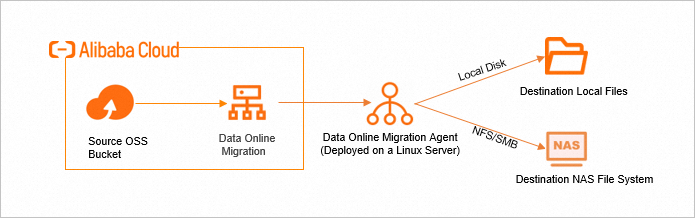
How it works: The agent is a secure exit point for writing data. Data Online Migration writes data to your local storage through the agent.
Data stream: OSS data source → Data Online Migration server → Agent ECS → Destination storage.
Step 1: Select a network solution
Based on your actual migration scenario, select an appropriate network connection method between the agent ECS instance and Data Online Migration:
VPC connection (Recommended): Use this option when the agent ECS and Data Online Migration are in the same Alibaba Cloud region. VPC internal communication provides higher security, greater stability, and lower latency. Make sure the agent ECS can reach the internal same-region endpoint of Data Online Migration in that region. For example, if you use Data Online Migration in the China (Beijing) region, the agent must be able to access:
{TunnelId}.cn-beijing.mgw-tc-internal.aliyuncs.com.Internet connection: Use this option when the agent ECS and Data Online Migration are in different regions, or when the agent runs on a local server or third-party cloud. Make sure the agent has a public IP address and can reach the public endpoint of Data Online Migration in the target region. For example, if you use Data Online Migration in the China (Beijing) region, the agent must be able to access:
{TunnelId}.cn-beijing.mgw-tc.aliyuncs.com.
After selecting a network solution, plan the instance type and quantity for the agent ECS.
Step 2: Plan the ECS selection
Select CPU, memory, and network bandwidth configurations based on your target migration bandwidth and data characteristics.
1. CPU
Minimum: At least 4 cores.
For large numbers of small files (file processing QPS greater than 1,000 per second per agent): CPU becomes the bottleneck under high-concurrency data migration. Select 8 or more cores.
2. Memory
Minimum: At least 8 GiB.
For large numbers of small files: High-concurrency migration consumes significant memory and risks exhaustion. Select at least 16 GiB.
3. Network bandwidth
Network bandwidth is the most critical factor for migration throughput. Calculate the number of ECS instances based on your total bandwidth requirement.
Formula: Number of instances = Total target migration bandwidth ÷ Network bandwidth per ECS instance.
-
Example: To achieve 100 Gbps total migration bandwidth using the VPC solution, focus on the internal bandwidth of each instance:
ecs.c7.2xlarge (5 Gbps internal bandwidth) → 100 ÷ 5 = 20 instances.
ecs.c7.4xlarge (10 Gbps internal bandwidth) → 100 ÷ 10 = 10 instances.
For more information about ECS models, see Instance family . For recommended ECS instance types and their performance metrics, see Appendix: Selected recommended ECS instance types .
Appendix: Selected recommended ECS instance types
When you select a specific ECS instance type, apply the following principles, ordered from highest to lowest priority:
Among instance families, prefer network-enhanced families of the 7th generation or later.
Among instance families, at the same vCPU count, prefer a larger baseline network bandwidth. This metric determines the single-machine throughput of a migration agent.
Among instance families, at the same vCPU count, prefer a smaller memory size. A vCPU-to-memory ratio of 1:2 is sufficient. A migration agent does not need much memory, but migrating large numbers of small files generates a very large number of small I/O requests, which consumes significant CPU resources.
Select an instance type of 2xlarge or larger.
|
Instance family |
vCPU (cores) |
Memory (GiB) |
Baseline network bandwidth (Gbit/s) |
|
ecs.c7.2xlarge |
8 |
16 |
5 |
|
ecs.c7.4xlarge |
16 |
32 |
10 |
|
ecs.c7nex.2xlarge |
8 |
16 |
10 |
|
ecs.c7nex.4xlarge |
16 |
32 |
20 |
|
ecs.c8ine.2xlarge |
8 |
16 |
12 |
|
ecs.c8ine.4xlarge |
16 |
32 |
23 |
|
ecs.c9i.2xlarge |
8 |
16 |
6 |
|
ecs.c9i.3xlarge |
12 |
24 |
10 |
|
ecs.c9i.4xlarge |
16 |
32 |
12 |