Updating a foundation model, swapping GPU hardware, or rolling out a new LoRA adapter version typically requires taking your inference service offline — disrupting clients and increasing risk. Gateway with Inference Extension eliminates this tradeoff by letting you shift traffic incrementally between model versions while keeping the existing service running. This guide covers two scenarios: updating an InferencePool to switch between foundation models or compute configurations, and updating an InferenceModel to shift traffic across LoRA adapter versions.
Before you begin, make sure you understand the concepts of InferencePool and InferenceModel.
Prerequisites
Before you begin, ensure that you have:
-
An ACK managed cluster with a GPU node pool. Alternatively, install the ACK Virtual Node component in the cluster to use ACS GPU computing power
-
The Gateway with Inference Extension component installed with the Enable Gateway API Inference Extension (Requires a deployed inference service) option selected. For instructions, see Install components
Choose your scenario
Both scenarios achieve zero-downtime updates by keeping the existing service running while gradually shifting traffic to the new version. Use the following table to determine which approach fits your situation.
| Scenario | Use when | Mechanism |
|---|---|---|
| Scenario 1: InferencePool update | Switching to a different foundation model, GPU card type, or model server configuration | Create a second InferencePool; use backendRefs.weight in HTTPRoute to split traffic between pools |
| Scenario 2: InferenceModel update | Rolling out a new LoRA adapter version on the same foundation model | Update targetModels weights in a single InferenceModel to shift traffic between LoRA versions |
Set up the sample inference service
Before demonstrating either phased release scenario, deploy and validate the baseline inference service.
-
Deploy the Qwen-2.5-7B-Instruct foundation model.
-
Deploy the InferencePool and InferenceModel resources.
kubectl apply -f- <<EOF apiVersion: inference.networking.x-k8s.io/v1alpha2 kind: InferencePool metadata: name: mymodel-pool-v1 namespace: default spec: extensionRef: group: "" kind: Service name: mymodel-v1-ext-proc selector: app: custom-serving release: qwen targetPortNumber: 8000 --- apiVersion: inference.networking.x-k8s.io/v1alpha2 kind: InferenceModel metadata: name: mymodel-v1 spec: criticality: Critical modelName: mymodel poolRef: group: inference.networking.x-k8s.io kind: InferencePool name: mymodel-pool-v1 targetModels: - name: mymodel weight: 100 EOF -
Deploy the gateway and routing rules.
-
Get the gateway IP address.
export GATEWAY_IP=$(kubectl get gateway/inference-gateway -o jsonpath='{.status.addresses[0].value}') -
Verify the inference service is working.
curl -X POST ${GATEWAY_IP}:8080/v1/chat/completions \
  -H 'Content-Type: application/json' \
  -d '{
    "model": "mymodel",
    "temperature": 0,
    "messages": [{"role": "user", "content": "Who are you?"}]
  }'
The expected output is similar to:
A successful response confirms the inference service is routing correctly through Gateway with Inference Extension.
Scenario 1: Use InferencePool updates for phased releases of infrastructure and foundation models
Use this scenario when you need to swap the underlying compute or model — not just a LoRA adapter — while keeping inference traffic running.
Use cases:
| Use case | Description |
|---|---|
| Infrastructure upgrade | Migrate workloads to a new GPU card type or driver version without dropping inference requests. Use this for hardware upgrades or resolving security issues. |
| Foundation model swap | Load a new model architecture or fine-tuned model weights behind a second InferencePool. Gradually increase traffic to the new model while monitoring output quality. |
How it works:
-
Deploy new infrastructure: Create a second InferencePool backed by the new GPU node type, model server version, or foundation model.
-
Split traffic: Update the HTTPRoute to distribute requests between the existing InferencePool and the new one using the
backendRefs.weightfield. -
Preserve rollback capability: Keep the original InferencePool running throughout the rollout. If the new version has issues, shift traffic back by updating the weights.

The following example shows how to migrate from Qwen-2.5-7B-Instruct to DeepSeek-R1-Distill-Qwen-7B. Both models serve under the same model name (mymodel), so clients need no changes. Adjust the traffic weights progressively until you're ready to complete the switch.
Step 1: Deploy the new foundation model
Step 2: Create the InferencePool and InferenceModel for the new service
mymodel-pool-v2 selects pods with the release: deepseek-r1 label. The InferenceModel declares the same model name (mymodel) as the existing pool, so the gateway can route to either pool transparently.
kubectl apply -f- <<EOF
apiVersion: inference.networking.x-k8s.io/v1alpha2
kind: InferencePool
metadata:
  name: mymodel-pool-v2
  namespace: default
spec:
  extensionRef:
    group: ""
    kind: Service
    name: mymodel-v2-ext-proc
  selector:
    app: custom-serving
    release: deepseek-r1
  targetPortNumber: 8000
---
apiVersion: inference.networking.x-k8s.io/v1alpha2
kind: InferenceModel
metadata:
  name: mymodel-v2
spec:
  criticality: Critical
  modelName: mymodel
  poolRef:
    group: inference.networking.x-k8s.io
    kind: InferencePool
    name: mymodel-pool-v2
  targetModels:
  - name: mymodel
    weight: 100
EOF
Step 3: Configure traffic splitting
Update the HTTPRoute to split traffic between mymodel-pool-v1 (existing) and mymodel-pool-v2 (new). The weight field in backendRefs controls the percentage allocated to each pool. The following configuration sends 10% of traffic to the DeepSeek-R1-Distill-Qwen-7B service.
kubectl apply -f- <<EOF
apiVersion: gateway.networking.k8s.io/v1
kind: HTTPRoute
metadata:
  name: inference-route
spec:
  parentRefs:
  - group: gateway.networking.k8s.io
    kind: Gateway
    name: inference-gateway
    sectionName: llm-gw
  rules:
  - backendRefs:
    - group: inference.networking.x-k8s.io
      kind: InferencePool
      name: mymodel-pool-v1
      port: 8000
      weight: 90
    - group: inference.networking.x-k8s.io
      kind: InferencePool
      name: mymodel-pool-v2
      weight: 10
    matches:
    - path:
        type: PathPrefix
        value: /
EOF
To complete the switch, gradually increase mymodel-pool-v2's weight to 100 while decreasing mymodel-pool-v1's weight to 0. To roll back, reverse the weights.
Step 4: Verify traffic distribution
Send repeated requests and compare the response content to confirm the split is working.
curl -X POST ${GATEWAY_IP}:8080/v1/chat/completions \
  -H 'Content-Type: application/json' \
  -d '{
    "model": "mymodel",
    "temperature": 0,
    "messages": [{"role": "user", "content": "Who are you?"}]
  }'
Most responses come from mymodel-pool-v1 (Qwen-2.5-7B-Instruct):
{"id":"chatcmpl-6e361a5e-b0cb-4b57-8994-a293c5a9a6ad","object":"chat.completion","created":1744601277,"model":"mymodel","choices":[{"index":0,"message":{"role":"assistant","reasoning_content":null,"content":"I am Qwen, a large language model created by Alibaba Cloud. I am designed to assist with a wide range of tasks, from answering questions and providing information to helping with creative projects and more. How can I assist you today?","tool_calls":[]},"logprobs":null,"finish_reason":"stop","stop_reason":null}],"usage":{"prompt_tokens":32,"total_tokens":74,"completion_tokens":42,"prompt_tokens_details":null},"prompt_logprobs":null}About 10% of responses come from mymodel-pool-v2 (DeepSeek-R1-Distill-Qwen-7B):
Step 5: Complete the switch
When you're satisfied with the new model's output quality, set mymodel-pool-v2 weight to 100 and mymodel-pool-v1 to 0. Then delete the old Deployment, Service, and InferencePool resources.
kubectl delete deployment qwen
kubectl delete service qwen
kubectl delete inferencepool mymodel-pool-v1
kubectl delete inferencemodel mymodel-v1
Scenario 2: Use InferenceModel configurations for phased releases of LoRA models
In a Multi-LoRA setup, multiple LoRA adapter versions run on the same foundation large language model (LLM). Gateway with Inference Extension lets you shift traffic between adapter versions by updating the targetModels weights in a single InferenceModel — no HTTPRoute changes required.
How it works:
-
Establish a baseline: Deploy an InferenceModel that routes all traffic to the current LoRA adapter version (
travel-helper-v1). -
Gradual rollout: Increase the weight of the new adapter version (
travel-helper-v2) incrementally, monitoring output quality at each step. -
Complete the switch: When satisfied, set the new adapter's weight to
100and remove the old adapter fromtargetModels.
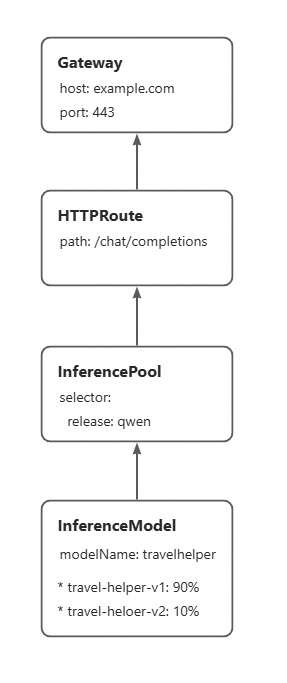
This example uses two LoRA versions fine-tuned from Qwen-2.5-7B-Instruct: travel-helper-v1 and travel-helper-v2. The foundation service already has both adapters loaded.
Make sure the new LoRA adapter version is successfully loaded in the inference service before updating the InferenceModel weights.
Step 1: Deploy the InferenceModel with traffic split
Apply an InferenceModel that directs 90% of requests to travel-helper-v1 and 10% to travel-helper-v2. Requests to the model name travelhelper are automatically split between the two adapters according to these weights.
kubectl apply -f- <<EOF
apiVersion: inference.networking.x-k8s.io/v1alpha2
kind: InferenceModel
metadata:
  name: loramodel
spec:
  criticality: Critical
  modelName: travelhelper
  poolRef:
    group: inference.networking.x-k8s.io
    kind: InferencePool
    name: mymodel-pool-v1
  targetModels:
  - name: travel-helper-v1
    weight: 90
  - name: travel-helper-v2
    weight: 10
EOF
Step 2: Verify traffic distribution
Send repeated requests to confirm traffic is splitting between the two LoRA versions.
curl -X POST ${GATEWAY_IP}:8080/v1/chat/completions \
  -H 'Content-Type: application/json' \
  -d '{
    "model": "travelhelper",
    "temperature": 0,
    "messages": [{"role": "user", "content": "I just arrived in Beijing. Can you recommend a tourist spot?"}]
  }'
Most responses come from travel-helper-v1 (the "model" field in the response shows which adapter served the request):
About 10% of responses come from travel-helper-v2:
Step 3: Complete the rollout
Once travel-helper-v2 is performing as expected, update the InferenceModel to route all traffic to it.
kubectl patch inferencemodel loramodel --type='json' \
  -p='[
    {"op": "replace", "path": "/spec/targetModels/0/name", "value": "travel-helper-v2"},
    {"op": "replace", "path": "/spec/targetModels/0/weight", "value": 100},
    {"op": "remove", "path": "/spec/targetModels/1"}
  ]'
After all traffic is served by travel-helper-v2, unload travel-helper-v1 from your inference service instances.