Microservices Engine (MSE) provides a UI-based migration tool that shifts traffic from a self-managed NGINX Ingress gateway to an MSE cloud-native gateway without downtime.
How it works
The MSE cloud-native gateway doesn't copy your Ingress configurations — it listens to them directly. During migration, both NGINX Ingress Controller and the MSE Ingress gateway watch the same Ingress resources in real time. Traffic shifts gradually based on weight, and you can roll back at any point before completing the migration.
Prerequisites
Before you begin, ensure that you have:
-
An ACK cluster, ACK Serverless cluster, or ACS cluster with NGINX Ingress Controller deployed
-
An MSE cloud-native gateway at version V1.2.22 or later. See Create a cloud-native gateway
-
The MSE cloud-native gateway and the cluster in the same virtual private cloud (VPC)
Usage notes
-
After migration, keep all NGINX Ingress configurations that are currently in use — do not delete them. The MSE Ingress gateway listens to and parses these configurations.
-
After migration, all Ingress configurations (existing and new) must remain associated with the NGINX Ingress class. For example, if
ingressClassNameis set tonginx, that setting stays unchanged.
Choose a traffic switching method
Two traffic switching methods are available. Choose before starting the migration:
| Method | How it works | Best for |
|---|---|---|
| Reuse original cluster SLB | Add the MSE gateway to the SLB instance's backend vServer group. The SLB instance distributes traffic by weight between NGINX and MSE. | Clusters where the SLB instance is managed by the Kubernetes service |
| DNS resolution to SLB | Update DNS records to map domain names to the MSE gateway's SLB IP address. Shift traffic gradually using DNS weights. | Scenarios where DNS-level traffic control is preferred |
Migration workflow
The migration consists of five steps:
-
Migrate routing rules
-
Check route compatibility
-
Select a traffic switching method
-
Switch traffic
-
Complete the migration
Step 1: Migrate routing rules
-
Log on to the MSE console. In the top navigation bar, select a region.
-
In the left navigation pane, choose Cloud-native Gateway > Migration to Cloud.
-
On the Migration to Cloud page, click Add Task.
-
In the Create Migration Configuration panel, configure the parameters.
ImportantIf the MSE cloud-native gateway is already associated with the cluster and has Ingress listening enabled, the source Ingress class you configure here must match the existing Ingress class configured for that cluster. A mismatch blocks migration.
Parameter Description Cloud-native Gateway The MSE cloud-native gateway to migrate to. Must be V1.2.22 or later. ACK Managed Cluster/ACK Serverless Cluster/ACS Cluster The cluster where NGINX Ingress Controller is deployed. The MSE gateway and this cluster must be in the same VPC. Source Ingress class The Ingress class associated with the Ingress resources to migrate. Only one Ingress class is supported. If left blank, the MSE gateway listens to all Ingress resources in the cluster. 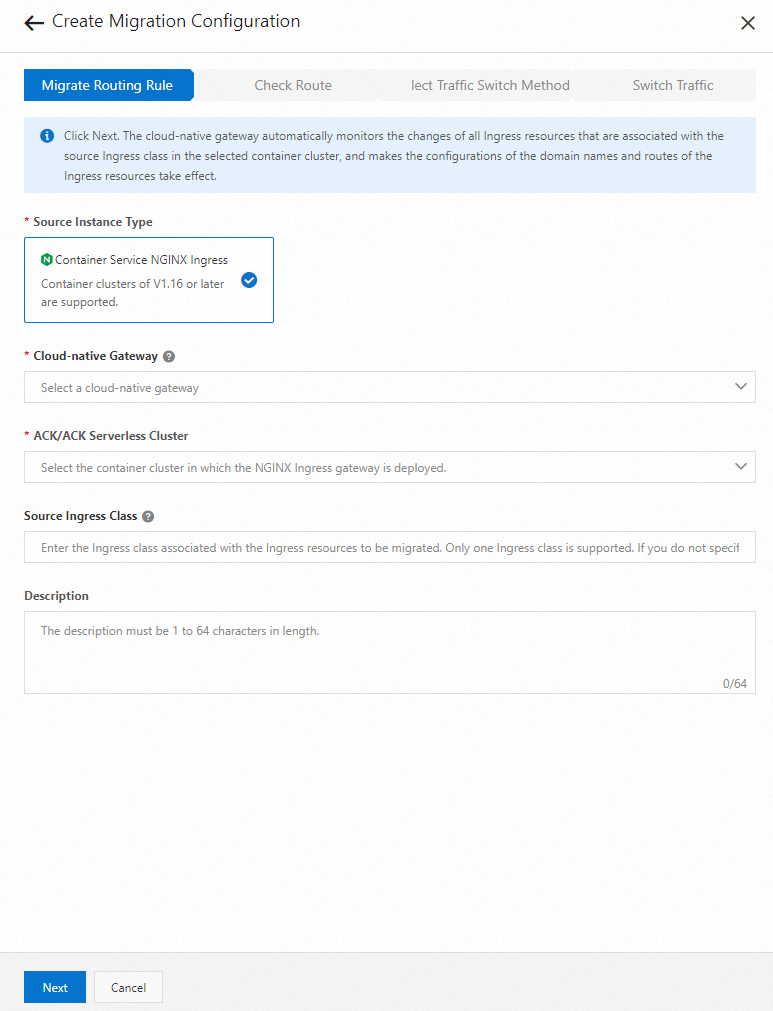
-
Click Next.
After you click Next, the MSE cloud-native gateway automatically listens to all Ingress resources associated with the configured source Ingress class. Domain names and routes from those Ingress resources are synchronized to the gateway. Verify in the MSE console that your Ingress resources appear and their domain names and routes are generated correctly.
Step 2: Check route compatibility
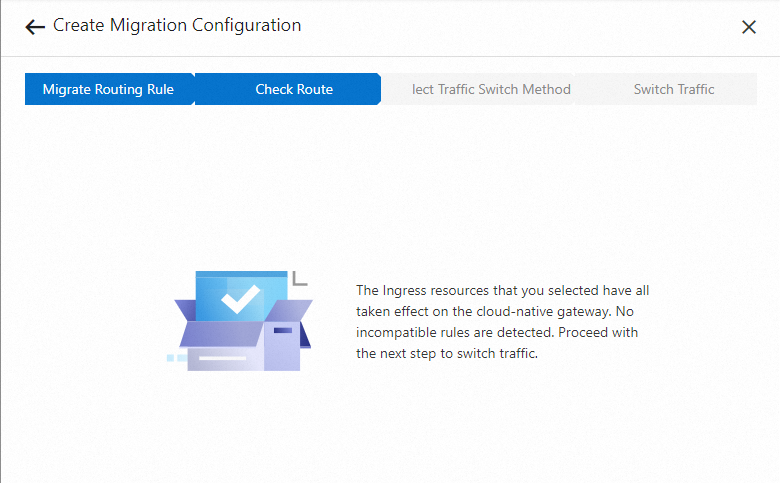
The MSE console checks whether the annotations on your Ingress resources are compatible with the cloud-native gateway.
-
If all annotations are compatible, proceed to step 3.
-
If any annotation is incompatible, submit a ticket for assistance.
The annotationnginx.ingress.kubernetes.io/service-weightwith an empty string value ("") can be ignored. It is added by default in older versions of the ACK console and has no effect.
Do not delete incompatible annotations during migration. NGINX Ingress Controller still parses those annotations and applies them to your traffic. To achieve the same behavior on the MSE Ingress gateway, add the equivalent MSE extended annotations to your Ingress resources. After all traffic is on the MSE gateway, remove the incompatible annotations based on your needs.
Step 3: Select a traffic switching method
Before switching traffic, test the MSE gateway locally:
-
Modify your local hosts file to map the SLB instance IP address (associated with the MSE cloud-native gateway) to the relevant domain names.
-
Use curl or Postman to verify that traffic is routed as expected.
Then select one of the two traffic switching methods described in Choose a traffic switching method.
If you select Reuse original cluster SLB, configure the following parameters:
| Parameter | Description |
|---|---|
| ACK Cluster Namespace | The namespace of the Kubernetes service that corresponds to the SLB instance associated with the NGINX Ingress gateway. |
| ACK Cluster SLB Service | The name of the Kubernetes service that corresponds to the SLB instance associated with the NGINX Ingress gateway. |
| SLB ID | The ID of the SLB instance whose traffic you want to switch. |
| Ports and Backend Servers | The listener port of the SLB instance and the gateway protocol (HTTP or HTTPS). After you select the port and protocol, the vServer group is automatically displayed. Make sure that the port and protocol you select are valid. Otherwise, traffic loss may occur. |
Step 4: Switch traffic
Reuse original cluster SLB
The SLB-based method shifts traffic by adjusting weights on the SLB instance's vServer group. Follow these four substeps in order.
Substep 1: Change the SLB configuration
Click Change SLB. This removes the SLB instance from cluster management and changes the listener scheduling algorithm to weighted round-robin.
After clicking Change SLB, the SLB instance can no longer detect pod IP address changes in NGINX Ingress Controller. Complete substep 2 immediately to re-associate the Kubernetes service with the SLB instance.
Substep 2: Overwrite service annotations
-
Log on to the ACK console.
-
Find the Kubernetes service you specified when selecting Reuse Original Cluster SLB.
-
Delete all existing annotations on that service.
-
Copy the annotations auto-generated on the Switch Traffic tab and apply them to the Kubernetes service. This step re-associates the service with the SLB instance.
-
Click Pre-check. Wait for the check to pass before continuing.
If pods in the same cluster access the NGINX Ingress gateway, add the annotation service.beta.kubernetes.io/alibaba-cloud-loadbalancer-hostname: mse-ingress-migration to the Kubernetes service. Make sure IP address-based access control is not enabled on the SLB instance before adding this annotation. This forces in-cluster pods to access the NGINX Ingress gateway through the SLB instance and disables SLB instance bypass via kube-proxy.
Substep 3: Shift traffic by weight
Set the weight for traffic routed to the MSE cloud-native gateway. The valid range is 1–100.
How weights work:
The weight you set is the total weight across all nodes in the MSE gateway. The default total weight of all NGINX Ingress gateway nodes is 100. The SLB instance distributes traffic proportionally:
| MSE gateway weight | Traffic to MSE gateway |
|---|---|
| 100 | 50% (100 out of 200 total) |
| 50 | 33% (50 out of 150 total) |
| 0 | 0% (rollback) |
Start with a value of 1–10 for the initial shift.
Monitoring and adjusting weights:
-
Monitor the MSE gateway's health and business metrics on the dashboard in the MSE console.
-
If metrics are as expected, gradually increase the weight. Weight changes take effect asynchronously — wait at least 3 minutes between adjustments.
-
If metrics are not as expected, set the weight to 0 to stop traffic from reaching the MSE gateway.
-
To increase MSE gateway traffic, you can also decrease the value of the annotation
service.beta.kubernetes.io/alibaba-cloud-loadbalancer-weighton the Kubernetes service. Setting this annotation to 0 routes all SLB traffic to the MSE gateway.
SLB operates at Layer 4 using connection-level throttling. Weights control connection distribution, not individual request distribution, so the proportions are approximate.
Stay in this step until you have verified that traffic is behaving as expected and rollback is no longer needed. Once you click Complete Traffic Verification, you cannot modify the weights.
Substep 4: Switch all traffic to the MSE gateway
In the ACK console, set the annotation service.beta.kubernetes.io/alibaba-cloud-loadbalancer-weight on the Kubernetes service to 0, or delete the Kubernetes service entirely. NGINX Ingress Controller is automatically removed from the SLB instance, and all traffic is routed to the MSE cloud-native gateway.
Click Complete Migration to finish.
DNS resolution to SLB
In your DNS provider's management console, add records that map all domain names involved in the migration to the IP address of the SLB instance associated with the MSE cloud-native gateway. Gradually shift traffic by adjusting DNS weight values.
Rollback
If traffic behaves unexpectedly, roll back immediately:
-
Reuse original cluster SLB: Set the MSE gateway weight to
0. -
DNS resolution to SLB: Delete the DNS records that map business domain names to the MSE gateway's SLB IP address.
Step 5: Complete the migration
Reuse original cluster SLB
Make sure all SLB traffic is routed to the MSE cloud-native gateway. Then, based on your needs, delete the Kubernetes service and NGINX Ingress Controller.
DNS resolution to SLB
Make sure all domain names resolve to the SLB IP address associated with the MSE cloud-native gateway. Then, based on your needs, delete the Kubernetes service and NGINX Ingress Controller.
FAQ
I see the error mse.backend.gw.MIGRATE_INGRESS_CLASS_CONFLICT. How do I fix it?
This error means the MSE cloud-native gateway is already associated with your cluster and has Ingress listening enabled, but the Ingress class it's configured to listen on doesn't match the source Ingress class you're trying to migrate.
To fix this, update the Ingress class configuration:
-
If you use the
MseIngressConfigresource to manage MSE Ingresses, follow the steps in Use MSE Ingresses to access applications in ACK clusters. -
Otherwise, update the Ingress listening settings for the cluster directly in the MSE console.
I see the error mse.backend.gw.MIGRATE_SERVICE_ANNOTATION_NOT_MATCH [annotation is not expected]. How do I fix it?
This issue occurs because the annotation of the Kubernetes service is not as expected.
I see the error mse.backend.gw.MIGRATE_SERVICE_NOT_MATCH [weight hasn't be 0 or service hasn't been deleted]. How do I fix it?
The migration cannot complete because the Kubernetes service is still receiving traffic. In the ACK console, either set the annotation service.beta.kubernetes.io/alibaba-cloud-loadbalancer-weight on the Kubernetes service to 0, or delete the Kubernetes service.