Gateway with Inference Extension routes inference requests to different backends based on the model name in the request body — without any changes to the client. This topic shows how to configure model-name-based routing for OpenAI-compatible inference services on an ACK cluster, using Qwen-2.5-7B-Instruct and DeepSeek-R1-Distill-Qwen-7B as examples.
Before you begin, familiarize yourself with the concepts of InferencePool and InferenceModel. This topic requires Gateway with Inference Extension version 1.4.0 or later.
How it works
OpenAI-compatible APIs expose LLM inference services using the same interface design, parameters, and response format as the official OpenAI API (such as GPT-3.5 and GPT-4). This includes:
-
HTTP interface: POST requests, standard endpoint paths, and API key authentication
-
Parameters:
model,prompt,temperature,max_tokens, and others -
Response format: JSON with
choices,usage, andidfields
Most major LLM inference engines — including vLLM and SGLang — support OpenAI-compatible APIs.
The routing challenge
When you expose multiple LLM inference services through a single gateway, you typically want to route each request to the backend that serves the requested model. The problem: in OpenAI-compatible APIs, the model name is in the request body, not the headers. Standard HTTP routers cannot inspect the request body for routing decisions.
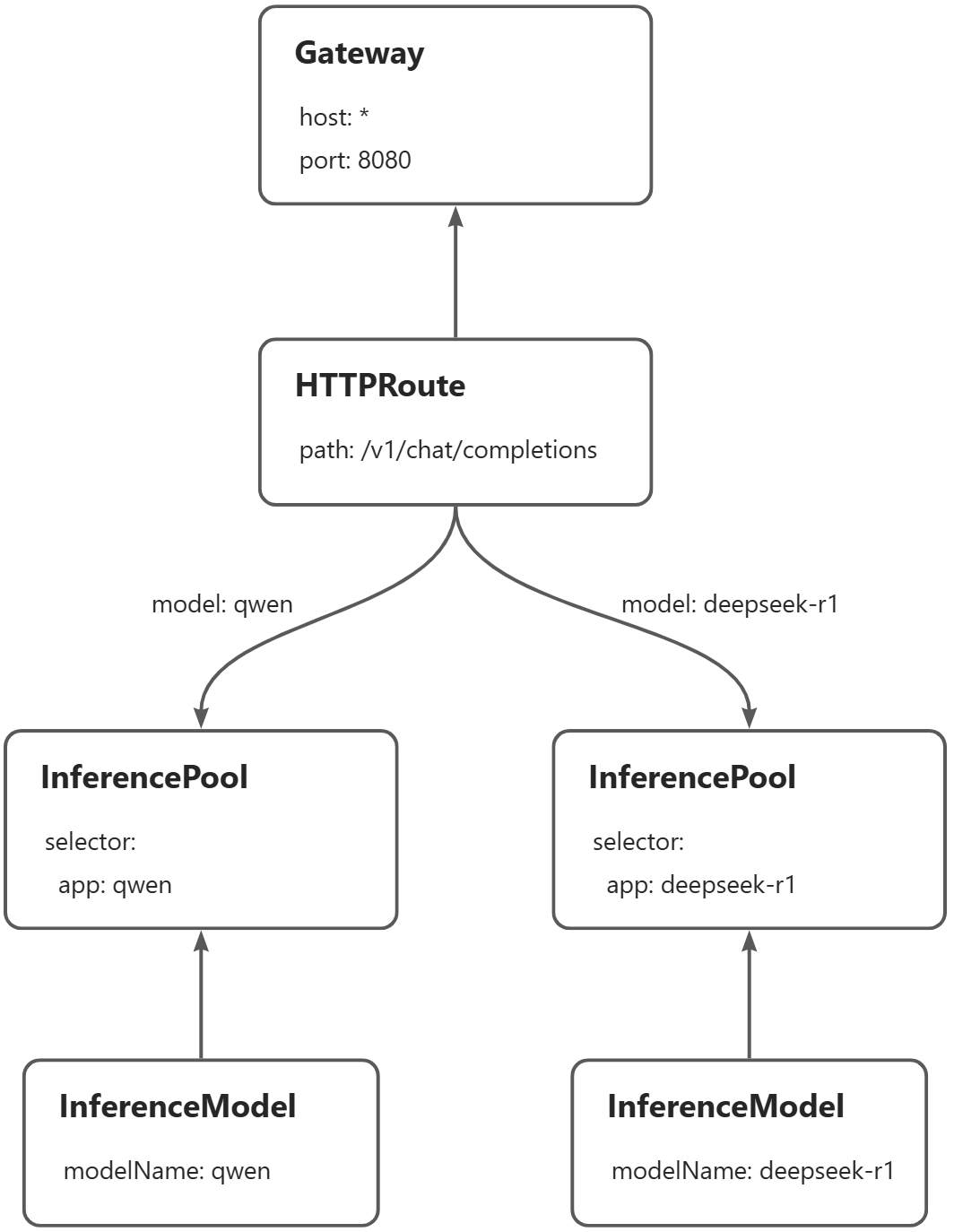
Gateway with Inference Extension solves this by parsing the request body, extracting the model name, and injecting it into the X-Gateway-Model-Name request header. Your HTTPRoute rules then match on this header, enabling model-name-based routing without any client changes.
The example in this topic routes requests to two inference services on the same gateway instance:
-
Requests with
"model": "qwen"→ Qwen-2.5-7B-Instruct -
Requests with
"model": "deepseek-r1"→ DeepSeek-R1-Distill-Qwen-7B
Prerequisites
Before you begin, ensure that you have:
-
An ACK managed cluster with a GPU node pool, or an ACK managed cluster with the ACK Virtual Node component installed to use ACS GPU computing power
-
Gateway with Inference Extension version 1.4.0 or later installed, with Enable Gateway API Inference Extension (Requires a deployed inference service) selected. See Install components
The images used in this topic are large. Transfer them to Alibaba Cloud Container Registry (ACR) in advance and pull them over the internal network — pulling directly from the public internet is slow and depends on your cluster's elastic IP address (EIP) bandwidth. For GPU card recommendations: use A10 cards for ACK clusters and L20 (GN8IS) cards for ACS GPU computing power.
Step 2: Deploy the inference routes
Create the InferencePool and InferenceModel resources. Each InferencePool selects the pods that serve a specific model. Each InferenceModel maps a model name to its pool.
Create a file named inference-pool.yaml:
apiVersion: inference.networking.x-k8s.io/v1alpha2
kind: InferencePool
metadata:
  name: qwen-pool
  namespace: default
spec:
  extensionRef:
    group: ""
    kind: Service
    name: qwen-ext-proc
  selector:
    app: qwen
  targetPortNumber: 8000
---
apiVersion: inference.networking.x-k8s.io/v1alpha2
kind: InferenceModel
metadata:
  name: qwen
spec:
  criticality: Critical
  modelName: qwen
  poolRef:
    group: inference.networking.x-k8s.io
    kind: InferencePool
    name: qwen-pool
  targetModels:
  - name: qwen
    weight: 100
---
apiVersion: inference.networking.x-k8s.io/v1alpha2
kind: InferencePool
metadata:
  name: deepseek-pool
  namespace: default
spec:
  extensionRef:
    group: ""
    kind: Service
    name: deepseek-ext-proc
  selector:
    app: deepseek-r1
  targetPortNumber: 8000
---
apiVersion: inference.networking.x-k8s.io/v1alpha2
kind: InferenceModel
metadata:
  name: deepseek-r1
spec:
  criticality: Critical
  modelName: deepseek-r1
  poolRef:
    group: inference.networking.x-k8s.io
    kind: InferencePool
    name: deepseek-pool
  targetModels:
  - name: deepseek-r1
    weight: 100
Apply the manifest:
kubectl apply -f inference-pool.yamlStep 3: Deploy the gateway and routing rules
This step creates the GatewayClass, Gateway, HTTPRoute, ClientTrafficPolicy, and BackendTrafficPolicy resources.
Create a file named inference-gateway.yaml:
apiVersion: gateway.networking.k8s.io/v1
kind: GatewayClass
metadata:
  name: inference-gateway
spec:
  controllerName: gateway.envoyproxy.io/gatewayclass-controller
---
apiVersion: gateway.networking.k8s.io/v1
kind: Gateway
metadata:
  name: inference-gateway
spec:
  gatewayClassName: inference-gateway
  listeners:
    - name: llm-gw
      protocol: HTTP
      port: 8080
---
apiVersion: gateway.envoyproxy.io/v1alpha1
kind: ClientTrafficPolicy
metadata:
  name: client-buffer-limit
spec:
  connection:
    bufferLimit: 20Mi
  targetRefs:
    - group: gateway.networking.k8s.io
      kind: Gateway
      name: inference-gateway
---
apiVersion: gateway.envoyproxy.io/v1alpha1
kind: BackendTrafficPolicy
metadata:
  name: backend-timeout
spec:
  timeout:
    http:
      requestTimeout: 24h
  targetRef:
    group: gateway.networking.k8s.io
    kind: Gateway
name: inference-gatewayTheClientTrafficPolicysets the client-to-gateway buffer limit to 20 MiB. TheBackendTrafficPolicysets a 24-hour request timeout to handle long-running inference requests.
Create a file named inference-route.yaml.
The HTTPRoute rules match on the X-Gateway-Model-Name header, which Gateway with Inference Extension automatically populates by parsing the model name from the request body.
apiVersion: gateway.networking.k8s.io/v1
kind: HTTPRoute
metadata:
  name: inference-route
spec:
  parentRefs:
  - group: gateway.networking.k8s.io
    kind: Gateway
    name: inference-gateway
    sectionName: llm-gw
  rules:
  - backendRefs:
    - group: inference.networking.x-k8s.io
      kind: InferencePool
      name: qwen-pool
      weight: 1
    matches:
    - headers:
      - type: Exact
        name: X-Gateway-Model-Name
        value: qwen
  - backendRefs:
    - group: inference.networking.x-k8s.io
      kind: InferencePool
      name: deepseek-pool
      weight: 1
    matches:
    - headers:
      - type: Exact
        name: X-Gateway-Model-Name
        value: deepseek-r1
Apply both manifests:
kubectl apply -f inference-gateway.yaml
kubectl apply -f inference-route.yaml
Step 4: Verify routing
Get the gateway IP address:
export GATEWAY_IP=$(kubectl get gateway/inference-gateway -o jsonpath='{.status.addresses[0].value}')Send a request to the qwen model:
curl -X POST ${GATEWAY_IP}:8080/v1/chat/completions \
  -H 'Content-Type: application/json' \
  -d '{
    "model": "qwen",
    "temperature": 0,
    "messages": [
      {
        "role": "user",
        "content": "who are you?"
      }
    ]
  }'
Expected output:
{"id":"chatcmpl-475bc88d-b71d-453f-8f8e-0601338e11a9","object":"chat.completion","created":1748311216,"model":"qwen","choices":[{"index":0,"message":{"role":"assistant","reasoning_content":null,"content":"I am Qwen, a large language model created by Alibaba Cloud. I am here to assist you with any questions or conversations you might have! How can I help you today?","tool_calls":[]},"logprobs":null,"finish_reason":"stop","stop_reason":null}],"usage":{"prompt_tokens":33,"total_tokens":70,"completion_tokens":37,"prompt_tokens_details":null},"prompt_logprobs":null}Send a request to the deepseek-r1 model:
curl -X POST ${GATEWAY_IP}:8080/v1/chat/completions \
  -H 'Content-Type: application/json' \
  -d '{
    "model": "deepseek-r1",
    "temperature": 0,
    "messages": [
      {
        "role": "user",
        "content": "who are you?"
      }
    ]
  }'
Expected output:
{"id":"chatcmpl-9a143fc5-8826-46bc-96aa-c677d130aef9","object":"chat.completion","created":1748312185,"model":"deepseek-r1","choices":[{"index":0,"message":{"role":"assistant","reasoning_content":null,"content":"Alright, someone just asked, \"who are you?\" Hmm, I need to explain who I am in a clear and friendly way. Let's see, I'm an AI created by DeepSeek, right? I don't have a physical form, so I don't have a \"name\" like you do. My purpose is to help with answering questions and providing information. I'm here to assist with a wide range of topics, from general knowledge to more specific inquiries. I understand that I can't do things like think or feel, but I'm here to make your day easier by offering helpful responses. So, I'll keep it simple and approachable, making sure to convey that I'm here to help with whatever they need.\n</think>\n\nI'm DeepSeek-R1-Lite-Preview, an AI assistant created by the Chinese company DeepSeek. I'm here to help you with answering questions, providing information, and offering suggestions. I don't have personal experiences or emotions, but I'm designed to make your interactions with me as helpful and pleasant as possible. How can I assist you today?","tool_calls":[]},"logprobs":null,"finish_reason":"stop","stop_reason":null}],"usage":{"prompt_tokens":9,"total_tokens":232,"completion_tokens":223,"prompt_tokens_details":null},"prompt_logprobs":null}Both responses confirm that requests are routed to the correct inference service based on the model name in the request body.