Set up a GitHub event source in Knative to receive repository events and route them to a Knative Service. This pattern fits CI/CD pipelines, data synchronization, and automated testing workflows.
Prerequisites
Before you begin, ensure that you have:
A Knative Service deployed. This guide uses the service from Quickly deploy a Knative application
Knative Eventing and the GitHub add-on deployed. See Manage Knative components
A custom domain name configured in Knative. See Configure a custom domain name
Step 1: Create a GitHub token
GitHubSource uses two tokens with distinct roles:
accessToken: A GitHub personal access token that allows GitHubSource to call the GitHub API and register webhooks on your behalf.
secretToken: A secret string you generate. GitHub signs each webhook payload with this token, and Knative uses it to verify that incoming events are authentic.
Create a personal access token
Go to Personal access tokens in your GitHub settings and create a token named
GitHubSource Sample. Select the following scopes: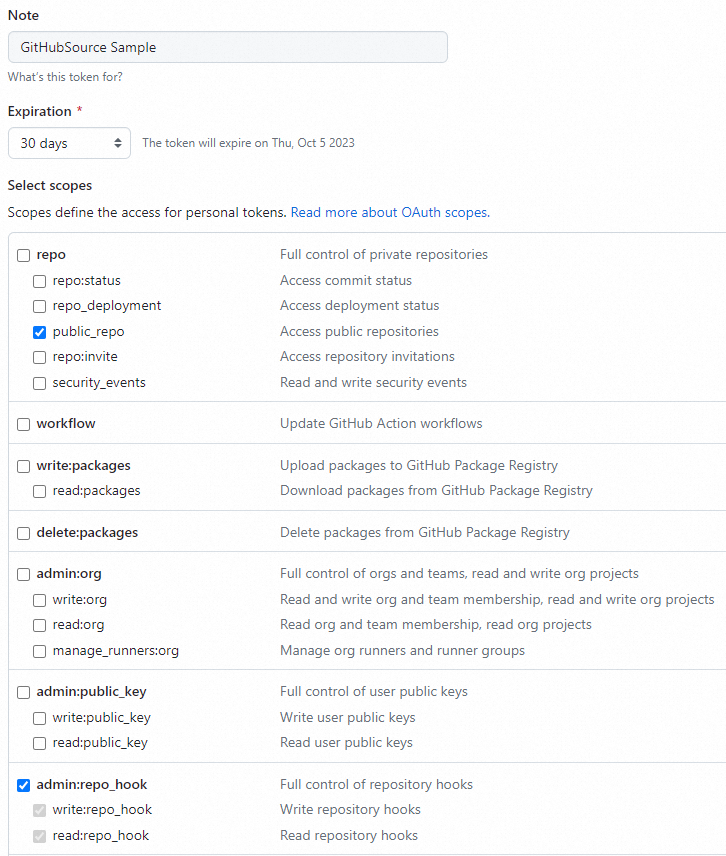
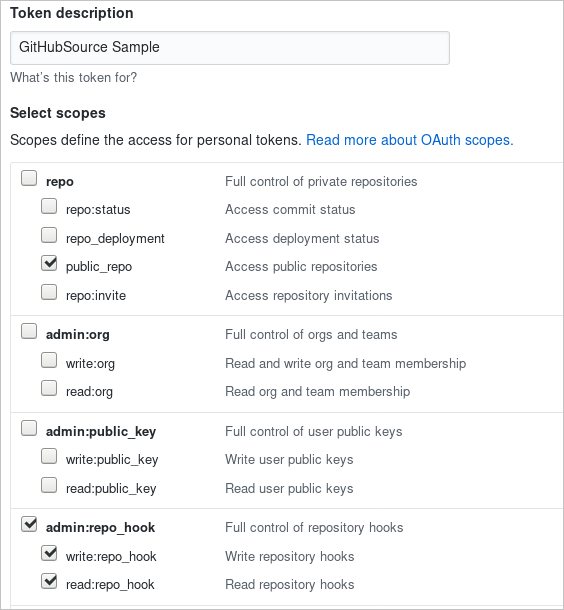
repo:public_repo— allows GitHubSource to receive events from your public repositoriesadmin:repo_hook— allows GitHubSource to create webhooks in those repositories
ImportantCopy and save the token immediately. GitHub will not display it again after you leave the page.
Generate a random string to use as the
secretToken:head -c 8 /dev/urandom | base64Create a file named
githubsecret.yamlwith the following content. Replacepersonal_access_token_valuewith your personal access token andasdfasfdsafwith the string generated in the previous step. The following is an example of a filled-in Secret, whereGitHubSourceSampleis the access token name andrVzY0DQ5AM8=is a sample base64-encoded secretToken:apiVersion: v1 kind: Secret metadata: name: githubsecret type: Opaque stringData: accessToken: GitHubSourceSample secretToken: rVzY0DQ5AM8=Replace the placeholder values with your own:
apiVersion: v1
kind: Secret
metadata:
  name: githubsecret
type: Opaque
stringData:
  accessToken: personal_access_token_value
  secretToken: asdfasfdsaf
Apply the Secret to the
defaultnamespace:kubectl apply -f githubsecret.yaml --namespace default
Step 2: Create a GitHub event source
Create a file named
github-source.yamlwith the following content. Replace<YOUR USER>with your GitHub username and<YOUR REPO>with your repository name.apiVersion: sources.eventing.knative.dev/v1alpha1 kind: GitHubSource metadata: name: githubsourcesample spec: eventTypes: - pull_request ownerAndRepository: <YOUR USER>/<YOUR REPO> accessToken: secretKeyRef: name: githubsecret key: accessToken secretToken: secretKeyRef: name: githubsecret key: secretToken sink: apiVersion: serving.knative.dev/v1alpha1 kind: Service name: github-event-displayApply the GitHubSource to the
defaultnamespace:kubectl --namespace default apply -f github-source.yaml
Step 3: Verify the setup
Verify webhook registration
In your GitHub repository, go to Settings > Webhooks and check the verified hook URL.
The domain name must have an Internet Content Provider (ICP) number.
Verify event delivery
In your GitHub repository, open a pull request to trigger an event.
Check the pods and logs:
kubectl --namespace default get pods
kubectl --namespace default logs github-event-display-XXXX user-container
A successfully received event produces output similar to the following in Knative Eventing:
2018/11/08 18:25:34 Message Dumper received a message: POST / HTTP/1.1
Host: github-event-display.knative-demo.svc.cluster.local
Accept-Encoding: gzip
Ce-Cloudeventsversion: 0.1
Ce-Eventid: a8d4cf20-e383-11e8-8069-46e3c8ad****
Ce-Eventtime: 2018-11-08T18:25:32.819548012Z
Ce-Eventtype: dev.knative.source.github.pull_request
Ce-Source: https://github.com/someuser/somerepo/pull/1
Content-Length: 21060
Content-Type: application/json
User-Agent: Go-http-client/1.1
X-B3-Parentspanid: b2e514c3dbe94c03
X-B3-Sampled: 1
X-B3-Spanid: c85e346d89c8be4e
X-B3-Traceid: abf6292d458fb8e7
X-Envoy-Expected-Rq-Timeout-Ms: 60000
X-Envoy-Internal: true
X-Forwarded-For: 12*.*.*.*, 12*.*.*.*
X-Forwarded-Proto: http
X-Request-Id: 8a2201af-5075-9447-b593-ec3a243a****

{"action":"opened","number":1,"pull_request": ...}
What's next
To use EventBridge event sources instead of GitHub, see Use the event-driven capabilities of EventBridge in Knative.