You can use resource groups with RAM to isolate resources and manage permissions with fine-grained control within a single Alibaba Cloud account. This topic summarizes Compute Nest's support for resource groups and outlines the steps to grant permissions at the resource group level.
-
Resource group-level authorization applies only to resource types that support resource groups and to actions that support resource group-level authorization.
-
For resource types that do not support resource groups, permissions granted at the resource group scope have no effect. When selecting a resource scope, choose Account Level to enable account-level authorization. For more information, see Actions that do not support resource group-level authorization.
Resource Group authorization
You can use Resource Groups to organize and manage resources within your Alibaba Cloud account. For example, you can create a Resource Group for each project and move the corresponding resources into that group to manage them centrally. For more information, see What is a Resource Group?.
After you organize resources into Resource Groups, you can grant principals (such as RAM users, RAM user groups, or RAM roles) permissions for a specific Resource Group. This ensures that a principal can only manage resources within that group. For more information, see Resource grouping and authorization.
This authorization method offers the following advantages:
-
Fine-grained permissions: You can grant each RAM identity only the specific permissions it needs. This helps you manage resources for each project separately.
-
Scalability: When you add new resources, you only need to add them to the relevant Resource Group. The associated RAM identities automatically gain the necessary permissions for the new resources, eliminating the need to grant permissions again.
Grant resource group-level permissions to a RAM user
This topic explains how to grant a RAM user permissions to Compute Nest resources in a specific resource group.
1. Prerequisites
-
Create a RAM user. For more information, see Create a RAM user.
-
Create a resource group and move your resources into it. For more information, see Create a resource group, Automatically transfer resources to a resource group, and Manually transfer a resource to a resource group.
2. Grant resource group-level permissions
You can grant permissions at the resource group level by using either of the following methods.
Resource management console
Use the permission management feature of a resource group to grant permissions to a specific RAM user. For detailed instructions, see Grant permissions on a resource group to a RAM identity.
-
Log on to the Resource Management console.
-
On the resource groups page, find the target resource group and click Manage Permissions in the Actions column.
-
On the Manage Permissions tab, click Add Authorization.
-
In the Add Authorization panel, configure the principal and permission policy.
-
Principal: Select an existing RAM user.
-
Permission Policy: Select a system policy or a custom policy that you have created. For more information, see Create a custom policy.
-
-
Click Confirm.
RAM console
Use the RAM console to grant resource group-level permissions to a specific RAM user. For detailed instructions, see Manage the permissions of a RAM user.
-
Log on to the RAM console with your Alibaba Cloud account (root account) or as a RAM administrator.
-
In the left-side navigation pane, choose . On the Users page, find the target RAM user and click Add Permissions in the Actions column.
-
In the Add Permissions panel, add permissions to the RAM user.
-
Resource Scope: Select Resource Group.
-
Principal: Select an existing RAM user, for example, the one you created in the prerequisites.
-
Permission Policy: Select a system policy or a custom policy that you have created. For more information, see Create a custom policy.
-
-
Click Confirm.
Resource types that support resource groups
The following table lists the Compute Nest resource types that support resource groups.
|
Cloud service |
Cloud service code |
Resource type |
|
Compute Nest |
computenest |
artifact: artifact |
|
Compute Nest |
computenest |
service: service |
|
Compute Nest |
computenest |
serviceinstance: service instance |
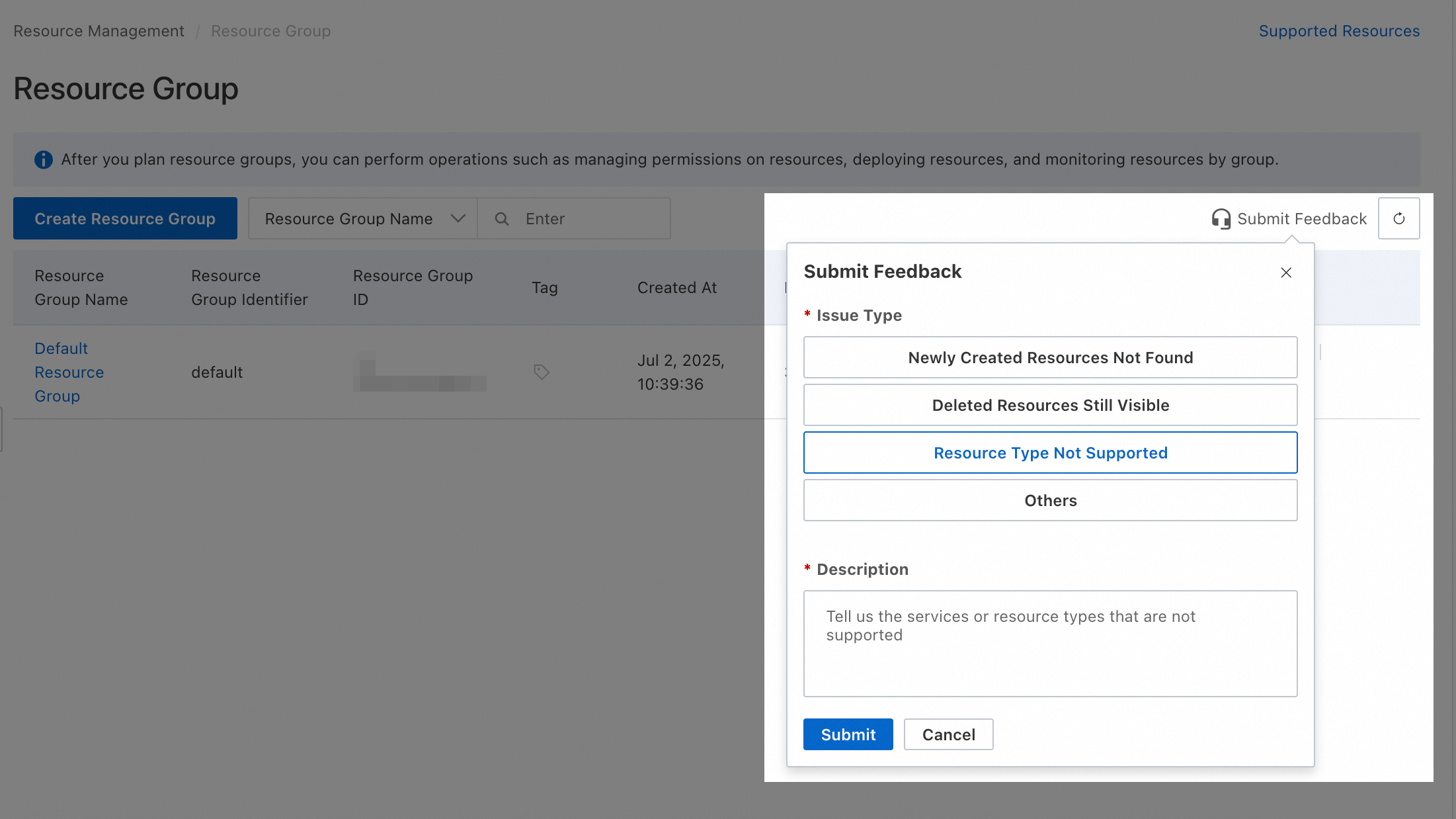
For resource types that do not support resource groups, you can submit feedback in the Resource Group console.
Actions that do not support resource group-level authorization
The following table lists the Compute Nest Actions that do not support resource group-level authorization.
|
Actions |
Description |
|
computenest:CreateRestoreTask |
Creates a restore task. |
|
computenest:DeleteBackup |
Deletes a backup of a Compute Nest instance. |
|
computenest:GetBackup |
Gets the details of a backup. |
|
computenest:GetNetworkAvailableRegions |
- |
|
computenest:GetNetworkAvailableZones |
Gets a list of availability zones in a specified region. |
|
computenest:GetServiceEndpointServiceInfo |
- |
|
computenest:GetServiceUsageSchema |
- |
|
computenest:GetUserInformation |
Gets user information. |
|
computenest:GetVirtualInternetEndpoint |
- |
|
computenest:ListBackups |
Lists backups of Compute Nest instances. |
|
computenest:ListPolicies |
Lists permission policies. |
|
computenest:ListRestoreTasks |
Lists restore tasks. |
|
computenest:ListServiceCategories |
Lists service categories. |
|
computenest:ListServiceUsages |
Lists the current user's service usage requests. |
|
computenest:ListServices |
Lists current services. |
|
computenest:ListTagKeys |
Lists existing tag keys. |
|
computenest:ListTagValues |
Lists the tag values of a tag key. |
|
computenest:SendOperationMessage |
- |
|
computenest:UpdateUserInformation |
Updates user information. |
|
computenest:ValidateServiceInstanceName |
Validates a service instance name. |
|
computenestsupplier:CancelServiceRegistration |
Cancels a service registration request. |
|
computenestsupplier:DeleteAcrImageRepositories |
Deletes ACR image repositories. |
|
computenestsupplier:DeleteAcrImageTags |
Deletes versions of an ACR container image. |
|
computenestsupplier:DeleteServiceTestCase |
Deletes a service test case. |
|
computenestsupplier:DeleteVirtualInternetService |
- |
|
computenestsupplier:GenerateServiceParameterMapping |
- |
|
computenestsupplier:GetArtifactRepositoryCredentials |
Gets the credentials required to upload an artifact. |
|
computenestsupplier:GetDingTalkAppSecurityRisk |
- |
|
computenestsupplier:GetDingTalkAppSlsSetting |
- |
|
computenestsupplier:GetHelmChartParameters |
- |
|
computenestsupplier:GetNetworkAvailableZones |
Gets a list of availability zones in a specified region. |
|
computenestsupplier:GetNetworkSupportFunction |
- |
|
computenestsupplier:GetOpsNotice |
Gets the details of an O&M announcement. |
|
computenestsupplier:GetServiceElasticStrength |
- |
|
computenestsupplier:GetServiceRegistration |
Gets the details of a service registration request. |
|
computenestsupplier:GetServiceTestTask |
Gets the execution details of each test case in a service test task. |
|
computenestsupplier:GetSupplierInformation |
Gets supplier information. |
|
computenestsupplier:GetUploadCredentials |
Gets the access credentials for file uploads. |
|
computenestsupplier:GetVirtualInternetEndpoint |
- |
|
computenestsupplier:GetVirtualInternetService |
- |
|
computenestsupplier:ListAcrImageRepositories |
Lists image repositories in ACR. |
|
computenestsupplier:ListAcrImageTags |
Lists the tags (versions) of an image in an ACR image repository. |
|
computenestsupplier:ListBillCodeMappings |
- |
|
computenestsupplier:ListOpsNotices |
Lists O&M announcements published by a supplier. |
|
computenestsupplier:ListPocQuotaUsedDetails |
- |
|
computenestsupplier:ListResellers |
Lists resellers. |
|
computenestsupplier:ListServiceInstanceDeployDetails |
Lists deployment details for service instances. |
|
computenestsupplier:ListServiceRegistrations |
Lists service registration requests. |
|
computenestsupplier:ListServiceTemplates |
- |
|
computenestsupplier:ListServiceTestCases |
Lists the service test cases for the current service version. |
|
computenestsupplier:ListServiceTestTaskLogs |
Lists real-time logs for a service test. |
|
computenestsupplier:ListServiceTestTasks |
Lists service template test tasks. |
|
computenestsupplier:ListServiceUsages |
Lists the current user's service usage requests. |
|
computenestsupplier:ListSupplierRegistrations |
Lists onboarding applications submitted by suppliers. |
|
computenestsupplier:ListTagKeys |
Lists existing tag keys. |
|
computenestsupplier:ListTagValues |
Lists the tag values of a tag key. |
|
computenestsupplier:ListTemplateArtifactRelationMarks |
- |
|
computenestsupplier:ListTemplateImages |
- |
|
computenestsupplier:ListVirtualInternetEndpoints |
- |
|
computenestsupplier:ListVirtualInternetServiceExecutionDetails |
- |
|
computenestsupplier:ListVirtualInternetServices |
- |
|
computenestsupplier:UpdateServiceTestCase |
Modifies a service test case. |
|
computenestsupplier:UpdateSupplierInformation |
Updates supplier information. |
|
computenestsupplier:UpdateVirtualInternetService |
- |
|
computenestsupplier:ValidateTemplate |
- |
For Actions that do not support resource group-level authorization, granting permissions at the resource group level is ineffective. If a RAM user needs these permissions, you must create a custom permission policy and grant the permissions at the account level.
 Below are two examples of custom permission policies. You can adapt the policy content to meet your business needs.
-
Allows all read-only Actions that do not support resource group-level authorization. The
Actionelement lists all such read-only Actions.{ "Version": "1", "Statement": [ { "Effect": "Allow", "Action": [ "computenest:GetBackup", "computenest:GetNetworkAvailableRegions", "computenest:GetNetworkAvailableZones", "computenest:GetServiceEndpointServiceInfo", "computenest:GetServiceUsageSchema", "computenest:GetUserInformation", "computenest:GetVirtualInternetEndpoint", "computenest:ListBackups", "computenest:ListPolicies", "computenest:ListRestoreTasks", "computenest:ListServiceCategories", "computenest:ListServiceUsages", "computenest:ListServices", "computenest:ListTagKeys", "computenest:ListTagValues", "computenestsupplier:GetArtifactRepositoryCredentials", "computenestsupplier:GetDingTalkAppSecurityRisk", "computenestsupplier:GetDingTalkAppSlsSetting", "computenestsupplier:GetHelmChartParameters", "computenestsupplier:GetNetworkAvailableZones", "computenestsupplier:GetNetworkSupportFunction", "computenestsupplier:GetOpsNotice", "computenestsupplier:GetServiceElasticStrength", "computenestsupplier:GetServiceRegistration", "computenestsupplier:GetServiceTestTask", "computenestsupplier:GetSupplierInformation", "computenestsupplier:GetUploadCredentials", "computenestsupplier:GetVirtualInternetEndpoint", "computenestsupplier:GetVirtualInternetService", "computenestsupplier:ListAcrImageRepositories", "computenestsupplier:ListAcrImageTags", "computenestsupplier:ListBillCodeMappings", "computenestsupplier:ListOpsNotices", "computenestsupplier:ListPocQuotaUsedDetails", "computenestsupplier:ListResellers", "computenestsupplier:ListServiceInstanceDeployDetails", "computenestsupplier:ListServiceRegistrations", "computenestsupplier:ListServiceTemplates", "computenestsupplier:ListServiceTestCases", "computenestsupplier:ListServiceTestTaskLogs", "computenestsupplier:ListServiceTestTasks", "computenestsupplier:ListServiceUsages", "computenestsupplier:ListSupplierRegistrations", "computenestsupplier:ListTagKeys", "computenestsupplier:ListTagValues", "computenestsupplier:ListTemplateArtifactRelationMarks", "computenestsupplier:ListTemplateImages", "computenestsupplier:ListVirtualInternetEndpoints", "computenestsupplier:ListVirtualInternetServiceExecutionDetails", "computenestsupplier:ListVirtualInternetServices" ], "Resource": "*" } ] } -
Allows all Actions that do not support resource group-level authorization. The
Actionelement lists all such Actions.{ "Version": "1", "Statement": [ { "Effect": "Allow", "Action": [ "computenest:CreateRestoreTask", "computenest:DeleteBackup", "computenest:GetBackup", "computenest:GetNetworkAvailableRegions", "computenest:GetNetworkAvailableZones", "computenest:GetServiceEndpointServiceInfo", "computenest:GetServiceUsageSchema", "computenest:GetUserInformation", "computenest:GetVirtualInternetEndpoint", "computenest:ListBackups", "computenest:ListPolicies", "computenest:ListRestoreTasks", "computenest:ListServiceCategories", "computenest:ListServiceUsages", "computenest:ListServices", "computenest:ListTagKeys", "computenest:ListTagValues", "computenest:SendOperationMessage", "computenest:UpdateUserInformation", "computenest:ValidateServiceInstanceName", "computenestsupplier:CancelServiceRegistration", "computenestsupplier:DeleteAcrImageRepositories", "computenestsupplier:DeleteAcrImageTags", "computenestsupplier:DeleteServiceTestCase", "computenestsupplier:DeleteVirtualInternetService", "computenestsupplier:GenerateServiceParameterMapping", "computenestsupplier:GetArtifactRepositoryCredentials", "computenestsupplier:GetDingTalkAppSecurityRisk", "computenestsupplier:GetDingTalkAppSlsSetting", "computenestsupplier:GetHelmChartParameters", "computenestsupplier:GetNetworkAvailableZones", "computenestsupplier:GetNetworkSupportFunction", "computenestsupplier:GetOpsNotice", "computenestsupplier:GetServiceElasticStrength", "computenestsupplier:GetServiceRegistration", "computenestsupplier:GetServiceTestTask", "computenestsupplier:GetSupplierInformation", "computenestsupplier:GetUploadCredentials", "computenestsupplier:GetVirtualInternetEndpoint", "computenestsupplier:GetVirtualInternetService", "computenestsupplier:ListAcrImageRepositories", "computenestsupplier:ListAcrImageTags", "computenestsupplier:ListBillCodeMappings", "computenestsupplier:ListOpsNotices", "computenestsupplier:ListPocQuotaUsedDetails", "computenestsupplier:ListResellers", "computenestsupplier:ListServiceInstanceDeployDetails", "computenestsupplier:ListServiceRegistrations", "computenestsupplier:ListServiceTemplates", "computenestsupplier:ListServiceTestCases", "computenestsupplier:ListServiceTestTaskLogs", "computenestsupplier:ListServiceTestTasks", "computenestsupplier:ListServiceUsages", "computenestsupplier:ListSupplierRegistrations", "computenestsupplier:ListTagKeys", "computenestsupplier:ListTagValues", "computenestsupplier:ListTemplateArtifactRelationMarks", "computenestsupplier:ListTemplateImages", "computenestsupplier:ListVirtualInternetEndpoints", "computenestsupplier:ListVirtualInternetServiceExecutionDetails", "computenestsupplier:ListVirtualInternetServices", "computenestsupplier:UpdateServiceTestCase", "computenestsupplier:UpdateSupplierInformation", "computenestsupplier:UpdateVirtualInternetService", "computenestsupplier:ValidateTemplate" ], "Resource": "*" } ] }
RAM users or RAM roles with account-level permissions can operate on all resources in the account. Always adhere to the principle of least privilege by granting only the required permissions.
FAQ
Check the resource group of a resource
-
Method 1: Click the resource name to go to its details page, where you can view its resource group.
-
Method 2: Log on to the Resource Management console and choose . In the panel on the left, select the account to which the resource belongs (Current Account is selected by default), use the filters to locate the target resource, and then view its resource group.
View resources in a resource group
-
Method 1: Log on to the Resource Management console and choose . In the panel on the left, under the account that the resources belong to (Current Account is selected by default), click the name of the target resource group. Then, in the panel on the right, select the service you want from the Select Resource Type dropdown list to view all of its resources in that resource group.
-
Method 2: Log on to the Resource Management console and click . Find the target resource group and click Resource Management in the Actions column for that group. On the Resource Management page, select the current service from the Product drop-down list at the top of the page to view all resources of the service in the resource group.
Move resources to another resource group
Log on to the Resource Management console and choose . In the row that contains the target resource group, click Manage Resources in the Actions column. On the Resource Management page, use the filters to locate the resources to move, select the checkbox in the first column for each resource, and then click Move to Resource Group at the bottom of the page. Follow the on-screen instructions to complete the move.