Overview
Introduction
Use public cloud load balancing for servers in a data center to design an application delivery network and move your public network ingress and egress to the cloud. This approach lets you quickly build a hybrid cloud with elastic scaling to support cloud migration.
Keywords
-
ALB: Application Load Balancer (ALB) is a load balancing service that Alibaba Cloud provides for application-layer load balancing scenarios, such as HTTP, HTTPS, and QUIC. ALB offers high elasticity and can process large-scale application-layer traffic. ALB can process complex service routes and is deeply integrated with cloud-native services. It is the official cloud-native Ingress gateway provided by Alibaba Cloud. You can also add on-premises servers in a data center as backend servers of an ALB instance.
-
NLB: Network Load Balancer (NLB) is a new-generation Layer 4 load balancing service that Alibaba Cloud provides. It supports high performance and automatic scaling. A single instance can support up to 100 million concurrent connections to help you manage high-concurrency services. You can also add on-premises servers in a data center as backend servers of an NLB instance.
-
EIP: An Elastic IP Address (EIP) is a public IP address resource that you can purchase and hold independently. In this architecture, an EIP is associated with an IPv4 gateway and mapped to a server in an on-premises data center to provide public network access for the data center.
-
VPC: A virtual private cloud (VPC) is a custom private network that you create on Alibaba Cloud. VPCs are logically isolated from each other at Layer 2. You can create and manage cloud resources, such as ECS instances, SLB instances, and RDS instances, in your VPC.
-
Cloud Enterprise Network: Cloud Enterprise Network (CEN) is a highly available network that runs on Alibaba Cloud's private global network. CEN uses a transit router (TR) to establish private communication channels between VPCs in different regions and between VPCs and on-premises data centers. This helps you build a flexible, reliable, and large-scale enterprise-level cloud network.
-
Internet Shared Bandwidth: This service provides region-level bandwidth sharing and reuse. After you create an Internet Shared Bandwidth instance, you can add EIPs in the same region to the instance. The EIPs can then share the bandwidth of the instance to save on public bandwidth costs.
-
Express Connect: A network service that connects data centers to Alibaba Cloud. It establishes high-speed, stable, and secure private communication channels between data centers and cloud networks. Express Connect ensures reliable data transmission, which improves network communication quality and security.
-
Express Connect circuit: An Express Connect circuit is a physical connection, such as a dedicated cable or optical fiber, that links a data center to an Alibaba Cloud access point. These lines are usually provided and maintained by carriers. Based on different delivery modes, Express Connect circuits that connect to Alibaba Cloud access points are classified into dedicated Express Connect circuits and shared Express Connect circuits.
-
VBR: Alibaba Cloud uses software-defined networking (SDN) and vSwitch virtualization to isolate the access ports of Express Connect circuits. These isolated ports are abstracted into virtual border routers (VBRs). A VBR is a router between a customer-premises equipment (CPE) device and a VPC. It acts as a forwarding bridge for data from the VPC to the on-premises data center.
-
VBR uplink: A VBR uplink provides simple point-to-point private network peering between a VPC and a VBR using static routing.
-
Express Connect Router (ECR): A forwarding service component for global hybrid cloud networks over Express Connect circuits. It provides features such as global network peering over Express Connect circuits, fully dynamic routing, and unified route publishing and management. For example, you can add a VBR to an ECR and then attach the ECR to a TR instance or a VPC-connected instance to enable communication between your on-premises data center and cloud resources.
-
NIS: Network Intelligence Service (NIS) is a set of AIOps toolkits for cloud networks that covers the entire lifecycle from network planning to O&M. It includes features such as network traffic analysis, network inspection, performance monitoring, network diagnostics, path analysis, and network topology. NIS helps you optimize your network architecture, improve O&M efficiency, and reduce operational costs.
-
Cloud Monitor: A service that monitors Alibaba Cloud resources and Internet applications.
-
CLB: A service that distributes incoming traffic across multiple backend Elastic Compute Service (ECS) instances based on forwarding rules. CLB increases the capacity of your applications and improves their availability.
Design principles
Combine Server Load Balancer, Cloud Enterprise Network, Express Connect, Internet Shared Bandwidth, EIP, and security products to connect data center servers to the public cloud network. This solution provides flexibility, scalability, security, and reliability for enterprise data and applications, delivering a stable and efficient transitional network for cloud migration.
The following diagram illustrates the solution architecture.

This architecture follows these design principles:
-
Stability: Public network ingress and egress design requires high stability. Unstable network elements can cause service interruptions that affect business operations and end-user experience.
-
Security and compliance: Network security threats such as DDoS attacks and intrusion attempts can compromise sensitive enterprise data. The public cloud network must be secure to prevent data breaches. Many industries and regions also have strict data protection regulations that enterprises must meet.
-
High performance: Enterprise public network applications, especially those of Internet companies, often experience traffic peaks and valleys. Elastic networks and gateways (load balancers) automatically scale resources based on demand to handle fluctuations and maintain service quality. This pay-as-you-go model lets enterprises scale resources up or down to optimize costs.
Key design points
Stability
-
Load balancing (Application Load Balancer/Network Load Balancer):
Unlike the traditional active-passive mode of SLB, Alibaba Cloud ALB and NLB use multi-zone deployment. If a zone fails, services continue to run, ensuring high availability. ALB and NLB use a multilayer disaster recovery architecture with cluster disaster recovery, session persistence, and multi-zone redundancy.
-
Express Connect access (Express Connect):
Use Express Connect to connect your data center to Alibaba Cloud points of presence (POPs) over an Express Connect circuit. Use two Express Connect circuits to connect to two Alibaba Cloud POPs. Use different physical routes or Express Connect circuit providers for the two circuits to ensure service stability.
For connections over Express Connect circuits, use the Border Gateway Protocol (BGP) and enable Bidirectional Forwarding Detection (BFD). This ensures that if a single Express Connect circuit fails, traffic can be switched to the other circuit and routes can quickly converge. BFD can detect a network interruption in milliseconds.
-
Public network ingress (Elastic IP Address):
Use multi-line BGP EIPs. Multi-line BGP enables Alibaba Cloud EIPs to use multiple lines for stable network access and optimized paths. BGP automatically selects the optimal data transmission path and, when a line fails or degrades, adjusts routing policies based on real-time conditions to switch to a better line, ensuring service continuity.
-
Intra-cloud connection (ECR):
To connect a VBR to a VPC, use an ECR. ECR uses a fully dynamic routing mode that provides end-to-end coverage and greater stability. ECR also supports optimal path scheduling to optimize the forwarding latency of Express Connect access.
Security and compliance
-
Load balancing (Application Load Balancer/Network Load Balancer):
-
NLB supports the TCPSSL protocol, mutual authentication, and custom TLS policies.
-
ALB supports the HTTPS protocol, mutual authentication, and custom TLS policies.
-
Security group: You can add NLB and ALB instances to a security group to implement blacklists and whitelists.
-
Network ACL for VPC: You can filter access traffic to the virtual IP addresses (VIPs) of private NLB and ALB instances.
-
-
DDoS attack defense (EIP with Anti-DDoS (Enhanced)):
By default, an EIP instance provides basic DDoS mitigation of up to 5 Gbps, with the maximum free mitigation varying by region. Select the Anti-DDoS (Enhanced) protection level when purchasing an EIP to obtain professional DDoS mitigation at the terabit-per-second level. EIP with Anti-DDoS (Enhanced) requires no additional Anti-DDoS Pro or Anti-DDoS Premium configurations and no service IP address changes.
-
Web application firewall (WAF):
After you move your public network ingress to the cloud, enable WAF to detect and block malicious traffic targeting your website or app. WAF scrubs and filters traffic, then forwards legitimate traffic to your servers, preventing intrusion-related performance issues and protecting your services and data.
If you use ALB, use WAF 3.0 in transparent proxy mode. In transparent proxy mode, you only need to add the website information that you want to protect to WAF. You do not need to modify the DNS resolution settings of the domain name to enable WAF protection.
-
Internet border protection (Internet firewall):
An Internet firewall works at the Internet border to provide unified control and protection for all inbound and outbound traffic of your public assets. It enables fine-grained traffic control, reducing Internet exposure and lowering security risks.
High performance
-
Load balancing (Application Load Balancer/Network Load Balancer):
In a multi-zone region, the initial maximum queries per second (QPS) for an ALB instance is 100,000. This value does not change as the number of zones increases. The maximum QPS for an ALB instance in fixed IP mode is 100,000. ALB instances in dynamic IP mode automatically scale out based on the elastic Service-Level Agreement (SLA), with a maximum QPS of up to 1,000,000.
A single NLB instance supports a maximum of 100 million concurrent connections and 100 Gbps of bandwidth. You do not need to specify or manually adjust the instance type of an NLB instance. The instance performance automatically scales with your business growth.
You can add backend servers from different regions to NLB and ALB instances. Deploying NLB/ALB instances in a region close to your clients can reduce public network access latency and optimize network quality.
-
Public network ingress (Elastic IP Address/Internet Shared Bandwidth):
CEN cross-region capabilities let you establish public network ingresses in multiple regions that connect to a single data center, enabling local access and multi-ISP coverage. Up to 89 high-quality BGP lines cover the globe, providing the same level of multi-line BGP bandwidth used by services such as Taobao and Tmall. Each region in the Chinese mainland provides direct connections to multiple lines, including China Telecom, China Unicom, China Mobile, China Tietong, China Netcom, CERNET, China Broadcasting Network, Dr. Peng, and Founder Broadband. Depending on the region, Internet Shared Bandwidth can provide hundreds of Gbps of bandwidth.
You can request and release EIPs at any time and quickly attach them to different servers or network devices in an on-premises data center. This provides high flexibility in IP address management and service deployment.
Internet Shared Bandwidth dynamically adjusts the bandwidth size based on actual needs. You can quickly respond to service traffic changes, either manually or through API automation, to balance cost and performance. To handle traffic bursts in high-bandwidth scenarios, you can use the 95th percentile billing method, which provides an elastic bandwidth limit of up to five times the base bandwidth.
-
Express Connect Router (ECR):
An ECR can use optimal path scheduling to optimize the forwarding latency of Express Connect access.
-
Express Connect access (Express Connect):
Express Connect access ports do not support real-time elastic scaling. Plan your resources in advance as needed.
Observability
-
Load Balancer (Application Load Balancer/Network Load Balancer):
-
ALB/NLB monitoring: Monitor metrics such as connections and bandwidth, and configure alerting.
-
ALB/NLB operation logs: Record operations on ALB/NLB made through OpenAPI or the console for auditing.
-
NLB per-second monitoring: Observe micro-bursts.
-
ALB access logs: Record user access in Simple Log Service (SLS) to analyze user behavior, understand the regional distribution of users, and troubleshoot issues.
-
-
Artificial intelligence for IT operations:
Network Intelligence Service (NIS) provides health analysis, performance monitoring, diagnostics and remediation, network traffic analysis, and measurement simulation for Internet traffic and Server Load Balancer. NIS uses AIOps methods such as machine learning and knowledge graphs to reduce network complexity and provide self-service O&M capabilities for network architects and engineers.
-
Network traffic analysis:
CEN TR Enterprise Edition and VPC support flow logs to record and output service traffic for detailed traffic analysis.
-
Cloud Monitor:
Provides comprehensive O&M, alerting, and monitoring for related cloud products.
Design best practices
Layer 4 application delivery (using NLB)
Core architecture best practices:
-
NLB: Provides multi-zone access for Layer 4 service traffic from the Internet and adds servers in the data center as backend servers.
-
ECR + Express Connect: A fully dynamic routing design with multiple Express Connect access points. BGP+BFD is used for connections between the data center and Alibaba Cloud.

Layer 7 application delivery (using ALB)
Recommended core architecture:
-
ALB: Provides multi-zone access for Layer 7 service traffic from the Internet.
-
ECR + Express Connect: A fully dynamic routing design with multiple Express Connect access points. BGP+BFD is used for connections between the data center and Alibaba Cloud.

Layer 7 application delivery (NLB + self-managed Layer 7 gateway on the cloud)
Core architecture:
-
NLB: Provides multi-zone access for Layer 4 service traffic from the Internet. It adds a self-managed Layer 7 gateway in the same VPC or in another VPC through a TR as a backend server.
-
Self-managed gateway: Processes Layer 7 application traffic from the Internet.
-
ECR + Express Connect: A fully dynamic routing design with multiple Express Connect access points. BGP+BFD is used for connections between the data center and Alibaba Cloud.

Layer 7 application delivery (NLB + self-managed Layer 7 gateway in the data center)
Recommended core architecture:
-
NLB: Provides multi-zone access for Layer 4 service traffic from the Internet and adds a self-managed Layer 7 gateway in the data center as a backend server.
-
Self-managed gateway: Processes Layer 7 application traffic from the Internet.
-
ECR + Express Connect: A fully dynamic routing design with multiple Express Connect access points. BGP+BFD is used for connections between the data center and Alibaba Cloud.

Scenarios
-
Elastic public network ingress for Internet applications: Alibaba Cloud networks provide real-time elasticity, letting enterprises scale compute resources and bandwidth to manage traffic fluctuations while paying only for what they use. This is especially useful for Internet companies that experience sudden traffic surges during high-traffic events or marketing campaigns.
-
Enterprise classified protection compliance: Alibaba Cloud provides compliance support and tools. After migrating their public network ingress to the cloud, enterprises can more easily achieve and maintain classified protection compliance.
-
Public network security: Alibaba Cloud has a professional security team and makes continuous investments in security. After migrating their public network ingress to the cloud, enterprises can benefit from continuous security updates and protection.
-
Public network capability optimization: With globally distributed data centers, enterprises can deploy public network ingress close to their users to reduce latency and improve response speed.
Terraform reference
Layer 4 application delivery (using NLB)
|
Project |
Description |
|
Terraform Module official website |
|
|
GitHub address |
|
|
Example address |
Code flow:
-
Create a VPC and vSwitches on the cloud. Create an NLB instance in the VPC and add servers in an on-premises data center as backend servers of the NLB instance.
-
Create a VBR and an ECR, associate the ECR with the VPC, and configure BGP+BFD to build a highly available network over Express Connect circuits.
The following instances need to be created:
-
1 VPC
-
2 vSwitches
-
1 NLB instance
-
1 ECR
-
2 VBRs
Layer 7 application delivery (using ALB)
|
Project |
Description |
|
Terraform Module official website |
|
|
GitHub address |
|
|
Example address |
Code flow:
-
Create a VPC and vSwitches on the cloud. Create an ALB instance in the VPC and add servers in an on-premises data center as backend servers of the ALB instance.
-
Create a VBR and an ECR, associate the ECR with the VPC, and configure BGP+BFD to build a highly available network over Express Connect circuits.
The following instances need to be created:
-
1 VPC
-
2 vSwitches
-
1 ALB instance
-
1 ECR
-
2 VBRs
Visualized architecture CADT reference
Layer 4 application delivery (using NLB)
|
Scenario |
Content item |
Description |
|
Layer 4 application delivery |
Template ID |
FMW2B14GQWCIUYD5 |
|
Template library address |
||
|
Code example address |
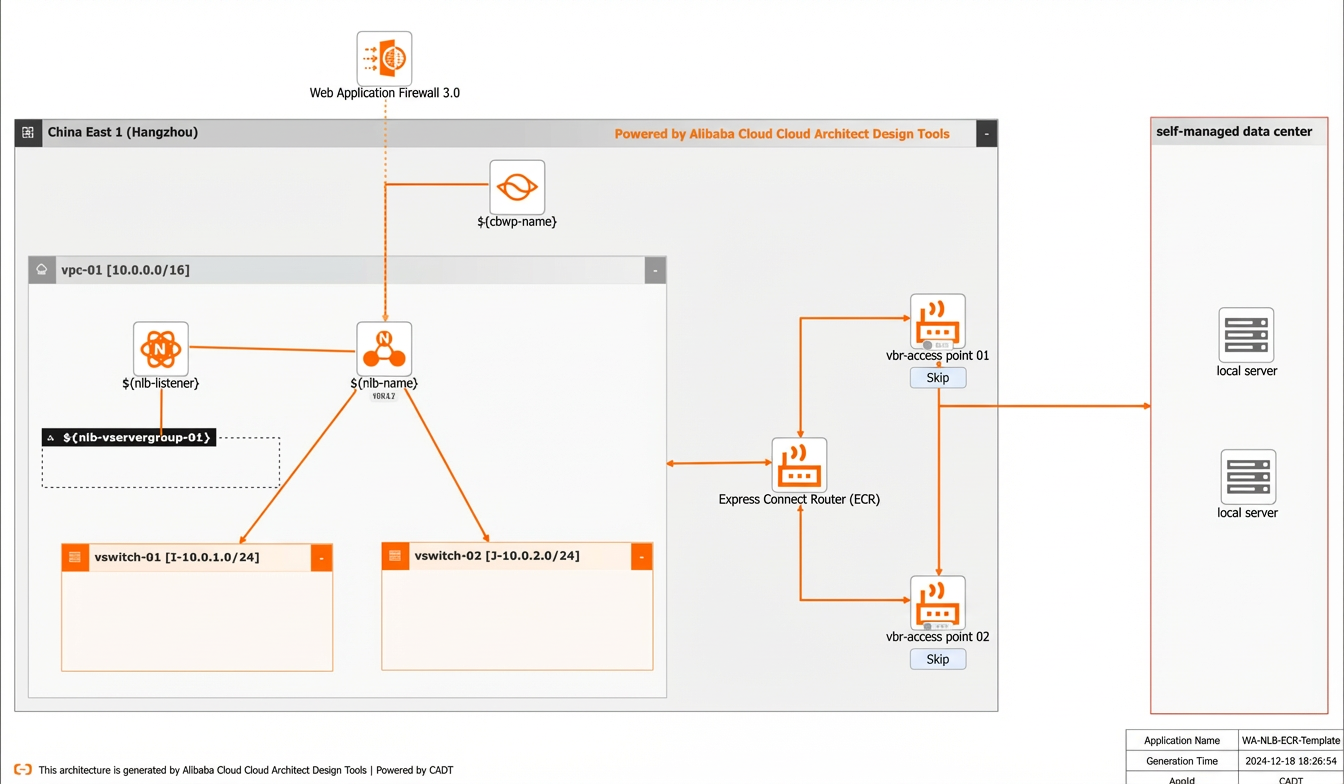
Visualized deployment architecture diagram for Layer 4 application delivery:
Procedure
Visualized method
-
Create multiple cloud services in a batch, including 1 VPC, 2 vSwitches, 1 NLB instance with a corresponding listener and vServer group, 1 ECR, 1 Internet Shared Bandwidth instance, and 1 WAF instance.
-
Create an application based on the template. The default region is China (Hangzhou), and all cloud products are new.
-
Save the application, and then validate it and view its price. All cloud products in this example use the pay-as-you-go billing method.
-
After you check the details, agree to the terms of service and start the batch deployment. Add servers in an on-premises data center as backend servers and associate the ECR with the VPC.
-
-
Create a VBR, associate the ECR with the VBR, configure the corresponding routing policies, and configure BGP+BFD to build a highly available network over Express Connect circuits.
Integrated API call method
-
Use a set of OpenAPI operations to quickly complete the deployment through integrated API calls.
-
Initialize the command line interface as described in the documentation.
-
Refer to the model YAML file to directly deploy the resources and view the outputs.
-
To change the region, replace the value of the `area_id` field. For example, replace "cn-hangzhou" for China (Hangzhou) with "cn-shanghai" for China (Shanghai).
-
If you want to use existing instances in the template, such as a VPC or vSwitch, replace the corresponding ID in the `instances` field.
Layer 7 application delivery (using ALB)
|
Scenario |
Content item |
Description |
|
Layer 7 application delivery |
Template ID |
6DG34M62ELQZW75T |
|
Template library address |
||
|
Code example address |
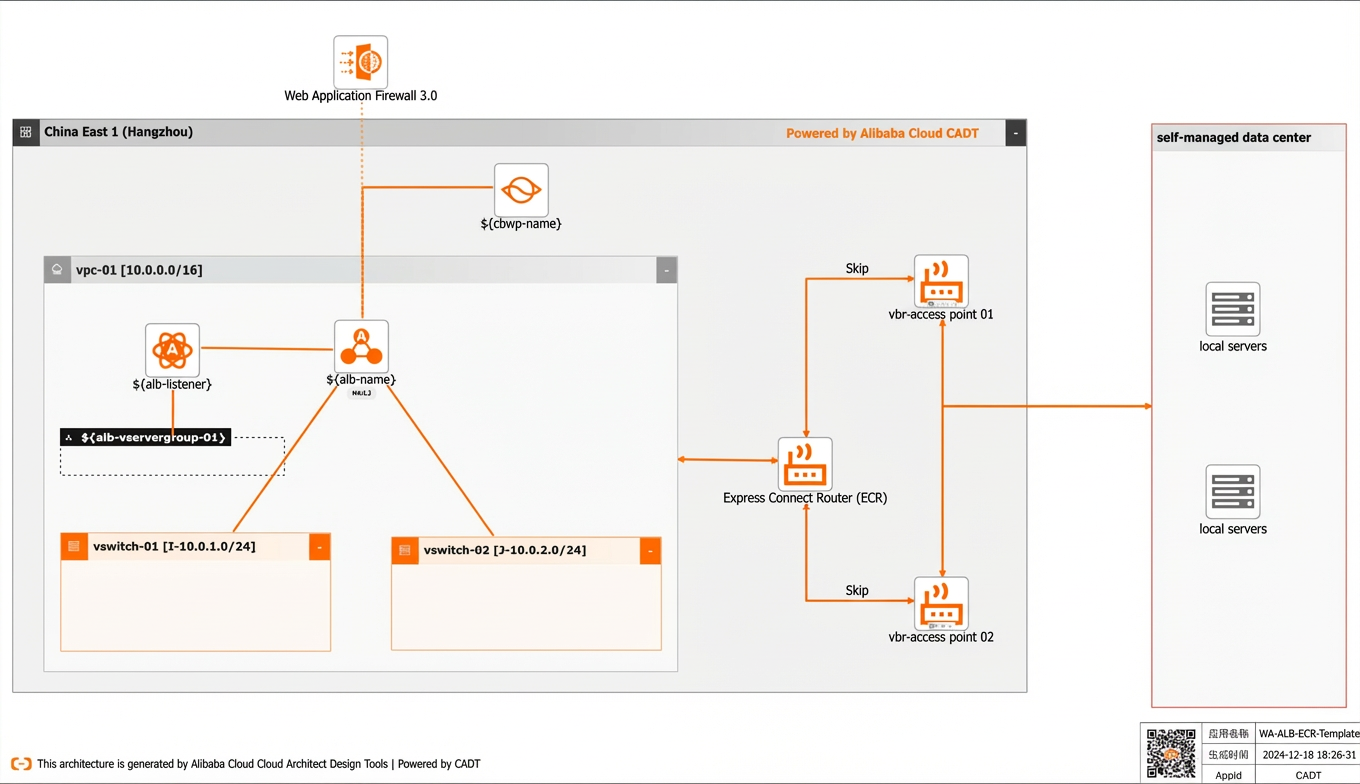
Visualized deployment architecture diagram for Layer 7 application delivery:
Procedure
Visualized method
-
Create multiple cloud services in a batch, including 1 VPC, 2 vSwitches, 1 ALB instance with a corresponding listener and vServer group, 1 ECR, 1 Internet Shared Bandwidth instance, and 1 WAF instance.
-
Create an application based on the template. The default region is China (Hangzhou), and all cloud products are new.
-
Save the application, and then validate it and view its price. All cloud products in this example use the pay-as-you-go billing method.
-
After you check the details, agree to the terms of service and start the batch deployment. Add servers in an on-premises data center as backend servers and associate the ECR with the VPC.
-
-
Create a VBR, associate the ECR with the VBR, configure the corresponding routing policies, and configure BGP+BFD to build a highly available network over Express Connect circuits.
Integrated API call method
-
Use a set of OpenAPI operations to quickly complete the deployment through integrated API calls.
-
Follow the instructions in the reference document to initialize the command line interface.
-
Refer to the model YAML file to directly deploy the resources and view the outputs.
-
To change the region, replace the value of the `area_id` field. For example, replace "cn-hangzhou" for China (Hangzhou) with "cn-shanghai" for China (Shanghai).
-
If you want to use existing instances in the template, such as a VPC or vSwitch, replace the corresponding ID in the `instances` field.