Download query results to your local computer for immediate review, or export logs to an Object Storage Service (OSS) bucket for long-term archiving.
Prerequisites
Before you begin, ensure that you have:
The log analysis feature of Cloud Firewall enabled. For more information, see Log analysis overview
Download logs to your local computer
Limits
| Limit | Details |
|---|---|
| Concurrent downloads | Each Alibaba Cloud account supports a maximum of 3 concurrent download operations, including downloads initiated by multiple Resource Access Management (RAM) users under the same account. The total number of downloads is not limited. If this limit is exceeded, wait for active downloads to complete and retry. |
| Maximum log quantity | If a download request exceeds the maximum number of logs allowed, only the maximum number is downloaded. To download all logs, narrow the time range and download in batches. |
| Export record retention | Export records are retained for 1 day, then automatically deleted. |
| Retry behavior | If a network error occurs, the system automatically retries up to 3 times. If the download fails after three retries, the task status changes to Failed. |
Steps
Log on to the Agentic NDR console.
In the navigation pane, select Logs.
Set the query conditions and run the query. For more information, see Log management.
On the Raw Logs tab, click the
 icon and select Download Log.
If no logs are available, Download Log is disabled.
In the Log Download dialog box, configure the following parameters, then click OK.
Parameter Description Task name A name for the download task. Log Quantity The number of logs to download. Data format Supported formats: CSV and JSON. For CSV, column names are generated from the fields of the first 100 logs; if later logs contain new fields, those fields are stored in JSON format in an unnamed last column. For JSON, each log entry is written as a single line. Quote A quote character to wrap special characters in log values and prevent them from being escaped. Download Inaccurate Results If set to No, the download task fails when query results are inaccurate. Compression Method Supported methods: gzip, lz4, and zstd. For large downloads, select a compression method to reduce file size and download time. Leave blank to skip compression. 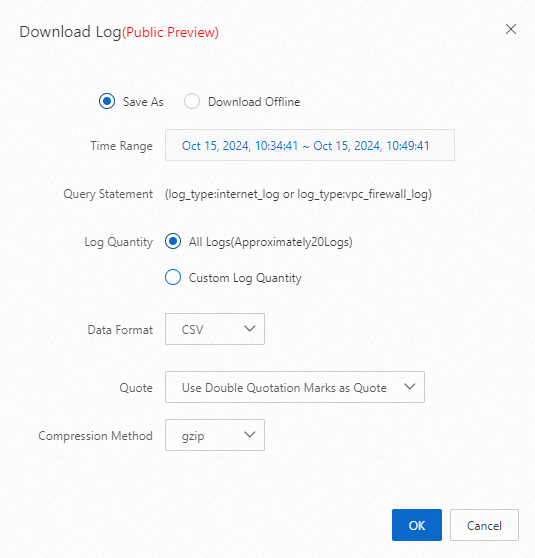
Open the Download Tasks dialog box to monitor the task status and download the file when ready.
See also
Log fields — descriptions of all fields in a downloaded log file