The default intrusion prevention system (IPS) of Cloud Firewall proactively detects and blocks malicious traffic that is generated by attacks, vulnerability exploits, brute-force attacks, worms, mining programs, trojans, and DoS attacks in real time. This protects enterprise information systems and network architectures on the cloud against attacks, prevents unauthorized access or data leaks, and prevents damage or failures of your business systems and applications.
Common cloud-based cyberattacks
In a cloud environment, enterprises often deploy critical business systems that are exposed to the public internet or facilitate internal network communication, including development environments, production environments, and data platforms. These systems face various cybersecurity threats. Attackers can exploit these network channels to launch intrusions or gain unauthorized access, causing data breaches, server resource exhaustion, or service interruptions.
Common types of cyberattacks include:
-
Malware attacks: Attackers trick users into downloading malicious software such as viruses, worms, or trojans to infect cloud servers, allowing them to establish persistent control or move laterally across the network.
-
Port scanning and brute-force attacks: Attackers use automated tools to scan for open ports and then attempt to obtain system login credentials by using brute-force attacks. After a successful breach, they often deploy a trojan backdoor, mining program, or ransomware.
-
Web application vulnerability attacks: These include SQL injection, cross-site scripting (XSS), cross-site request forgery (CSRF), and remote code execution (RCE). Attackers exploit application flaws to steal data, tamper with content, or gain system privileges.
-
Layer 4 protocol vulnerability attacks: These attacks target vulnerabilities in the transport layer (such as TCP/UDP) protocol stack and can lead to denial of service or privilege escalation.
-
Database attacks: These attacks target unauthorized access or configuration flaws in database services like Redis and MySQL to steal data or inject malicious commands.
-
Command execution and reverse shells: Attackers exploit system or application vulnerabilities to execute arbitrary commands or establish outbound reverse connections (reverse shells) to bypass perimeter defenses and achieve remote control.
To effectively counter these risks, enterprises should implement a defense-in-depth strategy. This includes enabling Cloud Firewall, strengthening network security configurations, and promptly patching vulnerabilities to ensure the security and availability of business systems.
IPS capabilities of Cloud Firewall
Alibaba Cloud Firewall integrates an intrusion prevention system (IPS) that uses real-time traffic inspection, virtual patching, outbound threat protection, threat intelligence correlation, and intelligent analysis models to efficiently and precisely secure your cloud workloads.
Core capabilities include:
-
Vulnerability exploit blocking: With over 5,000 built-in basic defense rules and virtual patches, Cloud Firewall can quickly block known vulnerability exploits, significantly reducing the attack window.
-
Virtual patching: For business systems with unpatched vulnerabilities, Cloud Firewall provides a protection policy within three hours, without requiring you to install system patches or restart services. This capability helps mitigate risks from high-risk and 0-day vulnerabilities.
-
Outbound malicious traffic protection: Detects and blocks communication from compromised hosts to malicious C&C servers, outbound crypto-mining connections, and abnormal data exfiltration. This prevents the spread of internal threats and the leakage of sensitive information.
-
Threat intelligence correlation: Leverages Alibaba Cloud's global security awareness system to synchronize high-confidence threat intelligence in real time. This includes malicious IP addresses and domain names, C&C server addresses, and the sources of scans and brute-force attacks. This enables dynamic and precise protection.
-
Intelligent threat detection: Uses machine learning models built from a massive volume of attack samples and behavioral data accumulated by Alibaba Cloud to improve detection of and response to unknown threats and new attack patterns.
With these capabilities, the Cloud Firewall IPS provides proactive, continuous, and automated network and application layer security without disrupting business operations.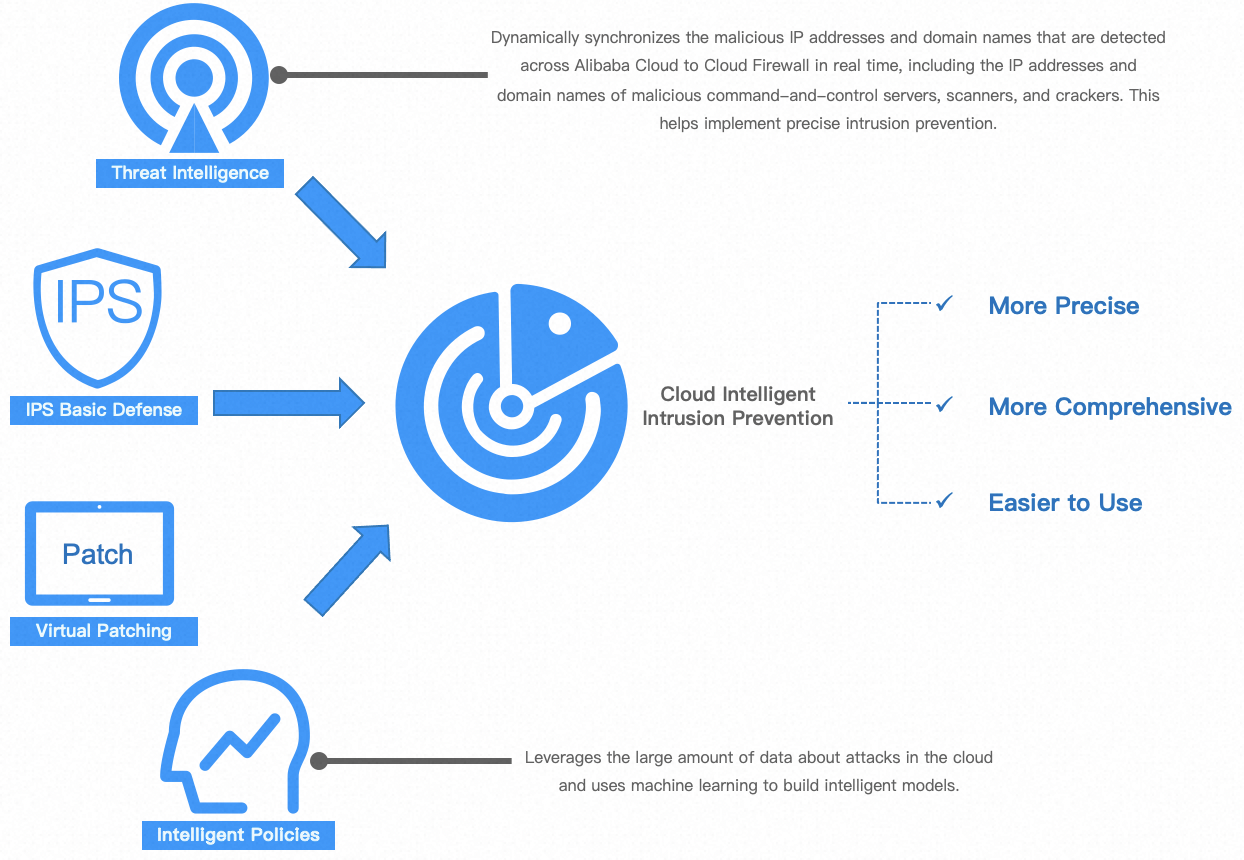
For outbound traffic at the internet boundary, the Cloud Firewall intrusion prevention feature supports TLS inspection to decrypt and inspect encrypted traffic. For inbound traffic, we recommend using a Web Application Firewall.
Threat intelligence capabilities
Alibaba Cloud generates threat intelligence through multi-dimensional data fusion and intelligent analysis to ensure the intelligence is highly reliable.
Data sources
-
Cloud-wide attack events: Real-time capture of attack traffic and samples from sensors deployed in the public cloud and partner networks.
-
Massive anonymized security traffic logs: Analysis of sanitized network traffic to extract attack patterns and malicious connections.
-
Global open-source threat intelligence: Integration and verification of open-source intelligence (OSINT) from authoritative industry organizations and security communities.
-
Partner intelligence sharing: Trusted data exchange with carriers, cloud computing vendors, and other security organizations.
Generation methods and identification standards
-
Multi-dimensional correlation analysis: Builds a complete threat graph by correlating information such as IP addresses, domains, URLs, file hashes, and attack techniques to reduce false positives.
-
Intelligent analysis engine
-
Big data and machine learning models: Uses behavioral analysis and anomaly detection models to automatically identify suspicious malicious patterns and emerging threat families from large datasets.
-
Expert rule system: Employs precise detection rules refined by security experts to quickly and accurately match known threat types.
-
Dynamic reputation scoring: Calculates a dynamic reputation score for each threat indicator based on factors such as activity history, distribution scope, threat type, and confidence level.
-
-
Manual analysis and verification: For high-value or complex threats, our security analysts conduct a final review to ensure the intelligence is accurate and reliable.
Core categories of threat intelligence
Alibaba Cloud threat intelligence is structured around key elements of network interactions and is divided into three categories: IP threat intelligence, domain threat intelligence, and URL threat intelligence. IP threat intelligence is further divided into outbound and inbound threat intelligence based on traffic direction.
Outbound IP threat intelligence
-
Match target: The destination IP addresses that internal networks proactively access.
-
Core value: Detects whether an internal host is compromised (for example, infected with a trojan backdoor or part of a botnet) or if there are non-compliant or malicious outbound activities (such as accessing mining pools or C&C servers).
-
Types and descriptions:
Type
Description
Tor node
Matches known IP addresses of Tor network exit, entry, or relay nodes. Access from an internal host may indicate an attempt to anonymize communication to hide malicious activities such as data theft or command and control.
Mining
Matches IP addresses used for cryptocurrency mining trojan communication or public/hidden mining pool IP addresses. Access to such IP addresses indicates that the system may be infected with a mining program, which consumes computing resources.
C&C
Matches IP addresses of C&C servers for malware such as botnets, remote access trojans, and ransomware. A compromised host accesses these IP addresses to receive attack commands or send back data.
APT
Matches infrastructure IP addresses owned or used by an Advanced Persistent Threat (APT) group. Access to such IP addresses strongly suggests a targeted and sophisticated attack.
Reverse shell
Matches IP addresses that have been observed receiving reverse shell connections. An internal host accessing such an IP address may be attempting to establish a reverse control channel that bypasses the firewall.
Phishing
Matches the backend server IP addresses used to host phishing websites. Accessing such an IP address may mean a user has clicked a phishing link and connected to a fraudulent server.
Malicious download source
Matches server IP addresses used to distribute malware such as viruses, trojans, and spyware. Access to such IP addresses may indicate a download or update of a malicious payload.
Inbound IP threat intelligence
-
Match target: The source IP addresses that external networks use to proactively access internal assets.
-
Core value: Detects and provides real-time warnings about external attacks targeting your network perimeter, servers, and application systems.
-
Types and descriptions:
Type
Description
Scanning
Matches IP addresses that exhibit reconnaissance behaviors such as port scanning, service probing, and network mapping. This is a typical preparatory activity before an attack.
Brute-force attack
Matches IP addresses that launch a large number of login attempts against services such as SSH, RDP, FTP, databases, and web login portals.
Vulnerability exploit
Matches IP addresses that launch attacks exploiting known vulnerabilities, such as Apache Log4j2 and EternalBlue. Characteristics include sending specific attack payloads or exploit chain traffic.
SQL injection
Matches IP addresses that inject malicious SQL code into web application parameters in an attempt to manipulate the database.
Code execution
Matches IP addresses that attempt to remotely execute system commands or code by exploiting vulnerabilities in web applications or services.
Webshell
Matches IP addresses that attempt to upload webshell files or communicate with known webshell backdoors.
XSS attack
Matches IP addresses that launch cross-site scripting (XSS) attacks to inject malicious scripts into web pages.
Domain threat intelligence
-
Match target: Domain names that internal hosts resolve or access.
-
Core value: Attackers often dynamically switch IP addresses by using domain names to evade blocking. Domain intelligence provides a more persistent and effective way to detect access to domain-based malicious infrastructure.
-
Types and descriptions:
Type
Description
Dnslog domain
Matches domains of DNS logging platforms that are commonly used for attack verification or data exfiltration. Abnormal, non-user-initiated access may indicate that a system vulnerability (such as a blind SQL injection or remote code execution) has been successfully exploited, leading to unintentional DNS resolution and data leakage.
Dark web proxy
Matches web proxy domains (such as Tor2web) that provide access to dark web networks like Tor. Accessing such domains is often a starting point for accessing dark web services.
Sinkhole domain
Matches domains whose DNS records have been redirected to a "sinkhole" (an invalid address) by security vendors or operators due to malicious activity or abuse. An access attempt suggests the presence of malware or misconfiguration within the internal network.
Mining
Matches mining pool domains or update server domains that mining scripts or trojans connect to.
C&C
Matches domains associated with malware families that use domain names instead of static IP addresses for their C&C servers.
APT
Matches exclusive domains registered and used by APT groups for long-term campaigns.
Phishing
Matches phishing website domains that impersonate legitimate organizations such as banks or social media platforms.
Malicious download source
Matches domains used to distribute malware, which are often hidden by URL shortening services or CDNs.
URL threat intelligence
-
Match target: The full web address (URL) accessed by an internal host.
-
Core value: Enables precise targeting of access destinations and helps identify specific malicious pages hosted on legitimate cloud services or shared IP addresses.
-
Types and descriptions:
Type
Description
Mining
Matches specific page URLs that embed web-based mining scripts (such as Coinhive) or mining pool management pages.
C&C
Matches specific URL paths that serve as control panels or data exchange interfaces for trojans or botnets.
APT
Matches URLs used in APT campaigns, such as links to weaponized document downloads or vulnerability exploit pages.
Phishing
Matches URLs of highly realistic phishing pages used to steal account credentials or payment information.
Malicious download source
Matches download links that point directly to malicious executables (such as .exe and .dll), scripts, or documents.
How the Cloud Firewall IPS works
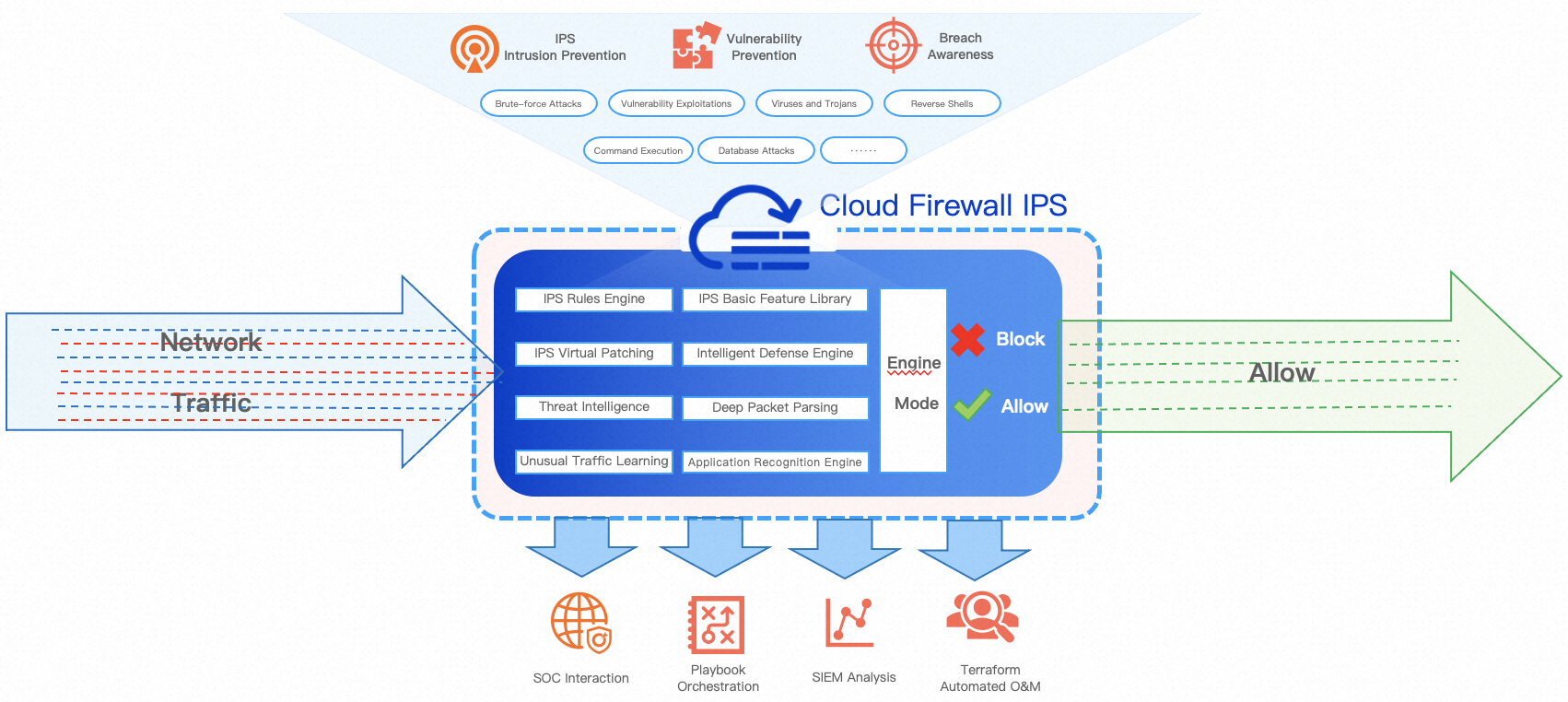
Cloud Firewall is deployed in the cloud network in series mode. It protects the traffic from and to the Internet, the traffic passing through NAT gateways, the traffic between virtual private clouds (VPCs) in internal networks, and the traffic between the cloud and on-premises data centers. The following figure shows the network architecture.

Cloud Firewall monitors all network traffic that passes through Cloud Firewall, filters the traffic by using the IPS engine and ACL engine of Cloud Firewall, and then forwards normal traffic.
Cloud Firewall uses a deep packet inspection (DPI) engine to detect and identify network traffic, recognize protocols, and parse packets. For IPS attacks and threat intelligence, Cloud Firewall performs stream and packet filtering. If traffic matches the configured threat engine mode (Monitor Mode, Block Mode - Loose, Block Mode - Medium, or Block Mode - Strict) and triggers an IPS rule, Cloud Firewall drops or allows the malicious packet based on the rule's action. This enables real-time alerting and blocking of attacks.
Types of attacks supported by Cloud Firewall
For more information about how to configure the mode of the threat detection engine, see IPS configuration.
Attack type |
Attack hazard |
Suggestion |
Suspicious connection |
Attackers may use scanners to scan open ports on a server. If the server has unauthorized database ports or services that have weak passwords, data loss or data leaks may occur. For example, unauthorized access to Redis is a common risk. If the security settings of a Redis database are not properly configured, attackers can obtain sensitive data or damage the database by implementing unauthorized access. |
If you have a number of non-web applications, such as MySQL and SQL Server applications for which ports 80, 443, or 8080 are enabled, take note of whether the rules for behaviors such as shellcode and sensitive operations are hit. The rules are also the attack methods that are intended for non-web applications. If you do not have the preceding non-web applications, we recommend that you enable Block Mode - Strict. |
Command execution |
If an attacker executes malicious commands, serious consequences may occur. For example, the control permissions of a server may be obtained, sensitive data may be leaked, and other systems may be attacked. For example, attackers may exploit the Log4j vulnerability to execute malicious commands, which poses security threats. |
You can use the Block Mode - Loose mode to protect most web applications against common and non-common RCE attacks. This mode also meets your daily protection requirements. RCE attacks are the most harmful among various attacks. If you use the Block Mode - Medium mode to protect against RCE attacks, you must take note of the hit details of rules for each module. If your business is complex and involves a number of non-web applications, we recommend that you enable Block Mode - Strict. |
Scanning |
If machines or network devices are overloaded by network scanning, service interruptions or stability issues may occur. As a result, the system may stop responding or the service may become unavailable. |
We recommend that you check whether Server Message Block (SMB) named pipes are enabled in your business. SMB named pipes are used for features such as file sharing. If you do not need to use SMB named pipes in your business, we recommend that you disable SMB named pipes to reduce potential security risks. If you need to use SMB named pipes, we recommend that you enable Block Mode - Medium or Block Mode - Strict. |
Information leakage |
Information leakage may lead to the violation of personal privacy rights, and unauthorized use of sensitive information, such as ID card numbers, contact information, and financial information. |
The definition of information leakage may vary based on your business. Take note of the hit details of rules in Block Mode - Medium and Block Mode - Strict. We recommend that you enable Monitor Mode to monitor the hit details of rules and check whether false positives are reported within a business cycle, such as 24 hours, a week, or a month. If no false positives is reported in Monitor Mode, normal traffic is not identified as a threat. In this case, you can enable Block Mode - Medium or Block Mode - Strict. |
DoS attack |
If machines or network devices are overloaded by DoS attacks, service interruptions or stability issues may occur. As a result, the system may stop responding or the service may become unavailable. |
DoS attacks are less harmful. You can check whether your service is interrupted or suspended due to unknown causes. If your service is not affected, you can retain the Block Mode - Loose setting. If your business requires a high level of service uptime, you can select Block Mode - Medium or Block Mode - Strict. |
Overflow attack |
If machines or network devices are overloaded by overflow attacks, service interruptions or stability issues may occur. As a result, the system may stop responding or the service may become unavailable. |
Overflow attacks occur when input points in the binary representation are not strictly controlled. In this case, out-of-bounds access occurs during parameter configuration, and other attacks such as command execution and information leakage are initiated. When you protect against overflow attacks, take note of the hit details of non-web application attacks. If your business mainly involves web applications, you can select Block Mode - Loose. If your business involves a number of non-web applications, we recommend that you select Block Mode - Medium or Block Mode - Strict. |
Web attack |
Web attacks are serious security threats. Attackers can obtain control permissions on specific servers and steal sensitive data by initiating web attacks. This may cause service interruptions. |
Common web attacks include SQL injections, XSS attacks, and arbitrary files that are listed in Open Web Application Security Project (OWASP) Top 10. To prevent these attacks, we recommend that you perform strict testing during the canary release and official release of the rules. We also recommend that you enable Block Mode - Medium or Block Mode - Strict during routine O&M. |
Trojan |
A trojan is a type of malware that can provide continuous unauthorized access to a victim machine. Attackers may access the system again even if system vulnerabilities are fixed. Attackers can monitor the compromised system for a long period of time and steal sensitive data by using a trojan. Systems that are compromised by trojans may lead to legal liabilities, lawsuits, fines, and reputation damage. |
In most cases, encryption, obfuscation, and encoding are used in trojan communication to bypass protection measures. In Block Mode - Strict mode, weak features are usually used for detection and blocking. In daily operations, we recommend that you enable the Block Mode - Medium mode. We recommend that you enable Block Mode - Medium or Block Mode - Strict during routine O&M. |
Worm |
A worm is a type of persistent malware that provides continuous unauthorized access to a victim machine. Attackers may access the system again even if system vulnerabilities are fixed. Attackers can monitor the compromised system for a long period of time and steal sensitive data by using a worm. At the same time, systems that are compromised by worms may lead to legal liabilities, lawsuits, fines, and reputation damage. |
In most cases, this type of attack compromises hosts. If a rule is hit in Monitor Mode, you must use the traceability analysis feature to identify the source of the attack and take appropriate countermeasures. If no rules are hit, the host is securely running. In this case, we recommend that you enable Block Mode - Medium. |
Mining |
Mining is a malicious behavior that occupies bandwidth resources and computing power of machines, which causes system stuttering and affects the system performance. As a result, issues occur, such as slow application running and response latency, which adversely affect efficiency and experience. |
In most cases, this type of attack compromises hosts. If a rule is hit in Monitor Mode, you must use the traceability analysis feature to identify the source of the attack and take appropriate countermeasures. If no rules are hit, the host is securely running. In this case, we recommend that you enable Block Mode - Medium. |
Reverse shell |
Reverse shells are attack tools that provide continuous unauthorized access to a victim machine. Attackers may access the system again even if system vulnerabilities are fixed. Attackers can monitor the compromised system for a long period of time and steal sensitive data by using a reverse shell. At the same time, systems that are compromised by reverse shells may lead to legal liabilities, lawsuits, fines, and reputation damage. |
In most cases, this type of attack compromises hosts. If a rule is hit in Monitor Mode, you must use the traceability analysis feature to identify the source of the attack and take appropriate countermeasures. If no rules are hit, the host is securely running. In this case, we recommend that you enable Block Mode - Medium. Bash reverse shell detection does not cover port 80. In typical attack and defense scenarios, port 80 is not used for reverse shell operations, and monitoring it for this purpose could generate false positives that affect legitimate business traffic. |
Others |
Attacks that are used for illegal outbound connections and attacks that are caused by outbound connections are included. Attacks that cannot be classified are also included. |
|
Modes of the threat detection engine
The modes of the threat detection engine are the Monitor mode and Block mode. The action of basic protection policies and virtual patching policies varies based on the mode of the threat detection engine. For example, if you set the threat detection engine to the Block - Strict mode, the action of basic protection policies and virtual patching policies is Block. The following list describes the modes of the threat detection engine.
Category |
Scenario |
Description |
Example |
|
Monitor | Protection is not supported. | In Monitor mode, the system only records attacks and generates alerts for the attacks. However, the system intercepts attacks in Block mode. | Remote DoS vulnerability in Apache Tomcat (CVE-2014-0075), Atlassian Jira SSRF vulnerability (CVE-2019-16097), and Godlua backdoor software communication | |
Block |
Loose |
The system blocks attacks in a loose manner by using rules that prevent a high rate of false positives. This level is suitable for business that requires the rate of false positives to be minimized. |
In this level, the system detects keywords and key parameters of vulnerability exploits in attack packets and behavior. No false positives can be generated. |
RCE vulnerability in Apache Struts 2 (CVE-2018-11776), unauthorized access to Spark REST API (CVE-2018-11770), and Jenkins RCE vulnerability (CVE-2018-1000861) |
Medium |
The system blocks attacks in a standard manner. This level is suitable for daily O&M. |
In this level, the system uses common rules to detect various types of attacks in a comprehensive manner based on different types of detection methods for vulnerability exploits. This level provides a lower rate of false positives than the Loose level. |
RCE vulnerability in Oracle WebLogic Server (CVE-2020-2551), RCE vulnerability in Microsoft WindowsRDP Client (CVE-2020-1374), and SMBv1 DoS attack (CVE-2020-1301) |
|
Strict |
The system blocks attacks in a strict manner by using all rules. This level is suitable for business that requires the rate of false negatives to be minimized. This level may cause a higher rate of false positives than the Medium level. |
In this level, the system detects high-risk vulnerabilities, such as stack overflow and buffer overflow, most of which are Layer-4 protocol vulnerabilities. The system identifies attacks based on various methods such as protocol analysis, keyword matching, multiple redirects, and keyword offset. |
Squid Proxy HTTP Request Processing buffer overflow (CVE-2020-8450), Nginx 0-Length Headers Leak denial of service (CVE-2019-9516), and Oracle WebLogic |
|