Sign in once through a browser to grant Alibaba Cloud CLI temporary credentials for calling cloud APIs. The CLI handles token refresh and renewal automatically, so you never store or rotate long-lived AccessKey pairs. This is the recommended authentication method for local development.
Prerequisites
Environment requirements
-
Alibaba Cloud CLI version
3.3.0or later. Runaliyun versionto check your installed version. If your version is earlier than3.3.0, see Install or update the CLI to upgrade before proceeding. -
An account that can sign in to the console: an Alibaba Cloud account (root account), a RAM user, or an enterprise user through SSO. If you are using a RAM user, make sure console logon is enabled. For more information, see Enable console logon.
-
A local environment with a graphical browser. Terminal-only sessions (such as SSH without X11 forwarding) do not support OAuth configuration.
Install the Alibaba Cloud CLI application and assign identities
A RAM administrator must complete this setup before any user can use OAuth credentials. After the initial setup, adding new users requires only Step 2.
-
Install the CLI application (one-time): Sign in to the RAM console. In the left navigation pane, choose . Switch to the Third-party Application tab. If the
official-cliapplication is not listed, click Provision Official Application and select Official CLI. -
Assign identities: Open the
official-cliapplication details page and switch to the Allowed Identities tab. Click Add Users or roles to add RAM users or roles that need to use Alibaba Cloud CLI.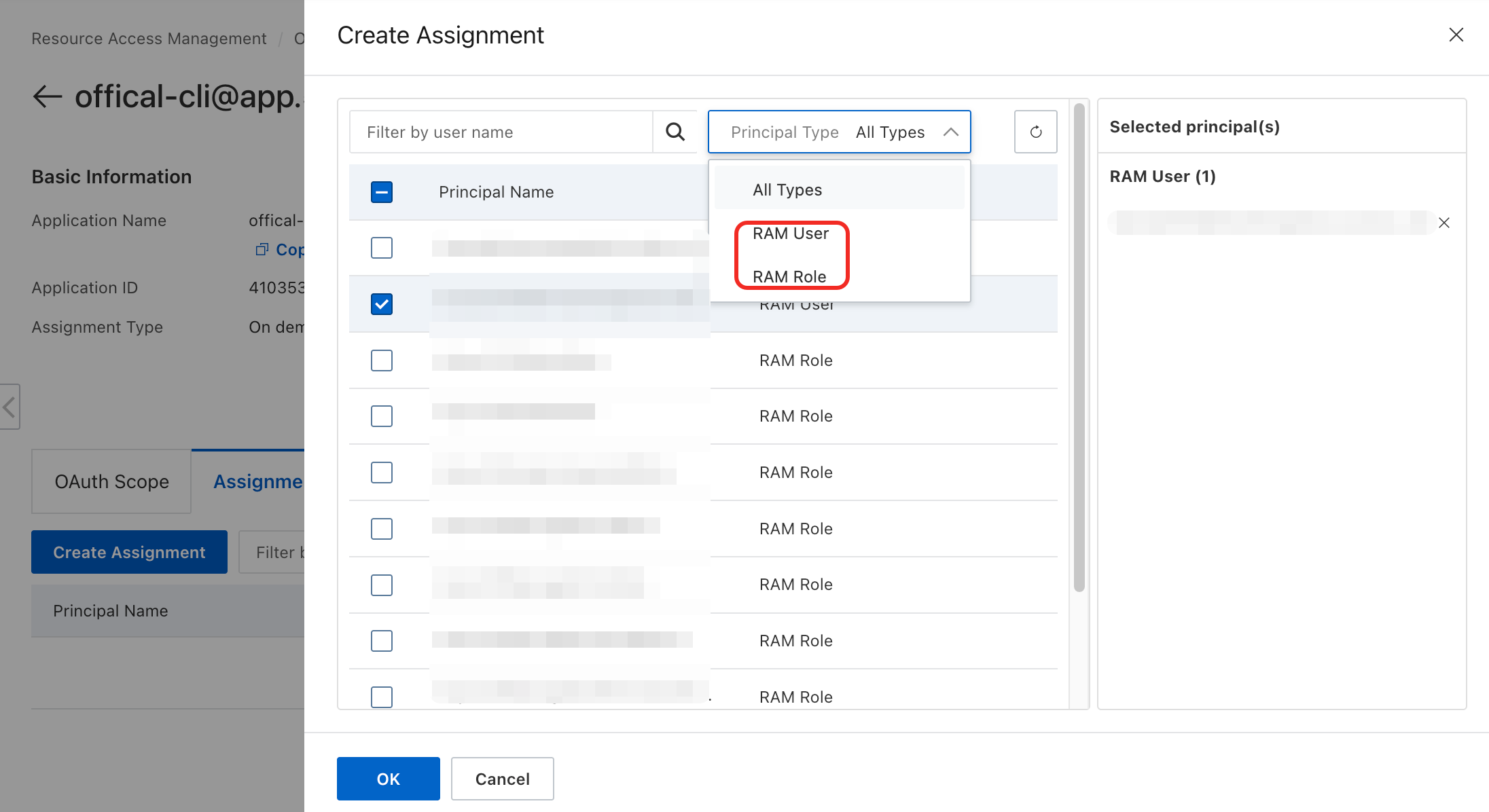
These steps are documented in Install the CLI application and Assign identities.
Configure credentials
OAuth credentials require the interactive command aliyun configure --mode OAuth, which launches a browser sign-in flow. The aliyun configure set command only writes parameters without triggering sign-in.
-
Run the following command. Replace
<ProfileName>with a name of your choice (for example,OAuthProfile):aliyun configure --mode OAuth --profile <ProfileName> -
Select the sign-in site when prompted for
OAuth Site Type:aliyun configure --profile OAuthProfile --mode OAuth Configuring profile 'OAuthProfile' in 'OAuth' authenticate mode... OAuth Site Type (CN: 0 or INTL: 1, default: CN):-
Enter
0orCNfor the China site (aliyun.com). -
Enter
1orINTLfor the International site (alibabacloud.com). -
Press Enter to accept the default (CN).
-
-
Complete browser sign-in. A browser window opens automatically. Sign in with your RAM user credentials. If the browser does not open, copy the sign-in URL (SignIn URL) displayed in the CLI prompt and paste it into a browser manually:
Please open the following URL in your browser to authorize: https://signin.alibabacloud.com/oauth2/v1/auth?... -
Authorize the application. On the authorization page in the browser, click Authorize. After successful authorization, the browser displays
Authorization successful. You can close this window. -
Set the default region and language:
Default Region Id []: cn-shanghai
Default Language [zh|en] en: en
Available values are listed in Regions and endpoints. Set the default region to where your resources reside, as some services do not support cross-region calls.
-
When the terminal displays
Configure Donewith a welcome message, the configuration is complete.
After successful configuration, the new profile becomes the active profile automatically. To switch to a different profile, run aliyun configure switch --profile <ProfileName>.
Credential refresh
OAuth credentials consist of three token layers. The CLI manages renewal automatically — no manual intervention needed during normal use:
-
Security Token Service (STS) token
-
OAuth access token
-
OAuth refresh token
Each time a token renews successfully, the old token is invalidated. The configuration file (~/.aliyun/config.json) updates automatically.
Delete credentials
Run the following command to delete a specific OAuth profile:
aliyun configure delete --profile <ProfileName>After deletion:
-
The profile and all its stored OAuth and STS tokens are removed from
~/.aliyun/config.json. -
This does not revoke the OAuth application authorization in RAM. No administrator action is needed.
FAQs
Browser does not open during authorization
The CLI prints the sign-in URL in the terminal. Copy and open it manually. If the page fails to load, check:
-
Local ports 12345–12349 are available (the CLI uses one for the authorization callback).
-
Network connectivity to
signin.alibabacloud.com(China site) orsignin.alibabacloud.com(International site).
Error: The call is not authorized / You are not allowed to do this action.
The administrator has not installed the CLI application in the Alibaba Cloud account that the user belongs to. Refer to the steps in Install the Alibaba Cloud CLI application and assign identities to install the application and add the user to the official-cli OAuth application authorization list.
Can I switch from AccessKey to OAuth without deleting my existing profile?
Yes. Create a new OAuth profile — your existing profiles are preserved. Switch between them at any time using aliyun configure switch --profile <profile-name>.
Does CLI OAuth support RAM role sign-in?
Yes. Use either of these approaches:
-
Sign in through role-based SSO from your identity provider (IdP). This requires role SSO to be configured.
-
Sign in as a RAM user first, then switch identity to the target RAM role in the console.
Perform these steps before running aliyun configure --mode OAuth, so the CLI detects your current identity as the RAM role during the browser authorization step.