A blockchain network is a consortium of multiple organizations. Each organization represents a participant in the network — enterprises, government agencies, groups, and other entities can all join as participants.
Alibaba Cloud BaaS supports two organization roles:
Consortium operator: Manages and operates the public infrastructure of the consortium.
Business participant: Represents a company or enterprise in the consortium. Each enterprise can define one or more organizations.
Create an organization
BaaS provides two modes for creating an organization:
Quick mode: Specify the required information and BaaS automatically creates the consortium, organizations, and channel memberships. See Quick start with blockchain.
Standard mode: Manually configure and create an organization. Follow the steps below.
Prerequisites
Before you begin, ensure that you have:
An Alibaba Cloud account with access to the BaaS console
Steps
Log on to the Alibaba Cloud BaaS console.
On the Overview page, click Create Organization.
Configure the following parameters:
Parameter Description Organization Name Enter a name that reflects the organization's business purpose. Domain Name Enter the prefix for the consortium domain name. Region Select the region where your organization operates. For best performance, select the same region as your business application. Specification Select Basic, Enterprise Edition, or Enterprise Security Edition based on your requirements. Node Quantity Enter the number of peer nodes for the organization. Description Enter a description for the organization. Click OK. Resource provisioning takes 15 to 40 minutes. When the organization is ready, its status changes to Running.
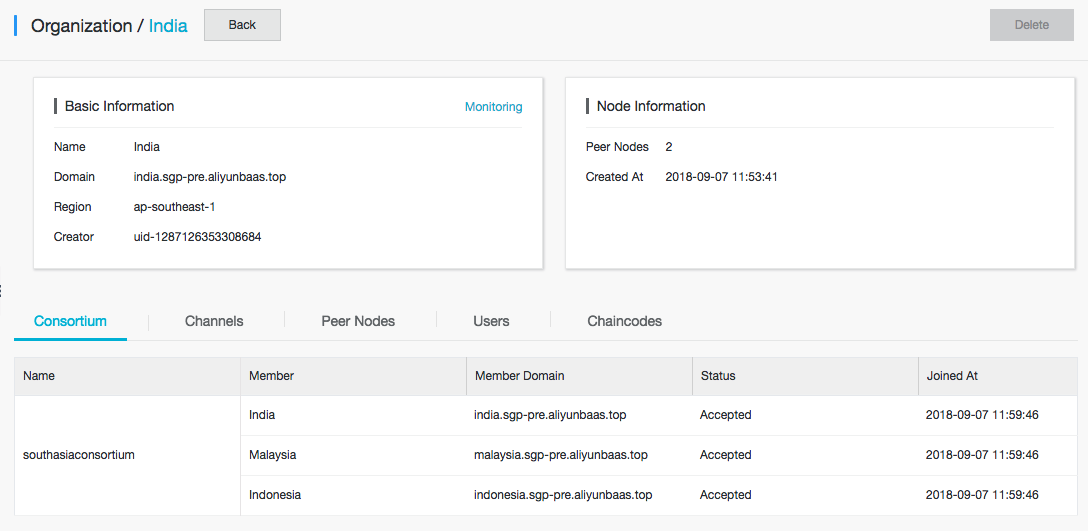
In My Organizations, click the organization name to open the organization details. The details page includes the following tabs:
Tab Content Consortium Consortia this organization has joined Channels Channels available to this organization Peer Nodes Peer nodes in this organization Users Users associated with this organization Chaincodes Chaincodes deployed by this organization
What to do next
After the organization status shows Running, complete the following steps to make the organization operational in a consortium network:
Join a consortium: Use the Consortium tab to join an existing consortium or create a new one.
Set up channels: Use the Channels tab to create or join channels for communication between organizations.
Deploy chaincodes: Use the Chaincodes tab to install and instantiate chaincodes on your peer nodes.
For a complete walkthrough of the blockchain setup process, see Use blockchain services.