Alibaba Cloud Blockchain as a Service (BaaS) supports three blockchain frameworks: Ant Blockchain, Hyperledger Fabric, and Quorum (an enterprise-focused version of Ethereum). This guide explains the available editions and their use cases, then walks you through the purchase process for each framework.
Before you begin
Before choosing a framework or edition, understand the key building blocks:
-
Consortium: A group of organizations that share a blockchain network. You create a consortium first, then add blockchain instances to it.
-
Organization: An individual participant in a consortium. Each organization runs its own peer nodes.
-
Channel: A private communication channel within a consortium that restricts data visibility to specific organizations.
-
Node: A server that stores the ledger and processes transactions.
Choose a framework
| Framework | Best for |
|---|---|
| Ant Blockchain | Enterprises that need a high-throughput, managed blockchain with a simplified setup process |
| Hyperledger Fabric | Enterprises that need fine-grained access control, multi-organization consortia, or interoperability with external systems |
| Quorum | Enterprises migrating from or integrating with Ethereum-based smart contracts |
Purchase process - Ant Blockchain
Step 1: File a declaration of use
A declaration of use is required before every new instance purchase — whether you are a first-time buyer or are adding a new instance to an existing account.
You must declare the purpose in advance. This is required for first-time purchases, renewals, and the creation of new blockchain instances.
-
Log on to the console. In the left-side navigation pane, choose AntChain > Contract Chain to open the My Consortium page.
-
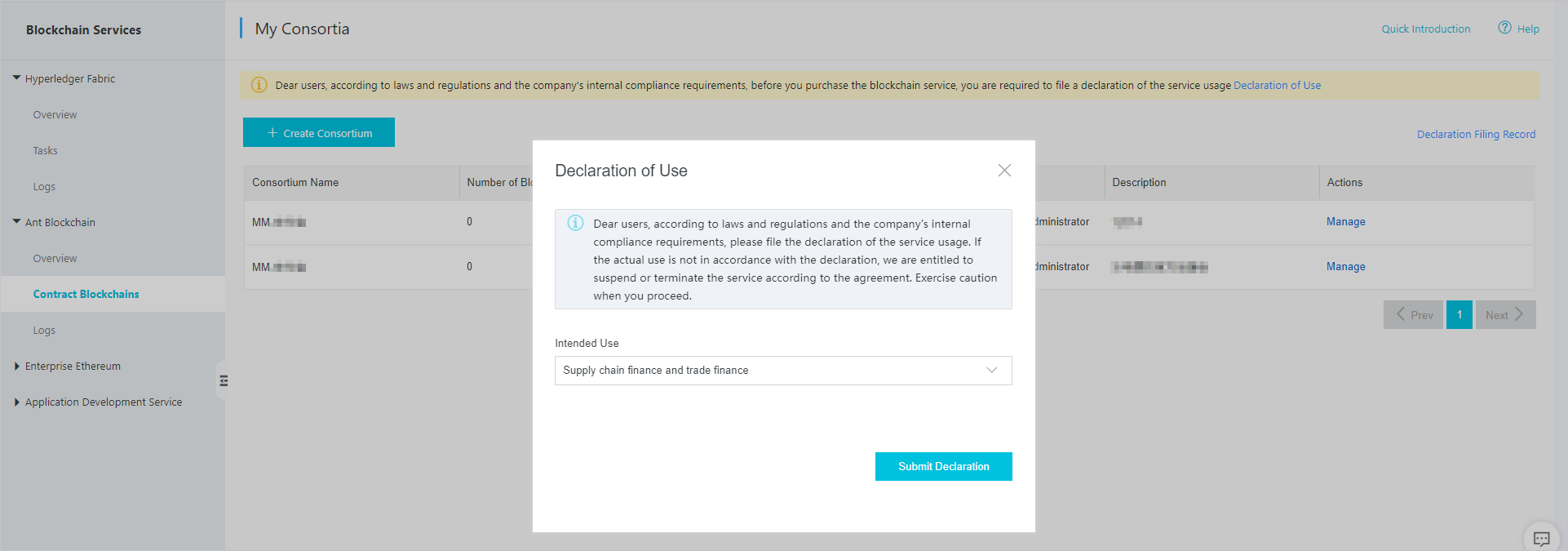
In the upper-right corner of the page, click Declaration of Use in the yellow area. Select the intended use in the pop-up window and click Submit Declaration.
If you select Others, enter a description of no more than 30 characters in the text box.
-
Follow the on-screen instructions to complete the declaration.
The Description of Your Intended Use field accepts up to 300 characters.
-
Check the review status.
-
Click Declaration Filing Record in the upper-right corner of the My Consortium page.
-
In the window that appears, view the declaration status:
-
Approved: The declaration is approved. Proceed to purchase.
-
To be reviewed: The review is in progress. The review typically takes 1–2 days. A notification banner also appears at the top of the My Consortium page:

-
Rejected: Click Re-Submit Declaration in the red banner at the top of the My Consortium page to resubmit.

-
-
Step 2: Create a consortium
Skip this step if you are adding a blockchain to an existing consortium.
-
In the console, choose AntChain > Contract Chain.
-
Click Create Consortium. Enter a name and description, then click Submit.
Step 3: Purchase a blockchain instance
-
In the consortium list, click Manage to open the chain management page.
-
Click Create Blockchain to go to the purchase page. The Consortium field is pre-populated with all consortia in your account.
-
Configure the following parameters:
Parameter Description Region Select the region closest to your applications to minimize network latency. Consortium Select an existing consortium or create one. Blockchain Name Enter a name of 1–100 characters using digits, letters, and hyphens (-). You can modify the name at any time on the console chain management page. Duration Select a subscription period. Instances are subscription-based. -
Click Buy Now and complete the payment.
After payment, the instance appears in the console. Instance creation takes 10–30 minutes because each instance uses exclusive dedicated resources. For pricing details, see Specifications and billing methods.
Purchase process - Hyperledger Fabric
Purchase options
Purchase from either the product page or the console:
-
Product page: Go to the Alibaba Cloud BaaS product page and click Buy Now.
-
Console: Log on to the Alibaba Cloud BaaS console. On the Hyperledger Fabric page, click Create Consortium or Create Organization, then click Purchase consortium/organization resources.
Configure instance parameters
On the purchase page, configure the following:
| Parameter | Description |
|---|---|
| Region | Select the region closest to your business applications. |
| Instance parameters | Select an edition based on your requirements. See Purchase reference - Hyperledger Fabric for a feature comparison. |
| Duration | Select a subscription period. Instances are subscription-based. |
If you have previously created a Fabric V1.4 or V2.2 instance, you can continue creating instances of those versions or create a new instance of Fabric V2.5. Mixed networking between different versions is not supported.
New accounts can only create Fabric V2.5 instances by default. To create a V1.4 or V2.2 instance, submit a ticket.
Click Buy Now and complete the payment. For pricing details, see Specifications and billing methods.
Purchase reference - Ant Blockchain
Ant Blockchain instances are available in Enterprise Edition only.
|
Edition |
Chain Property |
Price |
Benefits |
Resource Configuration |
Purchase Recommendation |
|
Enterprise Edition |
Dedicated consortium chain |
Paid (For more information, see Specifications and pricing) |
|
|
This edition provides complete blockchain management and development features, along with value-added capabilities. It is suitable for important business systems of medium-sized or large enterprises that have high requirements for the number of participants or transaction processing capacity. |
| Instance type | Nodes | Free storage per node | Use case |
|---|---|---|---|
| Enterprise Edition | 4 | 6 TB | Medium-to-large enterprises with many business participants or high transaction throughput requirements |
Purchase reference - Hyperledger Fabric
Choose an edition
Select the edition that matches your network type and scale:
| Edition | Network type | Use case |
|---|---|---|
| Starter Edition | Test network (single customer) | Product evaluation or proof of concept |
| Basic Edition | Production network (multiple parties) | Developers and small-to-medium enterprises running basic production workloads on Alibaba Cloud |
| Enterprise Edition | Production network (multiple parties) | Medium-to-large enterprises requiring interoperability, external Certificate Authority (CA), China-approved cryptographic algorithms, or high transaction throughput (up to 2,000 TPS) |
Consortium instance features
| Feature | Starter Edition | Basic Edition | Enterprise Edition |
|---|---|---|---|
| High availability | Not supported | Supported | Supported |
| Scalable storage | Not supported | Supported | Supported |
| Max organizations per consortium | 2 | 5 | 10 |
| Max channels per consortium | 5 | 5 | 10 |
| Max organizations per channel | 2 | 5 | 10 |
| Cryptographic algorithms recommended by China authorities | Not supported | Not supported | Supported |
| Anti-DDoS Basic | Not supported | Not supported | Supported (Advanced protection available via ticket) |
| Service Level Agreement | Not supported | Supported | Supported |
Organization instance features
| Feature | Starter Edition | Basic Edition | Enterprise Edition |
|---|---|---|---|
| High availability | Not supported | Supported | Supported |
| Join consortium dynamically | Not supported | Supported | Supported |
| Scalable storage | Not supported | Supported | Supported |
| Max channels can be joined | 5 | 5 | 10 |
| Interoperability | Not supported | Not supported | Supported |
| Max triggers per Cloud Service Integration type | 1 | 1 | 3 |
| CA high-availability (HA) services | Not supported | Not supported | Supported |
| External CA | Not supported | Not supported | Supported |
| Cryptographic algorithms recommended by China authorities | Not supported | Not supported | Supported |
| Storage performance optimization | Not supported | Not supported | Supported |
| REST API | Supported | Supported | Supported |
| Anti-DDoS Basic | Not supported | Not supported | Supported (Advanced protection available via ticket) |
| TPS | No data | Up to 300 TPS | Up to 2,000 TPS |
| Service Level Agreement | Not supported | Supported | Supported |
Underlying resources
| Instance type | Edition | Server spec | Servers | Free storage |
|---|---|---|---|---|
| Consortium (test network) | Starter Edition | 4 CPU, 8 GB | 2 | 50 GB |
| Consortium | Basic Edition | 4 CPU, 8 GB | 3 | 100 GB |
| Enterprise Edition | 16 CPU, 31 GB | 3 | 500 GB | |
| Organization | Basic Edition | 4 CPU, 8 GB | 3 | 100 GB |
| Enterprise Edition | 16 CPU, 32 GB | 3 | 500 GB |